1. 现象
在不关闭一个已打开的文件前提下增加或改变它的 Unicode 编码
2. 原因分析
- 无
3. 问题解决
给一个以二进制模式打开的文件添加 Unicode 编码/解码方式,可以使用io.TextIOWrapper对象包装
import urllib.request
import io

# u 值 '<http.client.HTTPResponse object at 0x0000018BDD14C908>'
u = urllib.request.urlopen('https://www.baidu.com/')

# True
print(isinstance(u, io.BufferedIOBase))

# f 值 '<_io.TextIOWrapper encoding='utf-8'>'
f = io.TextIOWrapper(u, encoding='utf-8')

text = f.read()
如果修改一个已经打开的文本模式的文件的编码方式,可以先使用 detach方法移除掉已存在的文本编码层,并使用新的编码方式代替
import io
import sys

# 'utf-8'
print(sys.stdout.encoding)

sys.stdout = io.TextIOWrapper(sys.stdout.detach(), encoding='latin-1')
# 'latin-1'
print(sys.stdout.encoding)
I/O 系统由一系列的层次构建而成。可以试着运行下面这个操作一个文本文件的例子来查看这种层次
buffer属性返回的是底层二进制缓冲区Underling binary buffer
# f_obj 值 '<_io.TextIOWrapper name='sorted_file_6' mode='w' encoding='cp936'>'
f_obj = open('sorted_file_6', 'w')

# '<_io.BufferedWriter name='sorted_file_6'>'
print(f_obj.buffer)

# '<_io.FileIO name='sorted_file_6' mode='wb' closefd=True>'
print(f_obj.buffer.raw)
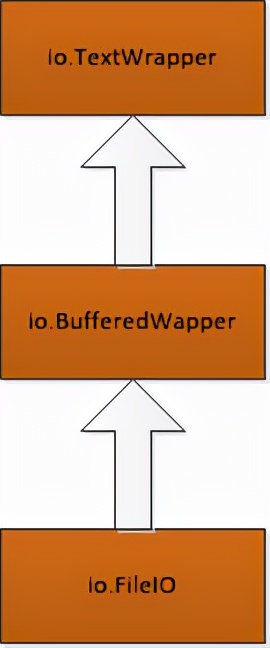
在这个例子中, io.TextIOWrapper 是一个编码和解码 Unicode 的文本处理层,io.BufferedWriter 是一个处理二进制数据的带缓冲的 I/O 层, io.FileIO 是一个表示操作系统底层文件描述符的原始文件
增加或改变文本编*会码**涉及增加或改变最上面的 io.TextIOWrapper 层
一般来讲,像上面例子这样通过访问属性值来直接操作不同的层是很不安全的。例如
# f_obj 值 '<_io.TextIOWrapper name='sorted_file_6' mode='w' encoding='cp936'>'
f_obj = open('sorted_file_6', 'w')

# f_obj 值 '<_io.TextIOWrapper name='sorted_file_6' encoding='utf-8'>'
f_obj = io.TextIOWrapper(f_obj.buffer, encoding='utf-8')

# '<_io.BufferedWriter name='sorted_file_6'>'
print(f_obj.buffer)

# '<_io.FileIO name='sorted_file_6' mode='wb' closefd=True>'
print(f_obj.buffer.raw)

# f_obj.write('Cory')
# 报错
"""
ValueError: I/O operation on closed fil
"""
结果 fobj.write 出错是因为 fobj 的原始值已经被破坏了并关闭了底层的文件
detach 方法会断开文件的最顶层并返回第二层,之后最顶层就没什么用了
# f_obj 值 '<_io.TextIOWrapper name='sorted_file_6' mode='w' encoding='cp936'>'
f_obj = open('sorted_file_6', 'w')

# b 值 '<_io.BufferedWriter name='sorted_file_6'>'
b = f_obj.detach()

# f_obj.buffer 值 为 None
print(f_obj.buffer)


# 报错
# print(f_obj.buffer.raw)
# f_obj.write('Cory')
一旦断开最顶层后,你就可以给返回结果添加一个新的最顶层
# f_obj 值 '<_io.TextIOWrapper name='sorted_file_6' mode='w' encoding='cp936'>'
f_obj = open('sorted_file_6', 'w')

# b 值 '<_io.BufferedWriter name='sorted_file_6'>'
b = f_obj.detach()

# f_obj 值 '<_io.TextIOWrapper name='sorted_file_6' encoding='utf-8'>'
f_obj = io.TextIOWrapper(b, encoding='utf-8')

# '<_io.BufferedWriter name='sorted_file_6'>'
print(f_obj.buffer)

# '<_io.FileIO name='sorted_file_6' mode='wb' closefd=True>'
print(f_obj.buffer.raw)

f_obj.write('Cory')
尽管已经向你演示了改变编码的方法,但是你还可以利用这种技术来改变文件行处理、错误机制以及文件处理的其他方面
sys.stdout = io.TextIOWrapper(sys.stdout.detach(), encoding='ascii', errors='xmlcharrefreplace')
# 'jfñ0'
print('jf\u00f10')

sys.stdout = io.TextIOWrapper(sys.stdout.detach(), encoding='utf-8', errors='xmlcharrefreplace')
# 'jfñ0'
print('jf\u00f10')
最后输出中的非 ASCII 字符 ñ 是如何被 ñ 取代的
4. 错误经历
- 无