背景:
定制centos7.3+4.20内核 ios
参考
报错
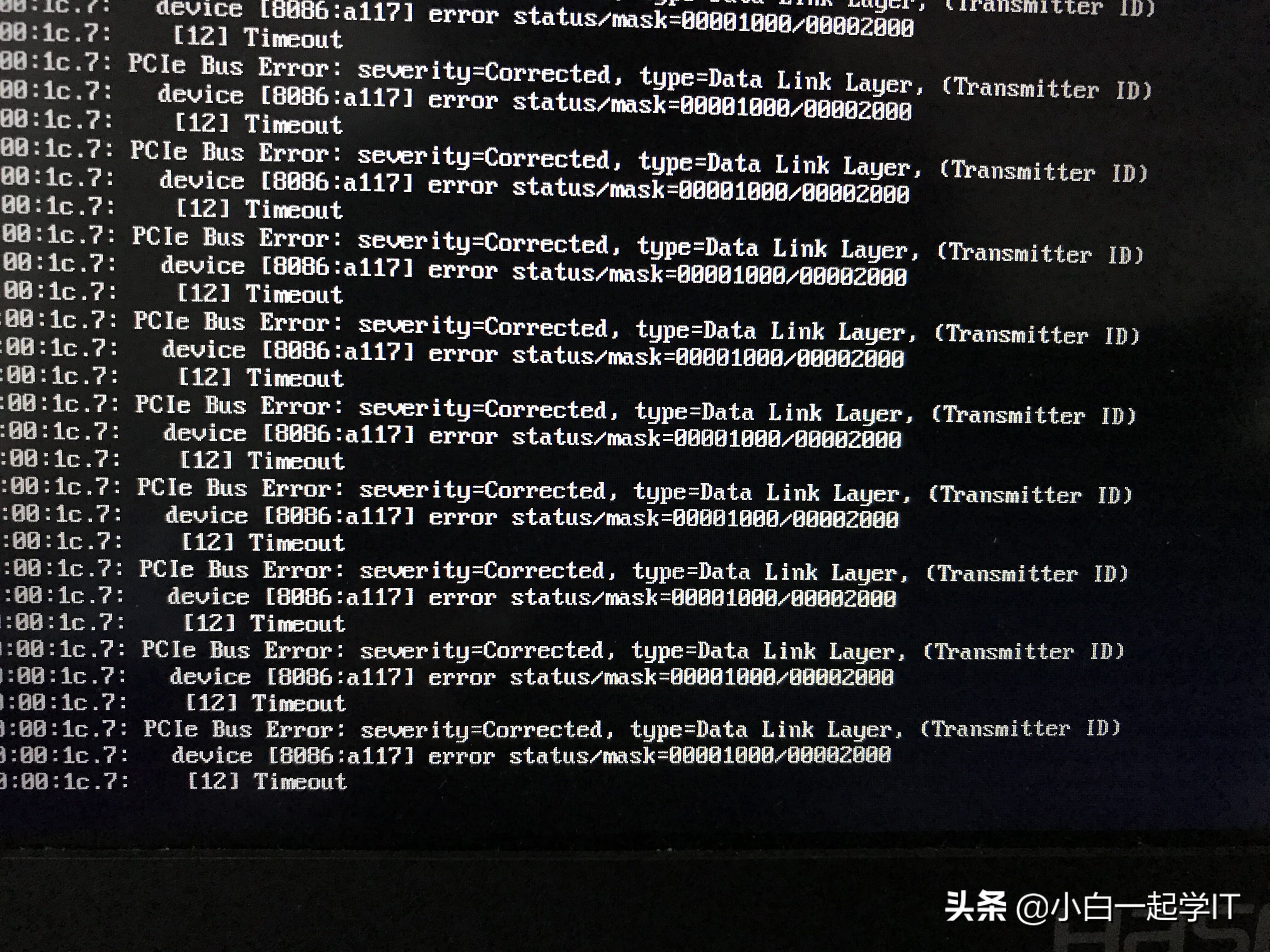
新装linux 系统后,每隔数分钟则报以下错误:
aer:corrected error received: 0000:00:1c:4
pcie bus error: severity=corrected, type=data link layer,(transmitter id)
device [8086:9d14] error status/mask=00001000/00002000
[12] timeout
翻译如下:
aer(高级纠错报告):收到被纠正的错误反馈:0000:00:1c:4
pcie总线错误: 严重程度=已纠正,类型=数据链路层,(发送 id)
设备 【8086:9d14】错误 状态/掩码=00001000/00002000
【12】超时
错误跟进
1.分析 8086:9d14究竟是什么
# lspci -nn |grep 8086:9d14
00:1c.4 pci bridge [0604] : intel corporation sunrise point-lp pci express root port #5 [8086:9d14] (rev f1)
看不懂这是什么? 这其实就是pcie的接口而已,现在我们来关注 00:1c.4 这个
2. 跟踪接口
# lspci -t |grep 1c.4
+-1c.4-[3a]----00.0
其实不用grep 的话我们可以看到这个命令是显示pci的树状接口图,这里可以看到 1c.4接到3a这个设备
3.找到目标
# lspci -nn |grep 3a
3a:00.0 network controller [0200]: qualcomm atheros qca6174 802.11ac wireless network adapter [168c:803e](rev 32)
终于找到报错的设备了,然而到底是什么原因报错呢?
4.分析
其实类型的错误都可以分析为cpu寻址错误,
部分类型设备可以通过在grub.cfg里面给引导内核时添加参数 pci=nocer pci=nomsi 之类解决,
实际上在正式运行的系统里面不应该有此错误,因为理论上驱动都是经测试正常的
那我们就只能得出一个结论,驱动不适合此设备
5.解决方法
找到适用的驱动并替换相应文件。
测试成功 (重启生效)
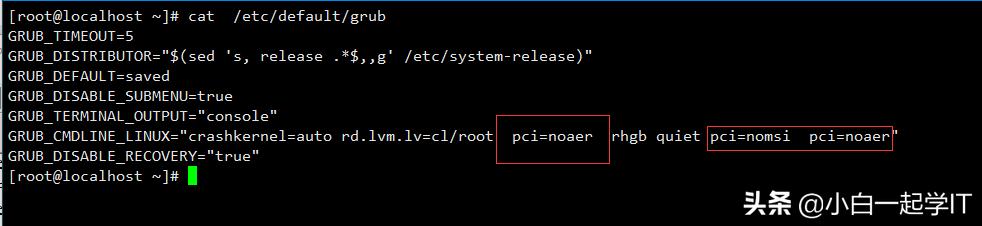
[root@localhost ~]# cat /etc/default/grub
GRUB_TIMEOUT=5
GRUB_DISTRIBUTOR="$(sed 's, release .*$,,g' /etc/system-release)"
GRUB_DEFAULT=saved
GRUB_DISABLE_SUBMENU=true
GRUB_TERMINAL_OUTPUT="console"
GRUB_CMDLINE_LINUX="crashkernel=auto rd.lvm.lv=cl/root pci=noaer rhgb quiet pci=nomsi pci=noaer"
GRUB_DISABLE_RECOVERY="true"
[root@localhost ~]#
[root@localhost ~]# grub2-mkconfig -o /boot/efi/EFI/centos/grub.cfg
Generating grub configuration file ...
Found linux image: /boot/vmlinuz-4.20.3-1.el7.elrepo.x86_64
Found initrd image: /boot/initramfs-4.20.3-1.el7.elrepo.x86_64.img
Found linux image: /boot/vmlinuz-0-rescue-af636be6982f45e887a6ee3c07c9a96f
Found initrd image: /boot/initramfs-0-rescue-af636be6982f45e887a6ee3c07c9a96f.img
done
[root@localhost ~]#init 6