使用linux的用户,大多是看上了linux的可定制性,如果windows遇上了开机慢的问题,可以用各种优化软件来解决,那 linux怎么解决呢?
以我曾经安装的deepin为例,使用的是机械硬盘。
先在终端执行如下命令:
systemd-analyze
输出如下:
Startup finished in 7.825s (kernel) + 38.210s (userspace) = 46.036s
可以看到,开机花了46秒,固件的启动速度很难再提升了,那慢就慢在用户空间这块,内核启动实际上只花了8秒。
那么用户空间究竟干了啥导致开机慢呢?执行下这个命令
systemd-analyze blame
输出如下:
23.005s apt-daily.service
 12.479s plymouth-quit-wait.service
 7.729s ModemManager.service
 7.714s loadcpufreq.service
 7.572s dev-sda5.device
 4.668s systemd-journal-flush.service
 4.149s systemd-logind.service
 3.417s systemd-rfkill.service
 3.385s pppd-dns.service
 3.330s alsa-restore.service
 3.297s avahi-daemon.service
 3.289s networking.service
 2.741s lightdm.service
 2.548s NetworkManager.service
 2.544s lastore-daemon.service
 1.884s lvm2-monitor.service
好家伙,就plymouth-quit-wait.service 和 apt-daily.service 这俩家伙最坑爹。
我们可以导出图像,看起来更直观:
sudo systemd-analyze plot > boot.svg
导出分析结果为图片
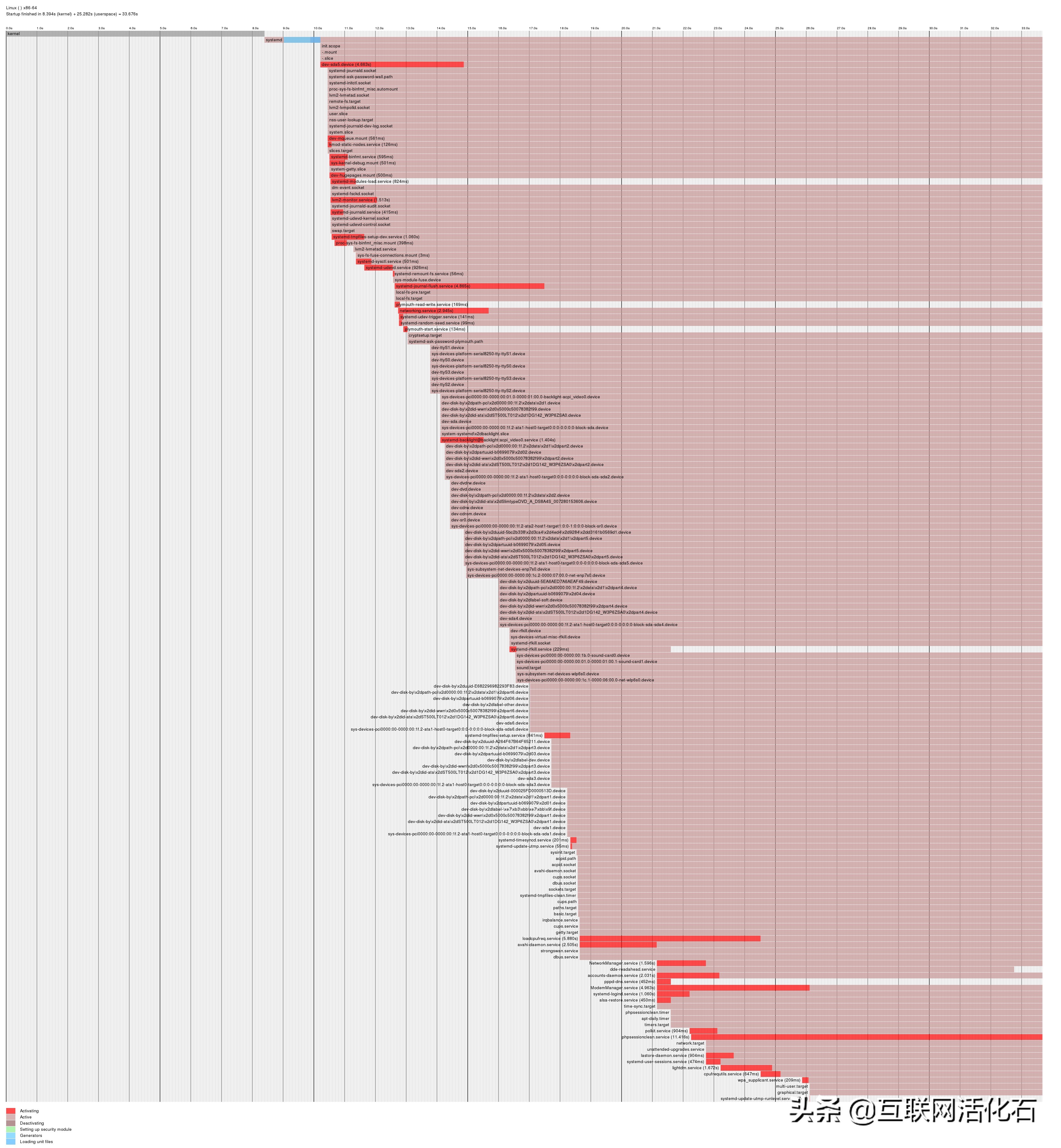
系统启动耗时
plymouth-quit-wait.service 这家伙是干啥的呢,这家伙就是开机动画。开机动画不可能耗时这么多,应该是登录的耗时,这个和显卡有关,优化效果不是太好,我们不用在这里耗时。
那接下来看apt-daily.service又是干啥的呢
systemctl status apt-daily.service
● apt-daily.service - Daily apt activities
 Loaded: loaded (/lib/systemd/system/apt-daily.service; static; vendor preset: enabled)
 Active: inactive (dead) since Tue 2017-12-26 19:21:27 CST; 36min ago
 Docs: man:apt(8)
 Process: 503 ExecStart=/usr/lib/apt/apt.systemd.daily (code=exited, status=0/SUCCESS)
Main PID: 503 (code=exited, status=0/SUCCESS)
Warning: Journal has been rotated since unit was started. Log output is incomplete or unavailable.
看看这个服务都干了啥
cat /usr/lib/apt/apt.systemd.daily
发现干的都是些apt包管理的事情,这个也好办,大不了我需要的时候手动清理和升级就好了
执行下面的命令,禁止这个服务开机启动
systemctl disable apt-daily.service
打完收工,再重启下看看
$ systemd-analyze
Startup finished in 7.495s (kernel) + 18.579s (userspace) = 26.074s
看到开机时间缩短到了26秒,实际上开机并没有缩短这么多,为什么呢?看下面的备注
注:
1.你的systemd-analyze blame输出和我的不一定相同,我只是提供一种思路。不确定的服务不要随便禁止。
2.虽然有的服务看起来占用时间很多,但由于systemd是并行执行的,所以实际耗时没有那么多,你禁用了那个服务,开机时间也不会有非常巨大的变化。
3.如果是SSD硬盘,优化效果有限。