最终结果图
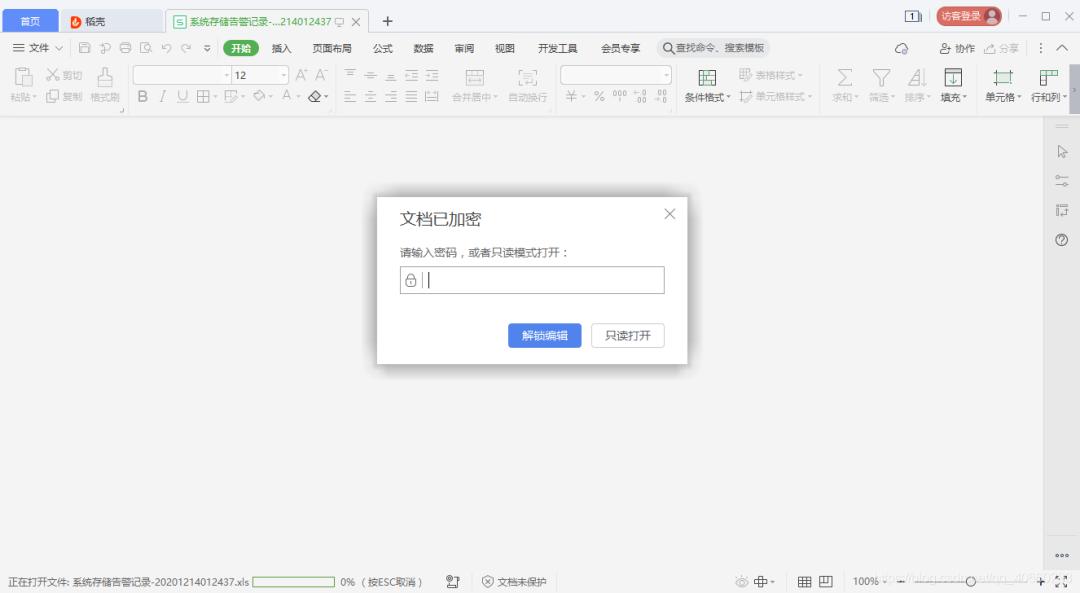
poi依赖jar包
<dependency> <groupId>org.apache.poi</groupId> <artifactId>poi</artifactId> <version>3.16-beta2</version></dependency><dependency> <groupId>org.apache.poi</groupId> <artifactId>poi-ooxml</artifactId> <version>3.16-beta2</version></dependency>
文件资源位置FileResource
package com.test.export;import java.io.File;import java.io.FileNotFoundException; import org.springframework.util.ResourceUtils; public class FileResource { public static String xls= "" ; static{ try { File path = new File(ResourceUtils.getURL( "classpath:" ).getPath()); // 如果通过jar允许,则使用当前jar包所在路径 if (!path.exists()) path = new File( "" ); path = new File(path.getAbsolutePath(), "static" +File.separator+ "xls" ); if (!path.exists()) path.mkdirs(); xls = path.getAbsolutePath(); } catch (FileNotFoundException e) { // TODO Auto-generated catch block e.printStackTrace(); } }}
TestExport 导出工具类
package com.example.demo123.service; import com.alibaba.fastjson.JSON;import com.alibaba.fastjson.JSONArray;import com.alibaba.fastjson.JSONObject;import com.example.demo123.config.FileResource;import com.example.demo123.controller.Test;import com.example.demo123.util.DCPException;import com.example.demo123.util.ErrorCode;import org.apache.poi.hssf.usermodel.HSSFRow;import org.apache.poi.hssf.usermodel.HSSFSheet;import org.apache.poi.hssf.usermodel.HSSFWorkbook;import org.apache.poi.openxml4j.exceptions.InvalidFormatException;import org.apache.poi.openxml4j.opc.OPCPackage;import org.apache.poi.openxml4j.opc.PackageAccess;import org.apache.poi.poifs.crypt.EncryptionInfo;import org.apache.poi.poifs.crypt.EncryptionMode;import org.apache.poi.poifs.crypt.Encryptor;import org.apache.poi.poifs.filesystem.POIFSFileSystem; import java.io.*;import java.security.GeneralSecurityException;import java.text.DateFormat;import java.text.SimpleDateFormat;import java.util.Date;import java.util.List; /** * @program: demo1231 * @description: * @author: lxq * @create: 2020-11-21 16:08 * @Version: 1.0 **/public class TestExport { public static String export (List<Test> rows, String excelName) throws ParseException{ HSSFWorkbook wb = new HSSFWorkbook(); HSSFSheet sheet = wb.createSheet( "poi导出" ); sheet.setDefaultRowHeight((short) (20 * 20)); HSSFRow row = null; row = sheet.createRow(0); // 假设你的查询数据里有表头这些字段 // 表头 row.createCell(0).setCellValue( "userId" ); row.createCell(1).setCellValue( "userName" ); row.createCell(2).setCellValue( "userPassword" ); row.createCell(3).setCellValue( "sex" ); JSONArray array = JSONArray.parseArray(JSON.toJSONString(rows)); // 数据 for (int i = 0; i < array.size(); i++) { JSONObject jsonObj = array.getJSONObject(i); row = sheet.createRow(i + 1); row.createCell(0).setCellValue(jsonObj.getString( "userId" )); row.createCell(1).setCellValue(jsonObj.getString( "userName" )); row.createCell(2).setCellValue(jsonObj.getString( "userPassword" )); row.createCell(3).setCellValue(jsonObj.getString( "sex" )); } sheet.setColumnWidth(0, 450 * 20); sheet.setColumnWidth(1, 300 * 20); sheet.setColumnWidth(2, 150 * 20); sheet.setColumnWidth(3, 150 * 20); String fileName = createFile(wb, excelName); return fileName; } private static String createFile(HSSFWorkbook workbook, String name) throws ParseException{ String filePath = FileResource.xls; // 生成文件 DateFormat fm = new SimpleDateFormat( "yyyMMddhhmmss" ); String fileName = name + fm.format(new Date())+ ".xlsx" ; FileOutputStream fos = null; try { File file = new File(filePath+File.separator+fileName); if (!file.exists()) { file.createNewFile(); } fileName=file.getPath(); // 保存此XSSFWorkbook对象为xlsx文件 workbook.write(new FileOutputStream(file)); FileOutputStream fileOut = new FileOutputStream(file); workbook.write(fileOut); fileOut.close(); POIFSFileSystem fs = new POIFSFileSystem(); EncryptionInfo info = new EncryptionInfo(EncryptionMode.agile); Encryptor enc = info.getEncryptor(); enc.confirmPassword( "123456" ); OPCPackage opc = OPCPackage.open(new File(String.valueOf(file)), PackageAccess.READ_WRITE); OutputStream os = enc.getDataStream(fs); opc.save(os); opc.close(); fos= new FileOutputStream(file); fs.writeFilesystem(fos); fos.close(); } catch (IOException e) { e.printStackTrace(); } catch (GeneralSecurityException | InvalidFormatException e) { e.printStackTrace(); } finally { try { fos.close(); workbook.close(); } catch (IOException e) { e.printStackTrace(); } } return fileName; } public static void export1(String filePath) { FileInputStream fis= null; //这里换成你本地的excel相对路径或绝对路径 try { fis = new FileInputStream(new File(filePath)); FileOutputStream fos= null; HSSFWorkbook workbook = new HSSFWorkbook(fis); workbook.writeProtectWorkbook( "password" , "admin" ); fos=new FileOutputStream(new File(filePath));//这里换成你本地的excel相对路径或绝对路径 workbook.write(fos); // writeProtectWorkbook第一个参数是打开Excel文件的密码 // writeProtectWorkbook第二个参数是现实文件密码是由谁设置的 // 第二个参数用中文可能会出现乱码的情况,我用utf8编码workspace // 可能用gbk不会有乱码 fis.close(); fos.close(); } catch (IOException e) { e.printStackTrace(); } }}
testExportController
package com.example.demo123.controller; import com.example.demo123.config.ReturnValue;import com.example.demo123.service.TestExport;import com.example.demo123.service.TestService;import com.example.demo123.util.ErrorCode;import lombok.extern.slf4j.Slf4j;import org.apache.commons.lang3.StringUtils;import org.apache.poi.hssf.usermodel.HSSFWorkbook;import org.apache.poi.xssf.usermodel.XSSFSheet;import org.apache.poi.xssf.usermodel.XSSFWorkbook;import org.springframework.beans.factory.annotation.Autowired;import org.springframework.web.bind.annotation.PostMapping;import org.springframework.web.bind.annotation.RequestMapping;import org.springframework.web.bind.annotation.RequestParam; import java.io.File;//import java.io.FileInputStream;import java.io.FileInputStream;import java.io.FileOutputStream;import java.util.ArrayList;import java.util.List; @Slf4j@RequestMapping( "/test" )public class testExportController { @Autowired private static TestService testService; @PostMapping( "/testDataExport" ) public R ReturnValue<String> testDataExport( @RequestParam(name = "excelName" , required = true ) String excelName) { try { List<Test> rows = new ArrayList<>(); Test test = new Test(); test.setUserId( "0000" ); test.setSex(0); test.setUserName( "张三" ); test.setUserPassword( "123456" ); rows.add( test ); if (rows.size()<= 0) { return R.data( "无数据导出" ); } String fileName = TestExport.export(rows, excelName); TestExport.export1(fileName); return R.data(fileName); } catch (Exception e) { return R.fail( "服务内部错误" ); } } public static void main(String[] args){ testDataExport( "11" ); } // public static void main(String[] args)throws Exception{// FileInputStream fis=new FileInputStream(new File( "E:/backup/系统存储告警记录-20201214012437.xls" )); //这里换成你本地的excel相对路径或绝对路径// FileOutputStream fos= null;// HSSFWorkbook workbook = new HSSFWorkbook(fis);// workbook.writeProtectWorkbook( "password" , "admin" );// fos=new FileOutputStream(new File( "E:/backup/系统存储告警记录-20201214012437.xls" ));//这里换成你本地的excel相对路径或绝对路径// workbook.write(fos);// // writeProtectWorkbook第一个参数是打开Excel文件的密码// // writeProtectWorkbook第二个参数是现实文件密码是由谁设置的// // 第二个参数用中文可能会出现乱码的情况,我用utf8编码workspace// // 可能用gbk不会有乱码// fis.close();// fos.close();// }}
pom.xml
<?xml version= "1.0" encoding= "UTF-8" ?><project xmlns= "http://maven.apache.org/POM/4.0.0" xmlns:xsi= "http://www.w3.org/2001/XMLSchema-instance" xsi:schemaLocation= "http://maven.apache.org/POM/4.0.0 https://maven.apache.org/xsd/maven-4.0.0.xsd" > <modelVersion>4.0.0</modelVersion> <parent> <groupId>org.springframework.boot</groupId> <artifactId>spring-boot-starter-parent</artifactId> <version>2.1.7.RELEASE</version> <relativePath/> <!-- lookup parent from repository --> </parent> <groupId>com.example</groupId> <artifactId>demo123</artifactId> <version>0.0.1-SNAPSHOT</version> <name>demo</name> <description>Demo project for Spring Boot</description> <properties> <java.version>1.8</java.version> </properties> <dependencies> <dependency> <groupId>org.springframework.boot</groupId> <artifactId>spring-boot-starter-web</artifactId> </dependency> <dependency> <groupId>org.springframework.boot</groupId> <artifactId>spring-boot-starter-test</artifactId> <scope> test </scope> </dependency> <!-- 热部署依赖 --> <dependency> <groupId>org.springframework.boot</groupId> <artifactId>spring-boot-devtools</artifactId> <optional> true </optional> </dependency> <!-- mysql的依赖--> <dependency> <groupId>mysql</groupId> <artifactId>mysql-connector-java</artifactId> <scope>runtime</scope> </dependency> <!-- get/ set 依赖 --> <dependency> <groupId>org.projectlombok</groupId> <artifactId>lombok</artifactId> <version>1.16.20</version> </dependency> <!-- 日志依赖 --> <dependency> <groupId>org.slf4j</groupId> <artifactId>log4j-over-slf4j</artifactId> </dependency> <!-- 阿里巴巴druid数据源依赖 --> <dependency> <groupId>com.alibaba</groupId> <artifactId>druid</artifactId> <version>1.1.12</version> </dependency> <!-- Base64编码需要 --> <dependency> <groupId>org.apache.directory.studio</groupId> <artifactId>org.apache.commons.codec</artifactId> <version>1.8</version> </dependency> <!-- 阿里巴巴fastjson依赖 --> <dependency> <groupId>com.alibaba</groupId> <artifactId>fastjson</artifactId> <version>1.2.47</version> </dependency> <!-- 谷歌gson依赖 --> <dependency> <groupId>com.google.code.gson</groupId> <artifactId>gson</artifactId> <version>2.8.2</version> </dependency> <!-- 工具包依赖 --> <dependency> <groupId>org.apache.commons</groupId> <artifactId>commons-lang3</artifactId> <version>3.4</version> </dependency> <dependency> <groupId>commons-io</groupId> <artifactId>commons-io</artifactId> <version>2.4</version> </dependency> <!-- servlet 依赖 --> <dependency> <groupId>javax.servlet</groupId> <artifactId>javax.servlet-api</artifactId> <scope>provided</scope> </dependency> <!-- 模板引擎依赖 --> <dependency> <groupId>org.springframework.boot</groupId> <artifactId>spring-boot-starter-thymeleaf</artifactId> </dependency> <!-- 加解密 --><!-- <dependency>--><!-- <groupId>org.springframework.boot</groupId>--><!-- <artifactId>encrypt-body-spring-boot-starter</artifactId>--><!-- <version>1.0.0</version>--><!-- </dependency>--><!-- <dependency>--><!-- <groupId>org.springframework.boot</groupId>--><!-- <artifactId>spring-boot-autoconfigure</artifactId>--><!-- <version>2.2.1.RELEASE</version>--><!-- </dependency>--> <dependency> <groupId>org.apache.poi</groupId> <artifactId>poi</artifactId> <version>3.16-beta2</version> </dependency> <dependency> <groupId>org.apache.poi</groupId> <artifactId>poi-ooxml</artifactId> <version>3.16-beta2</version> </dependency> <dependency> <groupId>net.lingala.zip4j</groupId> <artifactId>zip4j</artifactId> <version>1.3.2</version> </dependency> <!--缺少此jar包,导致@Mapper注解无效--> <dependency> <groupId>org.mybatis.spring.boot</groupId> <artifactId>mybatis-spring-boot-starter</artifactId> <version>1.2.0</version> </dependency> </dependencies> <build> <resources> <resource> <directory>src/main/java</directory> <filtering> true </filtering> </resource> <resource> <directory>src/main/java</directory> <includes> <include>**/*.xml</include> <include>**/*.ftl</include> </includes> </resource> </resources> <plugins> <plugin> <groupId>org.springframework.boot</groupId> <artifactId>spring-boot-maven-plugin</artifactId> </plugin> </plugins> </build> <repositories> <repository> <id>release</id> <name>Release Repository</name> <url>http://nexus.gitee.ltd/repository/maven-releases/</url> </repository> <repository> <id>aliyun-repos</id> <url>http://maven.aliyun.com/nexus/content/groups/public/</url> <snapshots> <enabled> false </enabled> </snapshots> </repository> </repositories> <pluginRepositories> <pluginRepository> <id>aliyun-plugin</id> <url>http://maven.aliyun.com/nexus/content/groups/public/</url> <snapshots> <enabled> false </enabled> </snapshots> </pluginRepository> </pluginRepositories></project>
看完记得 点赞 转发 关注
————————————————