浮动静态路由
浮动静态路由是一种特殊的静态路由,通过配置一个比主路由的管理距离更大的静态路由,保证网络中主路由失效的情况下,提供备份路由。但在主路由存在的情况下备份路由不会出现在路由表中。
拓扑图
VPC1和VPC2通信,默认走上面R2---R1---R3---PC2路由,如果R1挂掉或者端口down,会自动切换到下面R2---R4---R3路由。

配置名称和IP地址
R1
Router>en
Router#conf t
Enter configuration commands, one per line.  End with CNTL/Z.
Router(config)#hostnameR1
R1(config)#interface ethernet 0/0
R1(config-if)#ip add 12.1.1.1 255.255.255.0
R1(config-if)#no shut
R1(config)#interface ethernet 0/1
R1(config-if)#ip add 13.1.1.1 255.255.255.0
R1(config-if)#noshu
R1#show ip interface bri
Interface                  IP-Address      OK? Method Status                Protocol
Ethernet0/0                12.1.1.1        YES manual up                    up
Ethernet0/1                13.1.1.1        YES manual up                    up
Ethernet0/2                unassigned      YES manual administratively down down
Ethernet0/3                unassigned      YES NVRAM  administratively down down
R1#
R2
Router>en
Router#conf t
Enterconfigurationcommands,oneperline.EndwithCNTL/Z.
Router(config)#hostname R2
R2(config)#interface ethernet 0/1
R2(config-if)#ip add 12.1.1.2 255.255.255.0
R2(config-if)#no shut
R2(config)#interface e
R2(config)#interface ethernet 0/2
R2(config-if)#ip add 172.16.1.1 255.255.255.0
R2(config-if)#no shut
R2(config)#interface ethernet 0/0
R2(config-if)#ip add 24.1.1.1 255.255.255.0
R2(config-if)#no shut
R2#show ip interface brief
Interface                  IP-Address      OK? Method Status                Protocol
Ethernet0/0                24.1.1.1        YES manual up                    up
Ethernet0/1                12.1.1.2        YES manual up                    up
Ethernet0/2                172.16.1.1      YES manual up                    up
Ethernet0/3                unassigned      YES unset  administratively down down
R2#
R3
Router#conf t
Enterconfigurationcommands,oneperline.EndwithCNTL/Z.
Router(config)#hostnameR3
R3(config)#interface ethernet 0/0
R3(config-if)#ip add 13.1.1.3 255.255.255.0
R3(config-if)#noshu
R3(config)#interface
*Jul  8 23:17:56.567: %LINK-3-UPDOWN: Interface Ethernet0/0, changed state to up
*Jul  8 23:17:57.576: %LINEPROTO-5-UPDOWN: Line protocol on Interface Ethernet0/0, chan
gedstatetoup
R3(config)#interface ethernet 0/1
R3(config-if)#ip add 34.1.1.3 255.255.255.0
R3(config-if)#no shut
R3(config)#interface ethernet 0/2
R3(config-if)#ip add 172.16.2.1 255.255.255.0
R3(config-if)#noshut
R3(config-if)#en
*Jul  8 23:19:13.080: %LINK-3-UPDOWN: Interface Ethernet0/2, changed state to up
*Jul  8 23:19:14.080: %LINEPROTO-5-UPDOWN: Line protocol on Interface Ethernet0/2, chan
ged state to up
R3(config-if)#end
R3#
*Jul823:19:15.186:%SYS-5-CONFIG_I:Configuredfromconsolebyconsole
R3#show ip interface brief
Interface                  IP-Address      OK? Method Status                Protocol
Ethernet0/0                13.1.1.3        YES manual up                    up
Ethernet0/1                34.1.1.3        YES manual up                    up
Ethernet0/2                172.16.2.1      YES manual up                    up
Ethernet0/3                unassigned      YES unset  administratively down down
R3#
R4
Router>en
Router#conf t
Enterconfigurationcommands,oneperline.EndwithCNTL/Z.
Router(config)#hostnameR4
R4(config)#interface ethernet 0/0
R4(config-if)#ip add 24.1.1.4 255.255.255.0
R4(config-if)#noshu
R4(config)#interfaceethernet0/1
R4(config-if)#ip address 34.1.1.4 255.255.255.0
R4(config-if)#no shut
R4#show ip interface brief
Interface                  IP-Address      OK? Method Status                Protocol
Ethernet0/0                24.1.1.4        YES manual up                    up
Ethernet0/1                34.1.1.4        YES manual up                    up
Ethernet0/2                unassigned      YES unset  administratively down down
Ethernet0/3                unassigned      YES unset  administratively down down
Ethernet1/0                unassigned      YES unset  administratively down down
Ethernet1/1                unassigned      YES unset  administratively down down
Ethernet1/2                unassigned      YES unset  administratively down down
Ethernet1/3                unassigned      YES unset  administratively down down
R4#
VPC1
VPCS> set pcname VPC1
VPC1> ip 172.16.1.2/24 172.16.1.1
Checking for duplicate address...
PC1:172.16.1.2255.255.255.0gateway172.16.1.1
VPC1> ping 172.16.1.1
172.16.1.1 icmp_seq=1 timeout
84 bytes from 172.16.1.1 icmp_seq=2 ttl=255 time=0.532 ms
84 bytes from 172.16.1.1 icmp_seq=3 ttl=255 time=0.447 ms
84 bytes from 172.16.1.1 icmp_seq=4 ttl=255 time=0.386 ms
84bytesfrom172.16.1.1icmp_seq=5ttl=255time=0.470ms
VPC1>
VPC2
VPCS>setpcnameVPC2
VPC2> ip 172.16.2.2/24 172.16.2.1
Checking for duplicate address...
PC1:172.16.2.2255.255.255.0gateway172.16.2.1
VPC2>ping172.16.2.1
84 bytes from 172.16.2.1 icmp_seq=1 ttl=255 time=0.305 ms
84 bytes from 172.16.2.1 icmp_seq=2 ttl=255 time=0.887 ms
84 bytes from 172.16.2.1 icmp_seq=3 ttl=255 time=0.548 ms
84 bytes from 172.16.2.1 icmp_seq=4 ttl=255 time=0.600 ms
84bytesfrom172.16.2.1icmp_seq=5ttl=255time=0.503ms
VPC2>
配置完IP地址,最好互相ping下直接路由,避免是因为IP地址产生的问题。

配置静态路由和浮动静态路由
R1
R1(config)#iproute172.16.1.0255.255.255.0ethernet0/012.1.1.2
R1(config)#ip route 172.16.2.0 255.255.255.0 ethernet 0/1 13.1.1.3
R1(config)#
R1#show ip route
Codes: L - local, C - connected, S - static, R - RIP, M - mobile, B - BGP
       D - EIGRP, EX - EIGRP external, O - OSPF, IA - OSPF inter area
       N1 - OSPF NSSA external type 1, N2 - OSPF NSSA external type 2
       E1 - OSPF external type 1, E2 - OSPF external type 2
       i - IS-IS, su - IS-IS summary, L1 - IS-IS level-1, L2 - IS-IS level-2
       ia - IS-IS inter area, * - candidate default, U - per-user static route
       o - ODR, P - periodic downloaded static route, H - NHRP, l - LISP
       + - replicated route, % - next hop override


Gateway of last resort is not set


      12.0.0.0/8 is variably subnetted, 2 subnets, 2 masks
C        12.1.1.0/24 is directly connected, Ethernet0/0
L        12.1.1.1/32 is directly connected, Ethernet0/0
      13.0.0.0/8 is variably subnetted, 2 subnets, 2 masks
C        13.1.1.0/24 is directly connected, Ethernet0/1
L        13.1.1.1/32 is directly connected, Ethernet0/1
      172.16.0.0/24 is subnetted, 2 subnets
S        172.16.1.0 [1/0] via 12.1.1.2, Ethernet0/0
S        172.16.2.0 [1/0] via 13.1.1.3, Ethernet0/1
R1#
R2
R2(config)#iproute0.0.0.00.0.0.0ethernet0/112.1.1.1
R2(config)#ip route 0.0.0.0 0.0.0.0 ethernet 0/0 24.1.1.4 ?
  <1-255>    Distance metric for this route
  multicast  multicast route
  name       Specify name of the next hop
  permanent  permanent route
  tag        Set tag for this route
  track      Install route depending on tracked item
  <cr>
R2(config)#ip route 0.0.0.0 0.0.0.0 ethernet 0/0 24.1.1.4 10
R2#show ip route
Codes: L - local, C - connected, S - static, R - RIP, M - mobile, B - BGP
       D - EIGRP, EX - EIGRP external, O - OSPF, IA - OSPF inter area
       N1 - OSPF NSSA external type 1, N2 - OSPF NSSA external type 2
       E1 - OSPF external type 1, E2 - OSPF external type 2
       i - IS-IS, su - IS-IS summary, L1 - IS-IS level-1, L2 - IS-IS level-2
       ia - IS-IS inter area, * - candidate default, U - per-user static route
       o - ODR, P - periodic downloaded static route, H - NHRP, l - LISP
       + - replicated route, % - next hop override


Gateway of last resort is 12.1.1.1 to network 0.0.0.0


S*    0.0.0.0/0 [1/0] via 12.1.1.1, Ethernet0/1
      12.0.0.0/8 is variably subnetted, 2 subnets, 2 masks
C        12.1.1.0/24 is directly connected, Ethernet0/1
L        12.1.1.2/32 is directly connected, Ethernet0/1
      24.0.0.0/8 is variably subnetted, 2 subnets, 2 masks
C        24.1.1.0/24 is directly connected, Ethernet0/0
L        24.1.1.1/32 is directly connected, Ethernet0/0
      172.16.0.0/16 is variably subnetted, 2 subnets, 2 masks
C        172.16.1.0/24 is directly connected, Ethernet0/2
L        172.16.1.1/32 is directly connected, Ethernet0/2
R2#
#参数10这个取值范围为1-255之间,
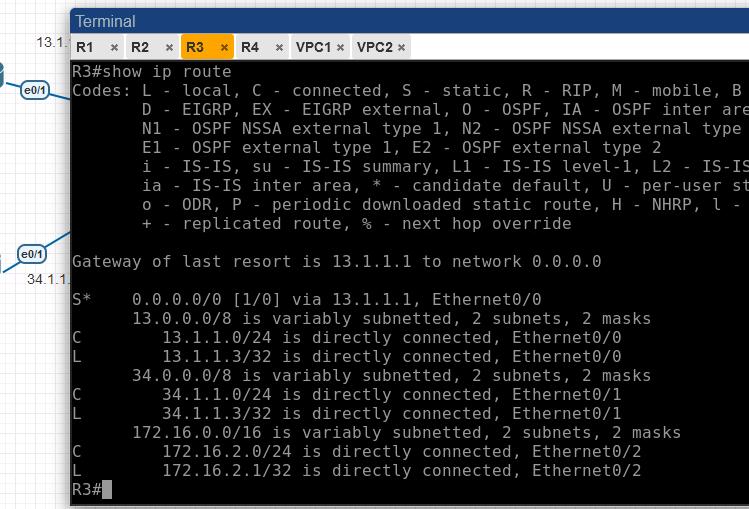
R3
R3(config)#ip route 0.0.0.0 0.0.0.0  ethernet 0/0 13.1.1.1
R3(config)#ip route 0.0.0.0 0.0.0.0  ethernet 0/1 34.1.1.4 10
R3#show ip route
Codes: L - local, C - connected, S - static, R - RIP, M - mobile, B - BGP
       D - EIGRP, EX - EIGRP external, O - OSPF, IA - OSPF inter area
       N1 - OSPF NSSA external type 1, N2 - OSPF NSSA external type 2
       E1 - OSPF external type 1, E2 - OSPF external type 2
       i - IS-IS, su - IS-IS summary, L1 - IS-IS level-1, L2 - IS-IS level-2
       ia - IS-IS inter area, * - candidate default, U - per-user static route
       o - ODR, P - periodic downloaded static route, H - NHRP, l - LISP
       + - replicated route, % - next hop override


Gateway of last resort is 13.1.1.1 to network 0.0.0.0


S*    0.0.0.0/0 [1/0] via 13.1.1.1, Ethernet0/0
      13.0.0.0/8 is variably subnetted, 2 subnets, 2 masks
C        13.1.1.0/24 is directly connected, Ethernet0/0
L        13.1.1.3/32 is directly connected, Ethernet0/0
      34.0.0.0/8 is variably subnetted, 2 subnets, 2 masks
C        34.1.1.0/24 is directly connected, Ethernet0/1
L        34.1.1.3/32 is directly connected, Ethernet0/1
      172.16.0.0/16 is variably subnetted, 2 subnets, 2 masks
C        172.16.2.0/24 is directly connected, Ethernet0/2
L        172.16.2.1/32 is directly connected, Ethernet0/2
R3#
R4
R4(config)#iproute172.16.1.0255.255.255.0ethernet0/024.1.1.2
R4(config)#ip route 172.16.2.0 255.255.255.0 ethernet 0/1 34.1.1.3
R4#show ip route
Codes: L - local, C - connected, S - static, R - RIP, M - mobile, B - BGP
       D - EIGRP, EX - EIGRP external, O - OSPF, IA - OSPF inter area
       N1 - OSPF NSSA external type 1, N2 - OSPF NSSA external type 2
       E1 - OSPF external type 1, E2 - OSPF external type 2
       i - IS-IS, su - IS-IS summary, L1 - IS-IS level-1, L2 - IS-IS level-2
       ia - IS-IS inter area, * - candidate default, U - per-user static route
       o - ODR, P - periodic downloaded static route, H - NHRP, l - LISP
       + - replicated route, % - next hop override


Gateway of last resort is not set


      24.0.0.0/8 is variably subnetted, 2 subnets, 2 masks
C        24.1.1.0/24 is directly connected, Ethernet0/0
L        24.1.1.4/32 is directly connected, Ethernet0/0
      34.0.0.0/8 is variably subnetted, 2 subnets, 2 masks
C        34.1.1.0/24 is directly connected, Ethernet0/1
L        34.1.1.4/32 is directly connected, Ethernet0/1
      172.16.0.0/24 is subnetted, 2 subnets
S        172.16.1.0 [1/0] via 24.1.1.2, Ethernet0/0
S        172.16.2.0 [1/0] via 34.1.1.3, Ethernet0/1
R4#
测试实验结果
1.VPC1与VPC2互通是正常的
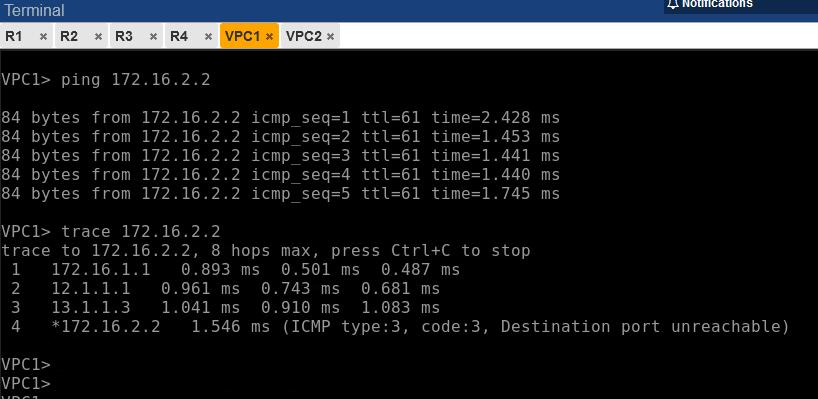

2.R1出现故障


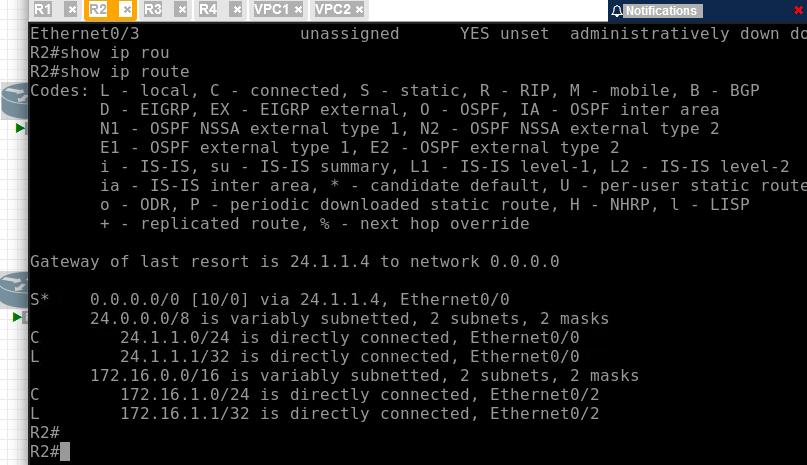
由于模拟器的原因,R1关闭端口但与R2和R3连接的对应端口还是up,R1也无法关闭,所以将R2和R3对应的端口关闭掉。
R2:

R3:

显示R2和R3的静态路由切换到下面R4。
突然发现一个问题:R2的 e0/0 地址配置错了,赶紧更正。

数据通信路由走的备份路由。

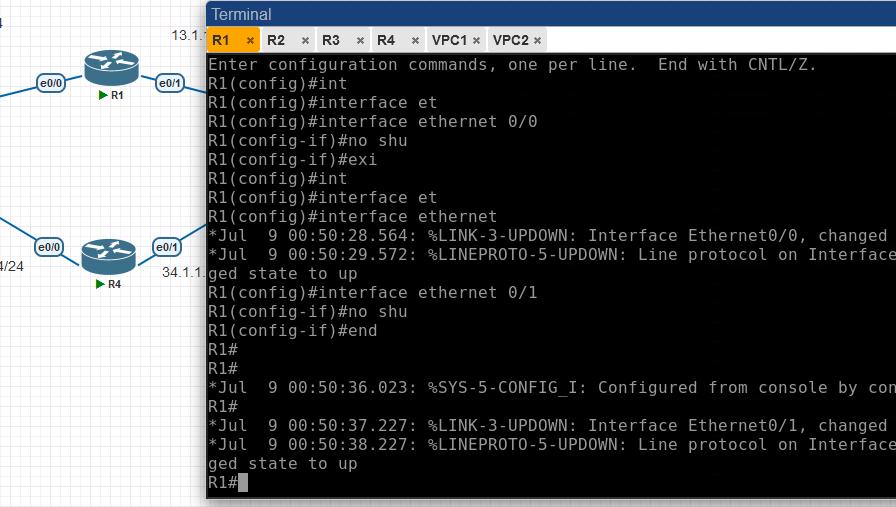
3.R1恢复之后
将之前R1关闭的端口,R2和R3关闭的端口都放开。
R2路由自动切换到主路由
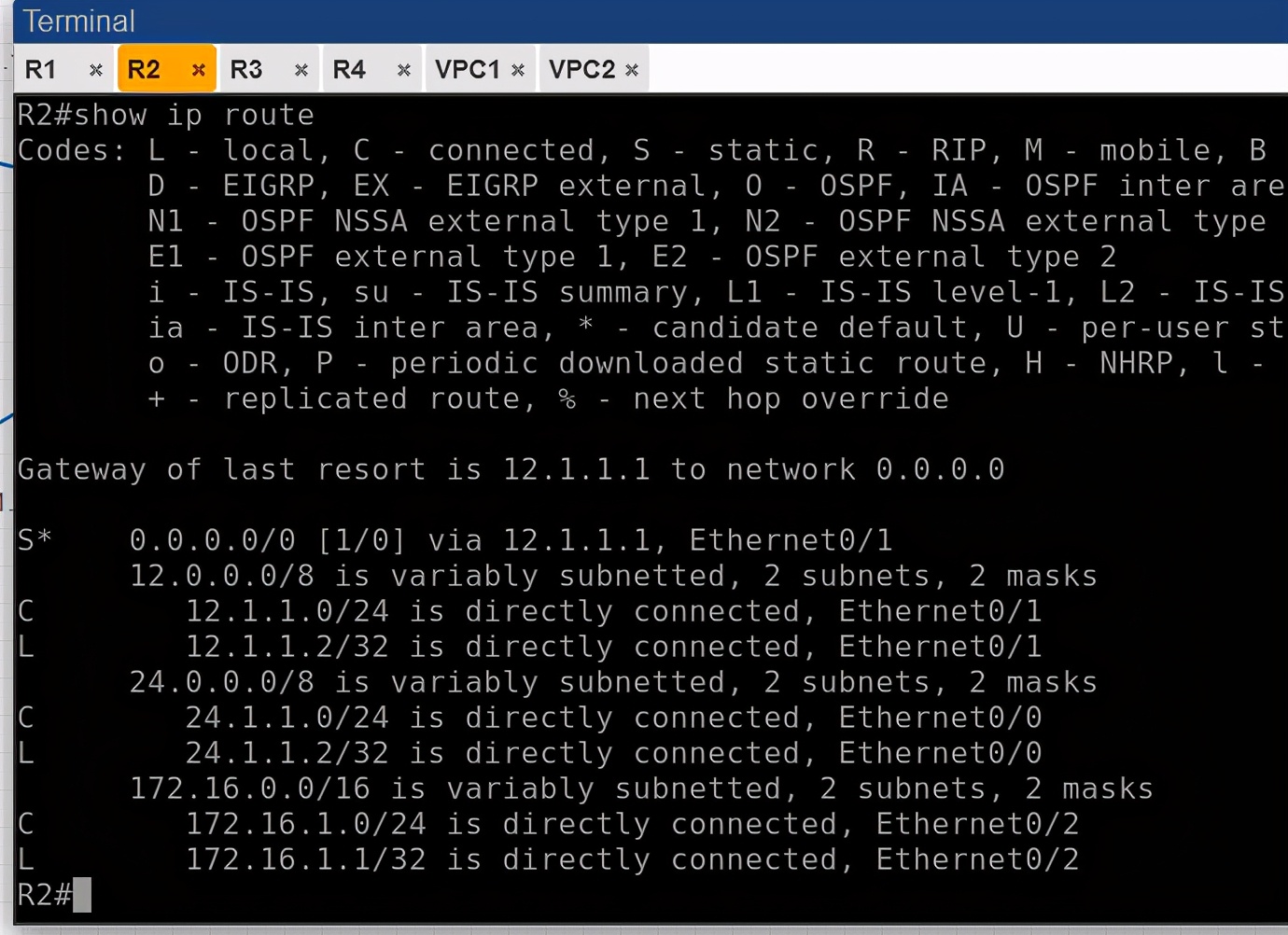
R3自动切换到主路由

通过浮动静态路由的实验,可以通过该特性,合理的使用,以增加网络的冗余和稳定性!
关于PNETLAB的Bug:
R1关机状态,但R2和R3对应的端口还是up,有知道如何解决的朋友,麻烦说下!
