开机引导模式下使用。此文说明主要适用android 6.0及以上版本
*载下**以下几个文件,CMD命令窗口切换到此目录就可使用了,当然还要安装USB驱动、打开USB调试(可选):
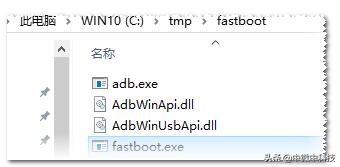
adb工具
怎么进入此模式 :
- 手机端:电源键+音量减/加
- 电脑端:用ADB工具,命令:adb reboot bootloader
格式: fastboot [OPTION...] COMMAND...
版本:与1.0.41版的adb适应
flashing : 写入命令
update ZIP : Flash all partitions from an update.zip package. 如fastboot update xxx.zip , xxx.zip中包含boot.img, recovery.img, system.img等镜像文件
flashall : Flash all partitions from $ANDROID_PRODUCT_OUT. On A/B devices, flashed slot is set as active. Secondary images may be flashed to inactive slot. 会自动搜索当前目录下的所有img文件,将它们都刷入系统对应分区。
flash PARTITION [FILENAME] : Flash given partition, using the image from $ANDROID_PRODUCT_OUT if no filename is given. 这里的PARTITION有boot/recovery/system/userdata/cache等
fastboot flash boot boot.img              将当前目录下的boot.img文件刷进系统的boot分区
fastboot flash recovery recovery.img  将当前目录下的recovery.img文件刷进系统的recovery分区
例子:
c:\tmp\fastboot>fastboot flash boot C:\tmp\F103_BAK\boot20220118.img
Sending 'boot' (16384 KB)                          OKAY [  1.583s]
Writing 'boot'                                     OKAY [  0.355s]
Finished. Total time: 2.011s
c:\tmp\fastboot>fastboot flash  recovery C:\tmp\F103_BAK\recovery20220118.img
Sending 'recovery' (16384 KB)                      OKAY [  1.584s]
Writing 'recovery'                                 OKAY [  0.354s]
Finished. Total time: 2.001s
basics :
devices [-l] : List devices in bootloader (-l: with device paths).
c:\tmp\fastboot>fastboot devices
000007CF00632D90        fastboot         显示以fastboot结尾的设备号

c:\adb\adb32>adb devices
* daemon not running. starting it now on port 5037 *
* daemon started successfully *
List of devices attached
8T8HBIZSBU9PCM4S        device           adb时显示以device结尾
getvar NAME : Display given bootloader variable.
reboot [bootloader] : Reboot device.
fastboot reboot                     重新启动到正常模式
fastboot reboot bootloader  重新启动到引导模式
fastboot reboot recovery      重新启动到恢复模式
例子:
c:\tmp\fastboot>fastboot reboot bootloader        android 5.0及以上可用此命令
Rebooting into bootloader                          OKAY [  0.003s]
Finished. Total time: 0.007s

c:\tmp\fastboot>fastboot reboot
Rebooting                                          OKAY [  0.002s]
Finished. Total time: 0.006s
locking/unlocking :上锁/解锁命令,将会删除个人数据
flashing lock|unlock : Lock/unlock partitions for flashing
fastboot flashing lock      给BL上锁
fastboot flashing unlock  解BL锁
flashing lock_critical|unlock_critical : Lock/unlock 'critical' bootloader partitions.
flashing get_unlock_ability : Check whether unlocking is allowed (1) or not(0).
advanced :
erase PARTITION : Erase a flash partition.
format[:FS_TYPE[:SIZE]] PARTITION : Format a flash partition.
set_active SLOT : Set the active slot.
oem [COMMAND...] : Execute OEM-specific command. 这里的command主要是自定义的命令(慎用)。高版本的系统可用fastboot oem help 查询有效的命令。
android 6.0以前:
fastboot oem lock      上BL锁
fastboot oem unlock  解BL锁
c:\tmp\fastboot>fastboot oem unlock
                                                   OKAY [ 30.582s]
Finished. Total time: 30.591s
另一个手机的解锁:
c:\tmp\fastboot>fastboot oem unlock
                                                   (bootloader) Start unlock flow
OKAY [ 29.972s]
Finished. Total time: 29.983s
c:\tmp\fastboot>fastboot oem lock
                                                   (bootloader) Start lock flow
OKAY [ 43.440s]
Finished. Total time: 43.449s

C:\tmp\fastboot-1>fastboot oem reboot-recovery    重启到recovery模式
                                                   OKAY [  0.003s]
Finished. Total time: 0.050s

还有:fastboot oem reboot-bootloader
查询设备BL上锁情况:
fastboot oem get_bootinfo    此处的get_bootinfo是用户自定义命令

C:\tmp\fastboot>fastboot oem device-info
                                                   (bootloader) Verity mode: true
(bootloader) Device unlocked: false
(bootloader) Device critical unlocked: false
(bootloader) Charger screen enabled: true
OKAY [  0.013s]
Finished. Total time: 0.018s
gsi wipe|disable : Wipe or disable a GSI installation (fastbootd only).
wipe-super [SUPER_EMPTY] : Wipe the super partition. This will reset it to contain an empty set of default dynamic partitions.
boot image : 用指定镜像文件临时启动系统,不会更改原系统的启动文件,如利用magisk加入root权限的boot文件启动
boot KERNEL [RAMDISK [SECOND]] : Download and boot kernel from RAM.
用magisk_patched-23000_EJX2G.img(加了面具的boot.img)启动手机例子:
C:\tmp\fastboot>fastboot boot C:\tmp\fastboot\magisk_patched-23000_EJX2G.img
Sending 'boot.img' (16384 KB)                      OKAY [  1.573s]
Booting                                            OKAY [  0.060s]
Finished. Total time: 1.678s
flash:raw PARTITION KERNEL [RAMDISK [SECOND]] : Create boot image and flash it.
--dtb DTB : Specify path to DTB for boot image header version 2.
--cmdline CMDLINE : Override kernel command line.
--base ADDRESS : Set kernel base address (default: 0x10000000).
--kernel-offset : Set kernel offset (default: 0x00008000).
--ramdisk-offset : Set ramdisk offset (default: 0x01000000).
--tags-offset : Set tags offset (default: 0x00000100).
--dtb-offset : Set dtb offset (default: 0x01100000).
--page-size BYTES : Set flash page size (default: 2048).
--header-version VERSION : Set boot image header version.
--os-version MAJOR[.MINOR[.PATCH]] : Set boot image OS version (default: 0.0.0).
--os-patch-level YYYY-MM-DD : Set boot image OS security patch level.
Android Things :
stage IN_FILE : Sends given file to stage for the next command.
get_staged OUT_FILE : Writes data staged by the last command to a file.
options : 选项参数
-w : Wipe userdata.
-s SERIAL : Specify a USB device.
-s tcp|udp:HOST[:PORT] : Specify a network device.
-S SIZE[K|M|G] : Break into sparse files no larger than SIZE.
--force : Force a flash operation that may be unsafe.
--slot SLOT : Use SLOT; 'all' for both slots, 'other' for non-current slot (default: current active slot).
--set-active[=SLOT] : Sets the active slot before rebooting.
--skip-secondary : Don't flash secondary slots in flashall/update.
--skip-reboot : Don't reboot device after flashing.
--disable-verity : Sets disable-verity when flashing vbmeta.
--disable-verification : Sets disable-verification when flashing vbmeta.
--unbuffered : Don't buffer input or output.
--verbose, -v : Verbose output.
--version : Display version.
--help, -h : Show this message.