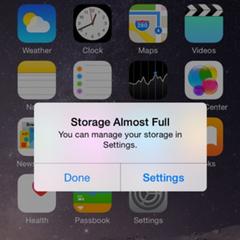
现如今,越来越多的人离不开手机。可是,手机的内存空间似乎很容易就会满。赶在新的iOS 9.3版本诞生之际,西城同学以iPhone为例,为大家介绍一些手机内存释放小技巧,希望能够对大家有所帮助
iPhone storage full? Free up space with these tricks | 苹果手机内存已满?
下面的技巧帮你释放更多内存
1.Find out how much space you actually have left | 查查你的手机现在还剩多少内
Open your settings app then click on the "general" tab and select “usage”. After a few moments of doing sums, your phone will show a list of apps and how much storage space each is using. This will alert you to anything which is being overly greedy.
打开“设置”应用程序,点击“通用”,然后选择“用量”。经过一段时间的计算后,你的手机会显示出一个应用列表,上面显示了每一个应用所占用的内存。这就提醒了你,哪个应用占用了过多的内存。
So now you know what is taking up the most space, but what can you do about it? 现在你该知道是什么占据了最多的内存。那么,接下来该怎么办呢?
2. Backup your photos|备份你的照片
If you are using iCloud to backup your photos, you can delete them from your camera roll and create more space on your phone. You could also choose to backup the photos on your home computer or storage devices as a precautious choice before deleting them.
如果你选择用iCloud备份了你的照片,你就可以在相机胶卷中删除它们来释放更多的内存。作为较为保险的方案,在删除照片之前你同样可以选择在电脑或移动设备上备份那些照片。
3. Remove unused apps|删除不用的应用程序
Unused apps can accumulate over months and years. Have a scroll through your menu and find out apps which are no longer useful for you. Then tap and hold the icon and a small cross will appear in the top-left. Press that cross and you will delete the app, clearing more space.
不用的应用程序会成年累月地堆积。滑动你的界面,找出那些对你没用的应用程序。然后长按图标知道左上角有小×号出现。点击“×”就能删除那个应用程序,从而释放出更多的内存。
4. Manage your music|管理你的音乐
If you're like me, your musical taste will be fickle. One week I'll listen to an album constantly on loop, but the next I'll be completely sick of it. Delete unwanted albums to make more room - they'll still be available on your computer if you want them back at a later date. To delete music, swipe a song from right to left, and a "delete" button will appear.
如果你和我一样,你的音乐品味可能是不断变化的。这个星期我循环*放播**的一个专辑,下个星期我可能就听厌了。删除不想听的专辑来释放更多的内存——如果以后你想听,你仍然能再电脑上听到他们。想删除音乐,从右至左划动列表上的歌曲,“删除”按钮就会出现。
5. Delete videos when you've watched them|删除你看过的视频
Videos take up far more room than albums. Just a few films will take up several GB of your memory. I often upload a few for long journeys, but delete them afterwards to clear space. 视频占用的空间比专辑要大得多。仅仅是几部电影就能占据好几个GB的内存。我常常在长途旅行之前存几部片子,但旅程结束之后就会马上删除它们、以释放内存。
6. Clear files downloaded to apps|清除应用程序中*载下**的文件
Some apps are capable of downloading files: iPlayer, for instance, can download programmes so that you can watch them later. If you have videos downloaded that you no longer want to watch, go into the app and ditch them. The usage list above should alert you to any apps that are taking up a suspiciously large amount of space.
有些应用程序能够*载下**文件,比如iPlayer。它可以把一些节目*载下**下来,这样你就可以稍后再观看它们。如果一些*载下**的视频你已经不想再看了,可以打开应用程序并删除它们。上面说的用量清单应该会提醒你注意那些占据了不可思议的内存空间量的应用。 ## 如果你还有什么其它的好方法,欢迎留言告诉大家!
本文作者:忘忧草爱西城@英语流利说
想提高英语口语,请*载下**“英语流利说”