1.基础信息配置
网络需求
对仅有出厂配置的设备进行初始化设置:
l 配置设备名称为“test_device”
l 配置enable密码为“maipu”并进行登陆验证
网络拓扑

配置步骤
步骤1:通过console端口连接到设备,进入配置模式
router>
router>enable
router#configure terminal
router(config)#
步骤2:设置hostname
router(config)#hostname test_device
test_device(config)#
步骤3:设置enable密码
test_device(config)#enable password 0 maipu
test_device(config)#
步骤4:检查结果
test_device#logout
Press any key to start the shell!
test_device>
test_device>enable
password:
test_device#
备注: 输入密码时系统不会回显,输入正确密码后回车即可进入特权模式
2.接口IP地址配置
网络需求
l 配置设备接口IP地址
l PC可与设备互相ping通
网络拓扑

配置步骤
步骤1:配置Gi1接口IP地址
test_device(config)#
test_device(config)#interface gigabitethernet 1
test_device(config-if-gigabitethernet1)#
test_device(config-if-gigabitethernet1)#ip address 1.1.1.1 24
步骤2:验证结果
设备ping PC结果

PC ping设备结果

备注:若出现PC可ping通设备,设备无法ping通PC,检查PC的防火墙设置
3. 登陆控制与管理
网络需求
l 配置设备的用户及密码
l 配置设备的enable密码
l 对本地console登陆、远程登陆用户启用用户及密码验证
网络拓扑

配置步骤
步骤1:配置设备的用户名及密码
test_device>enble
test_device#
test_device#configure terminal
test_device(config)#
test_device(config)#user test password 0 maipu
步骤2:配置设备的enable密码
test_device(config)#enable password 0 maipu
test_device(config)#
步骤3:对本地console和远程登陆用户启用认证
test_device(config)#line con 0
test_device(config-line)#login local
test_device(config-line)#exit
test_device(config)#line vty 0 15
test_device(config-line)#
test_device(config-line)#login local
步骤4:启用telnet和ssh服务
test_device(config)#
test_device(config)#telnet server enable
test_device(config)#
test_device(config)#ip ssh server
test_device(config)#
步骤4:配置Gi1接口IP地址
test_device(config)#
test_device(config)#interface gigabitethernet 1
test_device(config-if-gigabitethernet1)#
test_device(config-if-gigabitethernet1)#ip address 1.1.1.1 24
步骤5:验证结果
通过console登陆设备:
test_device#logout
Mar 17 2020 16:52:58: %SYS-LOGOUT_OK-5: (tty0) is closed by client or timer () OK
Press any key to start the shell!
User Access Verification
login:test
password:
test_device>
Mar 17 2020 16:53:10: %SYS-LOGIN_OK-5: (tty0) is entered by client (test) OK
test_device>en
password:
test_device#
test_device#

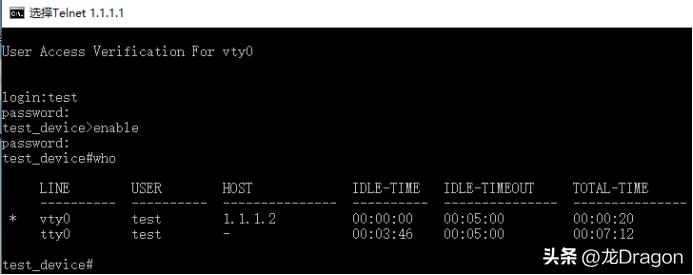
通过telnet登陆设备:
备注:也可通过ssh方式登陆设备,默认采用ssh2