概述
最近发现新系统weblogic中间件日志有一些线程超时方面的报错,因为默认是600,所以顺便对这块做了一些优化。处理过程如下:
报错内容:
首先贴报错信息:
ExecuteThread: '33' for queue: 'weblogic.kernel.Default (self-tuning)'> <<WLS Kernel>> <> <> <1555044816025> <BEA-000337> <[STUCK] ExecuteThread: '9' for queue: 'weblogic.kernel.Default (self-tuning)' has been busy for "701" seconds working on the request "glog.server.query.query_ListRetriever_whmeh3_EOImpl", which is more than the configured time (StuckThreadMaxTime) of "600" seconds.

思路:
此问题是由于处理请求超时引起的,系统配置的处理时间是600s,但是该线程处理了701后,仍然没将请求释放,所以报了这个错误。如果发送该请求较多,很有可能会导致weblogic的线程阻塞,严重会引起weblogic挂起现象。
考虑:
1)修改StuckThreadMaxTime参数,将默认的600s改成1200s,或者其它适合的值。
2)增大线程数,防止线程阻塞问题。
3)优化程序,减少处理时间。
解决
1、修改StuckThreadMaxTime参数,将默认的600s改成1200s

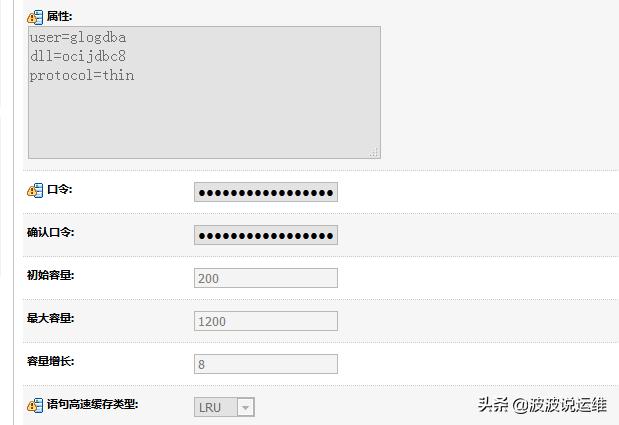
2、数据库连接池调优
优化前:

优化后:
3、线程池调优
线程池
修改config.xml(/otm/otm62/weblogic/domains/otm/config/config.xml)中的<self-tuning-thread-pool-size-min>
<server>
 <name>AdminServer</name>
 <reverse-dns-allowed>false</reverse-dns-allowed>
 <native-io-enabled>true</native-io-enabled>
 <thread-pool-percent-socket-readers>33</thread-pool-percent-socket-readers>
 <ssl>
 <login-timeout-millis>25000</login-timeout-millis>
 </ssl>
 <max-open-sock-count>-1</max-open-sock-count>
 <stuck-thread-max-time>1200</stuck-thread-max-time>
 <stuck-thread-timer-interval>60</stuck-thread-timer-interval>
 <self-tuning-thread-pool-size-min>50</self-tuning-thread-pool-size-min>
 <self-tuning-thread-pool-size-max>300</self-tuning-thread-pool-size-max>
 <listen-address></listen-address>
 <accept-backlog>300</accept-backlog>
 <login-timeout-millis>5000</login-timeout-millis>
 <low-memory-time-interval>3600</low-memory-time-interval>
 <low-memory-sample-size>10</low-memory-sample-size>
 <low-memory-granularity-level>5</low-memory-granularity-level>
 <low-memory-gc-threshold>5</low-memory-gc-threshold>
 </server>
4、系统层面调优
ulimit -n

篇幅有限,关于weblogic这个问题在这里也做个简单记录,后面会分享更多Linux方面的内容和平时的一些处理方式,感兴趣的朋友可以关注一下~
