介绍
canvas vs svg
* canvas 适用于动态创建的位图,缩放失真。
* svg 适用于静态描述的矢量图,缩放不失真。
绘图四步骤
* 定义canvas,设置width,height属性,设置变形等特效
* 获取canvas 2D context,绘制图形
* 添加动画
* 添加交互
canvas w3c坐标系
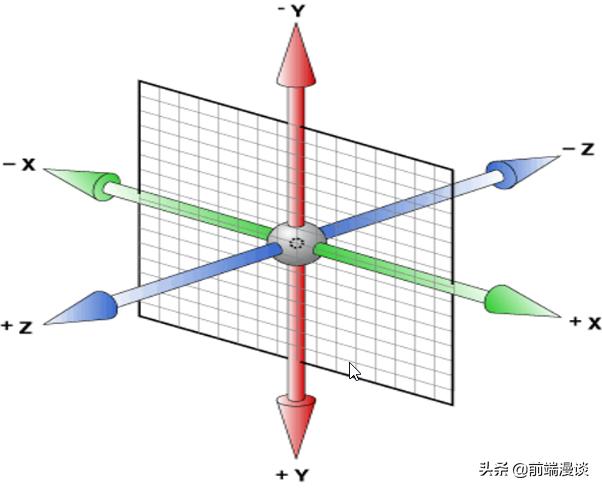
canvas width\height设置
const dom = document.getElementById('canvas');
dom.width = window.innerWidth;
dom.height = window.innerHeight;
<canvas id="canvas" width="600" height="700"></canvas>
canvas 绘直线
线段
- 单条描边
    ctx.moveTo(30,40);
    ctx.lineTo(130,140);
    ctx.lineHeight = '10'
    #绘制边
    ctx.stroke();
- 单挑多条
  ctx.moveTo(0,0);
  ctx.lineTo(300,100);
  ctx.lineTo(400,50);
矩形
- 利用绘制多条边特点
    ctx.moveTo(100,100);
    ctx.lineTo(300,100);
    ctx.lineTo(300,200);
    ctx.lineTo(100,200);
    ctx.lineTo(100,100);
    ctx.strokeStyle= 'blue';
    ctx.stroke();
- 绘制描边矩形
    ctx.strokeStyle= 'blue';
    ctx.strokeRect(100,210,200,100);

    # or
    ctx.strokeStyle= 'blue';
    ctx.rect(100,320,200,100);
    ctx.stroke();
- 绘制填充矩形
    ctx.fillStyle = 'red';
    ctx.fillRect(100,430,200,100);

    ctx.fillStyle = 'green'
    ctx.rect(100,540,200,100);
    ctx.fill();