A008.MPI 驱动
MPI 驱动,支持西门子的 S7-300/400,使用协议是 MPI;
□ PLC 必须是 S7-300/400,要提供 MPI 口;
□ 台式机中可使用 CP5611/CP5613/CP5621;
□ 笔记本中可使用 CP5512;
□ 如果使用串口,也支持适配器,但不建议使用;
□ 使用 CP5611/5512 最多可连接 2 台 PLC;
□ 使用 CP5613 最多可连接 4 台 PLC;
□ PLC 设定
□ 使用 STEP 7,把 CPU 的 MPI 地址设为 2 或者 3,波特率必须为 187.5k;
□ 打开"控制面板"中的"Set PC/PG Interface",使"S7ONLINE"对应为"CP5512(MPI)";
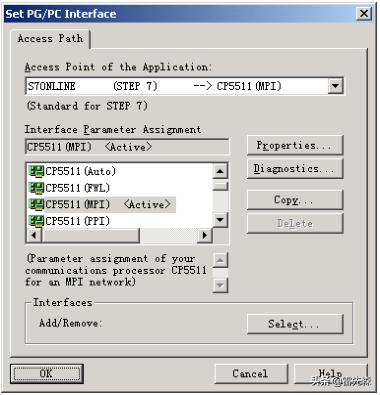
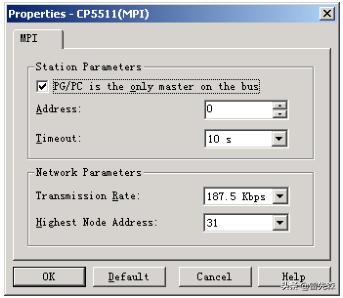
□ 选中 CP5512(MPI),点击"Properties"按钮,进行通讯属性设定: PC 机的站地址不能与 PLC 相
同,此例为 0, 波特率必须为 187.5K, 必须选择" √□ PG/PC is the only master on the bus",
否则 PLC 断电后不能自动连通;
□ 选中 CP5512(MPI),点击"Diagnostics"按钮,进行通讯诊断:
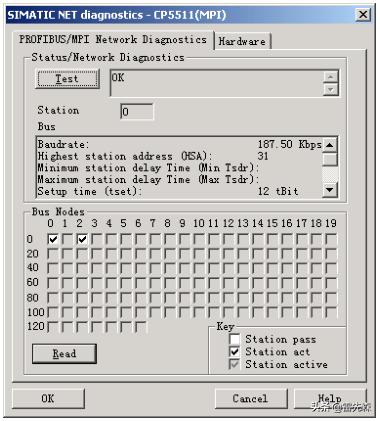
□ 如果没有出现"OK",或不能查询到 PC 和 PLC 的站号,请检查 PC 和 PLC 的 MPI 参数是否一致、
网线是否接好;
□ 直到能查询到 PC 和 PLC 的站号,说明通讯接通;
□ 通讯设定
□ 选择<设备通讯>功能,执行<安装驱动>任务,出现对话框:

□ 选择 MPI 驱动程序,进行安装;
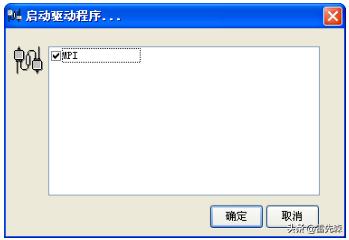
□ 选择<设备通讯>功能,执行<启动驱动>任务,出现对话框,选择 MPI:
□ 选择<设备通讯>功能,执行<定义设备数据表>任务,在设备数据表中定义某个设备号:
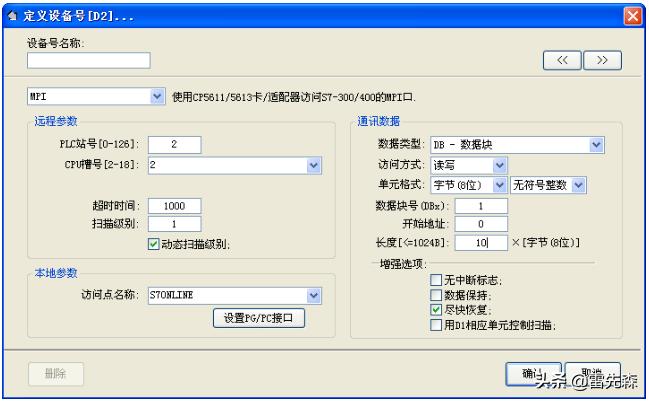
□ 访问点名称必须为 S7ONLINE;
□ PLC 站号为 PLC 的 MPI 地址(0-31), CPU 的槽号为 1-18,S7-300 总为 2,S7-400 可选;
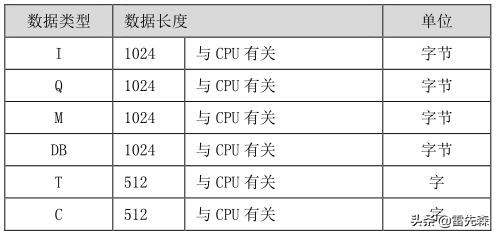
□ 各种数据类型的在每个设备号中的最大数据长度:
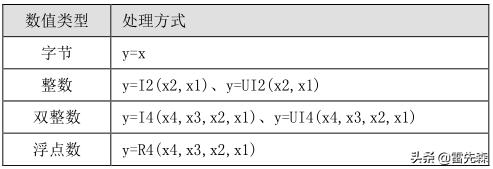
□ 应选用的处理方式:
□ 错误代码:
00CA : no resources available
00CB : configuration error
00CD : illegal call
00CE : module not found
00CF : driver not loaded
00D0 : hardware fault
00D1 : software fault
00D2 : memory fault
00D7 : no message
00D8 : storage fault
00DB : internal timeout
00E1 : too many channels open
00E2 : internal fault
00E7 : hardware fault
00E9 : sin_serv*ex.e** not started
00EA : protected
00F0 : scp db file does not exist
00F1 : no global dos storage available
00F2 : error during transmission
00F2 : error during reception
00F4 : device does not exist
00F5 : incorrect sub system
00F6 : unknown code
00F7 : buffer too small
00F8 : buffer too small
00F9 : incorrect protocol
00FB : reception error
00FC : licence error
0101 : connection not established / parameterised
010A : negative acknowledgement received / timeout error
010C : data does not exist or disabled
012A : system storage no longer available
012E : incorrect parameter
0132 : no memory in DPRAM
0201 : incorrect interface specified
0202 : maximum amount of interfaces exceeded
0203 : PRODAVE already initialised
0204 : wrong parameter list
0205 : PRODAVE not initialised
0206 : handle cannot be set
0207 : data segment cannot be disabled
0300 : initialisiation error
0301 : initialisiation error
0302 : block too small, DW does not exist
0303 : block limit exceeded, correct amount
0310 : no HW found 0311 : HW defective
0312 : incorrect config param
0313 : incorrect baud rate / interrupt vector
0314 : HSA parameterised incorrectly
0315 : MPI address error
0316 : HW device already allocated
0317 : interrupt not available
0318 : interrupt occupied
0319 : sap not occupied
031A : no remote station found
031B : internal error
031C : system error
031D : error buffer size
0320 : hardware fault
0321 : DLL function error
0330 : version conflict
0331 : error com config
0332 : hardware fault
0333 : com not configured
0334 : com not available
0335 : serial drv in use
336 : no connection
0337 : job rejected
0380 : internal error
0381 : hardware fault
0382 : no driver or device found
0384 : no driver or device found
03FF : system fault
0800 : toolbox occupied
4001 : connection not known
4002 : connection not established
4003 : connection is being established
4004 : connection broken down
8000 : function already actively occupied
8001 : not allowed in this operating status
8101 : hardware fault
8103 : object access not allowed
8104 : context is not supported
8105 : invalid address
8106 : type (data type) not supported
8107 : type (data type) not consistent
810A : object does not exist
8301 : memory slot on CPU not sufficient
8404 : grave error
8500 : incorrect PDU size
8702 : address invalid
D201 : syntax error block name
D202 : syntax error function parameter
D203 : syntax error block type
D204 : no linked block in storage medium
D205 : object already exists
D206 : object already exists
D207 : block exists in EPROM
D209 : block does not exist
D20E : no block available
D210 : block number too big
D241 : protection level of function not sufficient
D406 : information not available
EF01 : incorrect ID2
FFFB : TeleService Library not found
FFFE : unknown error FFFE hex
FFFF : timeout error. Check interface