手头有一个瑞芯微RV1126 Linux 的设备应用程序总是崩溃,因此想移植arm版的gdb上去查看崩溃位置。因为硬件配置不高,没有象高配arm64 CPU上自带apt直接*载下**gdb ,所以必须自己交叉编译gdb来调试,以下是调试笔记。

源码准备
我最终的编译成功是 gdb-7.6.1,看有一些文章说 gdb 7.11也可以通过,大家都可以试一下
这里gdb还需要 termcap库,所以把ncurser库也移植,这里我成功版本是ncurses-5.9
*载下**链接如下:
http://ftp.gnu.org/gnu/gdb/gdb-7.6.1.tar.gz
http://ftp.gnu.org/gnu/ncurses/ncurses-5.9.tar.gz
这里为编译方便,有如下目录结构,所有的输出放在源码目录下的output下
├── gdb-7.6.1
├── ncurses-5.9
└── output
          ├── bin
          ├── lib
          └── include
在开始编译前,需要把RV1126的编译器所在bin目录加入到系统目录,我是写在/etc/profile最后当中,注销后重登录生效
export PATH=/tools/rv1126_rv1109_linux_sdk_v1.8.0_20210224/prebuilts/gcc/linux-x86/arm/gcc-arm-8.3-2019.03-x86_64-arm-linux-gnueabihf/bin:$PATH
编译ncurse库
依次执行如下命令
tar xvf ncurses-5.9.tar.gz
cd ncurses-5.9/
./configure --host=arm-linux-gnueabihf --prefix=$PWD/../output --enable-termcap --with-shared
其中./configure是用来生成makefile ,--prefix表示输出目录在 output下,--enable-termcap是为gdb准备的 ,--host表示引用哪一个编译器
生成成功后,直接编译和安装
make
一些编译错误的解决
error: expected ‘)’ before ‘int’
arm-linux-gnueabihf-gcc -DHAVE_CONFIG_H -I../ncurses -I. -D_GNU_SOURCE -D_FILE_OFFSET_BITS=64 -DNDEBUG -I. -I../include -I/home/sguav/x85/arm-gdb/ncurses-5.9/../output/include/ncurses -O2 --param max-inline-insns-single=1200 -fPIC -c ../ncurses/lib_gen.c -o ../obj_s/lib_gen.o
In file included from ../ncurses/curses.priv.h:283,
from ../ncurses/lib_gen.c:19:
_12015.c:835:15: error: expected ‘)’ before ‘int’
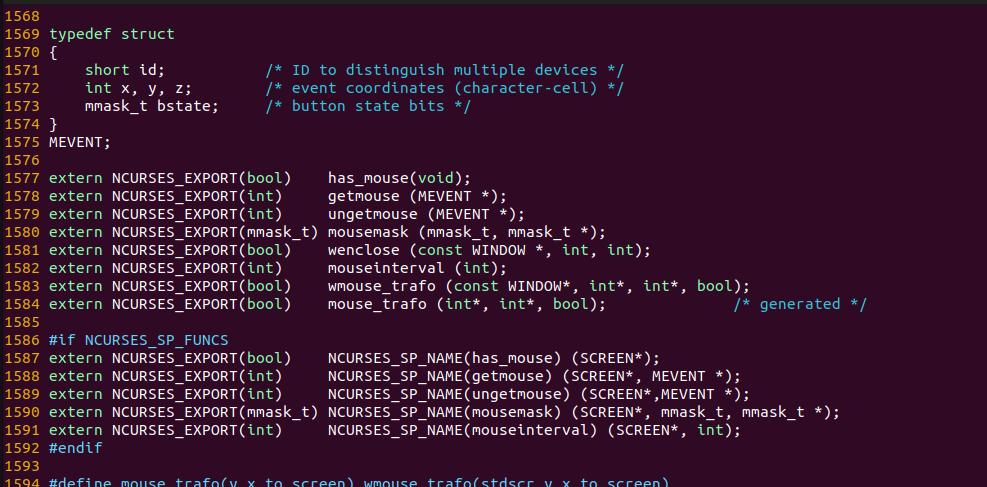
根据提示在include/curses.h的1594行
vim include/curses.h +1594
查找mouse_trafo ,删除这个/* generated */,即可编译通过
还有如下定义不配备
In file included from ../c++/cursesf.cc:35:../c++/cursesf.h: In member function ‘T* NCursesUserForm<T>::UserData() const’:../c++/cursesf.h:707:43: error: no matching function for call to ‘NCursesUserForm<T>::get_user() const’return reinterpret_cast<T>(get_user ());^../c++/cursesf.h:384:16: note: candidate: ‘void NCursesForm::get_user()’ <near match>inline void *get_user() {
原因是C++定义一个const 方法里,出现一个可以改变值的方法,解决方法是把const定义移走
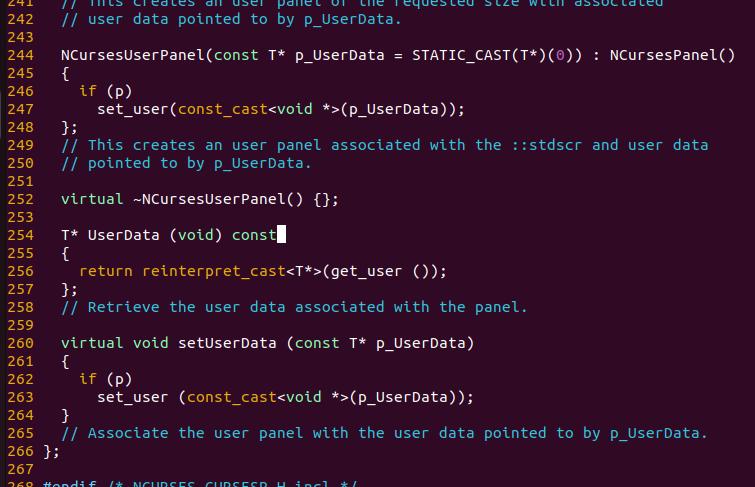
在../c++/cursesf.cc:35,c++/cursesm.h:663 也有同样问题,移走const即可。
安装头文件和库
make install
此时,在output的lib会有 libmenu.so.5.9生成,include下会有ncurses目录和多个头文件生成。表示编译成功.
用file查看是arm的版本
file libncurses.so.5.9
libncurses.so.5.9: ELF 32-bit LSB shared object, ARM, EABI5 version 1 (SYSV), dynamically linked, with debug_info, not stripped
编译gdb
生成Makefile
tar xvf gdb-7.6.1.tar.gz
cd gdb-7.6.1
./configure --host=arm-linux-gnueabihf --prefix=PWD/../output --disable-werror --disable-tui LDFLAGS="-LPWD/../output/lib" CPPFLAGS="-I$PWD/../output/include"
这里LDFLAGS和CPPFLAGS 是为了让configure找到nurses的头文件和库
调用make进行编译
编译错误处理
错误:error: conflicting types for ‘ps_get_thread_area’
这个错误原因是与编译器同名库函数定义有冲突,这里简单把gdb源码对应的函数关掉即可
arm-linux-gnueabihf-gcc -g -O2 -I. -I. -I./common -I./config -DLOCALEDIR="\"/home/sguav/x85/arm-gdb/gdb-7.6.1/../output/share/locale\"" -DHAVE_CONFIG_H -I./../include/opcode -I./../opcodes/.. -I./../readline/.. -I../bfd -I./../bfd -I./../include -I../libdecnumber -I./../libdecnumber -I./gnulib/import -Ibuild-gnulib/import -Wall -Wdeclaration-after-statement -Wpointer-arith -Wformat-nonliteral -Wno-pointer-sign -Wno-unused -Wunused-value -Wunused-function -Wno-switch -Wno-char-subscripts -Wmissing-prototypes -Wdeclaration-after-statement -Wempty-body -c -o arm-linux-nat.o -MT arm-linux-nat.o -MMD -MP -MF .deps/arm-linux-nat.Tpo arm-linux-nat.c
arm-linux-nat.c:616:1: error: conflicting types for ‘ps_get_thread_area’
ps_get_thread_area (const struct ps_prochandle *ph,
^~~~~~~~~~~~~~~~~~
In file included from gdb_proc_service.h:25,
from arm-linux-nat.c:44:
/home/hxy/project/sdk/rv1126_rv1109_linux_sdk_v1.8.0_20210224/prebuilts/gcc/linux-x86/arm/gcc-arm-8.3-2019.03-x86_64-arm-linux-gnueabihf/arm-linux-gnueabihf/libc/usr/include/proc_service.h:72:17: note: previous declaration of ‘ps_get_thread_area’ was here
extern ps_err_e ps_get_thread_area (struct ps_prochandle *,
^~~~~~~~~~~~~~~~~~
把源码中整函数注释掉
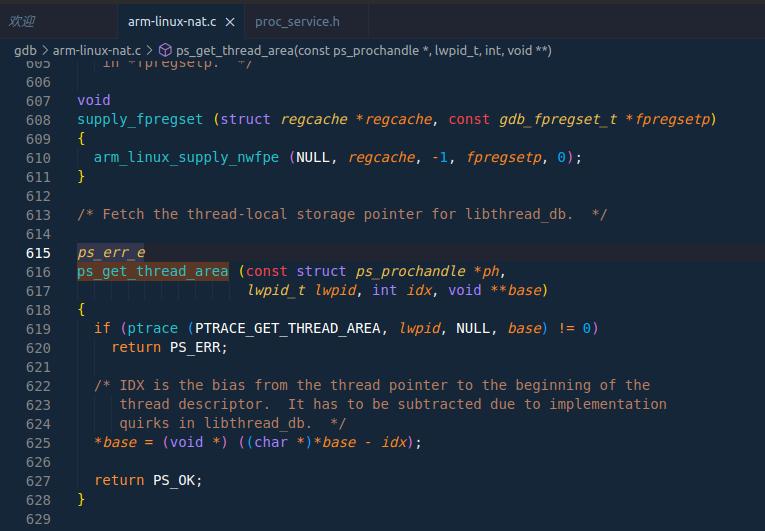
同样的错误还有好几个,都是简单注释即可
proc-service.c:303:1: error: conflicting types for ‘ps_lgetfpregs’
proc-service.c:323:1: error: conflicting types for ‘ps_lsetfpregs’
错误:error: unknown type name ‘gdb_fpregset_t’
这里错误的根源是
#ifdef PRFPREGSET_T_BROKEN
typedef gdb_fpregset_t gdb_prfpregset_t;
#else
typedef prfpregset_t gdb_prfpregset_t;
#endif
这里要关掉PRFPREGSET_T_BROKEN定义,按configure说是定义 gdb_cv_prfpregset_t_broken=no即可关掉,但我试了很多次不成功,因此手工修改config.h定义。
#define PRFPREGSET_T_BROKEN 1
改成
#undef PRFPREGSET_T_BROKEN
错误解决,最后make install
这样gdbserver gdb都会安装到output/bin 目录下
为了解少对RV112空间占用,需要strip最终可执行文件,这个会把gdb从20M减少到3M,效果非常好
arm-linux-gnueabihf-strip gdb
arm-linux-gnueabihf-strip gdbserver
在RV1126 板上调试
用gdb调试方法有两种,一种是本地直接运行gdb ,另外一种是在板上运行gdbserver,然后在PC机运行gdb来进行运程调试。
无论哪种方法,把gdb和gdbserver 上传 /usr/bin ,把 libncurses.so.5.9,libncurses.so.5 上传到 /usr/lib 上。
然后在编译应用程序必须加上 -g选项,并且取消优化。否则一执行就会报错
远程调试
首先直接在板上调用gdb ./track 会直接段错误,因此要试验一下远程调试
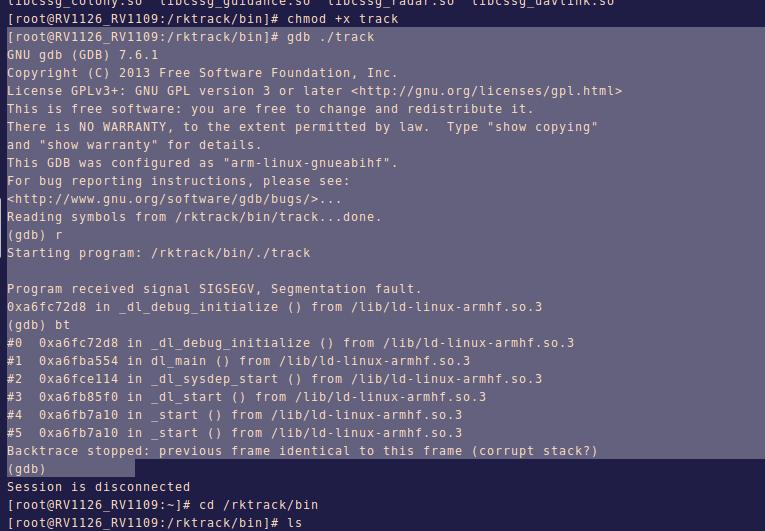
远程调试需要在pc端安装特殊的gdb版本,gdb-multiarch,桌面版gdb无法对arm-linux 的gdb server通讯
sudo apt install gdb-multiarch
首先在板上运行gdbserver
gdbserver :6666 ./track
这时gdbserver会在6666号端口等待调试命令,此时并未运行被调试程序
在PC端运行
gdb-multiarch ./track
进入成功后执行如下子命令连接开发板
target remote 192.168.144.99:6666
其中192.168.144.99是开发板的IP
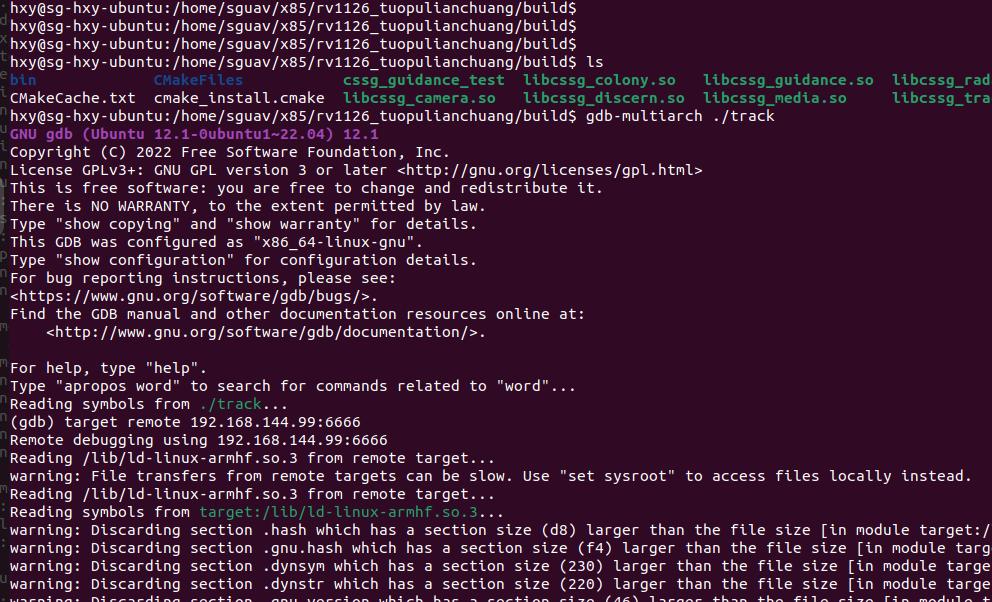
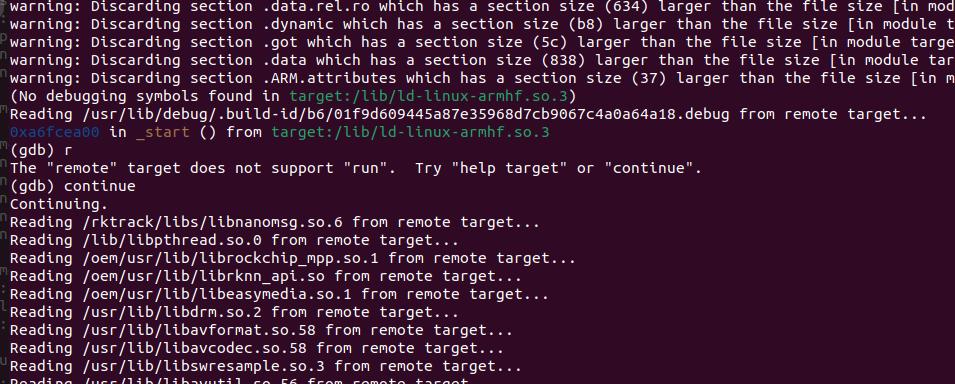
连接成功后,要运行continue 来启动远端应用,不能用run,随后象本地gdb操作即可
附加调试
虽然 gdb 无法在RV1126本地直接带起应用,但是实验发现可以用attach方式挂到已经运行的程序试,这也是一种调试手段。
在开发板上运行 gdb attach <进程号> 即可进行调试,这个方法占用资源更少