(一)使用websocket
- ① 介绍
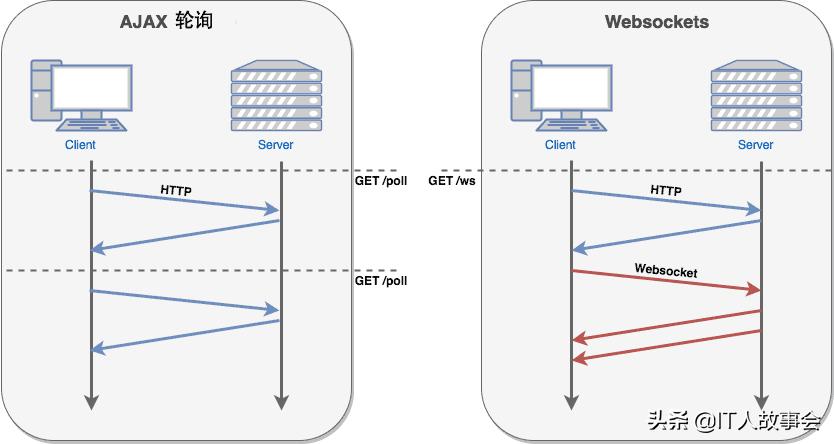
webSocket协议是基于TCP的一种新的网络协议。他的出现实现了网络和浏览器全双工通信,允许服务器主动发送信息给客户端。客户端 给 服务器发消息是半双工,服务器给客户端也发送消息就是全双工。
多客户端多语言多浏览器支持:浏览器,php,Java,ruby,nginx,python,Tomcat,erlang,.net等等。
- ② websocket实现
服务端和客户端交流,通过的是websocket这种协议,内部传输的协议,通过websocket这种方式和普通的socket没有什么区别,唯一一点就是协议不同。
- ③ websocket示例
绑定9001,这是浏览器js方式完成的,可以发送消息和接收消息,生成一个随机数当userId,在设计这个功能的时候,考虑到消息推送是否需要先登录。登录过调转到登录成功,成功之后拿到userId,在建立websocket连接的时候就可以携带userId,最终知道是那个用户。
<html>
 <head>
 <meta http-equiv="Content-Type" content="text/html; charset=UTF-8" />
 <title>Web Socket Test</title>
 </head>
 <body>
 <script type="text/javascript">
var socket;
if (!window.WebSocket) {
 window.WebSocket = window.MozWebSocket;
}
if (window.WebSocket) {
 // 随机数
 var random = Math.floor(Math.random()*(10000 - 10 +1) + 10)
 socket = new WebSocket("ws://127.0.0.1:9001/websocket?userId=" + random);
 socket.onmessage = function(event) {
 var ta = document.getElementById('responseText');
 ta.value = ta.value + '\n' + event.data
 };
 socket.onopen = function(event) {
 var ta = document.getElementById('responseText');
 ta.value = "Web Socket opened!";
 };
 socket.onclose = function(event) {
 var ta = document.getElementById('responseText');
 ta.value = ta.value + "Web Socket closed";
 };
} else {
 alert("Your browser does not support Web Socket.");
}

function send(message) {
 if (!window.WebSocket) { return; }
 if (socket.readyState == WebSocket.OPEN) {
 socket.send(message);
 } else {
 alert("The socket is not open.");
 }
}
</script>
 <form onsubmit="return false;">
 <input type="text" name="message" value="Hello, World!" />
 <input type="button" value="Send Web Socket Data" onclick="send(this.form.message.value)" />
 <h3>Output</h3>
 <textarea id="responseText" style="width:500px;height:300px;"></textarea>
 </form>
 </body>
</html>
java代码示例server端
import io.netty.bootstrap.ServerBootstrap;
import io.netty.channel.*;
import io.netty.channel.nio.NioEventLoopGroup;
import io.netty.channel.socket.nio.NioServerSocketChannel;

public final class WebSocketServer {

 static int PORT = 9000;

 public static void main(String[] args) throws Exception {

 EventLoopGroup bossGroup = new NioEventLoopGroup(1);
 EventLoopGroup workerGroup = new NioEventLoopGroup();
 try {
 ServerBootstrap b = new ServerBootstrap();
 b.group(bossGroup, workerGroup)
 .channel(NioServerSocketChannel.class)
 .option(ChannelOption.SO_REUSEADDR, true)
 .childHandler(new WebSocketServerInitializer())
 .childOption(ChannelOption.SO_REUSEADDR, true);
 b.bind(++PORT).addListener(new ChannelFutureListener() {
 public void operationComplete(ChannelFuture future) throws Exception {
 if ("true".equals(System.getProperty("netease.debug")))
 System.out.println("端口绑定完成:" + future.channel().localAddress());
 }
 });


 // 端口绑定完成,启动消息随机推送(测试)
 TestCenter.startTest();
 System.in.read();
 } finally {
 bossGroup.shutdownGracefully();
 workerGroup.shutdownGracefully();
 }
 }
}
server端的 channel类。绑定完成相关的业务逻辑处理,1.解析http协议编解码2.最大的解析数据包拦截3.自己的业务处理,得到msg对象,变成了一个request的对象。
import io.netty.channel.ChannelInitializer;
import io.netty.channel.ChannelPipeline;
import io.netty.channel.socket.SocketChannel;
import io.netty.handler.codec.http.HttpObjectAggregator;
import io.netty.handler.codec.http.HttpServerCodec;

/**
 */
public class WebSocketServerInitializer extends ChannelInitializer<SocketChannel> {
 @Override
 public void initChannel(SocketChannel ch) throws Exception {
 // 职责链, 数据处理流程
 ChannelPipeline pipeline = ch.pipeline();
 pipeline.addLast(new HttpServerCodec()); //
 pipeline.addLast(new HttpObjectAggregator(65536));
 pipeline.addLast(new WebSocketServerHandler());
 pipeline.addLast(new NewConnectHandler());
 }
}
TestCenter 的类
import io.netty.channel.Channel;
import io.netty.handler.codec.http.websocketx.TextWebSocketFrame;

import java.util.Random;
import java.util.concurrent.ConcurrentHashMap;
import java.util.concurrent.Executors;
import java.util.concurrent.TimeUnit;

// 正常情况是,后台系统通过接口请求,把数据丢到对应的MQ队列,再由推送服务器读取
public class TestCenter {
 // 此处假设一个用户一台设备,否则用户的通道应该是多个。
 // TODO 还应该有一个定时任务,用于检测失效的连接(类似缓存中的LRU算法,长时间不使用,就拿出来检测一下是否断开了);
 static ConcurrentHashMap<String, Channel> userInfos = new ConcurrentHashMap<String, Channel>();

 // 保存信息
 public static void saveConnection(String userId, Channel channel) {
 userInfos.put(userId, channel);
 }

 // 退出的时候移除掉
 public static void removeConnection(Object userId) {
 if (userId != null) {
 userInfos.remove(userId.toString());
 }
 }
server handler 服务
import io.netty.channel.ChannelHandlerContext;
import io.netty.channel.SimpleChannelInboundHandler;
import io.netty.handler.codec.http.FullHttpRequest;
import io.netty.handler.codec.http.QueryStringDecoder;
import io.netty.util.AttributeKey;

import java.util.List;
import java.util.Map;
import java.util.concurrent.atomic.AtomicInteger;

// 新连接建立了
public class NewConnectHandler extends SimpleChannelInboundHandler<FullHttpRequest> {
 @Override
 protected void channelRead0(ChannelHandlerContext ctx, FullHttpRequest req) throws Exception {
 // 解析请求,判断token,拿到用户ID。
 Map<String, List<String>> parameters = new QueryStringDecoder(req.uri()).parameters();
 // String token = parameters.get("token").get(0); 不是所有人都能连接,比如需要登录之后,发放一个推送的token
 String userId = parameters.get("userId").get(0);
 ctx.channel().attr(AttributeKey.valueOf("userId")).getAndSet(userId); // channel中保存userId
 TestCenter.saveConnection(userId, ctx.channel()); // 保存连接

 // 结束
 }
}
解析 handler,http解码失败,如果不是websocket协议升级的请求,现在开发的是一个websocket服务器,对于一切不符合我要求的请求,可以不管理它,这跟开发springmvc,要接触的东西,不是url,http协议底层,请求的头部协议,如果不符合就返回400,如果是就返回当前处理我可以接收。正常开始通信了,握手,返回响应的状态码。先处理websocket的握手,后处理websocket的消息。 握手就是你同意给我交往了,
import io.netty.buffer.ByteBuf;
import io.netty.buffer.Unpooled;
import io.netty.channel.ChannelFuture;
import io.netty.channel.ChannelFutureListener;
import io.netty.channel.ChannelHandlerContext;
import io.netty.channel.SimpleChannelInboundHandler;
import io.netty.handler.codec.http.*;
import io.netty.handler.codec.http.websocketx.BinaryWebSocketFrame;
import io.netty.handler.codec.http.websocketx.CloseWebSocketFrame;
import io.netty.handler.codec.http.websocketx.PingWebSocketFrame;
import io.netty.handler.codec.http.websocketx.PongWebSocketFrame;
import io.netty.handler.codec.http.websocketx.TextWebSocketFrame;
import io.netty.handler.codec.http.websocketx.WebSocketFrame;
import io.netty.handler.codec.http.websocketx.WebSocketServerHandshaker;
import io.netty.handler.codec.http.websocketx.WebSocketServerHandshakerFactory;
import io.netty.util.AttributeKey;
import io.netty.util.CharsetUtil;

import java.util.concurrent.atomic.AtomicInteger;
import java.util.concurrent.atomic.LongAdder;

import static io.netty.handler.codec.http.HttpMethod.*;
import static io.netty.handler.codec.http.HttpResponseStatus.*;
import static io.netty.handler.codec.http.HttpVersion.*;

/**
 * Handles handshakes and messages
 */
public class WebSocketServerHandler extends SimpleChannelInboundHandler<Object> {

 private static final String WEBSOCKET_PATH = "/websocket";

 private WebSocketServerHandshaker handshaker;

 public static final LongAdder counter = new LongAdder();

 @Override
 public void channelRead0(ChannelHandlerContext ctx, Object msg) {
 counter.add(1);
 if (msg instanceof FullHttpRequest) {
 // 处理websocket握手
 handleHttpRequest(ctx, (FullHttpRequest) msg);
 } else if (msg instanceof WebSocketFrame) {
 // 处理websocket后续的消息
 handleWebSocketFrame(ctx, (WebSocketFrame) msg);
 }
 }

 @Override
 public void channelReadComplete(ChannelHandlerContext ctx) {
 ctx.flush();
 }

 private void handleHttpRequest(ChannelHandlerContext ctx, FullHttpRequest req) {
 // Handle a bad request. //如果http解码失败 则返回http异常 并且判断消息头有没有包含Upgrade字段(协议升级)
 if (!req.decoderResult().isSuccess() || req.method() != GET || (!"websocket".equals(req.headers().get("Upgrade")))) {
 sendHttpResponse(ctx, req, new DefaultFullHttpResponse(HTTP_1_1, BAD_REQUEST));
 return;
 }

 // 构造握手响应返回
 WebSocketServerHandshakerFactory wsFactory = new WebSocketServerHandshakerFactory(
 getWebSocketLocation(req), null, true, 5 * 1024 * 1024);
 handshaker = wsFactory.newHandshaker(req);
 if (handshaker == null) {
 // 版本不支持
 WebSocketServerHandshakerFactory.sendUnsupportedVersionResponse(ctx.channel());
 } else {
 handshaker.handshake(ctx.channel(), req);
 ctx.fireChannelRead(req.retain()); // 继续传播
 }
 }

 private void handleWebSocketFrame(ChannelHandlerContext ctx, WebSocketFrame frame) {
 // Check for closing frame 关闭
 if (frame instanceof CloseWebSocketFrame) {
 Object userId = ctx.channel().attr(AttributeKey.valueOf("userId")).get();
 TestCenter.removeConnection(userId);
 handshaker.close(ctx.channel(), (CloseWebSocketFrame) frame.retain());
 return;
 }
 if (frame instanceof PingWebSocketFrame) { // ping/pong作为心跳
 System.out.println("ping: " + frame);
 ctx.write(new PongWebSocketFrame(frame.content().retain()));
 return;
 }
 if (frame instanceof TextWebSocketFrame) {
 // Echo the frame
 // TODO 处理具体的数据请求(... 聊天室,推送给其他的用户)
 //发送到客户端websocket
 ctx.channel().write(new TextWebSocketFrame(((TextWebSocketFrame) frame).text()
 + ", 欢迎使用Netty WebSocket服务, 现在时刻:"
 + new java.util.Date().toString()));

 return;
 }
 // 不处理二进制消息
 if (frame instanceof BinaryWebSocketFrame) {
 // Echo the frame
 ctx.write(frame.retain());
 }
 }

 private static void sendHttpResponse(
 ChannelHandlerContext ctx, FullHttpRequest req, FullHttpResponse res) {
 // Generate an error page if response getStatus code is not OK (200).
 if (res.status().code() != 200) {
 ByteBuf buf = Unpooled.copiedBuffer(res.status().toString(), CharsetUtil.UTF_8);
 res.content().writeBytes(buf);
 buf.release();
 HttpUtil.setContentLength(res, res.content().readableBytes());
 }

 // Send the response and close the connection if necessary.
 ChannelFuture f = ctx.channel().writeAndFlush(res);
 if (!HttpUtil.isKeepAlive(req) || res.status().code() != 200) {
 f.addListener(ChannelFutureListener.CLOSE);
 }
 }

 @Override
 public void exceptionCaught(ChannelHandlerContext ctx, Throwable cause) {
 cause.printStackTrace();
 ctx.close();
 }

 private static String getWebSocketLocation(FullHttpRequest req) {
 String location = req.headers().get(HttpHeaderNames.HOST) + WEBSOCKET_PATH;
 return "ws://" + location;
 }
}
上边是通过html的客户端,这里用java的netty写一个websocket的客户端
import io.netty.bootstrap.Bootstrap;
import io.netty.channel.*;
import io.netty.channel.nio.NioEventLoopGroup;
import io.netty.channel.socket.SocketChannel;
import io.netty.channel.socket.nio.NioSocketChannel;
import io.netty.handler.codec.http.HttpClientCodec;
import io.netty.handler.codec.http.HttpObjectAggregator;
import io.netty.handler.codec.http.websocketx.extensions.compression.WebSocketClientCompressionHandler;

import java.util.concurrent.atomic.AtomicInteger;

public final class WebSocketClient {


 public static void main(String[] args) throws Exception {
 final String host = System.getProperty("netease.pushserver.host", "127.0.0.1");
 final String maxSize = System.getProperty("netease.client.port.maxSize", "100");
 final String maxConnections = System.getProperty("netease.client.port.maxConnections", "60000");
 int port = 9001;

 EventLoopGroup group = new NioEventLoopGroup();
 try {

 Bootstrap b = new Bootstrap();
 b.group(group).channel(NioSocketChannel.class);
 b.option(ChannelOption.SO_REUSEADDR, true);
 b.handler(new ChannelInitializer<SocketChannel>() {
 @Override
 protected void initChannel(SocketChannel ch) {
 ChannelPipeline p = ch.pipeline();
 p.addLast(new HttpClientCodec());
 p.addLast(new HttpObjectAggregator(8192));
 p.addLast(WebSocketClientCompressionHandler.INSTANCE);
 p.addLast("webSocketClientHandler", new WebSocketClientHandler());
 }
 });
 // tcp 建立连接

 b.connect(host, port).sync().get();

 System.in.read();
 } finally

 {
 group.shutdownGracefully();
 }
 }
}
对应客户端的handler,先http捂手获取消息,然后服务端给客户端发送消息,客户端收到了,如果是http消息,可能不能解析,如果是websocket消息,进行消息的打印。客户端收到了消息,把消息的内容给打印出来。
import io.netty.channel.Channel;
import io.netty.channel.ChannelFuture;
import io.netty.channel.ChannelHandlerContext;
import io.netty.channel.ChannelPromise;
import io.netty.channel.SimpleChannelInboundHandler;
import io.netty.handler.codec.http.DefaultHttpHeaders;
import io.netty.handler.codec.http.FullHttpResponse;
import io.netty.handler.codec.http.websocketx.*;
import io.netty.util.CharsetUtil;

import java.net.InetSocketAddress;
import java.net.URI;
import java.net.URISyntaxException;
import java.util.Random;
import java.util.concurrent.atomic.AtomicInteger;

// handler 处理多个~ tcp连接建立之后的事件
// open websocket
public class WebSocketClientHandler extends SimpleChannelInboundHandler<Object> {

 private WebSocketClientHandshaker handshaker;
 private ChannelPromise handshakeFuture;

 public ChannelFuture handshakeFuture() {
 return handshakeFuture;
 }

 @Override
 public void handlerAdded(ChannelHandlerContext ctx) {
 handshakeFuture = ctx.newPromise();
 }

 static AtomicInteger counter = new AtomicInteger(0);

 @Override
 public void channelActive(ChannelHandlerContext ctx) {
 if (handshaker == null) {
 InetSocketAddress address = (InetSocketAddress) ctx.channel().remoteAddress();
 URI uri = null;
 try {
 uri = new URI("ws://" + address.getHostString() + ":" + address.getPort() + "/websocket?userId=" + counter.incrementAndGet());
 } catch (Exception e) {
 e.printStackTrace();
 }
 handshaker = WebSocketClientHandshakerFactory.newHandshaker(
 uri, WebSocketVersion.V13, null, true, new DefaultHttpHeaders());
 }
 handshaker.handshake(ctx.channel());
 }

 @Override
 public void channelInactive(ChannelHandlerContext ctx) {
 if ("true".equals(System.getProperty("netease.debug"))) System.out.println("WebSocket Client disconnected!");
 }

 @Override
 public void channelRead0(ChannelHandlerContext ctx, Object msg) throws Exception {
 Channel ch = ctx.channel();
 if (!handshaker.isHandshakeComplete()) {
 try {
 handshaker.finishHandshake(ch, (FullHttpResponse) msg);
 if ("true".equals(System.getProperty("netease.debug")))
 System.out.println("WebSocket Client connected!");
 handshakeFuture.setSuccess();
 } catch (WebSocketHandshakeException e) {
 if ("true".equals(System.getProperty("netease.debug")))
 System.out.println("WebSocket Client failed to connect");
 handshakeFuture.setFailure(e);
 }
 return;
 }

 if (msg instanceof FullHttpResponse) {
 FullHttpResponse response = (FullHttpResponse) msg;
 throw new IllegalStateException(
 "Unexpected FullHttpResponse (getStatus=" + response.status() +
 ", content=" + response.content().toString(CharsetUtil.UTF_8) + ')');
 }

 WebSocketFrame frame = (WebSocketFrame) msg;
 if (frame instanceof TextWebSocketFrame) {
 TextWebSocketFrame textFrame = (TextWebSocketFrame) frame;
 if ("true".equals(System.getProperty("netease.debug")))
 System.out.println("WebSocket Client received message: " + textFrame.text());
 } else if (frame instanceof PongWebSocketFrame) {
 if ("true".equals(System.getProperty("netease.debug")))
 System.out.println("WebSocket Client received pong");
 } else if (frame instanceof CloseWebSocketFrame) {
 if ("true".equals(System.getProperty("netease.debug")))
 System.out.println("WebSocket Client received closing");
 ch.close();
 }
 }

 @Override
 public void exceptionCaught(ChannelHandlerContext ctx, Throwable cause) {
 cause.printStackTrace();
 if (!handshakeFuture.isDone()) {
 handshakeFuture.setFailure(cause);
 }
 ctx.close();
 }
}
源码的pom文件
<?xml version="1.0" encoding="UTF-8"?>
<project xmlns="http://maven.apache.org/POM/4.0.0"
 xmlns:xsi="http://www.w3.org/2001/XMLSchema-instance"
 xsi:schemaLocation="http://maven.apache.org/POM/4.0.0 http://maven.apache.org/xsd/maven-4.0.0.xsd">
 <modelVersion>4.0.0</modelVersion>

 <groupId>com.idig8.netty</groupId>
 <artifactId>netty-push</artifactId>
 <version>1.0.0</version>
 <build>
 <plugins>
 <plugin>
 <groupId>org.apache.maven.plugins</groupId>
 <artifactId>maven-compiler-plugin</artifactId>
 <configuration>
 <source>8</source>
 <target>8</target>
 </configuration>
 </plugin>
 </plugins>
 </build>

 <dependencies>
 <dependency>
 <groupId>io.netty</groupId>
 <artifactId>netty-all</artifactId>
 <version>4.1.33.Final</version>
 </dependency>
 </dependencies>
</project>
(二)说说netty如何实现百万连接
- ① 介绍
100w连接需要多少台机器才能构建起来,这肯定是很多的,在测试的过程中,不需要几百个服务器完成百万连接。需要注意服务器支持端口的数量是可以支持很多的,但是如何2台服务器要实现百万连接,需要考虑一个TCP层次的一种限制,两台服务器之间建立的连接数量是有限的。网络四元组(客户端IP,客户端端口,服务端IP,服务端端口)。
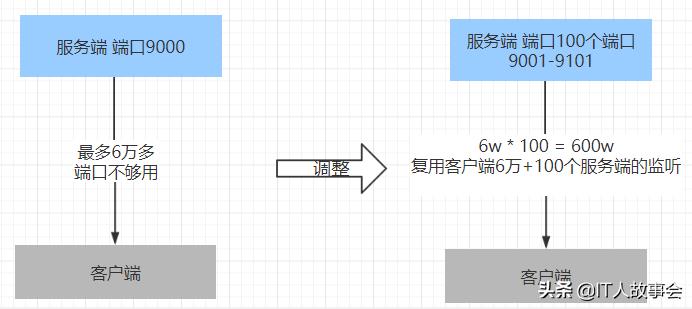
- 同一个IP的端口数不超过65535个,这是个限制,每一个连接不仅仅在服务器上开启一个端口,在客户端也会开启一个端口,每一个TCP连接涉及到端口数量的限制,客户端只有6万多个端口。(不可能搞那么多机器,所以让一个客户端发起100万的连接请求,如果是生产环境就不用考虑这个问题)
- 服务器只有一个端口的情况下,同一个客户端只能对他发起6万多个连接。客户端每发起一个请求,就需要开启一个端口。客户端没有端口就说明它没办法发起请求。
- ② 解决方案
- 服务器开启多个端口,网络上区别机器是通过网络四元组来标记的。客户端的端口虽然有限,但是可以复用里面的端口。
- 举个例子:客户端端口20000,已经连接了服务端9001 这个端口。20000端口在去连接服务端另一个端口9002这个端口。对于客户端指定端口复用,操作系统会自动处理的。
- netty里面开启了 地址的复用。客户端也开启复用。参数都是TCP参数。ChannelOption.SO_REUSEADDR
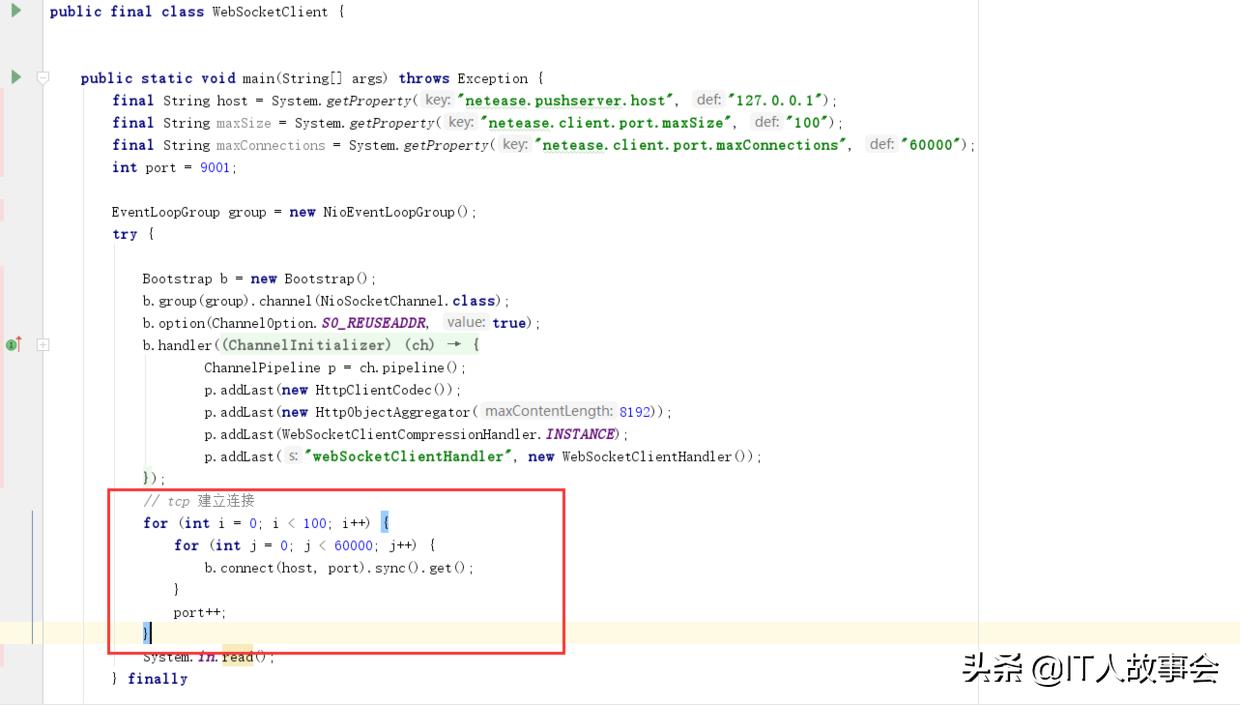
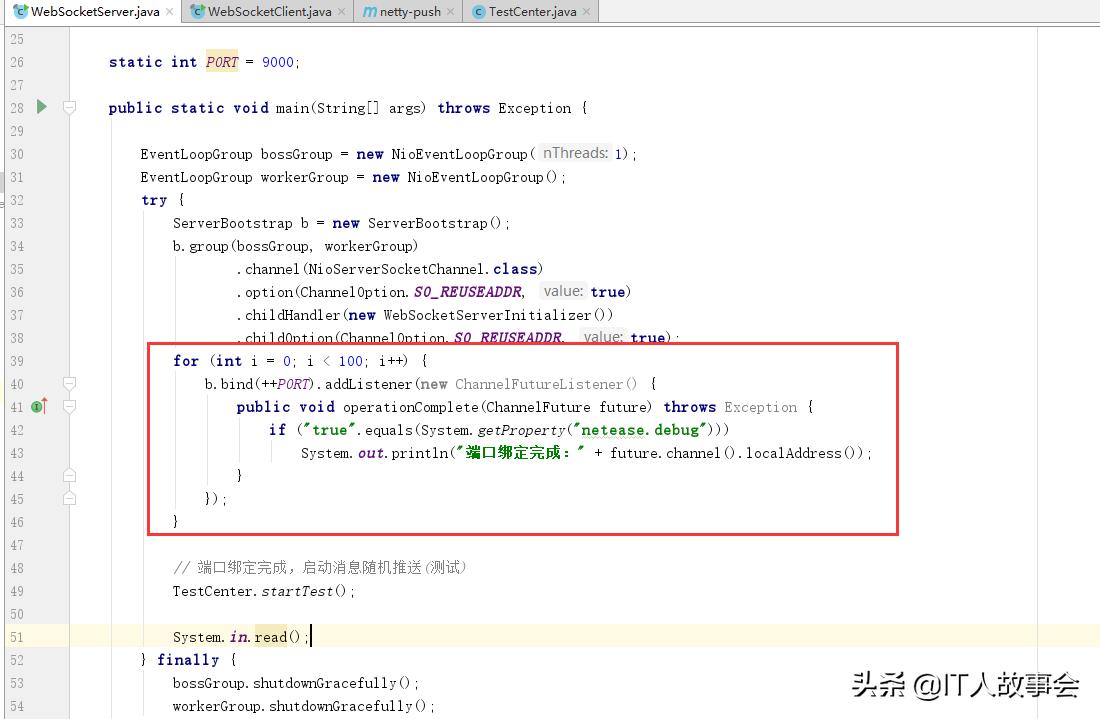
- client 和server端通过循环的方式,增加多个端口的绑定。
- ③ client端 和 server端需要修改的代码
WebSocketClient
 // tcp 建立连接
 for (int i = 0; i < 100; i++) {
 for (int j = 0; j < 60000; j++) {
 b.connect(host, port).sync().get();
 }
 port++;
 }
WebSocketServer
 for (int i = 0; i < 100; i++) {
 b.bind(++PORT).addListener(new ChannelFutureListener() {
 public void operationComplete(ChannelFuture future) throws Exception {
 if ("true".equals(System.getProperty("netease.debug")))
 System.out.println("端口绑定完成:" + future.channel().localAddress());
 }
 });
 }
(三)linux下的百万配置
- ① 环境配置
测试环境: 两台 centos7 jdk8 4核8G
- ② centos服务器配置
进程最大文件打开添加参数最大限制
vi /etc/security/limits.conf

# 修改下面的内容

* soft nofile 1000000
* hard nofile 1000000
全局限制 cat /proc/sys/fs/file-nr
echo 1200000 > /proc/sys/fs/file-max
服务设置
vi /etc/sysctl.conf
#修改下面的内容
fs.file-max = 1000000
问题汇总
# 客户机开不了这么多连接 ,可能的问题原因端口开放数
linux对外随机分配的端口是有限制,理论上单机对外端口数可达65535,但实际对外可建立的连接默认最大只有28232个
查看: cat /proc/sys/net/ipv4/ip_local_port_range
echo "net.ipv4.ip_local_port_range= 1024 65535">> /etc/sysctl.conf
sysctl -p

# 如果你的机器差,出现了奇怪的问题~
sysctl -w net.ipv4.tcp_tw_recycle=1 #快速回收time_wait的连接
sysctl -w net.ipv4.tcp_tw_reuse=1
sysctl -w net.ipv4.tcp_timestamps=1
# 如果发现自己的用例跑不上去,就看看linux日志
tail -f /var/log/messages
# linux 日志
1、 nf_conntrack: table full, dropping packet 表示防火墙的表满了,加大 nf_conntrack_max 参数
echo "net.nf_conntrack_max = 1000000">> /etc/sysctl.conf

# 2、 TCP: too many orphaned sockets 表示内存不太够,拒绝分配,一般就是TCP缓冲区内存不够用,调大一点
# cat /proc/sys/net/ipv4/tcp_mem
echo "net.ipv4.tcp_mem = 786432 2097152 16777216">> /etc/sysctl.conf
echo "net.ipv4.tcp_rmem = 4096 4096 16777216">> /etc/sysctl.conf
echo "net.ipv4.tcp_wmem = 4096 4096 16777216">> /etc/sysctl.conf
sysctl -p
- ③ centos服务器配置
# 查看某个端口的连接情况
netstat -nat|grep -i "9001"|wc -l
netstat -n | awk '/^tcp/ {++S[$NF]} END {for(a in S) print a, S[a]}'

# 网络接口的带宽使用情况
#tcpdump https://www.cnblogs.com/maifengqiang/p/3863168.html

# glances工具
yum install -y glances
glances 控制台查看
glances -s 服务器模式查看
- ④ 启动
# 服务端启动
java -Xmx4096m -Xms4096m -Dnetease.debug=true -cp netty-all-4.1.33.Final.jar:netty-push-1.0.0.jar com.idig8.netty.push.server.WebSocketServer

# 客户端
java -Xmx4096m -Xms4096m -Dnetease.debug=false -Dnetease.pushserver.host=192.168.100.101 -cp netty-all-4.1.33.Final.jar:netty-push-1.0.0.jar com.idig8.netty.push.client.WebSocketClient


# 发送消息服务端启动
java -Xmx4096m -Xms4096m -Dnetease.debug=true -Dneteae.server.test.sendmsg=true -cp netty-all-4.1.33.Final.jar:netty-push-1.0.0.jar com.idig8.netty.push.server.WebSocketServer
(四)百万连接配置说明
一台机器为什么能支持百万的连接感觉有点科幻,感觉不可能,首先需要理解NIO的概念,NIO如果没有做任何处理的情况下,网络是不需要java程序处理的,java程序在连接没有产生动静的时候,java是不产生事件的时候,只有真正产生事件的时候,selector会通知,在一个海量连接的过程中,只要没有消息的推送,消息传到服务器来,不管有几百万个请求,都可以去接受,这是NIO的特性,不像BIO一个请求要开启一个连接,并非是无限的增长,对于连接这么多,内存资源首先被消耗,占用最大的是内存,操作系统底层有TCP的关联,java的netty里面也有channel,需要保留连接,一个连接产生一个对应的对象,虽然这个对象没有处理但是会占用内存,跟cpu没有太大管理,只是java程序要处理占用了cpu和内存。
有很多连接有一个误解,百万连接需要很多机器,百万连接的关键是NIO网络的机制,对NIO没有直观认识的时候,不知道NIO能带来什么。在真实的生产环境的情况下,服务端不需要这么多端口,开100个端口,为了让测试服务器可以连接,上边有个命令是发送消息服务器启动,一旦涉及到百万连接和发送消息的话肯定设计到大量的资源消耗,netty调用handler,channel,这些都是消耗资源的,服务器cpu资源会挂掉,4核 linux top的方式来查看cpu最大是400%。
PS:最好是通过代码,自己试一下,了解下百万连接的思路,按照正常是分布式的架构,单机始终是有瓶颈的,100万用户的连接的话单机8g4核轻轻松松,分布式系统就要设计到分布式消息队列,负载均衡,注册中心的概念,推送使用netty方便系统的开发,沾包和拆包的问题方法区解决,而不是自己写一个socket程序很复杂,netty是通过责任链的方式,通过pipline控制之后的步骤。netty的底层是基于NIO,NIO的底层是基于多路复用的机制,多路复用机制是依托于操作系统的,百万连接这个是拼操作系统参数的,java代码是使用的NIO,如果不是使用的NIO,不好意思你达不到,设置到一些系统操作的配置。