一、项目开发背景
工作中经常跟合同打过交道的人,可能都有一个比较令人烦躁的问题,合同要素信息重复的填写,一个个的填,很麻烦。当使用固定合同模板时,只是合同要素(比如:甲方名称、乙方名称、合同名称、合同金额、地址信息、财务信息等等)不同,能否考虑率搞个通用的模板,通过Python老操作Word和Excel就直接替换,然后就有了这款软件,可使用Python操作Word读取Excel中的合同要素信息批量生成合同。
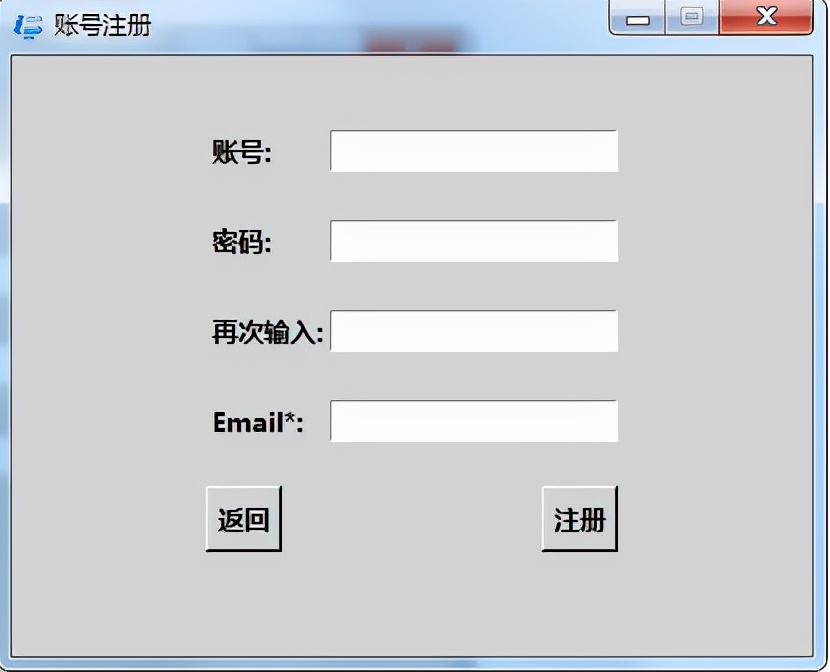
考虑到用户的友好体验,引入了GUI界面,同时为了增加一点难度,就引入了数据库,用户登录、注册、密码修改等,同时也适合Python初学者,自动化办公应用方便提高能力。
二、项目整体架构
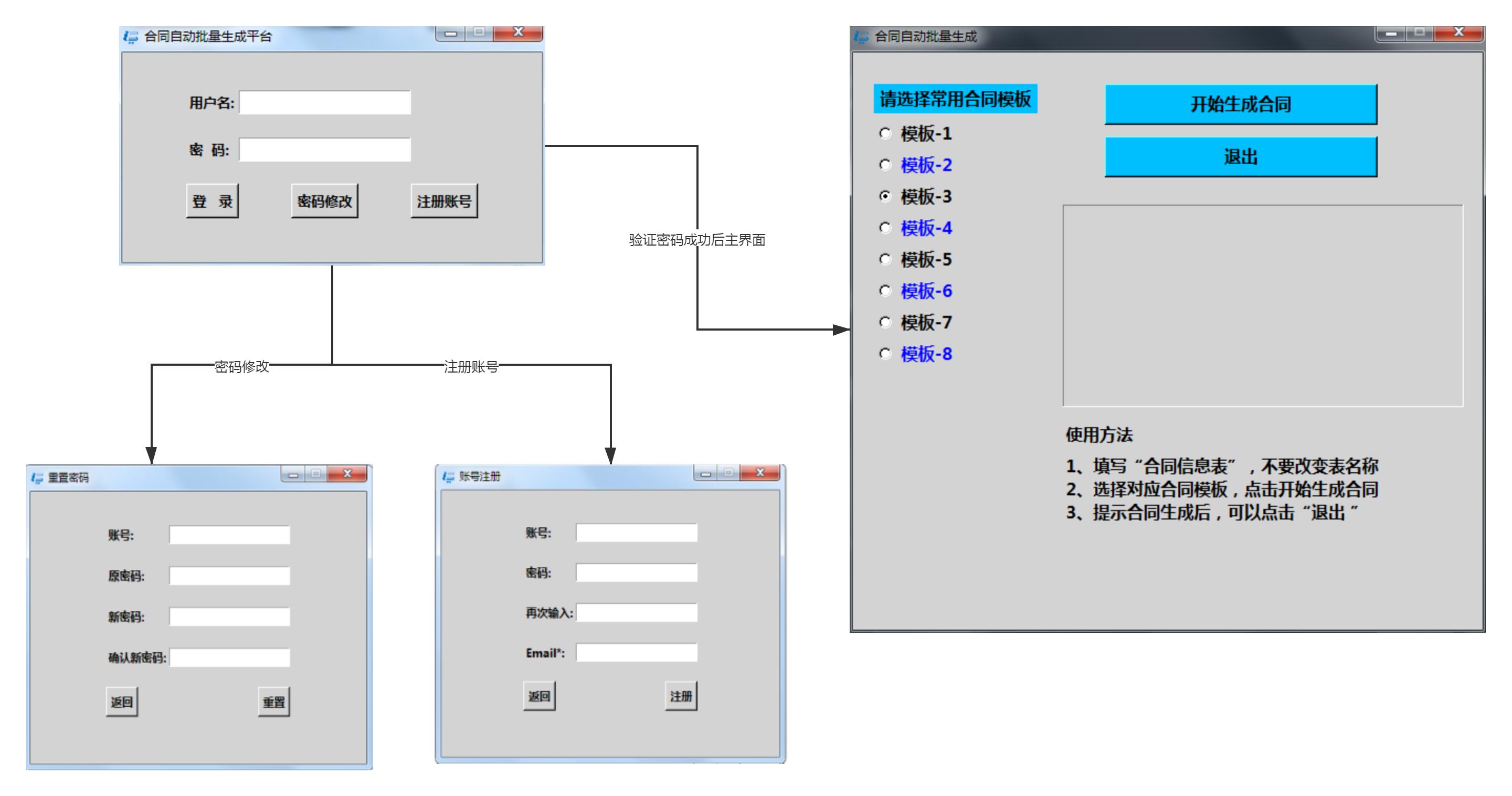
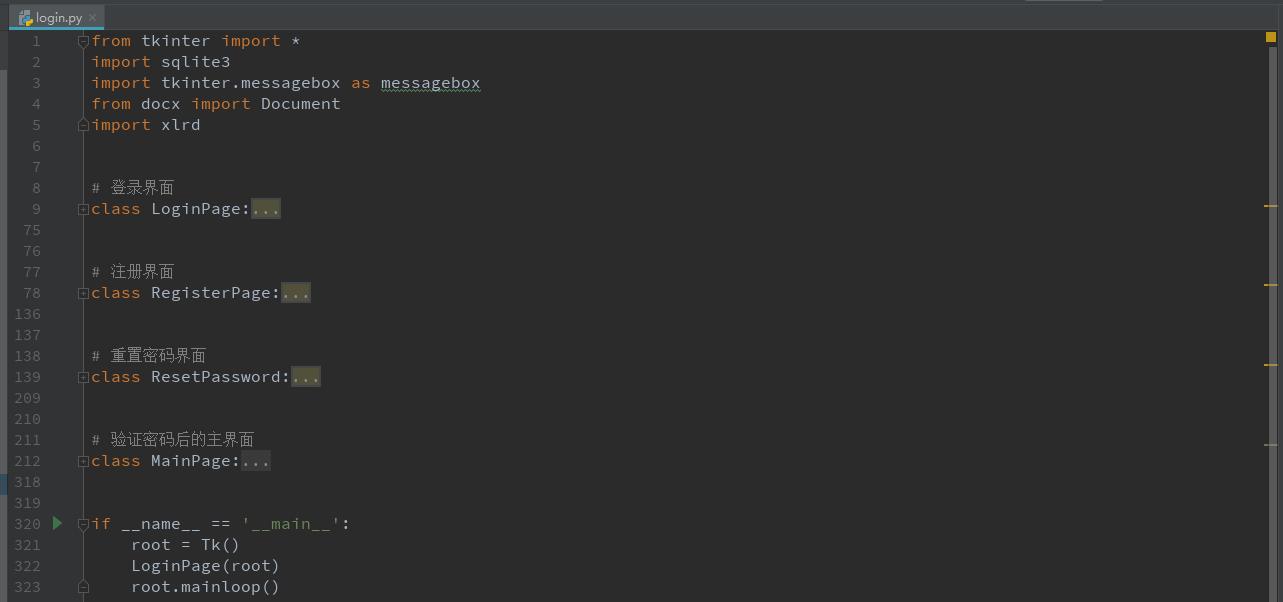
三、项目整体效果展示
1、生成EXE文件后的文件夹,双击login*ex.e** 即可使用

2、基于Python的tkinter库的用户登录、注册、密码修改等,数据库采用sqlite3是一个轻便型的数据库库,实现了自给自足的、无服务器的、零配置的、事务性的 SQL 数据库引擎。
self.conn = sqlite3.connect('data/login.db')
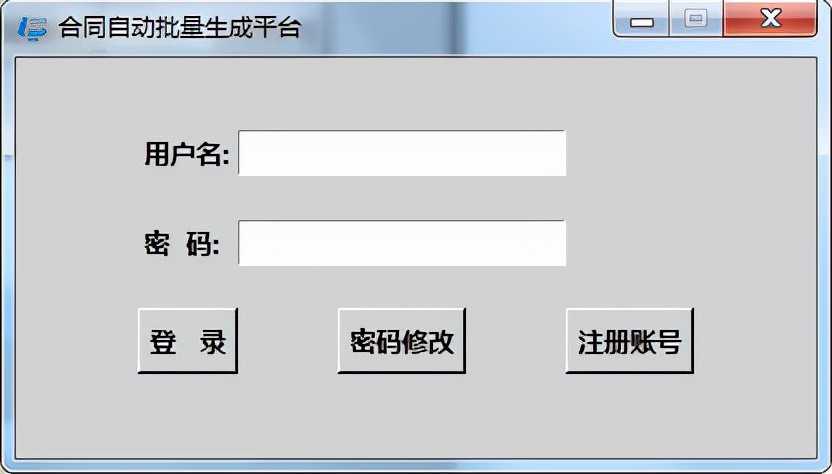
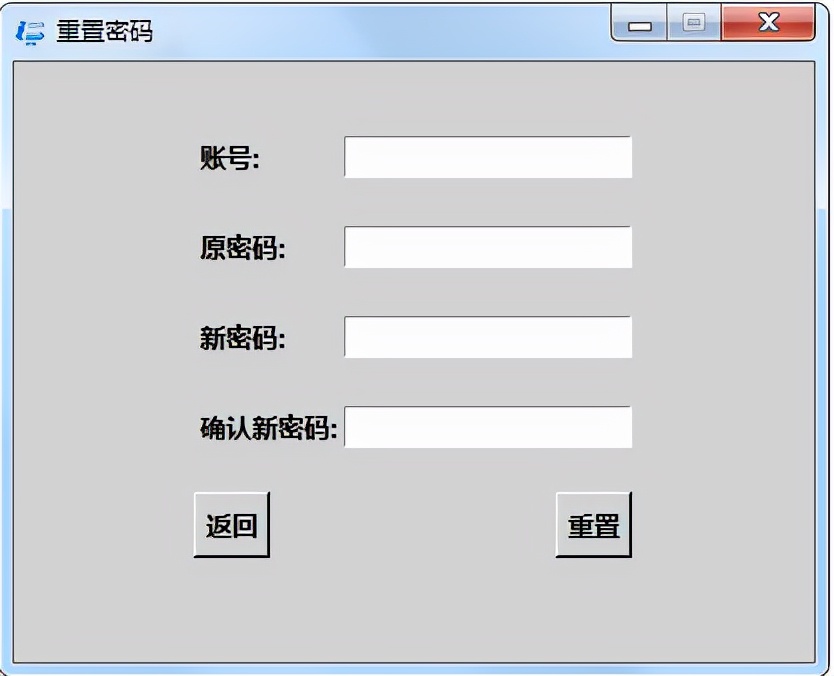
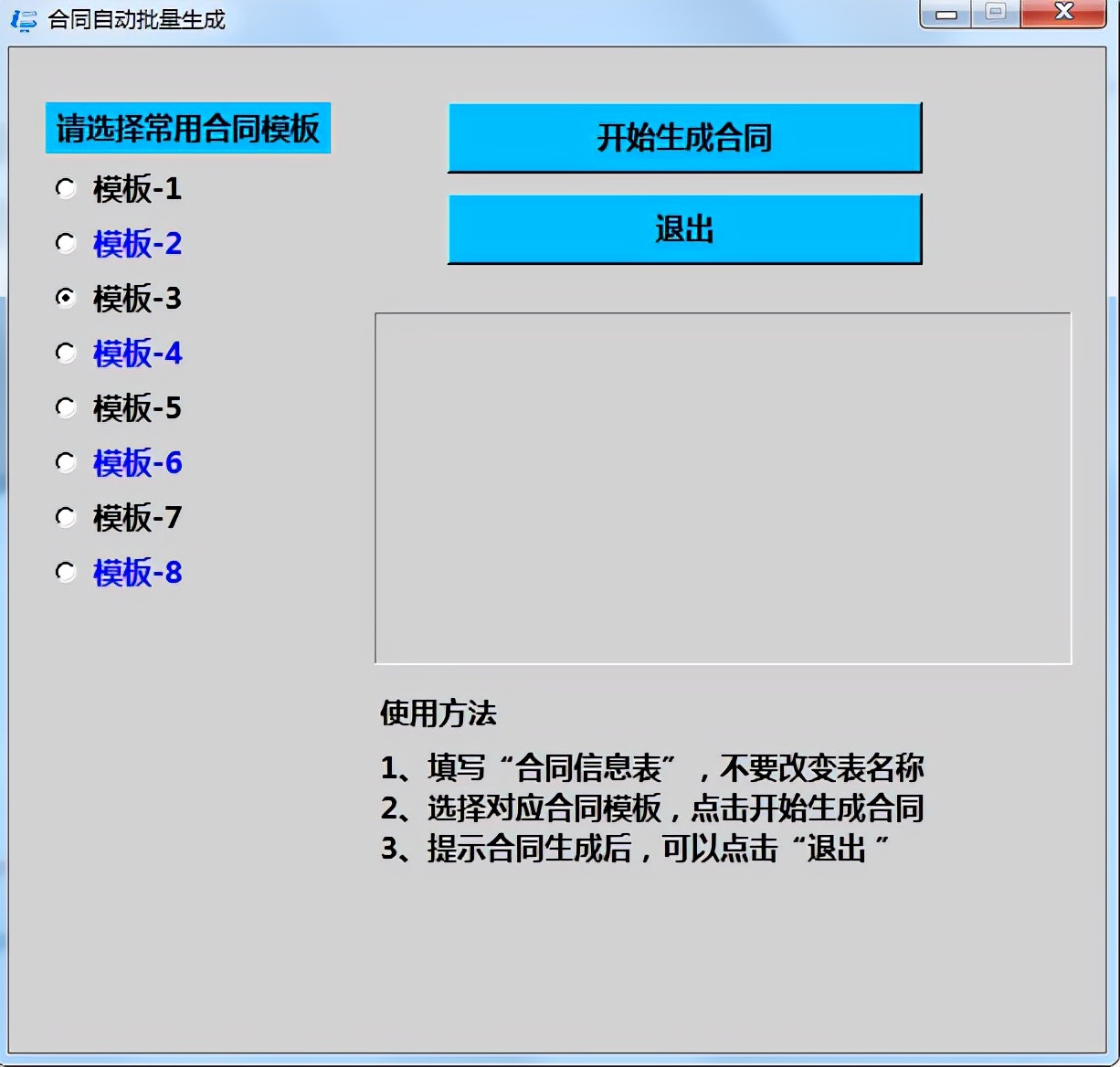
3、登录界面同数据库验证密码后,就可以出现登录使用,使用Python操作Word合同模板读取合同信息Excel表中的合同要素信息,批量生成合同。合同要素信息EXCEL表字段信息对应Word合同模板的字段信息,点击开始生成合同,软件自动批量生成对应的合同。
四、项目的代码
from tkinter import *
import sqlite3
import tkinter.messagebox as messagebox
from docx import Document
import xlrd


class LoginPage:
	"""登录界面"""

	def __init__(self, master):
		self.root = master
		self.root.geometry('400x200+600+400')
		self.root.resizable(0, 0)
		self.root.title('合同自动批量生成平台')
		self.root["background"] = "lightgrey"
		self.root.rowconfigure(3, weight=1)
		self.root.columnconfigure(4, weight=1)
		self.root.iconbitmap('image/logo2.ico')
		self.conn = sqlite3.connect('data/login.db')
		self.username = StringVar()
		self.password = StringVar()
		self.page = Frame(self.root)
		self.page["background"] = "lightgrey"
		self.creatapage()

	def creatapage(self):
		"""界面布局"""
		Label(self.page, font=("微软雅黑", 10, "bold"), background='lightgrey').grid(row=0)
		Label(self.page, text='用户名:', font=("微软雅黑", 10, "bold"), background='lightgrey').grid(row=1, stick=W, pady=10)
		Entry(self.page, textvariable=self.username, font=("微软雅黑", 10, "bold")).grid(row=1, column=3, stick=W)
		Label(self.page, text='密  码:', font=("微软雅黑", 10, "bold"), background='lightgrey').grid(row=2, stick=W, pady=10)
		Entry(self.page, textvariable=self.password, show='*', font=("微软雅黑", 10, "bold")).grid(row=2, stick=W, column=3)
		Button(self.page, text='登   录', command=self.login, font=("微软雅黑", 10, "bold"), background='lightgrey').grid(row=3, column=0,columnspan=2,pady=10)
		Button(self.page, text='密码修改', command=self.editpassword, font=("微软雅黑", 10, "bold"), background='lightgrey').grid(row=3, column=2,columnspan=2, pady=10)
		Button(self.page, text='注册账号', command=self.register, font=("微软雅黑", 10, "bold"), background='lightgrey').grid(row=3,column=4,columnspan=2, pady=10)
		self.page.pack()

	def login(self):
		"""登录功能"""

		curs = self.conn.cursor()
		query = "select username, password, loginerror from loginuser where username='%s'" % self.username.get()
		curs*ex.e**cute(query)  # 返回一个迭代器
		c = curs.fetchall()  # 接收全部信息
		print(len(c))
		if len(c) == 0:
			messagebox.showerror('登录失败', '账户不存在')
		else:
			us, pw, lerror = c[0]
			if lerror >= 3:
				messagebox.showwarning('登录失败', '账户已被锁定')
			elif us == self.username.get() and pw == self.password.get():
				self.conn.close()
				# messagebox.showinfo('登录成功', '欢迎:%s' % us)
				self.page.destroy()
				MainPage(self.root)
			else:
				messagebox.showwarning('登录失败', '密码错误')


	def register(self):
		"""注册功能跳转"""
		self.conn.close()
		self.page.destroy()
		RegisterPage(self.root)

	def editpassword(self):
		"""重置密码"""
		"""注册功能跳转"""
		self.conn.close()
		self.page.destroy()
		ResetPassword(self.root)


class RegisterPage:
	"""注册界面"""

	def __init__(self, master=None):
		self.root = master
		self.root.title('账号注册')
		self.root.geometry('400x300')
		self.root.resizable(0, 0)
		self.conn = sqlite3.connect('data/login.db')
		self.username = StringVar()
		self.password0 = StringVar()  # 第一次输入密码
		self.password1 = StringVar()  # 第二次输入密码
		self.email = StringVar()
		self.page = Frame(self.root)
		self.page["background"] = "lightgrey"
		self.createpage()

	def createpage(self):
		"""界面布局"""
		Label(self.page, font=("微软雅黑", 10, "bold"), background='lightgrey').grid(row=0)
		Label(self.page, text="账号:", font=("微软雅黑", 10, "bold"), background='lightgrey').grid(row=1, stick=W, pady=10)
		Entry(self.page, textvariable=self.username).grid(row=1, column=1, stick=E)
		Label(self.page, text="密码:", font=("微软雅黑", 10, "bold"), background='lightgrey').grid(row=2, stick=W, pady=10)
		Entry(self.page, textvariable=self.password0, show='*').grid(row=2, column=1, stick=E)
		Label(self.page, text="再次输入:", font=("微软雅黑", 10, "bold"), background='lightgrey').grid(row=3, stick=W, pady=10)
		Entry(self.page, textvariable=self.password1, show='*').grid(row=3, column=1, stick=E)
		Label(self.page, text="Email*:", font=("微软雅黑", 10, "bold"), background='lightgrey').grid(row=4, stick=W, pady=10)
		Entry(self.page, textvariable=self.email).grid(row=4, column=1, stick=E)
		Button(self.page, text="返回", command=self.repage, font=("微软雅黑", 10, "bold"), background='lightgrey').grid(row=5, stick=W, pady=10)
		Button(self.page, text="注册", command=self.register, font=("微软雅黑", 10, "bold"), background='lightgrey').grid(row=5, column=1, stick=E)
		self.page.pack()

	def repage(self):
		"""返回登录界面"""
		self.page.destroy()
		self.conn.close()
		LoginPage(self.root)

	def register(self):
		"""注册"""
		if self.password0.get() != self.password1.get():
			messagebox.showwarning('错误', '密码核对错误')
		elif len(self.username.get()) == 0 or len(self.password0.get()) == 0 or len(self.email.get()) == 0:
			messagebox.showerror("错误", "不能为空")
		else:
			curs = self.conn.cursor()
			query = 'insert into loginuser values (?,?,?,?)'
			val = [self.username.get(), self.password0.get(), self.email.get(), 0]
			try:
				curs*ex.e**cute(query, val)
				self.conn.commit()
				self.conn.close()
				messagebox.showinfo("成功", "注册成功,按确定返回登录界面")
				self.page.destroy()

				LoginPage(self.root)
			except sqlite3.IntegrityError:
				messagebox.showerror("注册失败", "该账户已存在")


class ResetPassword:
	"""重置界面界面"""

	def __init__(self, master=None):
		self.root = master
		self.root.title('重置密码')
		self.root.geometry('400x300')
		self.root.resizable(0, 0)
		self.conn = sqlite3.connect('data/login.db')
		self.username = StringVar()
		self.password = StringVar()  # 原密码
		self.password1 = StringVar()  # 新密码
		self.password2 = StringVar()  # 新密码
		self.page = Frame(self.root)
		self.page["background"] = "lightgrey"
		self.createpage1()

	def createpage1(self):
		"""界面布局"""
		Label(self.page, font=("微软雅黑", 10, "bold"), background='lightgrey').grid(row=0)
		Label(self.page, text="账号:", font=("微软雅黑", 10, "bold"), background='lightgrey').grid(row=1, stick=W, pady=10)
		Entry(self.page, textvariable=self.username).grid(row=1, column=1, stick=E)
		Label(self.page, text="原密码:", font=("微软雅黑", 10, "bold"), background='lightgrey').grid(row=2, stick=W, pady=10)
		Entry(self.page, textvariable=self.password, show='*').grid(row=2, column=1, stick=E)
		Label(self.page, text="新密码:", font=("微软雅黑", 10, "bold"), background='lightgrey').grid(row=3, stick=W, pady=10)
		Entry(self.page, textvariable=self.password1, show='*').grid(row=3, column=1, stick=E)
		Label(self.page, text="确认新密码:", font=("微软雅黑", 10, "bold"), background='lightgrey').grid(row=4, stick=W, pady=10)
		Entry(self.page, textvariable=self.password2, show='*').grid(row=4, column=1, stick=E)
		Button(self.page, text="返回", command=self.repage1, font=("微软雅黑", 10, "bold"), background='lightgrey').grid(row=5, stick=W, pady=10)
		Button(self.page, text="重置", command=self.register1, font=("微软雅黑", 10, "bold"), background='lightgrey').grid(row=5, column=1, stick=E)
		self.page.pack()

	def repage1(self):
		"""返回登录界面"""
		self.page.destroy()
		self.conn.close()
		LoginPage(self.root)

	def register1(self):
		"""重置"""

		curs = self.conn.cursor()
		query = "select username, password, loginerror from loginuser where username='%s'" % self.username.get()
		curs*ex.e**cute(query)  # 返回一个迭代器
		c = curs.fetchall()  # 接收全部信息
		print(len(c))
		if len(c) == 0:
			messagebox.showerror('登录失败', '账户不存在')
		else:
			us, pw, lerror = c[0]
			print(us,pw,lerror)
			if lerror >= 3:
				messagebox.showwarning('登录失败', '账户已被锁定')
			elif us == self.username.get() and pw == self.password.get():
				if self.password1.get() != self.password2.get():
					messagebox.showwarning('错误', '密码核对错误')
				else:
					curs = self.conn.cursor()
					query = "UPDATE loginuser SET password='%s' WHERE username='%s'" % (self.password1.get(),self.username.get())

					try:
						curs*ex.e**cute(query)
						self.conn.commit()
						self.conn.close()
						messagebox.showinfo("成功", "重置成功,按确定返回登录界面")
						self.page.destroy()

						LoginPage(self.root)
					except sqlite3.IntegrityError:
						messagebox.showerror("重置失败", "该账户不存在")


class MainPage:
	"""登陆后界面"""

	def __init__(self, master=None):
		self.root = master
		self.root.title("合同自动批量生成")
		self.root.geometry("600x550+600+100")
		self.root.resizable(0, 0)
		self.xlsx = xlrd.open_workbook('合同信息表.xlsx')
		self.sheet = self.xlsx.sheet_by_index(0)

		# 合同循环运行
		def MessageID():

			print('合同开始转换')
			text.insert(INSERT, '合同开始转换')
			text.insert(INSERT, "\r\n")
			text.update()
			for table_row in range(2, self.sheet.nrows):  # 合同要素Excel中逐列循环
				image_name = updata()
				# print(image_name)
				document1 = Document("合同模板/%s.docx" % image_name)

				for table_col in range(0, self.sheet.ncols):  # 合同要素Excel中逐行循环
					replace_text(str(self.sheet.cell_value(0, table_col)),
								 str(self.sheet.cell_value(table_row, table_col)), document1)  # 进行替换
				document1.save("%s.docx" % str(self.sheet.cell_value(table_row, 0)))  # 按定义的文件名进行保存
				print("%s合同生成完毕!" % str(self.sheet.cell_value(table_row, 0)))
				str5 = "%s合同生成完毕!" % str(self.sheet.cell_value(table_row, 0))

				text.insert(INSERT, str5)
				text.insert(INSERT, "\r\n")
				text.update()

		'''

		定义替换函数
		'''

		def replace_text(old_text, new_text, document1):
			all_paragraphs = document1.paragraphs  # 读取所有的自然段

			for paragraph in all_paragraphs:
				for run in paragraph.runs:  # 循环读取所有的run,并进行新旧文本的替换
					run_text = run.text.replace(old_text, new_text)
					run.text = run_text
			all_tables = document1.tables  # 读取所有的表格
			for table in all_tables:
				for row in table.rows:
					for cell in row.cells:  # 循环读取表格中所有的cells,并进行新旧文本的替换
						cell_text = cell.text.replace(old_text, new_text)
						cell.text = cell_text

		def updata():
			image_name_numb = ht.get()
			if image_name_numb == 1:
				image_name = "模板-1"
				return image_name
			elif image_name_numb == 2:
				image_name = "模板-2"
				return image_name
			elif image_name_numb == 3:
				image_name = "模板-3"
				return image_name
			elif image_name_numb == 4:
				image_name = "模板-4"
				return image_name
			elif image_name_numb == 5:
				image_name = "模板-5"
				return image_name
			elif image_name_numb == 6:
				image_name = "模板-6"
				return image_name
			elif image_name_numb == 7:
				image_name = "模板-7"
				return image_name
			elif image_name_numb == 8:
				image_name = "模板-8"
				return image_name

		"""界面布局"""
		Label(self.root, text="请选择常用合同模板", font=("微软雅黑", 12, "bold"), background='lightgrey', fg="Black", bg="DeepSkyBlue", width=15).place(x=20, y=30)
		ht = IntVar()  # 给单选框添加variable,用于显示value值
		ht.set(3)
		Radiobutton(self.root, text="模板-1", variable=ht, font=("微软雅黑", 12, "bold"), background='lightgrey', fg="Black", value=1, command=updata).place(x=20, y=60)
		Radiobutton(self.root, text="模板-2", variable=ht, font=("微软雅黑", 12, "bold"), background='lightgrey', value=2, fg="Blue", command=updata).place(x=20, y=90)
		Radiobutton(self.root, text="模板-3", variable=ht, font=("微软雅黑", 12, "bold"), background='lightgrey', value=3, command=updata).place(x=20, y=120)
		Radiobutton(self.root, text="模板-4", variable=ht, font=("微软雅黑", 12, "bold"), background='lightgrey', value=4, fg="Blue", command=updata).place(x=20, y=150)
		Radiobutton(self.root, text="模板-5", variable=ht, font=("微软雅黑", 12, "bold"), background='lightgrey', fg="Black", value=5, command=updata).place(x=20, y=180)
		Radiobutton(self.root, text="模板-6", variable=ht, font=("微软雅黑", 12, "bold"), background='lightgrey', value=6, fg="Blue", command=updata).place(x=20, y=210)
		Radiobutton(self.root, text="模板-7", variable=ht, font=("微软雅黑", 12, "bold"), background='lightgrey', value=7, command=updata).place(x=20, y=240)
		Radiobutton(self.root, text="模板-8", variable=ht, font=("微软雅黑", 12, "bold"), background='lightgrey', value=8, fg="Blue", command=updata).place(x=20, y=270)

		Button(self.root, text='开始生成合同', font=("微软雅黑", 12, "bold"), width=25, fg="Black", bg="DeepSkyBlue", command=MessageID).place(x=240, y=30)

		Button(self.root, text='退出', font=("微软雅黑", 12, "bold"), width=25, fg="Black", bg="DeepSkyBlue",command=root.quit).place(x=240, y=80)

		text = Text(self.root, width=42, height=9.3, font=("微软雅黑", 12), fg="Blue", background='LightGrey')
		text.place(x=200, y=145)
		Label(self.root, text="使用方法", font=("微软雅黑", 12, "bold"), wraplength=400, justify="left", anchor="w", fg="Black",  background='lightgrey', width = 60).place(x=200, y=350)
		str1 = "1、填写“合同信息表”,不要改变表名称 \n"
		str2 = "2、选择对应合同模板,点击开始生成合同 \n"
		str3 = "3、提示合同生成后,可以点击“退出 ”\n"
		Label(self.root, text=str1 + str2 + str3, font=("微软雅黑", 12, "bold"), wraplength=400, justify="left",anchor="w", fg="Black",  background='lightgrey', width=60).place(x=200, y=380)


if __name__ == '__main__':
	root = Tk()
	LoginPage(root)
	root.mainloop()
本文主要介绍了Python操作Word读取Excel中的合同要素信息批量生成合同的实现示例,文中通过示例代码介绍的非常详细,对大家的学习或者工作具有一定的参考学习价值,有问题欢迎大家关注或留言交流讨论共同进步。