一、MySQL Router简介
MySQL Router是MySQL官方提供的一个轻量级中间件,可以在应用程序与MySQL服务器之间提供透明的路由方式。主要用以解决MySQL主从库集群的高可用、负载均衡、易扩展等问题。Router可以与MySQL Fabric无缝连接,允许Fabric存储和管理用于路由的高可用数据库服务器组,使管理MySQL服务器组更加简单。
MySQL Router是一个可执行文件,可以与应用程序在同一平台上运行,也可以单独部署。虽然MySQL Router是InnoDB Cluster(MySQL 7.X)的一部分,MySQL 5.6 等版本数据库仍然可以使用Router作为其中间代理层。MySQL Router的配置文件中包含有关如何执行路由的信息。它与MySQL服务器的配置文件类似,也是由多个段组成,每个段中包含相关配置选项。
MySQL Router是MySQL Proxy的替代方案,MySQL官方不建议将MySQL Proxy用于生产环境,并且已经不提供MySQL Proxy的*载下**。
1. 功能
Router作为一个流量转发层,位于应用与MySQL服务器之间,其功能类似于LVS。MySQL Servers作为Router的“downstream”(NAT模式),应用不再直连MySQL Servers,而是与Router相连。根据Router的配置,将会把应用程序的读写请求转发给下游的MySQL Servers。
当下游有多个MySQL Servers,无论主、从,Router可以对读写请求进行负载均衡。当下游某个Server失效时,Router可以将其从Active列表中移除,当其online后再次加入Active列表,即提供了Failover特性。
当MySQL Servers集群拓扑变更时,比如增减Slaves节点,只需要修改Router的配置即可,无需修改应用中数据库连接配置,因为应用配置的为Router地址而非MySQL Servers的原始地址,即数据库集群对应用来说是透明的。如果MySQL Servers为5.7+版本,且构建为InnoDB Cluster模式,那么Router还能基于metaCache(metaServers)机制,感知MySQL Servers的主从切换、从库增减等集群拓扑变更,而且基于变更能够实现Master自动切换、Slaves列表自动装配等。比如Master失效后,Cluster将会自动选举一个新的Master,此时Router不需要任何调整、可以自动发现此新Master进而继续为应用服务。
考虑到Router独立部署可能引入“额外的部署成本”、“性能降级”、“连接数上限”等问题,通常建议基于“Agent”方式部署,即将Router与应用部署在机器上。Router通常是解决“MySQL集群规模性迁移”,比如跨机房部署、流量迁移、异构兼容,或者解决MySQL集群规模性宕机时快速切换等。
Router中间件本身不会对请求“拆包”(unpackage),所以无法在Router中间件上实现比如“SQL审计”、“隔离”、“限流”、“分库分表”等功能。但是Router提供了plugin(C语言)机制,用户可以开发自己的plugin来扩展Router的额外特性。
2. 架构
MySQL Router是一个单独的应用程序,其体系结构如图1所示。
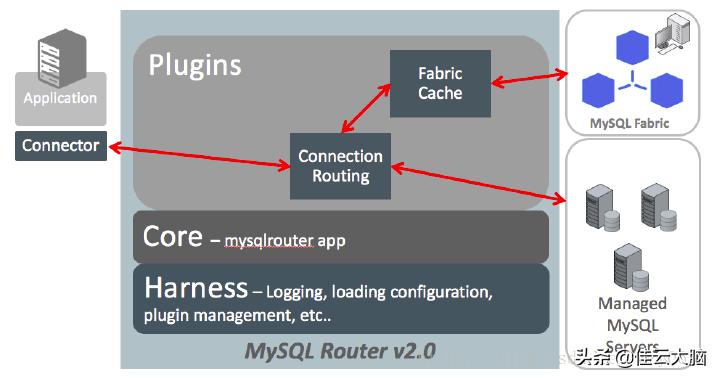
图1
在图1的最左边是连接到Router的应用程序,最右侧是两个连接目的地,即MySQL Fabric和MySQL Cluster。中间的Router架构分为三层,从上至下依次为插件层、核心层和Harness。插件层是对应用开放的接口,mysqlrouter程序是Router的核心,而该程序时基于MySQL Harness实现的。Router采用模块化设计,并在实现功能时利用此架构。MySQL Harness是一个基础模块,提供日志、配置重载、插件管理等功能。当前Router提供Connection Routing和Fabric Cache两个插件,未来功能将与这两个插件一起出现。
如图1中的箭头所示,应用程序连接Router,如果连接路由插件,Router从配置文件中读取目标并重定向到列表中的一个服务器。如果使用Fabric Cache,需在Router的路由策略中指定Fabric安装的URL。这种情况下,应用程序连接到Router,然后Router将从Fabric获取目标列表,然后将连接重定向到列表中的一个服务器。
3. 使用
正如前面提到的,在目前形式中,MySQL Router最好与应用程序一起使用。也就是说,应该在运行应用程序的相同机器上安装Router。虽然这不是强制要求,但建议采用这种做法。可以编写程序来监控mysqlrouter的执行,并在需要时重新启动它。例如,如果目标选项中的服务器列表已用尽,则可以使用新目标列表重新启动Router,或重新启动Router以重试列表中的服务器。图2说明了如何在应用程序中使用Router。
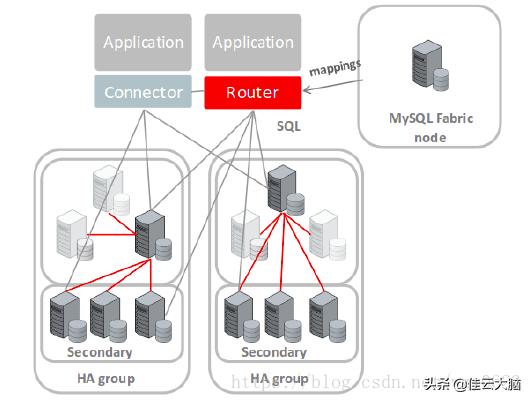
图2
可以在整个网络中运行多个Router实例。但是MySQL官方并没有提供Router集群的HA,即每个Router节点均为独立,它们之间互不通信,无Leader角色,无选举机制。那么当某个Router节点失效,应用层面需要借助MySQL Connector的高级特性,比如:failover、loadbalance等协议来实现Failover功能。简单而言,Router中间件与Connector的高级协议互相协作,才能够实现请求在Router集群之间的负载均衡、Failover等。
MySQL Router非常轻量级,与直连Servers相比,其性能损耗低于1%。摆在Router面前的问题,是其对链接数的支撑能力,原则上我们一个Router节点限定在500个TCP链接。Router本身CPU、内存、磁盘消耗都极低,但是要求Router节点对网络IO的支撑能力应该较强。考虑到Router底层为“异步IO”,如果条件允许,应该构建在较高版本的Linux平台下,且给予合理的CPU资源。MySQL Router在2.1.4版本以下,内核基于select() IO模型,存在连接数500上限、较大SQL请求导致CPU过高,以及并发连接过高时Router假死等问题,建议升级到2.1.6+。
Router对连接的管理是基于“粘性”方式,即应用与Router的一个TCP连接,将对应一个Router与MySQL Server的连接,当应用与Router的连接失效时,Router也将断开其与MySQL Server的连接。只要Router上下游网络联通性正常,那么Router将不会主动断开与应用的连接,也不会切换其与Server的连接。即当应用与Router创建一个新连接时,Router将根据负载均衡算法,选择一个Server并与其建立连接,此后将唯一绑定,直到此Server失效时触发重新选择其他Server。这就引入一个问题,如果某个连接上发生了“繁重”的SQL操作,那么将会导致下游Server伴随高负载而无法“负载均衡”。 Router对应用是透明的,开发与Router一起使用的应用程序不需要任何特殊的库或接口,所增加的工作只是维护MySQL Router实例。
二、安装配置
环境172.16.1.125:MySQL Router172.16.1.126:MySQL Replication Master172.16.1.127:MySQL Replication Slave
我们在172.16.1.125上安装配置MySQL Router,172.16.1.126、172.16.1.127为本例中要通过Router访问的两个已经MySQL数据库服务器地址。在本例中这两个MySQL服务器已经配置好主从复制,拓扑如图3所示。
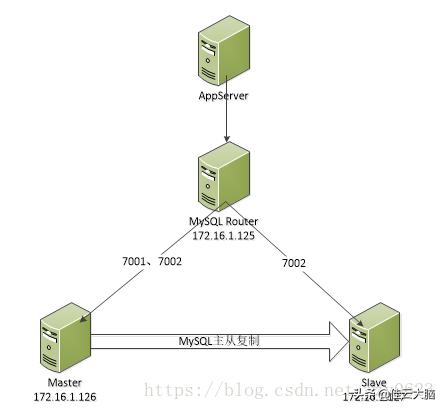
图3
1. *载下**二进制安装包 从https://dev.mysql.com/downloads/router/2.1.html页面选择*载下**的安装包,本例为mysql-router-2.1.6-linux-glibc2.12-x86-64bit.tar.gz。
2. 解压缩
tarxzfmysql-router-2.1.6-linux-glibc2.12-x86-64bit.tar.gz
mvmysql-router-2.1.6-linux-glibc2.12-x86-64bitmysql-router-2.1.6
3. 在资源文件中(本例为.bashrc)添加执行文件路径 .bashrc文件的内容为:
[mysql@hdp2~]$more~/.bashrc
# .bashrc

# Source global definitions
if[ -f /etc/bashrc ];then
 . /etc/bashrc
fi

# Uncomment the following line if you don't like systemctl's auto-paging feature:
# export SYSTEMD_PAGER=

# User specific aliases and functions
exportPATH=.:/sbin:/bin:/usr/sbin:/usr/bin:/usr/X11R6/bin:/home/mysql/mysql-5.6.14/bin:/home/mysql/mysql-router-2.1.6/bin;
[mysql@hdp2~]$
使资源配置生效:
source~/.bashrc
4. 验证安装
[mysql@hdp2~]$mysqlrouter--help
MySQL Router v2.1.6 on Linux (64-bit) (GPL community edition)
Copyright (c) 2015, 2018, Oracle and/or its affiliates. All rights reserved.

Oracle is a registered trademark of Oracle Corporation and/or its
affiliates. Other names may be trademarks of their respective
owners.

StartMySQL Router.

Configurationreadfromthefollowingfilesinthe givenorder(enclosed
inparentheses meansnotavailableforreading):
 (/home/mysql/mysql-router-2.1.6/bin/.././mysqlrouter.conf)
 (/home/mysql/.mysqlrouter.conf)
PluginsPath:
 /home/mysql/mysql-router-2.1.6/lib/mysqlrouter
DefaultLogDirectory:
 /home/mysql/mysql-router-2.1.6
DefaultPersistentDataDirectory:
 /home/mysql/mysql-router-2.1.6/data
DefaultRuntime StateDirectory:
 /home/mysql/mysql-router-2.1.6/run

......
从mysqlrouter联机帮助的输出中,可以看到默认配置文件寻找路径及其顺序,插件路径、日志目录、持久化数据目录、运行时状态目录的缺省位置等重要信息。在后面的配置文件和服务启停文件中需要定义这些目录。注意,如果在mysqlrouter命令行使用--config或-c选项传入用户定义的配置文件,则不会加载默认配置文件。
5. 配置Router
# 复制配置文件
cp/home/mysql/mysql-router-2.1.6/share/doc/mysqlrouter/sample_mysqlrouter.conf/etc/mysqlrouter.conf
cp/home/mysql/mysql-router-2.1.6/share/doc/mysqlrouter/sample_mysqlrouter.init /etc/init.d/mysqlrouter

# 修改属主为mysql
chown mysql:mysql/etc/mysqlrouter.conf
chown mysql:mysql/etc/init.d/mysqlrouter

# 变为可执行
chmod +x/etc/init.d/mysqlrouter

# 系统启动时自动执行
echo"/etc/init.d/mysqlrouter">> /etc/rc.d/rc.local

# 建立日志目录
mkdir/home/mysql/mysql-router-2.1.6/log
配置文件内容如下:
[mysql@hdp2~]$more /etc/mysqlrouter.conf
[DEFAULT]
#日志路径
logging_folder = /home/mysql/mysql-router-2.1.6/log

#插件路径
plugin_folder = /home/mysql/mysql-router-2.1.6/lib/mysqlrouter

#配置路径
config_folder = /home/mysql/mysql-router-2.1.6/config

#运行时状态路径
runtime_folder = /home/mysql/mysql-router-2.1.6/run

#数据文件路径
data_folder = /home/mysql/mysql-router-2.1.6/data

[logger]
#日志级别
level = INFO

#以下选项可用于路由标识的策略部分
[routing:basic_failover]
#Router地址
bind_address = 172.16.1.125
#Router端口
bind_port = 7001
#读写模式
mode = read-write
#目标服务器
destinations = 172.16.1.126:3306,172.16.1.127:3306

[routing:load_balance]
bind_address = 172.16.1.125
bind_port = 7002
mode = read-only
destinations = 172.16.1.126:3306,172.16.1.127:3306

[mysql@hdp2~]$
MySQL Router的配置文件比较简单,大部分配置项的含义一路了然。上面的文件中配置了两条路由策略,一个用于失败切换,一个用于负载均衡,绑定端口分别是7001和7002。值得一提的是mode参数,该参数的可选值为read-write或read-only,但其实际作用并不是字面含义所示。
对于read-write模式,将采用“首个可用”算法,优先使用第一个server,当第一个server(即172.16.1.126:3306)不可达时,将会Failover到第二个server(172.16.1.127:3306),依次进行。如果都不可达,那么此端口上的请求将会被中断,此端口将不能提供服务,且此时所属的路由策略将不可用。需要注意,此算法只遍历一次列表,即逐个验证destinations中的Server,不会循环。一旦所有的Servers依次验证且不可用后,本条路由策略将不能继续服务,内置状态设定为aborted,即使此后Servers恢复上线,也不能继续对Client提供服务,因为它不会与Servers保持心跳检测。对于Router而言,直接拒绝Client连接请求,只有重启Router节点才能解决。
对于read-only模式:将采用“轮询”算法,依次选择Server新建连接,如果某个Server不可达,将会重试下一个Server,如果所有的Server都不可达,那么此端口上的请求将中断,即读写操作将不可用。同时Router将会持续与每个Server保持心跳探测,当恢复后重新加入Active列表,此后那些新建连接请求将可以分发给此Server。
但是比较遗憾,Router不会将已有的连接重新分配给“新加入”列表的Server,比如Router有2个Server地址(S1,S2),某时刻S1不可达,那么在S1上粘性的客户端连接也将被断开,新建连接将会全部在S2上,此后S1恢复正常,那么在S2上的旧的连接将不会迁移到S1上,此时S1只会接收新的连接,如果没有新连接请求,那么S1将会在一段时间看起来是“不提供服务”的。为了解决此问题,我们要求Connection Pool有管理“连接生命周期”的相关控制,比如一个connection被创建X秒以后在返回连接池时应该被主动关闭,这个参数在tomcat-jdbc-pool中为“maxAge”。 如果应用程序中,部署方式是单Master、多Slaves,我们完全可以在承接“master”请求的Router节点上,也配置为“read-only”模式,那么此单master节点失效重启后,可以不需要重启Router节点即可继续服务。因为Router不会对TPC拆包,所有“read-write”、“read-only”并不会干扰实际的SQL执行。严格来说,这两种mode映射两种“路由算法”:“首个可用”、“轮询”;除此之外,再无特殊含义。 对于读写两种操作,因为Router不对请求拆包,所以它无法判断请求的读写类型。我们只能在配置文件中,分别为读、写设定不同的配置:使用不同的绑定端口。比如本例“7001”端口接收到的请求都会转发给172.16.1.126:3306,当它不可用时,都会转发给172.16.1.127:3306。“7002”端口接收的请求则会轮询转发给172.16.1.126:3306和172.16.1.127:3306。 MySQL Router服务启停文件内容如下:
[mysql@hdp2~]$more/etc/init.d/mysqlrouter
#! /bin/bash
#
# mysqlrouter This shell script takes care of starting and stopping
# the MySQL Router
#
# chkconfig: 2345 66 34
# description: MySQL Router
# processname: mysqlrouter
# config: /etc/mysqlrouter/mysqlrouter.ini
# pidfile: /var/run/mysqlrouter/mysqlrouter.pid
#
# Copyright (c) 2015, Oracle and/or its affiliates. All rights reserved.
#
# This program is free software; you can redistribute it and/or modify
# it under the terms of the GNU General Public License as published by
# the Free Software Foundation; version 2 of the License.
#
# This program is distributed in the hope that it will be useful,
# but WITHOUT ANY WARRANTY; without even the implied warranty of
# MERCHANTABILITY or FITNESS FOR A PARTICULAR PURPOSE. See the
# GNU General Public License for more details.
#
# You should have received a copy of the GNU General Public License
# along with this program; if not, write to the Free Software
# Foundation, Inc., 51 Franklin St, Fifth Floor, Boston, MA 02110-1301 USA

#
# Maintainer: MySQL Release Engineering <mysql-build@oss.oracle.com>
#

# Source function library
. /etc/rc.d/init.d/functions

# Source networking configuration
. /etc/sysconfig/network

# add general install path
base_dir=/home/mysql/mysql-router-2.1.6
# fix exec path
exec=${base_dir}/bin/mysqlrouter
prog=mysqlrouter
piddir=${base_dir}/run
pidfile=${piddir}/mysqlrouter.pid
logdir=${base_dir}/log
logfile=$logdir/mysqlrouter.log
lockfile=/var/lock/subsys/$prog

# add conf path
conf=/etc/mysqlrouter.conf

start() {
[ -d$piddir] || mkdir -p$piddir
chown mysql:mysql$piddir
[ -d$logdir] || mkdir -p$logdir
chown mysql:mysql$logdir
[ -e$logfile] || touch$logfile
chown mysql:mysql$logfile
exportROUTER_PID=$pidfile
# add opt -c to resolv mysqlrouter.ini
daemon --user mysql$exec-c$conf>/dev/null 2>&1 &       #
ret=$?
if[$ret-eq"0"];then
action #34;Starting$prog: "/bin/true
touch /var/lock/subsys/$prog
else
action #34;Starting$prog: "/bin/false
fi
return$ret
}

stop() {
[ -f /var/lock/subsys/$prog] ||return0
killproc mysqlrouter >/dev/null 2>&1
ret=$?
if[$ret-eq"0"];then
rm -f$pidfile
rm -f /var/lock/subsys/$prog
action #34;Stopping$prog: "/bin/true
else
ation #34;Stopping$prog: "/bin/false
fi
}

restart() {
stop
start
}

condrestart() {
[ -e /var/lock/subsys/$prog] && restart ||return0
}

case"$1"in
start)
start
;;
stop)
stop
;;
status)
status -p"$pidfile"$prog
;;
restart)
restart
;;
condrestart|try-restart)
condrestart
;;
reload)
exit3
;;
force-reload)
restart
;;
*)
echo#34;Usage:$0{start|stop|status|condrestart|try-restart|reload|force-reload}"
exit2
esac

exit$?
[mysql@hdp2~]$
当程序意外被KILL后,有相关程序运行标识,需要先:
rm -f $pidfile
rm -f /var/lock/subsys/$prog
再启动,否则程序会提示有一个实例运行而不能运行该服务。
很多程序需要判断是否当前已经有一个实例在运行,这个目录就是让程序判断是否有实例运行的标志。比如说xinetd,如果存在这个文件,表示已经有xinetd在运行了,否则就是没有。当然程序里面还要有相应的判断措施来真正确定是否有实例在运行。通常与该目录配套的还有/var/run目录,用来存放对应实例的PID,如果写脚本的话,会发现这2个目录结合起来可以很方便的判断出许多服务是否在运行,运行的相关信息等等。实际上,判断是否上锁就是判断这个文件,所以文件存在与否也就隐含了是否上锁。而这个目录的内容并不能表示一定上锁了,因为很多服务在启动脚本里用touch来创建这个加锁文件,在系统结束时该脚本负责清除锁,这本身就不可靠,比如意外失败导致锁文件仍然存在。所以脚本里一般结合PID文件,如果有PID文件的话,从PID文件里得到该实例的PID,然后用ps测试是否存在该PID,从而判断是否真正有这个实例在运行,更加稳妥的方法是用进程通讯,不过这样的话单单靠脚本就做不到了。6. 启动Router服务 用root用户执行服务启动命令:
[root@hdp2~]#servicemysqlrouterstart
Startingmysqlrouter(via systemctl):           [ OK ]
[root@hdp2~]#
查看日志文件,显示两个路由策略的监听器已经启动。
[mysql@hdp2~]$more/home/mysql/mysql-router-2.1.6/log/mysqlrouter.log
2026-03-17T01:58:25+00:00 INFO  [7fa3437fb700] [routing:load_balance] started: listening on 172.16.1.125:7002;read-only
2026-03-17T01:58:25+00:00 INFO  [7fa343ffc700] [routing:basic_failover] started: listening on 172.16.1.125:7001;read-write
[mysql@hdp2~]$
如果在启动服务时出现类似 log_daemon_msg: command not found 这样的错误,按如下步骤处理。
- 安装redhat-lsb-core。
yum -yinstallredhat-lsb-core
- 编辑/usr/lib/lsb/init-functions文件,在文件最后添加如下内容。
log_daemon_msg() {
 # Dummy function to be replaced by LSB library.

 echo$@
}
log_progress_msg() {
 echo$@
}
log_end_msg() {
 # Dummy function to be replaced by LSB library.

 iftest"$1"!="0";then
  echo"Error with$DESCRIPTION:$NAME"
 fi
 return$1
}
三、自动失败切换
当172.16.1.126可用时,对于7001端口的请求,会全部发送到172.16.1.126。对7002端口的请求,会轮询发送给172.16.1.126和172.16.1.127。
C:\WINDOWS\system32>mysql -utest -p123456 -h172.16.1.125-P7001 -e"show variables like 'server_id'"
mysql:[Warning] Usingapasswordonthecommandlineinterface canbeinsecure.
+---------------+-------+
| Variable_name | Value |
+---------------+-------+
| server_id   |126 |
+---------------+-------+

C:\WINDOWS\system32>mysql -utest -p123456 -h172.16.1.125-P7001 -e"show variables like 'server_id'"
mysql:[Warning] Usingapasswordonthecommandlineinterface canbeinsecure.
+---------------+-------+
| Variable_name | Value |
+---------------+-------+
| server_id   |126 |
+---------------+-------+

C:\WINDOWS\system32>mysql -utest -p123456 -h172.16.1.125-P7002 -e"show variables like 'server_id'"
mysql:[Warning] Usingapasswordonthecommandlineinterface canbeinsecure.
+---------------+-------+
| Variable_name | Value |
+---------------+-------+
| server_id   |126 |
+---------------+-------+

C:\WINDOWS\system32>mysql -utest -p123456 -h172.16.1.125-P7002 -e"show variables like 'server_id'"
mysql:[Warning] Usingapasswordonthecommandlineinterface canbeinsecure.
+---------------+-------+
| Variable_name | Value |
+---------------+-------+
| server_id   |127 |
+---------------+-------+
当172.16.1.126不可用时,对于7001端口的请求,会自动切换到172.16.1.127,而对于7002端口的请求,会全部转移到172.16.1.127。
杀掉172.16.1.126的进程:
pkill-9mysqld
查看路由的目标服务器:
C:\WINDOWS\system32>mysql -utest -p123456 -h172.16.1.125-P7001 -e"show variables like 'server_id'"
mysql:[Warning] Usingapasswordonthecommandlineinterface canbeinsecure.
+---------------+-------+
| Variable_name | Value |
+---------------+-------+
| server_id   |127 |
+---------------+-------+

C:\WINDOWS\system32>mysql -utest -p123456 -h172.16.1.125-P7001 -e"show variables like 'server_id'"
mysql:[Warning] Usingapasswordonthecommandlineinterface canbeinsecure.
+---------------+-------+
| Variable_name | Value |
+---------------+-------+
| server_id   |127 |
+---------------+-------+

C:\WINDOWS\system32>mysql -utest -p123456 -h172.16.1.125-P7002 -e"show variables like 'server_id'"
mysql:[Warning] Usingapasswordonthecommandlineinterface canbeinsecure.
+---------------+-------+
| Variable_name | Value |
+---------------+-------+
| server_id   |127 |
+---------------+-------+

C:\WINDOWS\system32>mysql -utest -p123456 -h172.16.1.125-P7002 -e"show variables like 'server_id'"
mysql:[Warning] Usingapasswordonthecommandlineinterface canbeinsecure.
+---------------+-------+
| Variable_name | Value |
+---------------+-------+
| server_id   |127 |
+---------------+-------+
当172.16.1.126再次可用时(假设复制已经重新搭建,主从角色已经互换,172.16.1.127为master,172.16.1.126为slave),对于7001端口的请求,还是会路由到172.16.1.127,而不会自动转到172.16.1.126。而对于7002端口的请求,会自动继续轮询发送给172.16.1.126、172.16.1.127两个服务器。
启动172.16.1.126的mysql服务:
service mysqlstart
查看路由的目标服务器:
C:\WINDOWS\system32>mysql -utest -p123456 -h172.16.1.125-P7001 -e"show variables like 'server_id'"
mysql:[Warning] Usingapasswordonthecommandlineinterface canbeinsecure.
+---------------+-------+
| Variable_name | Value |
+---------------+-------+
| server_id   |127 |
+---------------+-------+

C:\WINDOWS\system32>mysql -utest -p123456 -h172.16.1.125-P7001 -e"show variables like 'server_id'"
mysql:[Warning] Usingapasswordonthecommandlineinterface canbeinsecure.
+---------------+-------+
| Variable_name | Value |
+---------------+-------+
| server_id   |127 |
+---------------+-------+

C:\WINDOWS\system32>mysql -utest -p123456 -h172.16.1.125-P7002 -e"show variables like 'server_id'"
mysql:[Warning] Usingapasswordonthecommandlineinterface canbeinsecure.
+---------------+-------+
| Variable_name | Value |
+---------------+-------+
| server_id   |126 |
+---------------+-------+

C:\WINDOWS\system32>mysql -utest -p123456 -h172.16.1.125-P7002 -e"show variables like 'server_id'"
mysql:[Warning] Usingapasswordonthecommandlineinterface canbeinsecure.
+---------------+-------+
| Variable_name | Value |
+---------------+-------+
| server_id   |127 |
+---------------+-------+
此时重启mysqlrouter服务,回到初始状态,对于7001端口的请求,只会路由到172.16.1.126。对7002端口的请求路由策略不变,会轮询发送给172.16.1.126和172.16.1.127。
在172.16.1.125上重启mysqlrouter服务:
servicemysqlrouter restart
查看路由的目标服务器:
C:\WINDOWS\system32>mysql -utest -p123456 -h172.16.1.125-P7001 -e"show variables like 'server_id'"
mysql:[Warning] Usingapasswordonthecommandlineinterface canbeinsecure.
+---------------+-------+
| Variable_name | Value |
+---------------+-------+
| server_id   |126 |
+---------------+-------+

C:\WINDOWS\system32>mysql -utest -p123456 -h172.16.1.125-P7001 -e"show variables like 'server_id'"
mysql:[Warning] Usingapasswordonthecommandlineinterface canbeinsecure.
+---------------+-------+
| Variable_name | Value |
+---------------+-------+
| server_id   |126 |
+---------------+-------+

C:\WINDOWS\system32>mysql -utest -p123456 -h172.16.1.125-P7002 -e"show variables like 'server_id'"
mysql:[Warning] Usingapasswordonthecommandlineinterface canbeinsecure.
+---------------+-------+
| Variable_name | Value |
+---------------+-------+
| server_id   |126 |
+---------------+-------+

C:\WINDOWS\system32>mysql -utest -p123456 -h172.16.1.125-P7002 -e"show variables like 'server_id'"
mysql:[Warning] Usingapasswordonthecommandlineinterface canbeinsecure.
+---------------+-------+
| Variable_name | Value |
+---------------+-------+
| server_id   |127 |
+---------------+-------+
注意,此时172.16.1.126在复制中的角色依然是slave,但只有它接受读写请求,实际上是以172.16.1.126作为复制的master,这次Router的重启已经破坏了复制的数据一致性,因此这种情况下需要重新手工搭建复制互换角色。
C:\WINDOWS\system32>mysql -utest -p123456 -h172.16.1.125-P7001 -e"use test; create table t1 (a int); insert into t1 values (1);"
mysql: [Warning] Using a password on the command line interface can be insecure.

C:\WINDOWS\system32>mysql -utest -p123456 -h172.16.1.125-P7002 -e"show variables like 'server_id';select * from test.t1;"
mysql: [Warning] Using a password on the command line interface can be insecure.
+---------------+-------+
| Variable_name | Value |
+---------------+-------+
| server_id   |126 |
+---------------+-------+
+------+
| a  |
+------+
|  1|
+------+

C:\WINDOWS\system32>mysql -utest -p123456 -h172.16.1.125-P7002 -e"show variables like 'server_id';select * from test.t1;"
mysql: [Warning] Using a password on the command line interface can be insecure.
+---------------+-------+
| Variable_name | Value |
+---------------+-------+
| server_id   |127 |
+---------------+-------+
ERROR1146(42S02) at line1: Table'test.t1'doesn't exist

验证read-only模式下的写请求:
C:\WINDOWS\system32>mysql -utest -p123456 -h172.16.1.125-P7002 -e"insert into test.t1 values (2);"
mysql: [Warning] Using a password on the command line interface can be insecure.

C:\WINDOWS\system32>mysql -utest -p123456 -h172.16.1.125-P7002 -e"show variables like 'server_id';select * from test.t1;"
mysql: [Warning] Using a password on the command line interface can be insecure.
+---------------+-------+
| Variable_name | Value |
+---------------+-------+
| server_id   |126 |
+---------------+-------+
+------+
| a  |
+------+
|  1|
|  2|
+------+
四、负载均衡
从上面的实验可以看出,在一主一从的配置中,只要将读请求发送到7002端口,请求会被轮询发送到两个MySQL服务器,从而达到读负载均衡的目的。对于读写负载均衡,则需要配置双主复制,然后将两个MySQL服务器都放到read-only下,例如两台MySQL服务器互为主从的拓扑结构,只需要配置如下一条路由策略即可。
[routing:load_balance]
bind_address=172.16.1.125
bind_port=7001
mode= read-only
destinations=172.16.1.126:3306,172.16.1.127:3306
虽然叫read-only模式,但这只是指出路由方式为“轮询”。正如上面测试看到的,两个服务器会以轮询方式进行读写,也就实现了最简单读写负载均衡。
五、读写分离
从上面的实验可以看出,在一主一从的配置中,只要将写请求发送到7001端口,读请求7002端口,就可实现读写分离。正常情况下,master接收写请求,master和slave接收读请求。如果master宕机,所有读写请求都切换到slave一台服务器上。
六、多实例
1. 环境
172.16.1.125:3306、3307两个端口对应两个MySQL实例,均为master;MySQL Router;绑定VIP 172.16.1.100。172.16.1.126:3306、3307端口对应两个MySQL实例,分别是172.16.1.125上3306、3307两个MySQL实例的slave。
2. 配置文件
[root@hdp2/data2]#more /etc/mysqlrouter.conf
[DEFAULT]
logging_folder= /home/mysql/mysql-router-2.1.6/log
plugin_folder= /home/mysql/mysql-router-2.1.6/lib/mysqlrouter
config_folder= /home/mysql/mysql-router-2.1.6/config
runtime_folder= /home/mysql/mysql-router-2.1.6/run
data_folder= /home/mysql/mysql-router-2.1.6/data

[logger]
level= INFO

[routing:db1_write]
bind_address=172.16.1.100
bind_port=33060
mode= read-write
destinations=172.16.1.125:3306,172.16.1.126:3306

[routing:db1_read]
bind_address=172.16.1.100
bind_port=33061
mode= read-only
destinations=172.16.1.126:3306

[routing:db2_write]
bind_address=172.16.1.100
bind_port=33070
mode= read-write
destinations=172.16.1.125:3307,172.16.1.126:3307

[routing:db2_read]
bind_address=172.16.1.100
bind_port=33071
mode= read-only
destinations=172.16.1.126:3307
3. 功能测试
(1)在172.16.1.125上绑定VIP
/sbin/ifconfig ens32:1 172.16.1.100
(2)客户端用VIP访问数据库
C:\WINDOWS\system32>mysql -uroot -p123456 -P33060-h172.16.1.100-e"show variables like 'server_id'; show variables like 'port'"
mysql:[Warning] Using a password on the command line interface can be insecure.
+---------------+-------+
| Variable_name |Value|
+---------------+-------+
|server_id  | 125  |
+---------------+-------+
+---------------+-------+
| Variable_name |Value|
+---------------+-------+
|port     | 3306 |
+---------------+-------+

C:\WINDOWS\system32>mysql -uroot -p123456 -P33061 -h172.16.1.100-e"show variables like 'server_id'; show variables like 'port'"
mysql:[Warning] Using a password on the command line interface can be insecure.
+---------------+-------+
| Variable_name |Value|
+---------------+-------+
|server_id  | 126  |
+---------------+-------+
+---------------+-------+
| Variable_name |Value|
+---------------+-------+
|port     | 3306 |
+---------------+-------+

C:\WINDOWS\system32>mysql -uroot -p123456 -P33070-h172.16.1.100-e"show variables like 'server_id'; show variables like 'port'"
mysql:[Warning] Using a password on the command line interface can be insecure.
+---------------+-------+
| Variable_name |Value|
+---------------+-------+
|server_id  | 125  |
+---------------+-------+
+---------------+-------+
| Variable_name |Value|
+---------------+-------+
|port     | 3307 |
+---------------+-------+

C:\WINDOWS\system32>mysql -uroot -p123456 -P33071 -h172.16.1.100-e"show variables like 'server_id'; show variables like 'port'"
mysql:[Warning] Using a password on the command line interface can be insecure.
+---------------+-------+
| Variable_name |Value|
+---------------+-------+
|server_id  | 126  |
+---------------+-------+
+---------------+-------+
| Variable_name |Value|
+---------------+-------+
|port     | 3307 |
+---------------+-------+

C:\WINDOWS\system32>
(3)停止两个master
mysqladmin-uroot-p123456-P3306-h127.0.0.1shutdown
mysqladmin-uroot-p123456-P3307-h127.0.0.1shutdown
(4)客户端用VIP访问数据库
C:\WINDOWS\system32>mysql -uroot -p123456 -P33060-h172.16.1.100-e"show variables like 'server_id'; show variables like 'port'"
mysql:[Warning] Using a password on the command line interface can be insecure.
+---------------+-------+
| Variable_name |Value|
+---------------+-------+
|server_id  | 126  |
+---------------+-------+
+---------------+-------+
| Variable_name |Value|
+---------------+-------+
|port     | 3306 |
+---------------+-------+

C:\WINDOWS\system32>mysql -uroot -p123456 -P33061 -h172.16.1.100-e"show variables like 'server_id'; show variables like 'port'"
mysql:[Warning] Using a password on the command line interface can be insecure.
+---------------+-------+
| Variable_name |Value|
+---------------+-------+
|server_id  | 126  |
+---------------+-------+
+---------------+-------+
| Variable_name |Value|
+---------------+-------+
|port     | 3306 |
+---------------+-------+

C:\WINDOWS\system32>mysql -uroot -p123456 -P33070-h172.16.1.100-e"show variables like 'server_id'; show variables like 'port'"
mysql:[Warning] Using a password on the command line interface can be insecure.
+---------------+-------+
| Variable_name |Value|
+---------------+-------+
|server_id  | 126  |
+---------------+-------+
+---------------+-------+
| Variable_name |Value|
+---------------+-------+
|port     | 3307 |
+---------------+-------+

C:\WINDOWS\system32>mysql -uroot -p123456 -P33071 -h172.16.1.100-e"show variables like 'server_id'; show variables like 'port'"
mysql:[Warning] Using a password on the command line interface can be insecure.
+---------------+-------+
| Variable_name |Value|
+---------------+-------+
|server_id  | 126  |
+---------------+-------+
+---------------+-------+
| Variable_name |Value|
+---------------+-------+
|port     | 3307 |
+---------------+-------+

C:\WINDOWS\system32>
(5)重新启动两个master
mysqld_safe --defaults-file=/home/mysql/mysql-5.6.14/my.cnf&
mysqld_safe --defaults-file=/home/mysql/mysql-5.6.14/my_2.cnf&
(6)重启MySQL Router
servicemysqlrouter restart
(7)客户端用VIP访问数据库
C:\WINDOWS\system32>mysql -uroot -p123456 -P33060-h172.16.1.100-e"show variables like 'server_id'; show variables like 'port'"
mysql:[Warning] Using a password on the command line interface can be insecure.
+---------------+-------+
| Variable_name |Value|
+---------------+-------+
|server_id  | 125  |
+---------------+-------+
+---------------+-------+
| Variable_name |Value|
+---------------+-------+
|port     | 3306 |
+---------------+-------+

C:\WINDOWS\system32>mysql -uroot -p123456 -P33061 -h172.16.1.100-e"show variables like 'server_id'; show variables like 'port'"
mysql:[Warning] Using a password on the command line interface can be insecure.
+---------------+-------+
| Variable_name |Value|
+---------------+-------+
|server_id  | 126  |
+---------------+-------+
+---------------+-------+
| Variable_name |Value|
+---------------+-------+
|port     | 3306 |
+---------------+-------+

C:\WINDOWS\system32>mysql -uroot -p123456 -P33070-h172.16.1.100-e"show variables like 'server_id'; show variables like 'port'"
mysql:[Warning] Using a password on the command line interface can be insecure.
+---------------+-------+
| Variable_name |Value|
+---------------+-------+
|server_id  | 125  |
+---------------+-------+
+---------------+-------+
| Variable_name |Value|
+---------------+-------+
|port     | 3307 |
+---------------+-------+

C:\WINDOWS\system32>mysql -uroot -p123456 -P33071 -h172.16.1.100-e"show variables like 'server_id'; show variables like 'port'"
mysql:[Warning] Using a password on the command line interface can be insecure.
+---------------+-------+
| Variable_name |Value|
+---------------+-------+
|server_id  | 126  |
+---------------+-------+
+---------------+-------+
| Variable_name |Value|
+---------------+-------+
|port     | 3307 |
+---------------+-------+

C:\WINDOWS\system32>
参考:
- MySQL Router架构实践
- mysql router 自动failover测试
版权声明:本文为博主原创文章,遵循 CC 4.0 BY-SA 版权协议,转载请附上原文出处链接和本声明。
本文链接:
https://blog.csdn.net/wzy0623/article/details/81103469