上篇文章我们已经简单了解了什么是NIO,它和IO的区别在哪里,下边我们来使用NIO方式来编写一个简单的通信Demo来看一下NIO的使用方式,解释我都写在了注释中,方便大家对照代码理解
NIO网络通信-Server端
package cn.wolfcode.nio;
import java.io.IOException;
import java.io.UnsupportedEncodingException;
import java.net.InetSocketAddress;
import java.net.SocketAddress;
import java.nio.ByteBuffer;
import java.nio.channels.SelectionKey;
import java.nio.channels.Selector;
import java.nio.channels.ServerSocketChannel;
import java.nio.channels.SocketChannel;
import java.util.Iterator;
import java.util.Set;
public class EchoServer {
 private Selector selector = null;
 //测试Main方法
 public static void main(String[] args) {
 EchoServer server = new EchoServer();
 server.start(9527);
 }
 /**
 * 启动服务
 * @param port 服务器端口
 */
 public void start(int port) {
 //服务端使用ServerSocketChannel,客户端使用SocketChannel
 ServerSocketChannel serverChannel = null;
 try {
 selector = Selector.open();//获取Selector
 serverChannel = ServerSocketChannel.open();
 serverChannel.configureBlocking(false);//配置为非阻塞模式
 SocketAddress addr = new InetSocketAddress(port);
 serverChannel.bind(addr);//绑定端口
 System.out.println("Start Echo server and listen on the port " + port);
 /*将Channel注册到Selector,并监听感兴趣的事件,当Channel触发此注册事件即表示此Channel已就绪
 一共有四种事件可以监听:Connect, Accept, Read, Write
 一个Channel成功连接到一个服务器端就是“connect”就绪,服务器端接受一个连接请求就是“accept”就绪,
 可以从一个Channel读数据就是“read”就绪,可以向一个Channel写数据就是“write”就绪
 注册完成会返回一个SelectionKey,此key就对应着该Channel,你可以通过key获取到该Channel
 */
 serverChannel.register(selector, SelectionKey.OP_ACCEPT);
 while (true) {
 /*必须:唤醒selector,只有当最少有一个就绪时间发生时才会继续,否则一直阻塞在这里
 这个方法返回那些已就绪事件(connect, accept, read or write)Channels对应的SelectionKey。
 你可以使用SelectionKey来访问到对应Channel,然后对此通道进行读或写等操作
 */
 selector.select();
 Set<SelectionKey> keys = selector.selectedKeys();//获取准备就绪的key
 Iterator<SelectionKey> iterator = keys.iterator();//迭代就绪的key
 SelectionKey key = null;
 while (iterator.hasNext()) {
 key = iterator.next();
 //Selector不会自己移除SelectionKey实例,当处理完channel时必须手动移除。
 // 下次channel就绪的时候Selector会再次将对应的SelectionKey加入到SelectionKey集合中。
 iterator.remove();
 handle(key);//处理
 }
 }
 } catch (IOException e) {
 e.printStackTrace();
 } finally {
 //Selector使用完毕要调用它的close()方法,这样会关闭Selector并作废Selector中的所有SelectionKey,但channel本身不会被关闭。
 try {
 if (selector != null) {
 selector.close();
 }
 } catch (IOException e) {
 e.printStackTrace();
 }
 if (serverChannel != null) {
 try {
 serverChannel.close();
 } catch (IOException e) {
 e.printStackTrace();
 }
 }
 }
 }
 /**
 * 写消息到客户端
 */
 private void doWrite(SocketChannel channel, String response) throws IOException {
 byte[] bytes = response.getBytes();
 ByteBuffer writeBuffer = ByteBuffer.allocate(bytes.length);
 writeBuffer.put(bytes);
 writeBuffer.flip();//翻转状态,从写模式切换到读模式(必须!)
 channel.write(writeBuffer);//向客户端写出数据
 }
 /**
 * 处理客户端信息
 */
 private void handleForReadKey(SelectionKey key) throws IOException, UnsupportedEncodingException {
 SocketChannel sc = (SocketChannel) key.channel();//获取对应的Channel
 ByteBuffer buffer = ByteBuffer.allocate(1024);//创建Buffer,分配Buffer大小
 int readBytes = sc.read(buffer);//将数据读到Buffer
 if (readBytes > 0) {
 buffer.flip();//翻转Buffer状态:Buffer分为读状态和写状态,读取完毕必须要翻转状态才可写
 byte[] bytes = new byte[buffer.remaining()];//返回当前位置与限制之间的元素数。
 buffer.get(bytes);//将此缓冲区的字节传输到给定的目标数组中
 String msg = new String(bytes);//将数组转换为字符串
 System.out.println("Message send by Client:" + msg);
 //响应消息
 String rspMsg = "Send by Server:" + msg;
 doWrite(sc, rspMsg);//向客户端返回相应内容
 } else if (readBytes < 0) {
 key.cancel();
 sc.close();
 }
 }
 /**
 * 处理消息事件
 *
 * @param key 这个SelectionKey对象包含以下属性:
 * 1、interest事件集合:interest集合是一系列你感兴趣的事件,你可以通过SelectionKey对interest集合进行读或者写:int interestSet = selectionKey.interestOps();
 * 2、ready事件集合:ready集合是Channel上已经就绪的一系列操作:int readySet = selectionKey.readyOps();可以用key.isAcceptable()等四个方法分别判断四种就绪状态
 * 3、Channel:创建此键的通道,也就是一个Selectionkey对应一个Channel
 * 4、Selector:该key所注册的选择器
 * 5、附加对象(可选):你可以向一个SelectionKey附加一个对象,作为Channel标识,也可以附加更多信息到channel中:附加:selectionKey.attach(theObject);获取附加:selectionKey.attachment();
 */
 private void handle(SelectionKey key) {
 if (key.isValid())//判断key是否有效
 {
 if (key.isAcceptable())//测试此键的通道是否已准备好接受新的客户连接。客户端第一次连接会进入此判断执行accept
 {
 // 返回为之创建此键的通道,需要强转为ServerSocketChannel
 ServerSocketChannel ssc = (ServerSocketChannel) key.channel();
 try {
 SocketChannel ss = ssc.accept();//接受到此通道套接字的连接
 ss.configureBlocking(false);
 ss.register(selector, SelectionKey.OP_READ);
 } catch (IOException e) {
 e.printStackTrace();
 }
 } else if (key.isReadable())//判断缓冲区是否可读,如果可读,读取客户端发来的消息
 {
 try {
 handleForReadKey(key);
 } catch (IOException e) {
 e.printStackTrace();
 }
 }
 }
 }
}
NIO网络通信-Client端
package cn.wolfcode.nio;
import java.util.Scanner;
public class Client {
 private static String DEFAULT_HOST = "127.0.0.1";
 private static int DEFAULT_PORT = 9527;
 private static ClientHandle clientHandle;
 //测试方法
 public static void main(String[] args) {
 Client client = new Client();
 client.start(DEFAULT_HOST, DEFAULT_PORT);
 try {
 while (Client.sendMsg(new Scanner(System.in).nextLine())) ;
 } catch (Exception e) {
 e.printStackTrace();
 }
 }
 //启动客户端
 public static synchronized void start(String ip, int port) {
 if (clientHandle != null)
 clientHandle.stop();
 clientHandle = new ClientHandle(ip, port);
 new Thread(clientHandle, "Client ").start();
 }
 //向服务器发送消息
 public static boolean sendMsg(String msg) throws Exception {
 clientHandle.sendMsg(msg);
 return true;
 }
}
Client端信息处理类
package cn.wolfcode.nio;
import java.io.IOException;
import java.net.InetSocketAddress;
import java.nio.ByteBuffer;
import java.nio.channels.SelectionKey;
import java.nio.channels.Selector;
import java.nio.channels.SocketChannel;
import java.util.Iterator;
import java.util.Set;
public class ClientHandle implements Runnable{
 private String host;
 private int port;
 private Selector selector;
 private SocketChannel socketChannel;
 private volatile boolean started;
 public ClientHandle(String ip,int port) {
 this.host = ip;
 this.port = port;
 try{
 selector = Selector.open();//打开一个选择器
 socketChannel = SocketChannel.open();//客户端使用SocketChannel
 socketChannel.configureBlocking(false);//开启非阻塞模式
 started = true;
 }catch(IOException e){
 e.printStackTrace();
 System.exit(1);
 }
 }
 public void stop(){
 started = false;
 }
 @Override
 public void run() {
 try{
 doConnect();
 }catch(IOException e){
 e.printStackTrace();
 System.exit(1);
 }
 while(started){
 try{
 selector.select();
 Set<SelectionKey> keys = selector.selectedKeys();
 Iterator<SelectionKey> it = keys.iterator();
 SelectionKey key = null;
 while(it.hasNext()){
 key = it.next();
 it.remove();
 try{
 handleInput(key);
 }catch(Exception e){
 if(key != null){
 key.cancel();
 if(key.channel() != null){
 key.channel().close();
 }
 }
 }
 }
 }catch(Exception e){
 e.printStackTrace();
 System.exit(1);
 }
 }
 if(selector != null)
 try{
 selector.close();
 }catch (Exception e) {
 e.printStackTrace();
 }
 }
 private void handleInput(SelectionKey key) throws IOException{
 if(key.isValid()){
 SocketChannel sc = (SocketChannel) key.channel();
 if(key.isConnectable()){
 if(sc.finishConnect());
 else System.exit(1);
 }
 //读消息
 if(key.isReadable()){
 ByteBuffer buffer = ByteBuffer.allocate(1024);
 int readBytes = sc.read(buffer);
 if(readBytes>0){
 buffer.flip();
 byte[] bytes = new byte[buffer.remaining()];
 buffer.get(bytes);
 String result = new String(bytes,"UTF-8");
 System.out.println("客户端收到消息:" + result);
 }
 else if(readBytes<0){
 key.cancel();
 sc.close();
 }
 }
 }
 }
 //异步发送消息
 private void doWrite(SocketChannel channel,String request) throws IOException{
 byte[] bytes = request.getBytes();
 ByteBuffer writeBuffer = ByteBuffer.allocate(bytes.length);
 writeBuffer.put(bytes);
 writeBuffer.flip();
 channel.write(writeBuffer);
 }
 private void doConnect() throws IOException{
 if(socketChannel.connect(new InetSocketAddress(host,port)));
 //将Channel注册到Selector
 else socketChannel.register(selector, SelectionKey.OP_CONNECT);
 }
 public void sendMsg(String msg) throws Exception{
 socketChannel.register(selector, SelectionKey.OP_READ);
 doWrite(socketChannel, msg);
 }
}
使用步骤:
- 启动Server服务
- 启动Client 服务,并在Console区域输入文字按Enter发送到Server
NIO原理分析
- 由一个专门的线程来处理所有的 IO 事件,并负责分发。
- 事件驱动机制:事件到的时候触发,而不是同步的去监视事件。
- 线程通讯:线程之间通过 wait,notify 等方式通讯。保证每次上下文切换都是有意义的。减少无谓的线程切换。
- NIO Server中具体的处理流程如下:
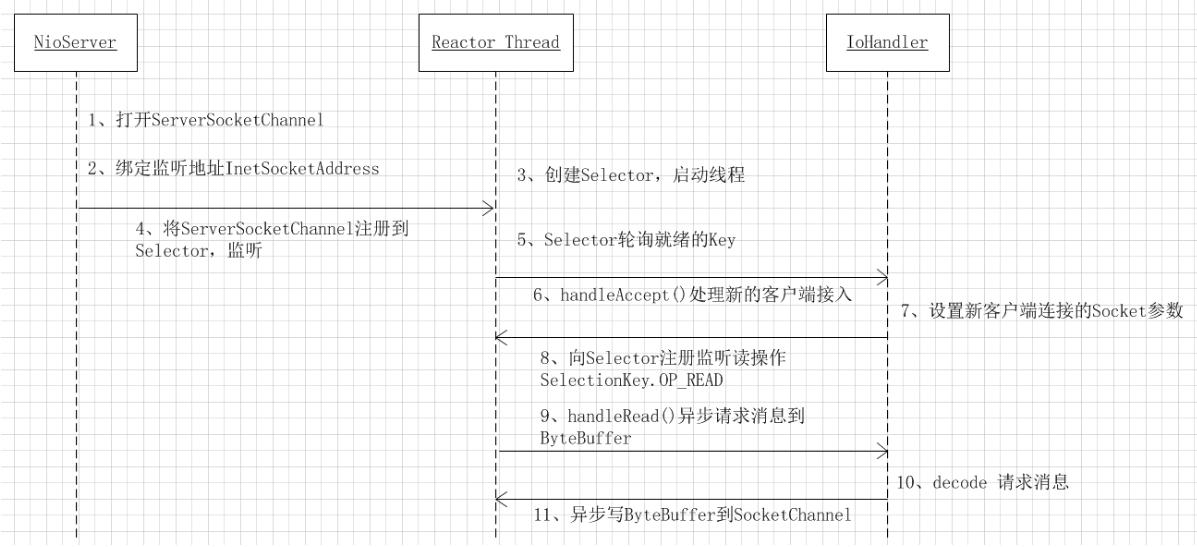
Selector 模式对于高并发,但是每个客户端传输的数据又不多的情况非常实用,比如聊天室. 但是对于
上面的示例只是写了一个最简单的通信Demo,但是不难发现NIO的API复杂度不是一般的高,很多方法的作用我已经注明了,具体的API大家可以查看JDK文档
此Demo并没有过多考虑高可用,数据读取不完整等各种情况,如果对NIO其理解不够深入的话很难写出即高效又高可用的代码来,我们只是通过此Demo来理解NIO,项目中的使用大家还都是选择Mina或Netty来开发。
本文作者:叩丁狼教育禹明明老师。