前言: 当了解了stm32通用bootloader的实现方法,今天给大家在bootloader的基础上,介绍app如何通过多种固件*载下**器实现OTA升级。
先看下演示视频,此视频演示了四种升级方式,分别是:
- 阿里云物联网平台OTA
- HTTP OTA
- Ymodem OTA
- 不用app,使用Bootloader中的Ymodem OTA
此项目硬件使用的是STM32F429开发板,代码全部使用RT-Thread Studio搭积木的方式实现,仅仅改动了几行代码,开发效率非常高。此项目的地址:https://gitee.com/Aladdin-Wang/RT-FOTA-STM32L431.git
使用到的软件包和组件:
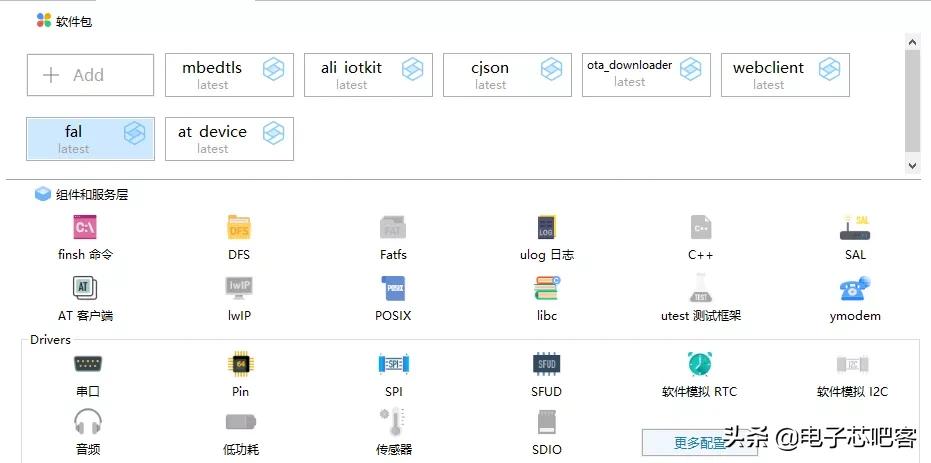
在这里插入图片描述
1.准备工作
1.1 新建工程
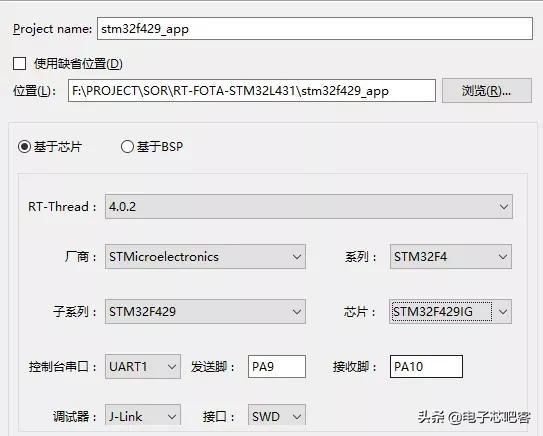
由于此项目使用的esp8266需要一个串口,我使用的是uart2,所以需要还需要配置uart2:
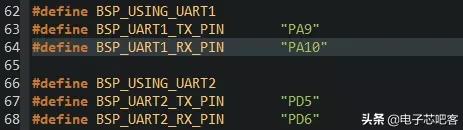
增加uart接收缓冲区大小:

1.2 打开fal和at device软件包
配置fal软件包

配置sfud组件
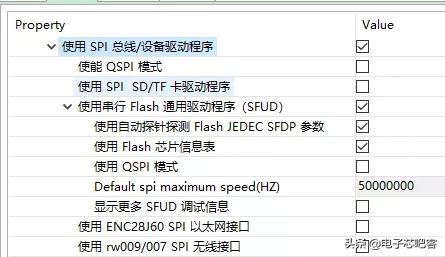
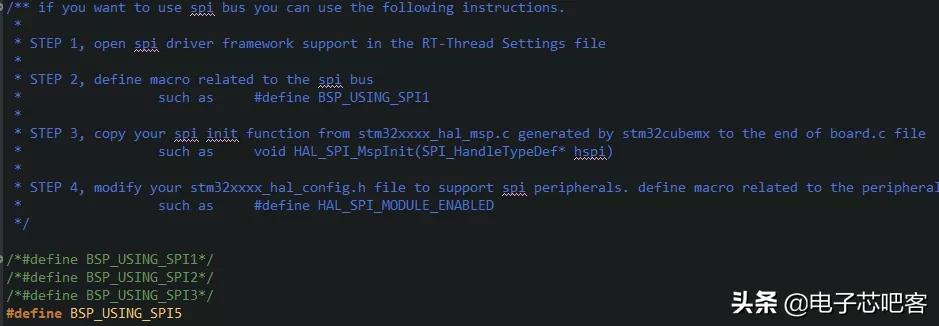
配置SPI
配置fal_cfg.h
 1#ifndef_FAL_CFG_H_
 2#define_FAL_CFG_H_
 3
 4#include<rtconfig.h>
 5#include<board.h>
 6
 7#defineFLASH_SIZE_GRANULARITY_16K(4*16*1024)
 8#defineFLASH_SIZE_GRANULARITY_64K(64*1024)
 9#defineFLASH_SIZE_GRANULARITY_128K(7*128*1024)
10
11#defineSTM32_FLASH_START_ADRESS_16KSTM32_FLASH_START_ADRESS
12#defineSTM32_FLASH_START_ADRESS_64K(STM32_FLASH_START_ADRESS_16K+FLASH_SIZE_GRANULARITY_16K)
13#defineSTM32_FLASH_START_ADRESS_128K(STM32_FLASH_START_ADRESS_64K+FLASH_SIZE_GRANULARITY_64K)
14/*=====================FlashdeviceConfiguration=========================*/
15externconststructfal_flash_devstm32_onchip_flash_16k;
16externconststructfal_flash_devstm32_onchip_flash_64k;
17externconststructfal_flash_devstm32_onchip_flash_128k;
18externstructfal_flash_devnor_flash0;
19
20/*flashdevicetable*/
21#defineFAL_FLASH_DEV_TABLE\
22{\
23&stm32_onchip_flash_16k,\
24&stm32_onchip_flash_64k,\
25&stm32_onchip_flash_128k,\
26&nor_flash0,\
27}
28/*======================PartitionConfiguration==========================*/
29#ifdefFAL_PART_HAS_TABLE_CFG
30/*partitiontable*/
31#defineFAL_PART_TABLE\
32{\
33{FAL_PART_MAGIC_WROD,"bootloader","onchip_flash_16k",0,FLASH_SIZE_GRANULARITY_16K,0},\
34{FAL_PART_MAGIC_WROD,"param","onchip_flash_64k",0,FLASH_SIZE_GRANULARITY_64K,0},\
35{FAL_PART_MAGIC_WROD,"app","onchip_flash_128k",0,FLASH_SIZE_GRANULARITY_128K,0},\
36{FAL_PART_MAGIC_WROD,"ef","W25Q128",0,1024*1024,0},\
37{FAL_PART_MAGIC_WROD,"download","W25Q128",1024*1024,512*1024,0},\
38{FAL_PART_MAGIC_WROD,"factory","W25Q128",(1024+512)*1024,512*1024,0},\
39}
40#endif/*FAL_PART_HAS_TABLE_CFG*/
41
42#endif/*_FAL_CFG_H_*/
初始化spi flash和fal软件包
 1#include<rtthread.h>
 2#include"spi_flash.h"
 3#include"spi_flash_sfud.h"
 4#include"drv_spi.h"
 5
 6#ifdefined(RT_USING_SFUD)
 7staticintrt_hw_spi_flash_init(void)
 8{
 9__HAL_RCC_GPIOF_CLK_ENABLE();
10rt_hw_spi_device_attach("spi5","spi50",GPIOF,GPIO_PIN_6);
11
12if(RT_NULL==rt_sfud_flash_probe("W25Q128","spi50"))
13{
14return-RT_ERROR;
15}
16
17returnRT_EOK;
18}
19INIT_COMPONENT_EXPORT(rt_hw_spi_flash_init);
20#endif
1intfs_init(void)
2{
3/*partitioninitialized*/
4fal_init();
5return0;
6}
7INIT_ENV_EXPORT(fs_init);
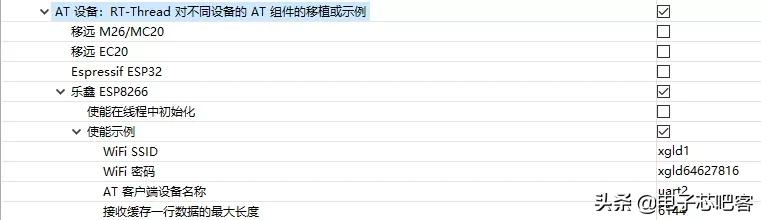
配置at device软件包
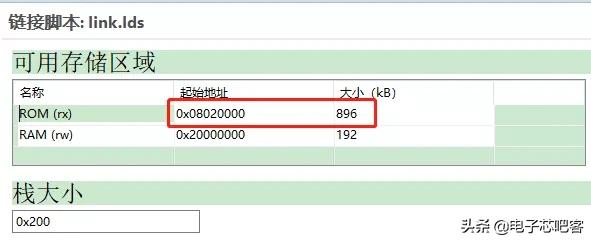
1.3 配置中断重定向
 1/**
 2*Functionota_app_vtor_reconfig
 3*DescriptionSetVectorTablebaselocationtothestartaddrofapp(RT_APP_PART_ADDR).
 4*/
 5staticintota_app_vtor_reconfig(void)
 6{
 7#defineNVIC_VTOR_MASK0x3FFFFF80
 8/*SettheVectorTablebaselocationbyuserapplicationfirmwaredefinition*/
 9SCB->VTOR=0x8020000&NVIC_VTOR_MASK;
10
11return0;
12}
13INIT_BOARD_EXPORT(ota_app_vtor_reconfig);
烧录bootloader: bootloader的制作方法请参考官方的教程https://www.rt-thread.org/document/site/application-note/system/rtboot/an0028-rtboot/
2.阿里云物联网平台OTA
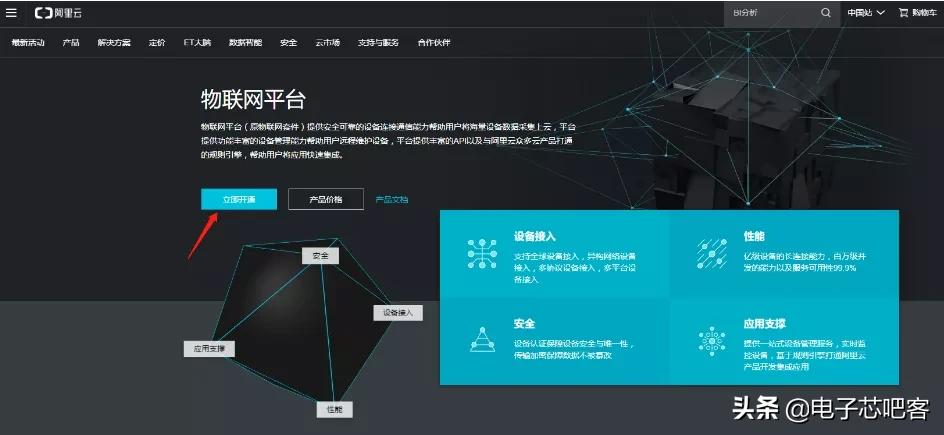
注册 LinkPlatform 平台
创建产品



产品详情:
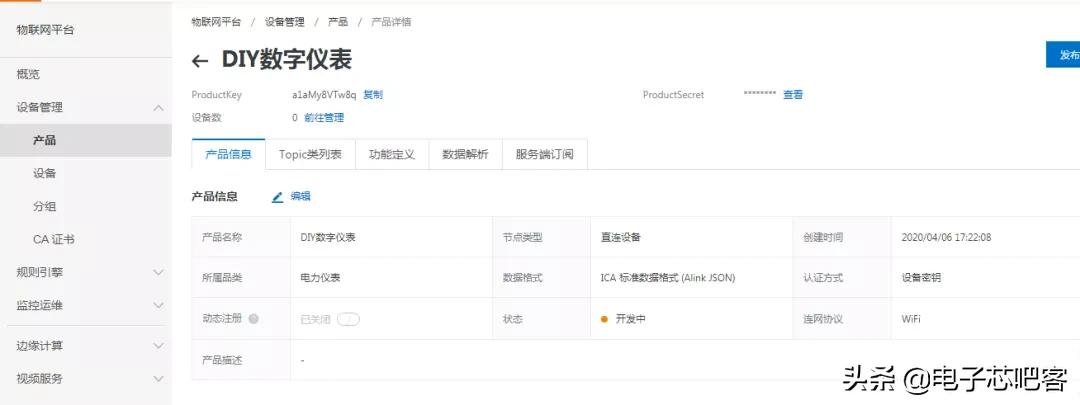
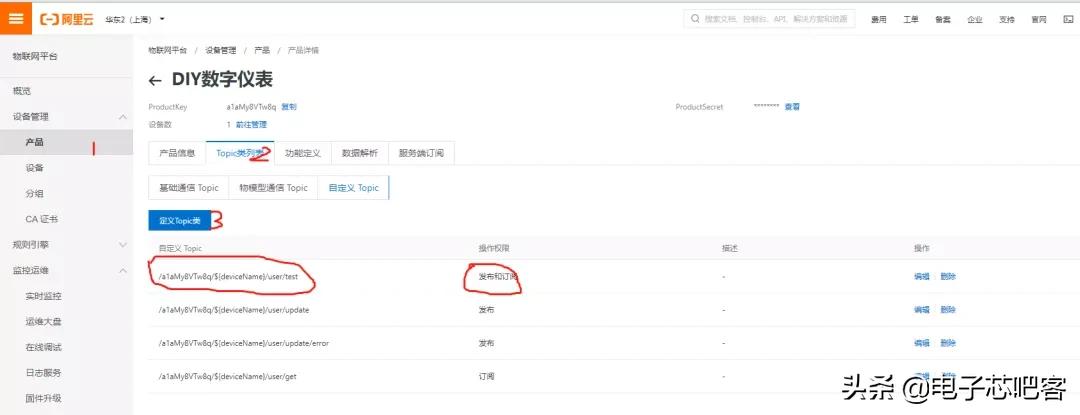
添加设备

添加自定义Topic
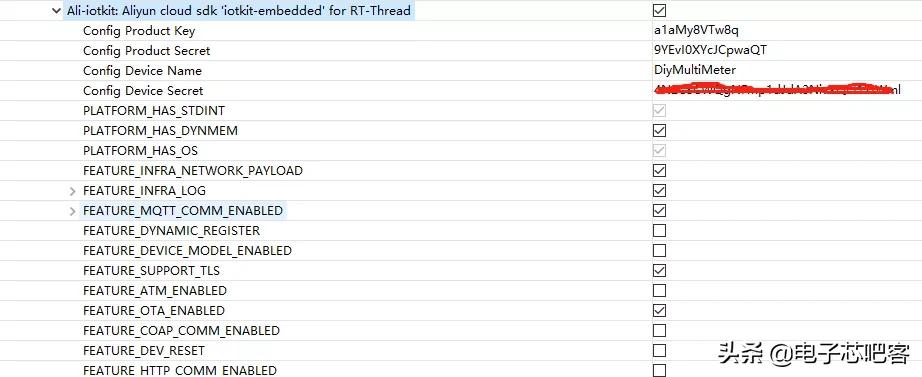
配置ali iotkit软件包 将刚才新建的阿里云设备信息填写到配置信息里:
将软件包的示例mqtt-example.c和ota_mqtt-example.c拷贝到applications目录备用

配置mbedtls软件包
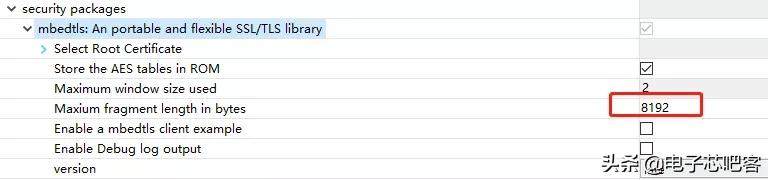
更改ota_mqtt-example.c中的部分代码:
  1staticint_ota_mqtt_client(void)
  2{
  3#defineOTA_BUF_LEN(16385)
  4#defineDEFAULT_DOWNLOAD_PART"download"
  5intrc=0,ota_over=0;
  6void*pclient=NULL,*h_ota=NULL;
  7iotx_conn_info_ptpconn_info;
  8iotx_mqtt_param_tmqtt_params;
  9
 10//FILE*fp;
 11staticcharbuf_ota[OTA_BUF_LEN];
 12conststructfal_partition*dl_part=RT_NULL;
 13
 14//if(NULL==(fp=fopen("ota.bin","wb+"))){
 15//EXAMPLE_TRACE("openfilefailed");
 16//gotodo_exit;
 17//}
 18
 19/**<getdeviceinfo*/
 20HAL_GetProductKey(g_product_key);
 21HAL_GetDeviceName(g_device_name);
 22HAL_GetDeviceSecret(g_device_secret);
 23/**<end*/
 24
 25/*DeviceAUTH*/
 26if(0!=IOT_SetupConnInfo(g_product_key,g_device_name,g_device_secret,(void**)&pconn_info)){
 27EXAMPLE_TRACE("AUTHrequestfailed!");
 28rc=-1;
 29gotodo_exit;
 30}
 31
 32/*InitializeMQTTparameter*/
 33memset(&mqtt_params,0x0,sizeof(mqtt_params));
 34
 35mqtt_params.port=pconn_info->port;
 36mqtt_params.host=pconn_info->host_name;
 37mqtt_params.client_id=pconn_info->client_id;
 38mqtt_params.username=pconn_info->username;
 39mqtt_params.password=pconn_info->password;
 40mqtt_params.pub_key=pconn_info->pub_key;
 41
 42mqtt_params.request_timeout_ms=2000;
 43mqtt_params.clean_session=0;
 44mqtt_params.keepalive_interval_ms=60000;
 45mqtt_params.read_buf_size=OTA_MQTT_MSGLEN;
 46mqtt_params.write_buf_size=OTA_MQTT_MSGLEN;
 47
 48mqtt_params.handle_event.h_fp=event_handle;
 49mqtt_params.handle_event.pcontext=NULL;
 50
 51/*ConstructaMQTTclientwithspecifyparameter*/
 52pclient=IOT_MQTT_Construct(&mqtt_params);
 53if(NULL==pclient){
 54EXAMPLE_TRACE("MQTTconstructfailed");
 55rc=-1;
 56gotodo_exit;
 57}
 58h_ota=IOT_OTA_Init(g_product_key,g_device_name,pclient);
 59if(NULL==h_ota){
 60rc=-1;
 61EXAMPLE_TRACE("initializeOTAfailed");
 62gotodo_exit;
 63}
 64
 65
 66do{
 67uint32_tfirmware_valid;
 68
 69EXAMPLE_TRACE("waitotaupgradecommand....");
 70
 71/*handletheMQTTpacketreceivedfromTCPorSSLconnection*/
 72IOT_MQTT_Yield(pclient,200);
 73
 74if(IOT_OTA_IsFetching(h_ota)){
 75uint32_tlast_percent=0,percent=0;
 76charmd5sum[33];
 77charversion[128]={0};
 78uint32_tlen,size_downloaded,size_file;
 79IOT_OTA_Ioctl(h_ota,IOT_OTAG_FILE_SIZE,&size_file,4);
 80/*Getdownloadpartitioninformationanderasedownloadpartitiondata*/
 81if((dl_part=fal_partition_find(DEFAULT_DOWNLOAD_PART))==RT_NULL)
 82{
 83LOG_E("Firmwaredownloadfailed!Partition(%s)finderror!","download");
 84rc=-1;
 85gotodo_exit;
 86}
 87
 88LOG_I("Starteraseflash(%s)partition!",dl_part->name);
 89
 90if(fal_partition_erase(dl_part,0,size_file)<0)
 91{
 92LOG_E("Firmwaredownloadfailed!Partition(%s)eraseerror!",dl_part->name);
 93rc=-1;
 94gotodo_exit;
 95}
 96LOG_I("Eraseflash(%s)partitionsuccess!",dl_part->name);
 97
 98rt_uint32_tcontent_pos=0,content_write_sz;
 99
100do{
101
102len=IOT_OTA_FetchYield(h_ota,buf_ota,OTA_BUF_LEN,1);
103if(len>0){
104content_write_sz=fal_partition_write(dl_part,content_pos,(uint8_t*)buf_ota,len);
105if(content_write_sz!=len)
106{
107LOG_I("WriteOTAdatatofilefailed");
108
109IOT_OTA_ReportProgress(h_ota,IOT_OTAP_BURN_FAILED,RT_NULL);
110
111gotodo_exit;
112}
113else
114{
115content_pos=content_pos+len;
116LOG_I("receive%dbytes,totalrecieve:%dbytes",content_pos,size_file);
117}
118}else{
119IOT_OTA_ReportProgress(h_ota,IOT_OTAP_FETCH_FAILED,NULL);
120EXAMPLE_TRACE("otafetchfail");
121}
122
123/*getOTAinformation*/
124IOT_OTA_Ioctl(h_ota,IOT_OTAG_FETCHED_SIZE,&size_downloaded,4);
125IOT_OTA_Ioctl(h_ota,IOT_OTAG_FILE_SIZE,&size_file,4);
126
127last_percent=percent;
128percent=(size_downloaded*100)/size_file;
129if(percent-last_percent>0){
130IOT_OTA_ReportProgress(h_ota,percent,NULL);
131}
132IOT_MQTT_Yield(pclient,100);
133}while(!IOT_OTA_IsFetchFinish(h_ota));
134
135IOT_OTA_Ioctl(h_ota,IOT_OTAG_MD5SUM,md5sum,33);
136IOT_OTA_Ioctl(h_ota,IOT_OTAG_VERSION,version,128);
137IOT_OTA_Ioctl(h_ota,IOT_OTAG_CHECK_FIRMWARE,&firmware_valid,4);
138if(0==firmware_valid){
139EXAMPLE_TRACE("Thefirmwareisinvalid");
140}else{
141EXAMPLE_TRACE("Thefirmwareisvalid");
142IOT_OTA_ReportVersion(h_ota,version);
143
144LOG_I("Downloadfirmwaretoflashsuccess.");
145LOG_I("Systemnowwillrestart...");
146
147HAL_SleepMs(1000);
148
149/*Resetthedevice,Startnewfirmware*/
150externvoidrt_hw_cpu_reset(void);
151rt_hw_cpu_reset();
152}
153
154ota_over=1;
155}
156HAL_SleepMs(2000);
157}while(!ota_over);
158
159HAL_SleepMs(1000);
160
161do_exit:
162
163if(NULL!=h_ota){
164IOT_OTA_Deinit(h_ota);
165}
166
167if(NULL!=pclient){
168IOT_MQTT_Destroy(&pclient);
169}
170
171returnrc;
172}
编译工程,将bin文件上传到阿里云:阿里云不支持rbl格式的文件,直接将rt_ota_packaging_tool生成的rbl文件后缀改为bin,上传即可。

最后使用ali_ota_sample命令升级:

3.HTTP OTA和Ymodem OTA
配置ota_downloader软件包

如果暂时没有自己的服务器,可以使用MyWebServer进行测试:
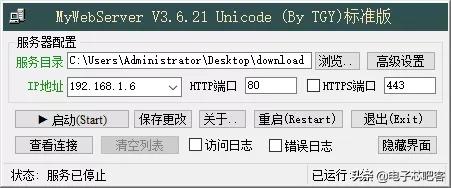
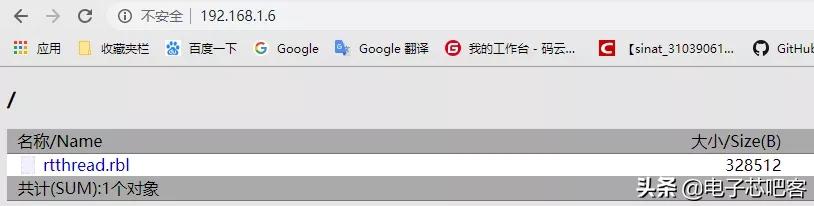
配置完MyWebServer,可以打开浏览器输入IP地址查看:
使用http_ota命令进行http_ota升级:

使用ymodem_ota命令进行ymodem_ota升级:

4.不使用APP进行升级
rt-fota集成了ymodem_ota,上电短按恢复出厂设置按钮即可进入rt-fota命令行模式,通过ymodem_ota命令即可进行升级:
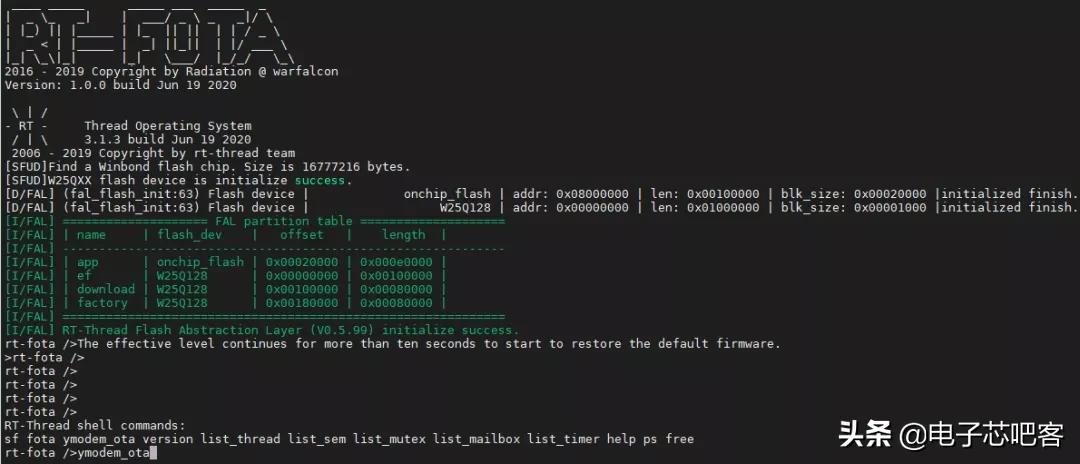
更多干货内容只需要你关注电子芯吧客微信公众号
声明:本文系网络转载,版权归原作者所有。