上一节我们讲到如何开发微信公众平台的菜单选择,已经实现了订阅用户的事件推送开发,但是里面提到的几个功能,比如是人脸识别、周公解梦、IMEI查询的接口,我们都还没有接入,如果对微信公众号开发感兴趣,欢迎看会之前的文章,也欢迎订阅我的头条号:一点热,yeehot.com
上一节快速入口
springmvc开发微信公众号用户关注后自动回复数字菜单
那么我们今天要说的,如何使用springmvc+okhttp+微信公众号+face++开发一款人脸识别的生活应用。
其实今天的课程的难点不是很多,主要是进行http访问,这个和我们之前接入的微信机器人的原理一样。
开始我们的课程,我们这个首先要做的是在face++人脸识别的官网开通一个账户,我这里提供一下官网的地址http://www.faceplusplus.com.cn/,其实我们也可以自己开发人脸识别的程序,如果有兴趣,大家也可以研究一下的,目前很多人脸识别的东西都是使用opencv来识别的,不过对于java的开发者来说,可能需要懂得C++的代码才行。
申请这个步骤我就不做介绍了,申请完毕后,可以在我们的应用里面拿到应用key和秘钥,这个我们在下一步会用到。
人脸识别的接口文档:
http://www.faceplusplus.com.cn/detection_detect/
输入的参数只有几个,应用key和秘钥,还有图片的URL,识别的属性。
可以使用post和get传值
http://apicn.faceplusplus.com/v2/detection/detect?api_key=YOUR_API_KEY&api_secret=YOUR_API_SECRET&url=http%3A%2F%2Ffaceplusplus.com%2Fstatic%2Fimg%2Fdemo%2F1.jpg&attribute=glass,pose,gender,age,race,smiling
我们这里是在前几章节项目的基础接入我们的人脸识别,如果对这些不是很了解,建议看回之前的文章。
首先,我们需要*载下**okhttp的包,我这里以maven的安装方式为例,在pom.xml添加
<!-- https://mvnrepository.com/artifact/com.squareup.okhttp/okhttp -->
<dependency>
<groupId>com.squareup.okhttp</groupId>
<artifactId>okhttp</artifactId>
<version>2.7.5</version>
</dependency>
<dependency>
<groupId>jdom</groupId>
<artifactId>jdom</artifactId>
<version>1.0</version>
</dependency>
接着,我们可以使用OKhttp写一个获取人脸识别结果的方法FaceDetect,参数为图片地址,然后把我们的key和秘钥填入下面的地址,最后通过get的方式获取数据。
public String FaceDetect(String picurl) throws JSONException {
Map<String, String> param = new HashMap<String, String>();
param.put("api_key", "你的应用KEY");
param.put("api_secret", "你的秘钥");
param.put("url", picurl);
param.put("attribute", "glass,pose,gender,age,race,smiling");
OkHttpClient client = new OkHttpClient();
StringBuilder sb=new StringBuilder();
int keylenght=0;
for (String key : param.keySet()) {
if (keylenght<param.size()-1){
sb.append(key).append("=").append(param.get(key)).append("&");
}
else {
sb.append(key).append("=").append(param.get(key));
}
keylenght++;
}
String result="无法识别你的信息";
String url="http://apicn.faceplusplus.com/v2/detection/detect?"+sb.toString();
System.out.print(url);
Request request = new Request.Builder()
.url(url)
.get()
.build();
Response response = null;
try {
response = client.newCall(request)*ex.e**cute();
} catch (IOException e) {
e.printStackTrace();
}
if (response != null) {
try {
result= response.body().string();
response.body().close();
} catch (IOException e) {
e.printStackTrace();
}
} else {
}
System.out.print(result);
return result;
}
返回的结果是一个json的数据
{
"face": [
{
"attribute": {
"age": {
"range": 9,
"value": 20
},
"gender": {
"confidence": 99.3203,
"value": "Male"
},
"glass": {
"confidence": 99.6884,
"value": "None"
},
"pose": {
"pitch_angle": {
"value": -5e-06
},
"roll_angle": {
"value": 3.56087
},
"yaw_angle": {
"value": 2.356649
}
},
"race": {
"confidence": 99.7146,
"value": "White"
},
"smiling": {
"value": 21.1957
}
},
]
"img_height": 400,
"img_id": "58857f600ac52df0663aaad42bbd8c4d",
"img_width": 600,
"session_id": "87281ee9b10b434082f36f5476ed5780",
"url": "http://www.faceplusplus.com.cn/wp-content/themes/faceplusplus/assets/img/demo/9.jpg"
}
在我们的项目的验证微信post数据的入口的方法进行处理,对图片的消息进行人脸识别处理,识别结果返回后,我们就解析一下JSON数据,然后把这些数据拼接成微信可识别的XML的cdata数据,由于我这里已经封装好一个文本类,所有看起来比较简单。如果对这个类不懂可以看会我之前头条好一点热的文章,这里是将接受到的信息
else if (messagetype.equals("image")){
ImageMessage RecivetextMessage=new ImageMessage(postmessage);
String result="查无结果";
StringBuffer buffer = new StringBuffer();
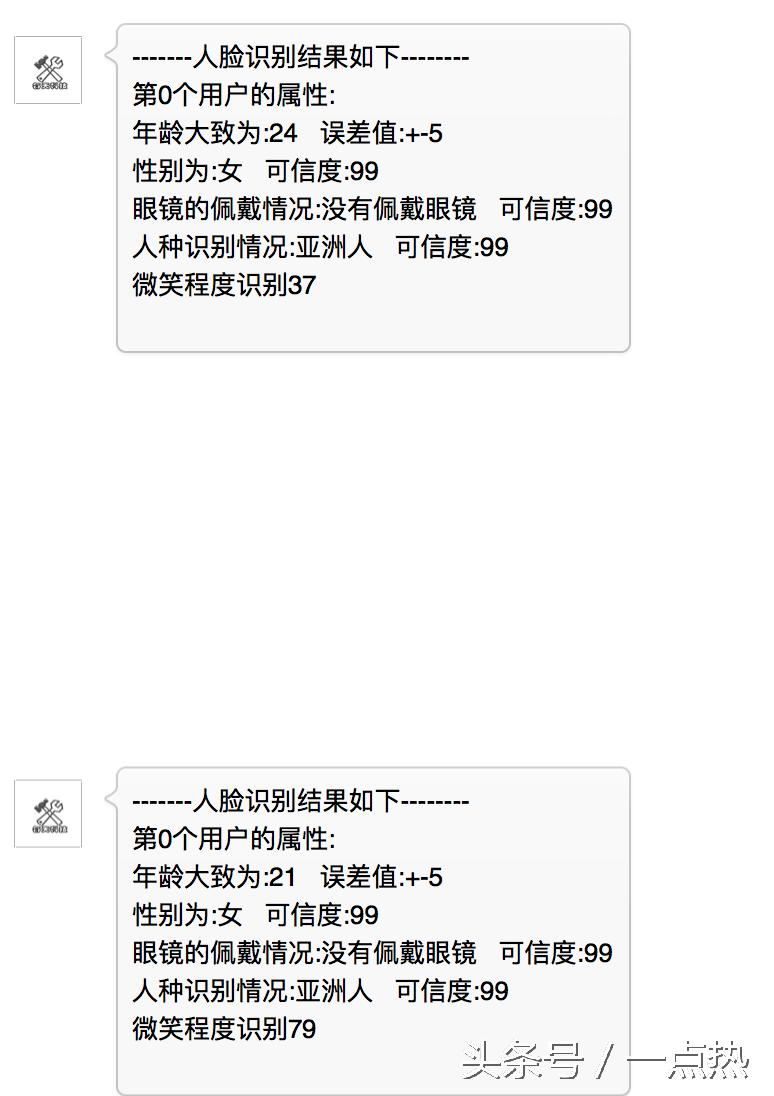
buffer.append("-------人脸识别结果如下--------").append("\n");
try {
result=FaceDetect(RecivetextMessage.getPicUrl());
if (result.contains("face")){
JSONObject reobject=new JSONObject(result);
JSONArray jsonArray=reobject.getJSONArray("face");
for (int i=0;i<jsonArray.length();i++){
JSONObject jsonObject=jsonArray.getJSONObject(i);
JSONObject attributeObject=jsonObject.getJSONObject("attribute");
buffer.append("第"+i+"个").append("用户的属性:").append("\n");
buffer.append("年龄大致为:").append(attributeObject.getJSONObject("age").getString("value")).append(" 误差值:+-").append(attributeObject.getJSONObject("age").getInt("range")).append("\n");
String gendervalue=attributeObject.getJSONObject("gender").getString("value");
String genderresult="无法识别";
if (gendervalue.equals("Male"))
{
genderresult="男";
}
else if (gendervalue.equals("Female")){
genderresult="女";
}
buffer.append("性别为:"+genderresult).append(" 可信度:").append(attributeObject.getJSONObject("gender").getInt("confidence")).append("\n");
String glassvalue=attributeObject.getJSONObject("glass").getString("value");
String glassresult="无法识别";
if (glassvalue.equals("None"))
{
glassresult="没有佩戴眼镜";
}
else
{
glassresult="佩戴眼镜";
}
buffer.append("眼镜的佩戴情况:"+glassresult).append(" 可信度:").append(attributeObject.getJSONObject("glass").getInt("confidence")).append("\n");
String racevalue=attributeObject.getJSONObject("race").getString("value");
String raceresult="无法识别";
if (racevalue.equals("White"))
{
raceresult="白种人";
}
else if (racevalue.equals("Asian")){
raceresult="亚洲人";
}
else if (racevalue.equals("Black")){
raceresult="黑色人种";
}
buffer.append("人种识别情况:"+raceresult).append(" 可信度:").append(attributeObject.getJSONObject("race").getInt("confidence")).append("\n");
buffer.append("微笑程度识别").append(attributeObject.getJSONObject("smiling").getInt("value")).append("\n");
}
}
} catch (JSONException e) {
e.printStackTrace();
}
YhTextMessage sendMessage=new YhTextMessage();
sendMessage.setContent(buffer.toString());
sendMessage.setToUserName(RecivetextMessage.getFromUserName());
sendMessage.setMsgType("text");
sendMessage.setFromUserName(RecivetextMessage.getToUserName());
sendMessage.setCreateTime(String.valueOf(System.currentTimeMillis()));
responsemessage=sendMessage.MessageToMap();
}
那么我也把整个controller的代码发一下,其它的类大家可以看会之前的,阅读性真的不好
package com.yeehot.controller;
import com.squareup.okhttp.*;
import com.yeehot.model.AccessToken;
import com.yeehot.model.ImageMessage;
import com.yeehot.model.SubscribeMessage;
import com.yeehot.model.YhTextMessage;
import com.yeehot.tools.XmlParseTool;
import org.jdom.JDOMException;
import org.json.JSONArray;
import org.json.JSONException;
import org.json.JSONObject;
import org.springframework.stereotype.Controller;
import org.springframework.web.bind.annotation.RequestMapping;
import org.springframework.web.bind.annotation.RequestMethod;
import org.springframework.web.bind.annotation.ResponseBody;
import javax.servlet.http.HttpServletRequest;
import java.io.BufferedReader;
import java.io.IOException;
import java.io.UnsupportedEncodingException;
import java.security.MessageDigest;
import java.security.NoSuchAlgorithmException;
import java.util.*;
import static org.springframework.data.repository.init.ResourceReader.Type.JSON;
/**
* Created by yeehot on 16/7/26.
*/
@Controller
public class WeixinController {
@ResponseBody
@RequestMapping(value = "/wx/developer", produces = "text/plain;charset=utf-8")
public String index(HttpServletRequest request) {
//
String method=request.getMethod();
System.out.print(method+"?");
if (method.equals("GET")) {
Map<String, String> params = new HashMap<String, String>();
Map requestParams = request.getParameterMap();
for (Iterator iter = requestParams.keySet().iterator(); iter.hasNext(); ) {
String name = (String) iter.next();
String[] values = (String[]) requestParams.get(name);
String valueStr = "";
for (int i = 0; i < values.length; i++) {
valueStr = (i == values.length - 1) ? valueStr + values[i]
: valueStr + values[i] + ",";
}
params.put(name, valueStr);
}
String signature = request.getParameter("signature");
String timestamp = request.getParameter("timestamp");
String nonce = request.getParameter("nonce");
String echostr = request.getParameter("echostr");
String token = "wx233fadfdfdasf3dfdfafdfaaaaa232";
String sign = digest(params, token);
if (sign.equals(signature)) {
return echostr;
} else {
return "";
}
}
else {
Map<String,String> postmessage=new HashMap<String, String>();
Map<String,String> responsemessage=new HashMap<String, String>();
StringBuffer jb = new StringBuffer();
String line = null;
BufferedReader reader = null;
try {
reader = request.getReader();
while ((line = reader.readLine()) != null)
{
jb.append(line);
}
postmessage=XmlParseTool.doXMLParse(jb.toString());
String messagetype=postmessage.get("MsgType");
if (messagetype.equals("text"))
{
YhTextMessage RecivetextMessage=new YhTextMessage(postmessage);
if (RecivetextMessage.getContent().equals("1")){
YhTextMessage sendMessage=new YhTextMessage();
sendMessage.setContent("你好,请上传一张人脸图片");
sendMessage.setToUserName(RecivetextMessage.getFromUserName());
sendMessage.setMsgType(RecivetextMessage.getMsgType());
sendMessage.setFromUserName(RecivetextMessage.getToUserName());
sendMessage.setCreateTime(String.valueOf(System.currentTimeMillis()));
responsemessage=sendMessage.MessageToMap();
}
else if (RecivetextMessage.getContent().equals("2")){
YhTextMessage sendMessage=new YhTextMessage();
sendMessage.setContent("你好,周公解梦将在下两节实现");
sendMessage.setToUserName(RecivetextMessage.getFromUserName());
sendMessage.setMsgType(RecivetextMessage.getMsgType());
sendMessage.setFromUserName(RecivetextMessage.getToUserName());
sendMessage.setCreateTime(String.valueOf(System.currentTimeMillis()));
responsemessage=sendMessage.MessageToMap();
}
else if (RecivetextMessage.getContent().equals("3")){
YhTextMessage sendMessage=new YhTextMessage();
sendMessage.setContent("你好,八字算命将在下两节实现");
sendMessage.setToUserName(RecivetextMessage.getFromUserName());
sendMessage.setMsgType(RecivetextMessage.getMsgType());
sendMessage.setFromUserName(RecivetextMessage.getToUserName());
sendMessage.setCreateTime(String.valueOf(System.currentTimeMillis()));
responsemessage=sendMessage.MessageToMap();
}
else if (RecivetextMessage.getContent().equals("4")){
YhTextMessage sendMessage=new YhTextMessage();
sendMessage.setContent("你好,IMEI查询将在下两节实现");
sendMessage.setToUserName(RecivetextMessage.getFromUserName());
sendMessage.setMsgType(RecivetextMessage.getMsgType());
sendMessage.setFromUserName(RecivetextMessage.getToUserName());
sendMessage.setCreateTime(String.valueOf(System.currentTimeMillis()));
responsemessage=sendMessage.MessageToMap();
}
else if (RecivetextMessage.getContent().equals("5")){
YhTextMessage sendMessage=new YhTextMessage();
sendMessage.setContent("你好,DOTA英雄资料将在下两节实现");
sendMessage.setToUserName(RecivetextMessage.getFromUserName());
sendMessage.setMsgType(RecivetextMessage.getMsgType());
sendMessage.setFromUserName(RecivetextMessage.getToUserName());
sendMessage.setCreateTime(String.valueOf(System.currentTimeMillis()));
responsemessage=sendMessage.MessageToMap();
}
else if (RecivetextMessage.getContent().equals("6")){
YhTextMessage sendMessage=new YhTextMessage();
sendMessage.setContent("你好,我的网站www.yeehot.com");
sendMessage.setToUserName(RecivetextMessage.getFromUserName());
sendMessage.setMsgType(RecivetextMessage.getMsgType());
sendMessage.setFromUserName(RecivetextMessage.getToUserName());
sendMessage.setCreateTime(String.valueOf(System.currentTimeMillis()));
responsemessage=sendMessage.MessageToMap();
}
else if (RecivetextMessage.getContent().equals("7")){
YhTextMessage sendMessage=new YhTextMessage();
sendMessage.setContent("你好,请留下你的邮箱,我到时发送给你");
sendMessage.setToUserName(RecivetextMessage.getFromUserName());
sendMessage.setMsgType(RecivetextMessage.getMsgType());
sendMessage.setFromUserName(RecivetextMessage.getToUserName());
sendMessage.setCreateTime(String.valueOf(System.currentTimeMillis()));
responsemessage=sendMessage.MessageToMap();
}
else if (RecivetextMessage.getContent().equals("8")){
YhTextMessage sendMessage=new YhTextMessage();
sendMessage.setContent("你好,随便输入一些文字,会有机器人回复你的");
sendMessage.setToUserName(RecivetextMessage.getFromUserName());
sendMessage.setMsgType(RecivetextMessage.getMsgType());
sendMessage.setFromUserName(RecivetextMessage.getToUserName());
sendMessage.setCreateTime(String.valueOf(System.currentTimeMillis()));
responsemessage=sendMessage.MessageToMap();
}
else if (RecivetextMessage.getContent().equals("图片")){
ImageMessage imageMessage=new ImageMessage();
imageMessage.setFromUserName(RecivetextMessage.getToUserName());
imageMessage.setCreateTime(String.valueOf(System.currentTimeMillis()));
imageMessage.setToUserName(RecivetextMessage.getFromUserName());
imageMessage.setMsgType("image");
// imageMessage.setMsgId(System.currentTimeMillis()+"00");
imageMessage.setMediaId("nEQXRooIfTR-yNXQK0mUnoyZs7gQ2_agbhY2UHr1jLATlCqLpPtVJqJWFftV8d92");
responsemessage=imageMessage.MessageToMap();
}
else {
YhTextMessage sendMessage=new YhTextMessage();
// sendMessage.setContent("你好,我的头条号:一点热");
sendMessage.setContent(RecivetextMessage.getContent());//用于图灵机器人测试
sendMessage.setToUserName(RecivetextMessage.getFromUserName());
sendMessage.setMsgType(RecivetextMessage.getMsgType());
sendMessage.setFromUserName(RecivetextMessage.getToUserName());
sendMessage.setCreateTime(String.valueOf(System.currentTimeMillis()));
try {
sendMessage=UseTulingMessage(sendMessage);
} catch (JSONException e) {
e.printStackTrace();
}
responsemessage=sendMessage.MessageToMap();
}
}
else if (messagetype.equals("image")){
ImageMessage RecivetextMessage=new ImageMessage(postmessage);
String result="查无结果";
StringBuffer buffer = new StringBuffer();
buffer.append("-------人脸识别结果如下--------").append("\n");
try {
result=FaceDetect(RecivetextMessage.getPicUrl());
if (result.contains("face")){
JSONObject reobject=new JSONObject(result);
JSONArray jsonArray=reobject.getJSONArray("face");
for (int i=0;i<jsonArray.length();i++){
JSONObject jsonObject=jsonArray.getJSONObject(i);
JSONObject attributeObject=jsonObject.getJSONObject("attribute");
buffer.append("第"+i+"个").append("用户的属性:").append("\n");
buffer.append("年龄大致为:").append(attributeObject.getJSONObject("age").getString("value")).append(" 误差值:+-").append(attributeObject.getJSONObject("age").getInt("range")).append("\n");
String gendervalue=attributeObject.getJSONObject("gender").getString("value");
String genderresult="无法识别";
if (gendervalue.equals("Male"))
{
genderresult="男";
}
else if (gendervalue.equals("Female")){
genderresult="女";
}
buffer.append("性别为:"+genderresult).append(" 可信度:").append(attributeObject.getJSONObject("gender").getInt("confidence")).append("\n");
String glassvalue=attributeObject.getJSONObject("glass").getString("value");
String glassresult="无法识别";
if (glassvalue.equals("None"))
{
glassresult="没有佩戴眼镜";
}
else
{
glassresult="佩戴眼镜";
}
buffer.append("眼镜的佩戴情况:"+glassresult).append(" 可信度:").append(attributeObject.getJSONObject("glass").getInt("confidence")).append("\n");
String racevalue=attributeObject.getJSONObject("race").getString("value");
String raceresult="无法识别";
if (racevalue.equals("White"))
{
raceresult="白种人";
}
else if (racevalue.equals("Asian")){
raceresult="亚洲人";
}
else if (racevalue.equals("Black")){
raceresult="黑色人种";
}
buffer.append("人种识别情况:"+raceresult).append(" 可信度:").append(attributeObject.getJSONObject("race").getInt("confidence")).append("\n");
buffer.append("微笑程度识别").append(attributeObject.getJSONObject("smiling").getInt("value")).append("\n");
}
}
} catch (JSONException e) {
e.printStackTrace();
}
YhTextMessage sendMessage=new YhTextMessage();
sendMessage.setContent(buffer.toString());
sendMessage.setToUserName(RecivetextMessage.getFromUserName());
sendMessage.setMsgType("text");
sendMessage.setFromUserName(RecivetextMessage.getToUserName());
sendMessage.setCreateTime(String.valueOf(System.currentTimeMillis()));
responsemessage=sendMessage.MessageToMap();
}
else if (messagetype.equals("event")){
String Events=postmessage.get("Event");
if (Events.equals("subscribe"))//用户订阅了我的公众号
{
SubscribeMessage ReciveMessage=new SubscribeMessage(postmessage);
YhTextMessage sendMessage=new YhTextMessage();
sendMessage.setContent(CreateMenu());//创建一个带数字序号的文本菜单
sendMessage.setToUserName(ReciveMessage.getFromUserName());
sendMessage.setMsgType("text");
sendMessage.setFromUserName(ReciveMessage.getToUserName());
sendMessage.setCreateTime(String.valueOf(System.currentTimeMillis()));
responsemessage=sendMessage.MessageToMap();
}
}
String info=XmlParseTool.RequestXml2StringByType(responsemessage);
System.out.print(info);
return info;
}
catch (JDOMException e) {
e.printStackTrace();
}
catch (IOException e) {
e.printStackTrace();
}
return "success";
}
}
public static String CreateMenu() {
StringBuffer buffer = new StringBuffer();
buffer.append("您好,欢迎关注我的公众号,每天科技,我是yeehot,请回复数字选择服务:").append("\n\n");
buffer.append("1 人脸识别").append("\n");
buffer.append("2 周公解梦").append("\n");
buffer.append("3 八字算命").append("\n");
buffer.append("4 IMEI查询").append("\n");
buffer.append("5 DOTA英雄资料").append("\n");
buffer.append("6 我的网站").append("\n");
buffer.append("7 获取源码").append("\n");
buffer.append("8 随便输入一些文字").append("\n\n");
return buffer.toString();
}
public static String digest(Map<String, String> params,String token) {
StringBuilder result = new StringBuilder();
List<String> keys = new ArrayList<String>();
keys.add(token);
keys.add(params.get("timestamp"));
keys.add(params.get("nonce"));
Collections.sort(keys);
for (Iterator<String> iterator = keys.iterator(); iterator.hasNext(); ) {
String key = iterator.next();
result.append(key);
}
System.out.println("sign="+result.toString());
String reuslt="";
try
{
MessageDigest crypt = MessageDigest.getInstance("SHA-1");
crypt.reset();
crypt.update(result.toString().getBytes("UTF-8"));
reuslt = byteToHex(crypt.digest());
}
catch (NoSuchAlgorithmException e)
{
e.printStackTrace();
}
catch (UnsupportedEncodingException e)
{
e.printStackTrace();
}
System.out.println("result="+reuslt);
return reuslt;
}
private static String byteToHex(final byte[] hash) {
Formatter formatter = new Formatter();
for (byte b : hash)
{
formatter.format("%02x", b);
}
String result = formatter.toString();
formatter.close();
return result;
}
public String FaceDetect(String picurl) throws JSONException {
Map<String, String> param = new HashMap<String, String>();
param.put("grant_type", "client_credential");
param.put("api_key", "你的face++的KEY");
param.put("api_secret", "你的秘钥");
param.put("url", picurl);
param.put("attribute", "glass,pose,gender,age,race,smiling");
OkHttpClient client = new OkHttpClient();
StringBuilder sb=new StringBuilder();
int keylenght=0;
for (String key : param.keySet()) {
if (keylenght<param.size()-1){
sb.append(key).append("=").append(param.get(key)).append("&");
}
else {
sb.append(key).append("=").append(param.get(key));
}
keylenght++;
}
String result="无法识别你的信息";
String url="http://apicn.faceplusplus.com/v2/detection/detect?"+sb.toString();
System.out.print(url);
Request request = new Request.Builder()
.url(url)
.get()
.build();
Response response = null;
try {
response = client.newCall(request)*ex.e**cute();
} catch (IOException e) {
e.printStackTrace();
}
if (response != null) {
try {
result= response.body().string();
response.body().close();
} catch (IOException e) {
e.printStackTrace();
}
} else {
}
System.out.print(result);
return result;
}
public YhTextMessage UseTulingMessage( YhTextMessage yhTextMessage) throws JSONException {
OkHttpClient okHttpClient = new OkHttpClient();
JSONObject jsonObject=new JSONObject();
jsonObject.put("key","你的图灵KEY");
jsonObject.put("info",yhTextMessage.getContent());
jsonObject.put("userid","0");
String recontent="查无该结果";
RequestBody requestBody = RequestBody.create(MediaType.parse("application/json; charset=utf-8"), jsonObject.toString());
//创建一个请求对象
Request request = new Request.Builder()
.url("http://www.tuling123.com/openapi/api")
.post(requestBody)
.build();
//发送请求获取响应
try {
Response response=okHttpClient.newCall(request)*ex.e**cute();
//判断请求是否成功
if(response.isSuccessful()){
recontent=response.body().string();
}
} catch (IOException e) {
e.printStackTrace();
}
if (recontent.contains("code")){
JSONObject rjsonobject=new JSONObject(recontent);
System.out.print("可以进入?");
int code=rjsonobject.getInt("code");
if (code==100000){
recontent=rjsonobject.getString("text");
}
else if (code==200000)
{
recontent=rjsonobject.getString("text")+"当前链接:"+rjsonobject.getString("url");
}
else if (code==302000)
{
recontent=rjsonobject.getString("text")+" ";
JSONArray jsonArray=rjsonobject.getJSONArray("list");
for (int i=0;i<jsonArray.length();i++){
recontent+=jsonArray.getJSONObject(i).getString("article")+"链接为:"+jsonArray.getJSONObject(i).getString("detailurl");
}
}
else if (code==308000)
{
recontent=rjsonobject.getString("text")+" ";
JSONArray jsonArray=rjsonobject.getJSONArray("list");
for (int i=0;i<jsonArray.length();i++){
recontent+=jsonArray.getJSONObject(i).getString("name")+"链接为:"+jsonArray.getJSONObject(i).getString("detailurl");
}
}
}
System.out.print(recontent);
yhTextMessage.setContent(recontent);
return yhTextMessage;
}
}
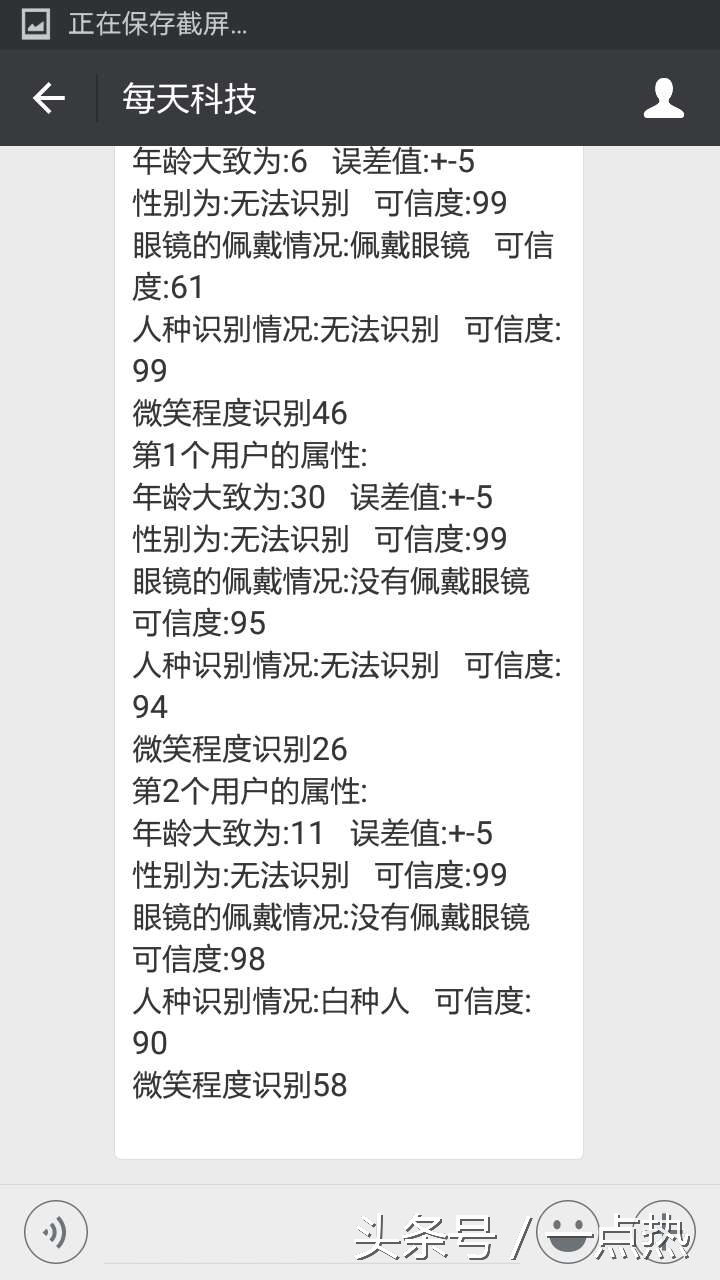
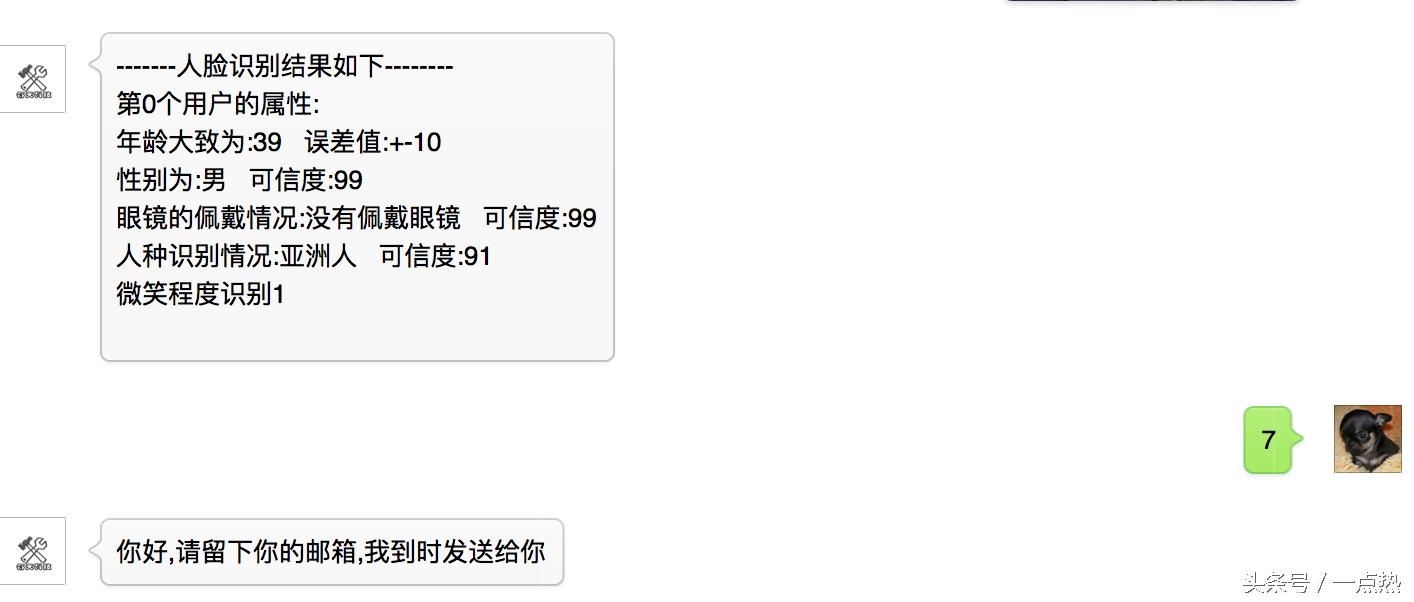
最后给一张运行的结果图大家吧,大家也可以自行测试。
今天就讲到这里,如果在这里看代码不够清晰的话,欢迎获取源码,毕竟代码越来越多了,我暂时不上传到网盘了。我等到完成所有的功能然后分享给大家,欢迎继续关注我的头条号:一点热,如果有什么问题,欢迎留言咨询,我看到之后会第一时间回复大家的。也欢迎收藏与转发,如果需要转载到其他网站,请与我联系。