知乎已经成为了爬虫的训练场,本文利用Python中的requests库,模拟登陆知乎,获取cookie,保存到本地,然后这个cookie作为登陆的凭证,登陆知乎的主页面,爬取知乎主页面上的问题和对应问题回答的摘要。

关于知乎验证码登陆的问题,用到了Python上一个重要的图片处理库PIL,如果不行,就把图片存到本地,手动输入。
爬取知乎的关键的部分:模拟登陆
通过对知乎登陆是的抓包,可以发现登陆知乎,需要post三个参数,一个是账号,一个是密码,一个是xrsf。
这个xrsf隐藏在表单里面,每次登陆的时候,应该是服务器随机产生一个字符串。所有,要模拟登陆的时候,必须要拿到xrsf。
用chrome (或者火狐 httpfox 抓包分析)的结果:

所以,必须要拿到xsrf的数值,注意这是一个动态变化的参数,每次都不一样。
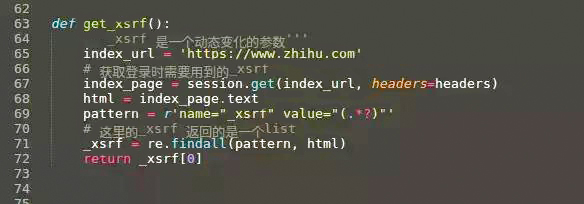
注意findall和find_all函数的区别。
拿到xsrf,下面就可以模拟登陆了。
使用requests库的session对象,建立一个会话的好处是,可以把同一个用户的不同请求联系起来,直到会话结束都会自动处理cookies。
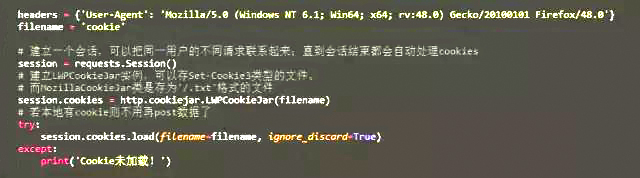
注意:cookies 是当前目录的一个文件,这个文件保存了知乎的cookie,如果是第一个登陆,那么当然是没有这个文件的,不能通过cookie文件来登陆。必须要输入密码。
def login(secret, account):
 # 通过输入的用户名判断是否是手机号
 if re.match(r"^1\d{10}$", account):
 print("手机号登录 \n")
 post_url = ’https://www.zhihu.com/login/phone_num’
 postdata = {
 ’_xsrf’: get_xsrf(),
 ’password’: secret,
 ’remember_me’: ’true’,
 ’phone_num’: account,
 }
 else:
 if "@" in account:
 print("邮箱登录 \n")
 else:
 print("你的账号输入有问题,请重新登录")
 return 0
 post_url = ’https://www.zhihu.com/login/email’
 postdata = {
 ’_xsrf’: get_xsrf(),
 ’password’: secret,
 ’remember_me’: ’true’,
 ’email’: account,
 }
 try:
 # 不需要验证码直接登录成功
 login_page = session.post(post_url, data=postdata, headers=headers)
 login_code = login_page.text
 print(login_page.status_code)
 print(login_code)
 except:
 # 需要输入验证码后才能登录成功
 postdata["captcha"] = get_captcha()
 login_page = session.post(post_url, data=postdata, headers=headers)
 login_code = eval(login_page.text)
 print(login_code[’msg’])
 session.cookies.save()
try:
 input = raw_input
except:
 pass
这是登陆的函数,通过login函数来登陆,post 自己的账号,密码和xrsf 到知乎登陆认证的页面上去,然后得到cookie,将cookie保存到当前目录下的文件里面。下次登陆的时候,直接读取这个cookie文件。
#LWP-Cookies-2.0
Set-Cookie3: cap_id="\"YWJkNTkxYzhiMGYwNDU2OGI4NDUxN2FlNzBmY2NlMTY=|1487052577|4aacd7a27b11a852e637262bb251d79c6cf4c8dc\""; path="/"; domain=".zhihu.com"; path_spec; expires="2026-03-16T14:45:12+00:00Z"; version=0
Set-Cookie3: l_cap_id="\"OGFmYTk3ZDA3YmJmNDQ4YThiNjFlZjU3NzQ5NjZjMTA=|1487052577|0f66a8f8d485bc85e500a121587780c7c8766faf\""; path="/"; domain=".zhihu.com"; path_spec; expires="2026-03-16T14:45:12+00:00Z"; version=0
Set-Cookie3: login="\"NmYxMmU0NWJmN2JlNDY2NGFhYzZiYWIxMzE5ZTZiMzU=|1487052597|a57652ef6e0bbbc9c4df0a8a0a59b559d4e20456\""; path="/"; domain=".zhihu.com"; path_spec; expires="2026-03-16T14:45:12+00:00Z"; version=0
Set-Cookie3: q_c1="ee29042649aa4f87969ed193acb6cb83|1487052577000|1487052577000"; path="/"; domain=".zhihu.com"; path_spec; expires="2026-03-16T14:45:12+00:00Z"; version=0
Set-Cookie3: z_c0="\"QUFCQTFCOGdBQUFYQUFBQVlRSlZUVFVzeWxoZzlNbTYtNkt0Qk1NV0JLUHZBV0N6NlNNQmZ3PT0=|1487052597|dcf272463c56dd6578d89e3ba543d46b44a22f68\""; path="/"; domain=".zhihu.com"; path_spec; expires="2026-03-16T14:45:12+00:00Z"; httponly=None; version=0
这是cookie文件的内容
以下是源码:
#!/usr/bin/env python
# -*- coding: utf-8 -*-
import requests
try:
 import cookielib
except:
 import http.cookiejar as cookielib
import re
import time
import os.path
try:
 from PIL import Image
except:
 pass
from bs4 import BeautifulSoup
# 构造 Request headers
agent = ’Mozilla/5.0 (Windows NT 5.1; rv:33.0) Gecko/20100101 Firefox/33.0’
headers = {
 "Host": "www.zhihu.com",
 "Referer": "https://www.zhihu.com/",
 ’User-Agent’: agent
}
# 使用登录cookie信息
session = requests.session()
session.cookies = cookielib.LWPCookieJar(filename=’cookies’)
try:
 session.cookies.load(ignore_discard=True)
except:
 print("Cookie 未能加载")
def get_xsrf():
 ’’’_xsrf 是一个动态变化的参数’’’
 index_url = ’https://www.zhihu.com’
 # 获取登录时需要用到的_xsrf
 index_page = session.get(index_url, headers=headers)
 html = index_page.text
 pattern = r’name="_xsrf" value="(.*?)"’
 # 这里的_xsrf 返回的是一个list
 _xsrf = re.findall(pattern, html)
 return _xsrf[0]
# 获取验证码
def get_captcha():
 t = str(int(time.time() * 1000))
 captcha_url = ’https://www.zhihu.com/captcha.gif?r=’ + t + "&type=login"
 r = session.get(captcha_url, headers=headers)
 with open(’captcha.jpg’, ’wb’) as f:
 f.write(r.content)
 f.close()
 # 用pillow 的 Image 显示验证码
 # 如果没有安装 pillow 到源代码所在的目录去找到验证码然后手动输入
 try:
 im = Image.open(’captcha.jpg’)
 im.show()
 im.close()
 except:
 print(u’请到 %s 目录找到captcha.jpg 手动输入’ % os.path.abspath(’captcha.jpg’))
 captcha = input("please input the captcha\n>")
 return captcha
def isLogin():
 # 通过查看用户个人信息来判断是否已经登录
 url = "https://www.zhihu.com/settings/profile"
 login_code = session.get(url, headers=headers, allow_redirects=False).status_code
 if login_code == 200:
 return True
 else:
 return False
def login(secret, account):
 # 通过输入的用户名判断是否是手机号
 if re.match(r"^1\d{10}$", account):
 print("手机号登录 \n")
 post_url = ’https://www.zhihu.com/login/phone_num’
 postdata = {
 ’_xsrf’: get_xsrf(),
 ’password’: secret,
 ’remember_me’: ’true’,
 ’phone_num’: account,
 }
 else:
 if "@" in account:
 print("邮箱登录 \n")
 else:
 print("你的账号输入有问题,请重新登录")
 return 0
 post_url = ’https://www.zhihu.com/login/email’
 postdata = {
 ’_xsrf’: get_xsrf(),
 ’password’: secret,
 ’remember_me’: ’true’,
 ’email’: account,
 }
 try:
 # 不需要验证码直接登录成功
 login_page = session.post(post_url, data=postdata, headers=headers)
 login_code = login_page.text
 print(login_page.status_code)
 print(login_code)
 except:
 # 需要输入验证码后才能登录成功
 postdata["captcha"] = get_captcha()
 login_page = session.post(post_url, data=postdata, headers=headers)
 login_code = eval(login_page.text)
 print(login_code[’msg’])
 session.cookies.save()
try:
 input = raw_input
except:
 pass
## 將main的問題列表輸出在shell上面
def getPageQuestion(url2):
 mainpage = session.get(url2, headers=headers)
 soup=BeautifulSoup(mainpage.text,’html.parser’)
 tags=soup.find_all("a",class_="question_link")
 #print tags
 for tag in tags:
 print tag.string
# 將main頁面上面的問題的回答的摘要輸出在shell上面
def getPageAnswerAbstract(url2):
 mainpage=session.get(url2,headers=headers)
 soup=BeautifulSoup(mainpage.text,’html.parser’)
 tags=soup.find_all(’div’,class_=’zh-summary summary clearfix’)
 for tag in tags:
 # print tag
 print tag.get_text()
 print ’詳細內容的鏈接 :’,tag.find(’a’).get(’href’)
def getPageALL(url2):
 #mainpage=session.get(url2,headers=headers)
 #soup=BeautifulSoup(mainpage.text,’html.parser’)
 #tags=soup.find_all(’div’,class_=’feed-item-inner’)
 #print "def getpageall "
 mainpage=session.get(url2,headers=headers)
 soup=BeautifulSoup(mainpage.text,’html.parser’)
 tags=soup.find_all(’div’,class_=’feed-content’)
 for tag in tags:
 #print tag
 print tag.find(’a’,class_=’question_link’).get_text()
 # 這裏有一點問題 bs 還是用的不是太熟練
 #print tag.find(’a’,class_=’zh-summary summary clearfix’).get_text()
 #print tag.find(’div’,class_=’zh-summary summary clearfix’).get_text()
if __name__ == ’__main__’:
 if isLogin():
 print(’您已经登录’)
 url2=’https://www.zhihu.com’
 # getPageQuestion(url2)
 #getPageAnswerAbstract(url2)
 getPageALL(url2)
 else:
 account = input(’请输入你的用户名\n> ’)
 secret = input("请输入你的密码\n> ")
 login(secret, account)
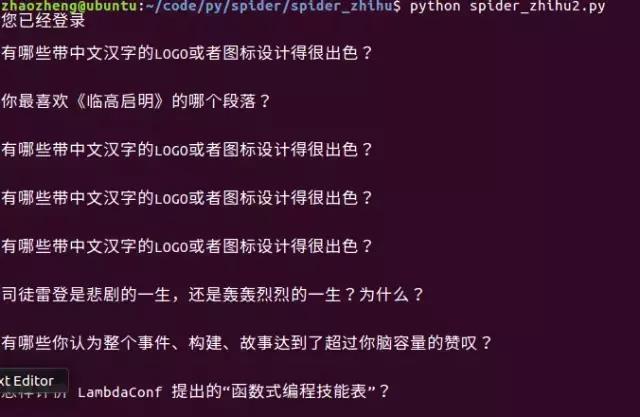
运行结果:
欢迎大家关注我的头条号,私信“python",学习资料包免费分享给需要的朋友,另有python学习交流群,可以交流学习拓展人脉。