在Excel中,当系统函数不能满足我们的需求时候,我们可以使用VBA自定义函数,如抓取网页数据,翻译词汇,手机号归属地查询等。下面将介绍2个自定义函数,
IDYMD函数 – 身份证年月日性别
通过身份证号,返回性别,出生年月日。
语法:= IDYMD(ID)
参数:ID,身份证号,默认身份证长度18位。
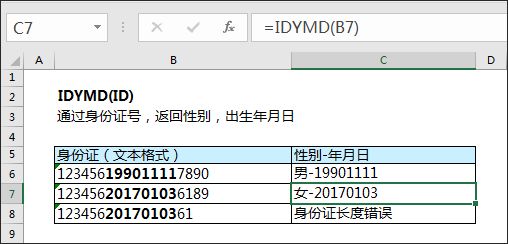
VBA代码如下:
Option Explicit
Public Function IDYMD(ID As String) As String
    '定义变量
    Dim strYMD As String
    Dim strSex As String
    If Len(ID) = 18 Then
        '截取出生年月日
        strYMD = Mid(ID, 7, 8)
        '奇数--男;偶数--女
        strSex = IIf((Mid(ID, 17, 1) Mod 2) = 0, "女", "男")
        '返回结果
        IDYMD = strSex & "-" & strYMD
    Else
        IDYMD = "身份证长度错误"
    End If
End Function
AdrsMobile函数 – 号码归属地
返回手机号码归属地。
语法:= AdrsMobile(strMobile)
参数:strMobile,手机号。
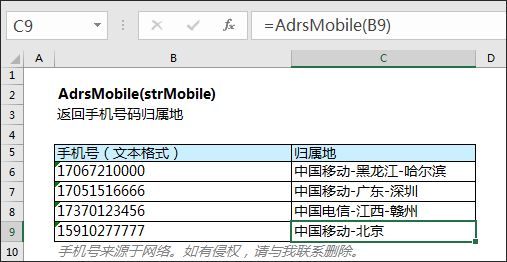
VBA代码如下:
Option Explicit
Public Function AdrsMobile(strMobile As String) As String
    Dim xmlHttp As Object
    Set xmlHttp = CreateObject("MSXML2.XMLHTTP")
'发送请求
xmlHttp.Open "GET", "http://v.showji.com/Locating/showji.co
m2016234999234.aspx?output=json&m=" & strMobile, False
    xmlHttp.Send
    '等待响应
    Do While xmlHttp.ReadyState <> 4
        DoEvents
    Loop
    '得到请求数据
    Dim strReturn As String
    strReturn = xmlHttp.ResponseText
    '处理数据
    Dim strType As String, strPro As String, strCity As String
    strType = Replace(Split(Split(strReturn, ",")(2), ":")(1), """", "")
    strPro = Replace(Split(Split(strReturn, ",")(4), ":")(1), """", "")
strCity = Replace(Split(Split(strReturn, ",")(5), ":")(1), """", "")
AdrsMobile = strType & "-" & IIf(strPro = strCity, strPro, strPro &
 "-" & strCity)
End Function