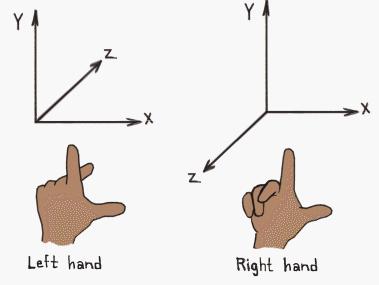
在Web3D|基于WebGL的Three.js框架|入门篇中我们已经介绍过了,Three.js用的是右手坐标系统,跟我们初中几何中用到的是一样的。
抛开z轴,x和y轴组成的二维平面,也与我们屏幕坐标不一样。通常情况下,不管是Web还是Java,Swift等的UI,坐标都是以屏幕左上角为原点(0,0)的,而与Three.js中的y轴正好相反。
让一个物体显示在屏幕上,两个因素必不可少,一是位置,另一个是大小。在实际的开发中,有时候我们需要将一个Three.js中的位置和大小与屏幕上的位置和大小进行相互转换,那么我们应该怎么办呢?
获取鼠标位置
窗口坐标转成Three坐标。
var mouse = new THREE.Vector2();
function onMouseMove( event ) {
 // calculate mouse position in normalized device coordinates
 // (-1 to +1) for both components

 mouse.x = ( event.clientX / window.innerWidth ) * 2 - 1;
 mouse.y = - ( event.clientY / window.innerHeight ) * 2 + 1;
}
位置(position)转换
Three坐标转屏幕坐标
function toScreenPosition(point3d) {
 var threePos = point3d.clone().project(camera);
 var halfWidth = window.innerWidth / 2;
 var halfHeight = window.innerHeight / 2;
 var result = {
 x: threePos.x * halfWidth + halfWidth,
 y: -threePos.y * halfHeight + halfHeight
 }
 return result;
}
屏幕坐标转Three坐标,由于缺少z值,根据需要设定
function toThreePosition(point2d, z) {
 var widthHalf = 0.5 * window.innerWidth;
 var heightHalf = 0.5 * window.innerHeight;
 var zValue = z == undefined ? 0.5 : z;
 var point3d = new THREE.Vector3(
 (point2d.x / widthHalf) * 2 - 1,
 -(point2d.y / heightHalf) * 2 + 1,
 zValue);
 point3d.unproject(camera);
 return point3d;
}
获取位置(position)
// Return the position of object
function getPosition(object) {
 var position = new THREE.Vector3();
 if (object instanceof THREE.Mesh) {
 object.updateMatrixWorld(true);
 position.setFromMatrixPosition(object.matrixWorld);
 }
 return position;
}
获取大小
function getSize(object) {
 if (object instanceof THREE.BufferGeometry) {
 var geometry = new THREE.Geometry().fromBufferGeometry(object);
 return getSize(geometry);
 } else if (object instanceof THREE.Mesh) {
 var box = new THREE.Box3();
 box.setFromObject(object);
 return box.getSize(new THREE.Vector3());
 } else if (object instanceof THREE.Geometry) {
 object.computeBoundingBox();
 return object.boundingBox.getSize(new THREE.Vector3());
 }
 return null;
}
获取中心点
function getCenter(object) {
 if (object instanceof THREE.BufferGeometry) {
 var geometry = new THREE.Geometry().fromBufferGeometry(object);
 return getCenter(geometry);
 } else if (object instanceof THREE.Geometry) {
 object.computeBoundingBox();
 return object.boundingBox.getCenter(new THREE.Vector3());
 } else if (object instanceof THREE.Mesh) {
 var box = new THREE.Box3();
 box.setFromObject(object);
 return box.getCenter(new THREE.Vector3());
 }
 return null;
}
获取Three中的物体在屏幕上的大小
 var positionOfCamera = camera.position;
 var positionOfMesh = mesh.position;
 // Mesh的大小,BBox
 var sizeOfMesh = getSize(mesh);
 // 计算相机到mesh表面的距离,注意:Z轴垂直与mesh表面。
 var dist = positionOfCamera.z - positionOfMesh.z - sizeOfMesh.z / 2;
 // convert vertical fov to radians
 var vFOV = THREE.Math.degToRad(camera.fov);
 // 计算高度
 var height = 2 * Math.tan(vFOV / 2) * dist;
 // 在Three中实际高度与投影高度的一个比值
 var fractionHeight = sizeOfMesh.y / height;
 // 屏幕上的实际高度
 var heightPixels = window.innerHeight * fractionHeight;
 // 计算宽度
 var width = height * camera.aspect;
 var fractionWidth = sizeOfMesh.x / width;
 //屏幕上的宽度
 var widthPixels = window.innerWidth * fractionWidth;
 // Mesh的中心点,BBox
 var center = getCenter(mesh);
 //将3D坐标转换到屏幕坐标
 var centerOnScreen = toScreenPosition(center);
总结
- 需要明白,Three中的物体是三维的,可以在空间范围内任意旋转。
- 最重要的是,随着物体的旋转,屏幕上显示的只是通过Camera投影过去的那部分,所以大小也会随之变化。