主要内容:
- 小目标:正则表达式语法
- 主要内容:语法详解与应用
1. 字符与次数匹配
1.1 字符匹配
语法说明:
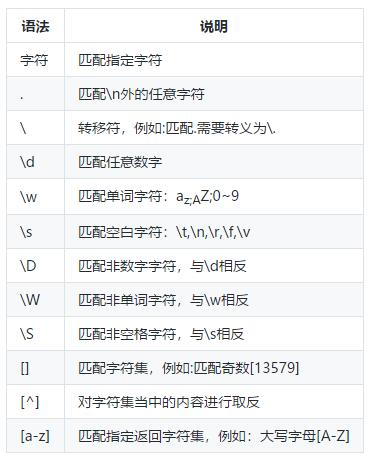
基本语法
1.2. 匹配次数
语法说明:

匹配次数
1.3. 几个练习
import re
#匹配所有开头为数字,内容为有效字符的内容
#例如:'1acbd1 c'->'1acbd1'
ma = re.match('\d\w+', '1acbd1 c')
print(ma.group())
#提取成绩
s = 'sun 90,100, 80'
result = re.findall(r'\d+', s)
print(result)
#匹配有效的三位数字
ma = re.match(r'[1-9]\d{2}', '666')
print(ma)
ma = re.match(r'[1-9]\d{2}', '99')
print(ma)
#匹配有效的非0的数字,例如:999,77,1,10000
#最高位必须为[1-9],\d*:数字出现0次或者多次
ma = re.match(r'[1-9]\d*', '1000')
print(ma)
结果:
1acbd1
['90', '100', '80']
<re.Match object; span=(0, 3), match='666'>
None
<re.Match object; span=(0, 4), match='1000'>
2. 边界匹配
2.1 边界匹配语法
语法说明:

边界匹配
2.2 练习:
- 开头与结尾
#匹配字符串必须全部由数字组成,
#正则加$,开头到结尾必须都是数字
ma = re.match(r'\d+#39;,'12345c')
print(ma)
#正则不加$,一直匹配到不为数字位置
ma = re.match(r'\d+','12345c')
print(ma)
结果:
None
<re.Match object; span=(0, 5), match='12345'>
- 边界匹配
#匹配以数字开头的单词
s = 'hello world 1st, 2st'
#\b代表单词开始或者结束,\d代表数字,\w代表有效字符
result = re.findall(r'\b\d\w*', s)
print(result)
#匹配s结尾单词
s = 'this is test'
#s\b:代表s结尾单词
result = re.findall(r'\w*s\b', s)
print(result)

s = 'hello world, this is test'
#查找单词中包含o的单词
result = re.findall(r'\w*o\w*', s)
print(result)
#查找在单词位置的o
result = re.findall(r'\Bo\B', s)
print(result)
结果:
['1st', '2st']
['this', 'is']
['hello', 'world']
['o']
3. 分组
3.1 基本语法:
语法说明:
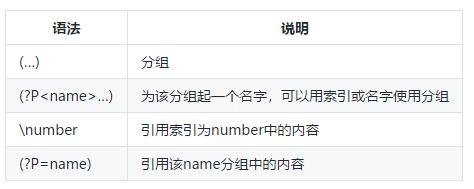
分组说明
3.2 练习
- 提取数据
#提取s中所有成绩
s = 'name:sun, id:1, score:88; name:liu, id:2, score:3'
#findall只提取分数
result = re.findall(r'score:(\d+)', s)
print(result)
#提取学生姓名与得分
#name:(\w+) 提取姓名
#.*?非贪婪匹配:匹配到score
#score:(\d+):提取分数
result = re.findall(r'name:(\w+).*?score:(\d+)', s)
print(result)
结果:
['88', '3']
- 分组引用
#判断单词开头与结尾是否相同
s = 'txt'
def func(s):
    #(\w)第一个字符,\1引用前一个分组
    pa = re.compile(r'(\w)(.*?)\1#39;)
    ma = pa.match(s)
    if ma:
        #获取匹配内容
        print(ma.group())
        #获取分组内容
        print(ma.groups())
func(s)
func('this')
结果:
txt
('t', 'x')
- 分组别名使用
#判断单词开头与结尾是否相同
s = 'txt'
def func(s):
    #(?P<head>\w), head为别名,(?P=head)引用别名
    pa = re.compile(r'(?P<head>\w)(.*?)(?P=head)#39;)
    ma = pa.match(s)
    if ma:
        #获取匹配内容
        print(ma.group())
        #获取分组内容
        print(ma.groups())
        #获取带有别名的分组
        print(ma.groupdict())
func(s)
func('this')
结果:
txt
('t', 'x')
{'head': 't'}
4. 正则表达式练习
- 匹配163邮箱,规则:
字母开头,邮箱名长度6~16位;
由数字,字母,下划线组成;
邮箱后缀:@163.com
s = 'test01@163.com'
def matchmail(s):
    #a-zA-Z开头
    #\.匹配.
    ma = re.match(r'[a-zA-z][a-zA-Z\d_]{5,15}@163\.com#39;, s)
    print(ma)
    return ma
matchmail(s)
结果:
<re.Match object; span=(0, 14), match='test01@163.com'>
- 匹配163与qq邮箱 规则:
字母开头,字母数字下划线组成,
长度5~10,
后缀@163.com或者@qq.com
- 匹配街道格式
- 格式:1180 Bordeaux Drive,3120 De la Cruz Boulevard
import re
ma = re.match('([a-zA-Z][\w_]{4,9})@(163|qq).com#39;, 'test124@163.com')
ma.group()
结果:
'test124@163.com'
- 提取链接地址:
html = '<img class="main_img" data-imgurl="https://ss0.bdstatic.com/0.jpg" src="https://ss0.bdstatic.com/=0.jpg" style="background-color: rgb(182, 173, 173); width: 263px; height: 164.495px;">'
ma = re.search(r'src="(.+?)"', html)
ma.groups()
结果:
('https://ss0.bdstatic.com/=0.jpg',)
- 多行匹配
code = '''def func1():
    pass
def func2():
    pass
class t:
    def func():
        pass
'''
统计code中def的数量
#re.M:多行匹配
re.findall(r'^def ', code, flags=re.M)
结果:
['def ', 'def ']
以上就是正则表达式常用语法, 如果你比较感兴趣,欢迎关注转发+评论。