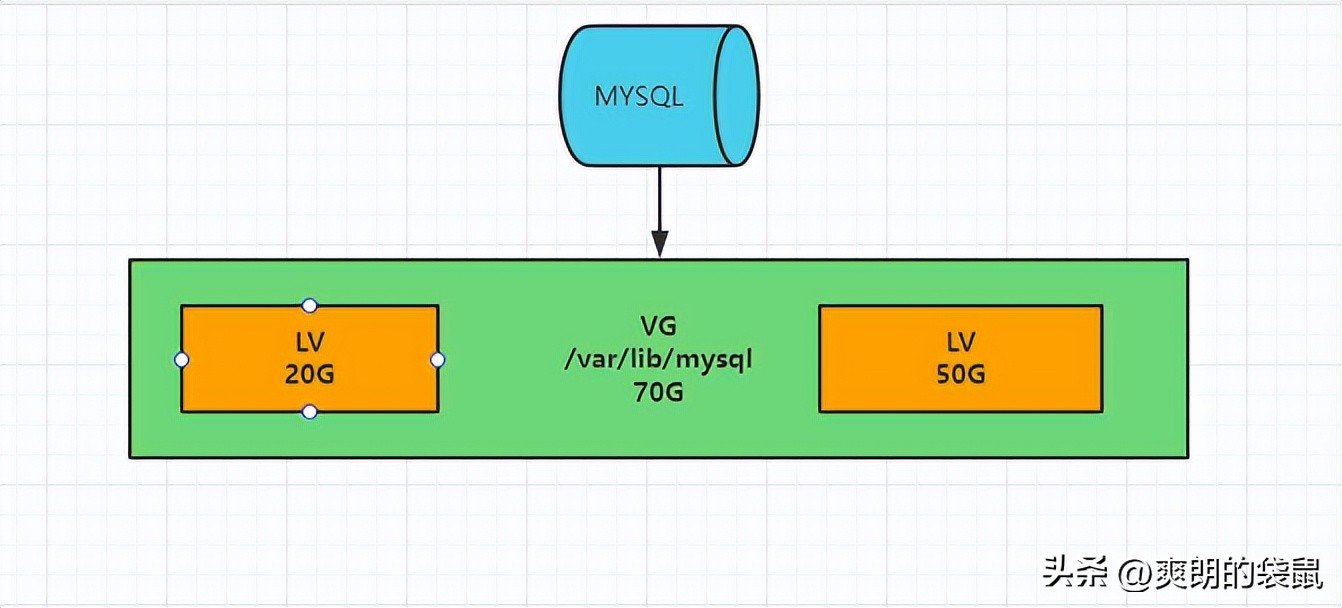
物理卷 Physical Volume(PV): 可以在上面建立卷组的媒介,可以使硬盘分区,也可以是硬盘本身或者回环(loopback file)。物理卷包括一个特殊的header,其余部分被切割为一块物理区域(Physical extent)
卷组 Volume group(VG): 将一组物理卷收集为一个管理单元
逻辑卷 Logucal voiume(LV): 虚拟分区,有物理区域(Physical extent)组成
物理区域 Physical extent(PE): 硬盘可供指派给逻辑卷的最小单位(通常为4MB)
背景:虚拟机磁盘10G,新挂载了一块5G的磁盘
一、查看系统磁盘情况
1、查看挂载点
[root@localhost ~]# df -Th

[root@localhost ~]# df -h
Filesystem               Size  Used Avail Use% Mounted on
devtmpfs                 475M     0  475M   0% /dev
tmpfs                    487M     0  487M   0% /dev/shm
tmpfs                    487M  7.6M  479M   2% /run
tmpfs                    487M     0  487M   0% /sys/fs/cgroup
/dev/mapper/centos-root  8.0G  1.4G  6.7G  17% /
/dev/sda1               1014M  137M  878M  14% /boot
tmpfs                     98M     0   98M   0% /run/user/0
[root@localhost ~]# lsblk
NAME            MAJ:MIN RM  SIZE RO TYPE MOUNTPOINT
sda               8:0    0   10G  0 disk
├─sda1            8:1    0    1G  0 part /boot
└─sda2            8:2    0    9G  0 part
  ├─centos-root 253:0    0    8G  0 lvm  /
  └─centos-swap 253:1    0    1G  0 lvm  [SWAP]
sdb               8:16   0    5G  0 disk
sr0              11:0    1 1024M  0 rom
2、显示当前Logucal voiume
[root@localhost ~]# lvdisplay
  --- Logical volume ---
  LV Path                /dev/centos/swap
  LV Name                swap
  VG Name                centos
  LV UUID                wUFT8g-Ek1L-y2Na-okKj-W6FR-1hsG-fGsLca
  LV Write Access        read/write
  LV Creation host, time localhost, 2026-03-18T23:26:14+00:00 -0400
  LV Status              available
  # open                 2
  LV Size                1.00 GiB
  Current LE             256
  Segments               1
  Allocation             inherit
  Read ahead sectors     auto
  - currently set to     8192
  Block device           253:1

  --- Logical volume ---
  LV Path                /dev/centos/root
  LV Name                root
  VG Name                centos
  LV UUID                WYZHEW-4tFT-nIFv-lNqs-jeL2-RrTE-tecnXr
  LV Write Access        read/write
  LV Creation host, time localhost, 2026-03-18T23:26:14+00:00 -0400
  LV Status              available
  # open                 1
  LV Size                <8.00 GiB
  Current LE             2047
  Segments               1
  Allocation             inherit
  Read ahead sectors     auto
  - currently set to     8192
  Block device           253:0
3、显示当前Volume group
[root@localhost ~]# vgdisplay
  --- Volume group ---
  VG Name               centos
  System ID
  Format                lvm2
  Metadata Areas        1
  Metadata Sequence No  3
  VG Access             read/write
  VG Status             resizable
  MAX LV                0
  Cur LV                2
  Open LV               2
  Max PV                0
  Cur PV                1
  Act PV                1
  VG Size               <9.00 GiB
  PE Size               4.00 MiB
  Total PE              2303
  Alloc PE / Size       2303 / <9.00 GiB
  Free  PE / Size       0 / 0
  VG UUID               QGhqYf-HT0c-f2Sl-J7pj-6sq5-eALu-2d3xDx
4、显示当前Physical Volume
[root@localhost ~]# pvdisplay
  --- Physical volume ---
  PV Name               /dev/sda2
  VG Name               centos
  PV Size               <9.00 GiB / not usable 3.00 MiB
  Allocatable           yes (but full)
  PE Size               4.00 MiB
  Total PE              2303
  Free PE               0
  Allocated PE          2303
  PV UUID               H6nAis-TqW8-3Zy1-MJ0a-0i5U-6hHK-FodvW6
二、开始LVM扩容
1、查看新磁盘
[root@localhost ~]# fdisk -l

Disk /dev/sda: 10.7 GB, 10737418240 bytes, 20971520 sectors
Units = sectors of 1 * 512 = 512 bytes
Sector size (logical/physical): 512 bytes / 512 bytes
I/O size (minimum/optimal): 512 bytes / 512 bytes
Disk label type: dos
Disk identifier: 0x000d4ea1

   Device Boot      Start         End      Blocks   Id  System
/dev/sda1   *        2048     2099199     1048576   83  Linux
/dev/sda2         2099200    20971519     9436160   8e  Linux LVM

Disk /dev/sdb: 5368 MB, 5368709120 bytes, 10485760 sectors
Units = sectors of 1 * 512 = 512 bytes
Sector size (logical/physical): 512 bytes / 512 bytes
I/O size (minimum/optimal): 512 bytes / 512 bytes


Disk /dev/mapper/centos-root: 8585 MB, 8585740288 bytes, 16769024 sectors
Units = sectors of 1 * 512 = 512 bytes
Sector size (logical/physical): 512 bytes / 512 bytes
I/O size (minimum/optimal): 512 bytes / 512 bytes


Disk /dev/mapper/centos-swap: 1073 MB, 1073741824 bytes, 2097152 sectors
Units = sectors of 1 * 512 = 512 bytes
Sector size (logical/physical): 512 bytes / 512 bytes
I/O size (minimum/optimal): 512 bytes / 512 bytes
2、新磁盘创建新分区
[root@localhost ~]# fdisk /dev/sdb
Welcome to fdisk (util-linux 2.23.2).

Changes will remain in memory only, until you decide to write them.
Be careful before using the write command.

Device does not contain a recognized partition table
Building a new DOS disklabel with disk identifier 0x3a867d96.

Command (m for help): n
Partition type:
   p   primary (0 primary, 0 extended, 4 free)
   e   extended
Select (default p):
Using default response p
Partition number (1-4, default 1):
First sector (2048-10485759, default 2048):
Using default value 2048
Last sector, +sectors or +size{K,M,G} (2048-10485759, default 10485759):
Using default value 10485759
Partition 1 of type Linux and of size 5 GiB is set

Command (m for help): w
The partition table has been altered!

Calling ioctl() to re-read partition table.
Syncing disks.
3、开始格式化新磁盘
[root@localhost ~]# fdisk -l

Disk /dev/sda: 10.7 GB, 10737418240 bytes, 20971520 sectors
Units = sectors of 1 * 512 = 512 bytes
Sector size (logical/physical): 512 bytes / 512 bytes
I/O size (minimum/optimal): 512 bytes / 512 bytes
Disk label type: dos
Disk identifier: 0x000d4ea1

   Device Boot      Start         End      Blocks   Id  System
/dev/sda1   *        2048     2099199     1048576   83  Linux
/dev/sda2         2099200    20971519     9436160   8e  Linux LVM

Disk /dev/sdb: 5368 MB, 5368709120 bytes, 10485760 sectors
Units = sectors of 1 * 512 = 512 bytes
Sector size (logical/physical): 512 bytes / 512 bytes
I/O size (minimum/optimal): 512 bytes / 512 bytes
Disk label type: dos
Disk identifier: 0x3a867d96

   Device Boot      Start         End      Blocks   Id  System
/dev/sdb1            2048    10485759     5241856   83  Linux

Disk /dev/mapper/centos-root: 8585 MB, 8585740288 bytes, 16769024 sectors
Units = sectors of 1 * 512 = 512 bytes
Sector size (logical/physical): 512 bytes / 512 bytes
I/O size (minimum/optimal): 512 bytes / 512 bytes


Disk /dev/mapper/centos-swap: 1073 MB, 1073741824 bytes, 2097152 sectors
Units = sectors of 1 * 512 = 512 bytes
Sector size (logical/physical): 512 bytes / 512 bytes
I/O size (minimum/optimal): 512 bytes / 512 bytes


 # 格式化新磁盘分区为xfs格式
[root@localhost ~]# mkfs -t xfs /dev/sdb1
meta-data=/dev/sdb1              isize=512    agcount=4, agsize=1966016 blks
         =                       sectsz=512   attr=2, projid32bit=1
         =                       crc=1        finobt=0, sparse=0
data     =                       bsize=4096   blocks=7864064, imaxpct=25
         =                       sunit=0      swidth=0 blks
naming   =version 2              bsize=4096   ascii-ci=0 ftype=1
log      =internal log           bsize=4096   blocks=3839, version=2
         =                       sectsz=512   sunit=0 blks, lazy-count=1
realtime =none                   extsz=4096   blocks=0, rtextents=0


# 格式化新磁盘分区为ext4格式
[root@localhost ~]# mkfs -t ext4 /dev/sdb1
mke2fs 1.42.9 (28-Dec-2013)
Filesystem label=
OS type: Linux
Block size=4096 (log=2)
Fragment size=4096 (log=2)
Stride=0 blocks, Stripe width=0 blocks
327680 inodes, 1310464 blocks
65523 blocks (5.00%) reserved for the super user
First data block=0
Maximum filesystem blocks=1342177280
40 block groups
32768 blocks per group, 32768 fragments per group
8192 inodes per group
Superblock backups stored on blocks:
    32768, 98304, 163840, 229376, 294912, 819200, 884736

Allocating group tables: done
Writing inode tables: done
Creating journal (32768 blocks): done
Writing superblocks and filesystem accounting information: done
4、创建PV
[root@localhost ~]# pvcreate /dev/sdb1
WARNING: ext4 signature detected on /dev/sdb1 at offset 1080. Wipe it? [y/n]: y
  Wiping ext4 signature on /dev/sdb1.
  Physical volume "/dev/sdb1" successfully created.
5、查看卷组
[root@localhost ~]# pvscan
  PV /dev/sda2   VG centos          lvm2 [<9.00 GiB / 0    free]
  PV /dev/sdb1                      lvm2 [<5.00 GiB]
  Total: 2 [<14.00 GiB] / in use: 1 [<9.00 GiB] / in no VG: 1 [<5.00 GiB]
6、扩容vg
[root@localhost ~]# vgextend centos /dev/sdb1
  Volume group "centos" successfully extended
[root@localhost ~]# pvscan
  PV /dev/sda2   VG centos          lvm2 [<9.00 GiB / 0    free]
  PV /dev/sdb1   VG centos          lvm2 [<5.00 GiB / <5.00 GiB free]
  Total: 2 [13.99 GiB] / in use: 2 [13.99 GiB] / in no VG: 0 [0   ]
7、查看VG和LV
[root@localhost ~]# vgdisplay
  --- Volume group ---
  VG Name               centos
  System ID
  Format                lvm2
  Metadata Areas        2
  Metadata Sequence No  4
  VG Access             read/write
  VG Status             resizable
  MAX LV                0
  Cur LV                2
  Open LV               2
  Max PV                0
  Cur PV                2
  Act PV                2
  VG Size               13.99 GiB
  PE Size               4.00 MiB
  Total PE              3582
  Alloc PE / Size       2303 / <9.00 GiB
  Free  PE / Size       1279 / <5.00 GiB
  VG UUID               QGhqYf-HT0c-f2Sl-J7pj-6sq5-eALu-2d3xDx

[root@localhost ~]# lvdisplay
  --- Logical volume ---
  LV Path                /dev/centos/swap
  LV Name                swap
  VG Name                centos
  LV UUID                wUFT8g-Ek1L-y2Na-okKj-W6FR-1hsG-fGsLca
  LV Write Access        read/write
  LV Creation host, time localhost, 2026-03-18T23:26:14+00:00 -0400
  LV Status              available
  # open                 2
  LV Size                1.00 GiB
  Current LE             256
  Segments               1
  Allocation             inherit
  Read ahead sectors     auto
  - currently set to     8192
  Block device           253:1

  --- Logical volume ---
  LV Path                /dev/centos/root
  LV Name                root
  VG Name                centos
  LV UUID                WYZHEW-4tFT-nIFv-lNqs-jeL2-RrTE-tecnXr
  LV Write Access        read/write
  LV Creation host, time localhost, 2026-03-18T23:26:14+00:00 -0400
  LV Status              available
  # open                 1
  LV Size                <8.00 GiB
  Current LE             2047
  Segments               1
  Allocation             inherit
  Read ahead sectors     auto
  - currently set to     8192
  Block device           253:0
8、LV逻辑卷扩容
# 按固定大小扩容
[root@localhost ~]# lvextend -L +5G /dev/centos/root

# 按百分比扩容
[root@localhost ~]# lvextend -l +100%FREE /dev/centos/root
  Size of logical volume centos/root changed from <8.00 GiB (2047 extents) to 12.99 GiB (3326 extents).
  Logical volume centos/root successfully resized.
9、刷新LV
# 使用 resize2fs 进行刷新LV路径 报错
[root@localhost ~]# resize2fs /dev/centos/root
resize2fs 1.42.9 (28-Dec-2013)
resize2fs: Bad magic number in super-block while trying to open /dev/centos/root
Couldn't find valid filesystem superblock.
# 发现报错 需要使用mount |grep root进行查看LV路径的文件格式是什么 发现是xfs文件系统
[root@localhost ~]# mount |grep root
/dev/mapper/centos-root on / type xfs (rw,relatime,seclabel,attr2,inode64,noquota)
# xfs文件系统使用如下命令进行刷新
[root@localhost ~]# xfs_growfs /dev/centos/root
meta-data=/dev/mapper/centos-root isize=512    agcount=4, agsize=524032 blks
         =                       sectsz=512   attr=2, projid32bit=1
         =                       crc=1        finobt=0 spinodes=0
data     =                       bsize=4096   blocks=2096128, imaxpct=25
         =                       sunit=0      swidth=0 blks
naming   =version 2              bsize=4096   ascii-ci=0 ftype=1
log      =internal               bsize=4096   blocks=2560, version=2
         =                       sectsz=512   sunit=0 blks, lazy-count=1
realtime =none                   extsz=4096   blocks=0, rtextents=0
data blocks changed from 2096128 to 3405824
10、查看大小发现已经有13G的空间了
[root@localhost ~]# df -h
Filesystem               Size  Used Avail Use% Mounted on
devtmpfs                 475M     0  475M   0% /dev
tmpfs                    487M     0  487M   0% /dev/shm
tmpfs                    487M  7.7M  479M   2% /run
tmpfs                    487M     0  487M   0% /sys/fs/cgroup
/dev/mapper/centos-root   13G  1.4G   12G  11% /
/dev/sda1               1014M  137M  878M  14% /boot
tmpfs                     98M     0   98M   0% /run/user/0