一、概述
在Windows运维中,当使用IIS web环境的站点,考虑到数据传输安全,经常需要强制用户使用https访问,可采用以下方法。

二、实施
本文以Windows 2012 R2为例,IIS版本为8.5。
1、点击以下*载下**链接安装64位的URL重写模块:Microsoft URL Rewrite Module。
http://download.microsoft.com/download/C/9/E/C9E8180D-4E51-40A6-A9BF-776990D8BCA9/rewrite_amd64.msi
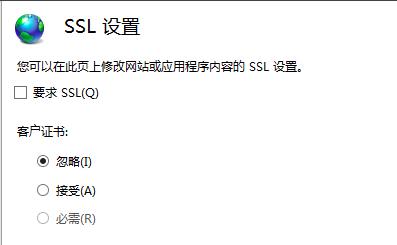
2、IIS控制台,取消勾选“SSL设置”->“要求 SSL”,右侧工具栏选择“应用”保存。
3、ASP.NET站可直接修改web.config。IIS控制台右键单击需要设置的站点,选择“浏览”,编辑Web.config文件。在system.webServer之间添加以下内容:
web.config
<configuration>
 <system.webServer>
 <rewrite>
 <rules>
 <rule name="HTTP to HTTPS redirect" stopProcessing="true">
 <match url="(.*)" />
 <conditions>
 <add input="{HTTPS}" pattern="off" ignoreCase="true" />
 </conditions>
 <action type="Redirect" redirectType="Found" url="https://{HTTP_HOST}/{R:1}" />
 </rule>
 </rules>
 </rewrite>
 </system.webServer>
</configuration>
实例截图所示:

三、测试
1、IIS控制台点击URL重写,验证是否正确显示URL重写规则;


2、通过浏览器访问,验证结果。在WEB浏览器地址输入:
www.xxxxxx.com 会自动跳转至https://www.xxxxxx.com/。