首先要解析Mapper.xml文件需要,在configuration中配置mapper文件的路径。配置的路径可以是resouce、url或者是class、package 。配置为 resouce、url 以流资源的方式解析mapper文件,class、package 另一种方式,通过MapperProxy代理来完成。
XmlConfigBuilder 类中mapperElement方法就是以不同的方式解析:
private void mapperElement(XNode parent) throws Exception {
    if (parent != null) {
      for (XNode child : parent.getChildren()) {
        //扫描包下面的类
        if ("package".equals(child.getName())) {
          String mapperPackage = child.getStringAttribute("name");
          configuration.addMappers(mapperPackage);
        } else {
          String resource = child.getStringAttribute("resource");
          String url = child.getStringAttribute("url");
          String mapperClass = child.getStringAttribute("class");
          if (resource != null && url == null && mapperClass == null) {
            //resource 以流方式读取
            ErrorContext.instance().resource(resource);
            try(InputStream inputStream = Resources.getResourceAsStream(resource)) {
              XMLMapperBuilder mapperParser = new XMLMapperBuilder(inputStream, configuration, resource, configuration.getSqlFragments());
              mapperParser.parse();
            }
          } else if (resource == null && url != null && mapperClass == null) {
            // url 网络流方式读取
            ErrorContext.instance().resource(url);
            try(InputStream inputStream = Resources.getUrlAsStream(url)){
              XMLMapperBuilder mapperParser = new XMLMapperBuilder(inputStream, configuration, url, configuration.getSqlFragments());
              mapperParser.parse();
            }
          } else if (resource == null && url == null && mapperClass != null) {
            // 以类的方式
            Class<?> mapperInterface = Resources.classForName(mapperClass);
            configuration.addMapper(mapperInterface);
          } else {
            throw new BuilderException("A mapper element may only specify a url, resource or class, but not more than one.");
          }
        }
      }
    }
  }
Mybatis 以流资源方式解析mapper.xml文件
通俗一点的意思就是:直接获取 mapper.xml文件进行解析。
XmlMapperBuilder 中的 parse 方法实现解析:
第一步解析Mapper标签:
public void parse() {
  //判断资源是否以及被加载过了
    if (!configuration.isResourceLoaded(resource)) {
      // 解析Mapper 标签
      configurationElement(parser.evalNode("/mapper"));
      //将资源路径加载到configuration的成员中 ,防止重复加载mapper
      //resource 全路径名
      configuration.addLoadedResource(resource);
      // 将mapper 绑定到 命名空间绑定
      bindMapperForNamespace();
    }
	//resultMap 、CacheRef、statement  绑定并且解析
    parsePendingResultMaps();
    parsePendingCacheRefs();
    parsePendingStatements();
  }
第二步解析Mapper标签中的子标签:
private void configurationElement(XNode context) {
    try {
      //获取命名空间
      String namespace = context.getStringAttribute("namespace");
      if (namespace == null || namespace.isEmpty()) {
        throw new BuilderException("Mapper's namespace cannot be empty");
      }
      //MapperBuilderAssistant对象设置命名空间,
      //bindMapperForNamespace()方法中会用到
      builderAssistant.setCurrentNamespace(namespace);
      //引用其它命名空间的缓存配置
      cacheRefElement(context.evalNode("cache-ref"));
      //命名空间的缓存配置
      cacheElement(context.evalNode("cache"));
      //此元素已被废弃,并可能在将来被移除!请使用行内参数映射
      parameterMapElement(context.evalNodes("/mapper/parameterMap"));
      //结果集映射
      resultMapElements(context.evalNodes("/mapper/resultMap"));
      //可重用语句块
      sqlElement(context.evalNodes("/mapper/sql"));
      // curd操作
      buildStatementFromContext(context.evalNodes("select|insert|update|delete"));
    } catch (Exception e) {
      throw new BuilderException("Error parsing Mapper XML. The XML location is '" + resource + "'. Cause: " + e, e);
    }
  }
第三部 查看Mapper子标签主要生成的对象:
select|insert|update|delete 标签 生成 XMLStatementBuilder对象进行封装;
private void buildStatementFromContext(List<XNode> list) {

    if (configuration.getDatabaseId() != null) {
      buildStatementFromContext(list, configuration.getDatabaseId());
    }
    buildStatementFromContext(list, null);
  }

private void buildStatementFromContext(List<XNode> list, String requiredDatabaseId) {
    for (XNode context : list) {
      //为每个 crud 标签创建一个 XMLStatementBuilder对象
      final XMLStatementBuilder statementParser = new XMLStatementBuilder(configuration, builderAssistant, context, requiredDatabaseId);
      try {
        statementParser.parseStatementNode();
      } catch (IncompleteElementException e) {
        configuration.addIncompleteStatement(statementParser);
      }
    }
  }
XMLStatementBuilder对象调用parseStatementNode()方法:
public void parseStatementNode() {
  //获取节点 key
    String id = context.getStringAttribute("id");
    String databaseId = context.getStringAttribute("databaseId");

    if (!databaseIdMatchesCurrent(id, databaseId, this.requiredDatabaseId)) {
      return;
    }

  //节点名称
    String nodeName = context.getNode().getNodeName();
  // SqlCommandType 数据类型是 UNKNOWN, INSERT, UPDATE, DELETE, SELECT, FLUSH
    SqlCommandType sqlCommandType = SqlCommandType.valueOf(nodeName.toUpperCase(Locale.ENGLISH));
    //是否是查询
   boolean isSelect = sqlCommandType == SqlCommandType.SELECT;
  //缓存刷新策略 flushCache 设置值 以设置的值为依据。
  //flushCache 没有设置值 ,查询返回FALSE,非查询true
    boolean flushCache = context.getBooleanAttribute("flushCache", !isSelect);
  //是否使用缓存 useCache 设置值 以设置的值为准
  //useCache没有设置值,查询返回TRUE,非查询返回FALSE
    boolean useCache = context.getBooleanAttribute("useCache", isSelect);
  //设置仅针对嵌套结果 select 语句:如果为 true,将会假设包含了嵌套结果集或是分组,
  //当返回一个主结果行时,就不会产生对前面结果集的引用。
    boolean resultOrdered = context.getBooleanAttribute("resultOrdered", false);

    // Include Fragments before parsing
  // 分析是否有 SQL片段引用
    XMLIncludeTransformer includeParser = new XMLIncludeTransformer(configuration, builderAssistant);
    includeParser.applyIncludes(context.getNode());

  //入参数据类型
    String parameterType = context.getStringAttribute("parameterType");
    Class<?> parameterTypeClass = resolveClass(parameterType);
   //指定特定语言, 可以使用 Apache Velocity 作为动态语言,
  //更多细节请参考 MyBatis-Velocity 项目。
    String lang = context.getStringAttribute("lang");
    LanguageDriver langDriver = getLanguageDriver(lang);

    // Parse selectKey after includes and remove them.
  // 引用sql片段 解析后 解析 selectKey ,然后删除这两个
    processSelectKeyNodes(id, parameterTypeClass, langDriver);

    // Parse the SQL (pre: <selectKey> and <include> were parsed and removed)
    KeyGenerator keyGenerator;
  // id + !selectKey
    String keyStatementId = id + SelectKeyGenerator.SELECT_KEY_SUFFIX;
    keyStatementId = builderAssistant.applyCurrentNamespace(keyStatementId, true);
    if (configuration.hasKeyGenerator(keyStatementId)) {
      keyGenerator = configuration.getKeyGenerator(keyStatementId);
    } else {
      keyGenerator = context.getBooleanAttribute("useGeneratedKeys",
          configuration.isUseGeneratedKeys() && SqlCommandType.INSERT.equals(sqlCommandType))
          ? Jdbc3KeyGenerator.INSTANCE : NoKeyGenerator.INSTANCE;
    }
		// 创建SqlSource
    SqlSource sqlSource = langDriver.createSqlSource(configuration, context, parameterTypeClass);
    StatementType statementType = StatementType.valueOf(context.getStringAttribute("statementType", StatementType.PREPARED.toString()));
    Integer fetchSize = context.getIntAttribute("fetchSize");
    Integer timeout = context.getIntAttribute("timeout");
    String parameterMap = context.getStringAttribute("parameterMap");
    String resultType = context.getStringAttribute("resultType");
    Class<?> resultTypeClass = resolveClass(resultType);
    String resultMap = context.getStringAttribute("resultMap");
    String resultSetType = context.getStringAttribute("resultSetType");
    ResultSetType resultSetTypeEnum = resolveResultSetType(resultSetType);
    if (resultSetTypeEnum == null) {
      resultSetTypeEnum = configuration.getDefaultResultSetType();
    }
    String keyProperty = context.getStringAttribute("keyProperty");
    String keyColumn = context.getStringAttribute("keyColumn");
    String resultSets = context.getStringAttribute("resultSets");

    builderAssistant.addMappedStatement(id, sqlSource, statementType, sqlCommandType,
        fetchSize, timeout, parameterMap, parameterTypeClass, resultMap, resultTypeClass,
        resultSetTypeEnum, flushCache, useCache, resultOrdered,
        keyGenerator, keyProperty, keyColumn, databaseId, langDriver, resultSets);
  }
langDriver.createSqlSource(configuration, context, parameterTypeClass)方法创建SqlSocre。createSqlSource方法生成XMLScriptBuilder对象。
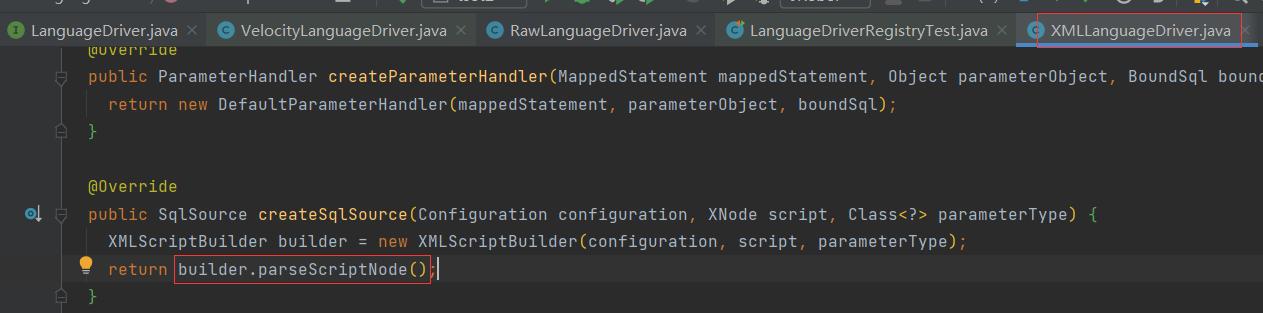
XMLScriptBuilder调用parseScriptNode方法生成SQL。
 public SqlSource parseScriptNode() {
   //该方法中包含是否是动态SQL的判断
    MixedSqlNode rootSqlNode = parseDynamicTags(context);
    SqlSource sqlSource;
    if (isDynamic) {
      //动态SQL
      sqlSource = new DynamicSqlSource(configuration, rootSqlNode);
    } else {
      //静态SQL
      sqlSource = new RawSqlSource(configuration, rootSqlNode, parameterType);
    }
    return sqlSource;
  }
解析标签并且判断SQL类型(动态|静态)。
 protected MixedSqlNode parseDynamicTags(XNode node) {
    List<SqlNode> contents = new ArrayList<>();
    NodeList children = node.getNode().getChildNodes();
    for (int i = 0; i < children.getLength(); i++) {
      XNode child = node.newXNode(children.item(i));
      // CDATA  TEXT
      if (child.getNode().getNodeType() == Node.CDATA_SECTION_NODE || child.getNode().getNodeType() == Node.TEXT_NODE) {
        String data = child.getStringBody("");
        TextSqlNode textSqlNode = new TextSqlNode(data);
        // 判断 SQL语句中是否有  ${}  GenericTokenParser.createParser
        if (textSqlNode.isDynamic()) {
          //动态SQL
          contents.add(textSqlNode);
          isDynamic = true;
        } else {
          //静态SQL
          contents.add(new StaticTextSqlNode(data));
        }
      } else if (child.getNode().getNodeType() == Node.ELEMENT_NODE) { // issue #628
        //当前是元素节点
        String nodeName = child.getNode().getNodeName();
        // nodeHandlerMap集合中查看是否有对应节点,
        //XMLScriptBuilder构造函数初始时加进集合的
        NodeHandler handler = nodeHandlerMap.get(nodeName);
        if (handler == null) {
          throw new BuilderException("Unknown element <" + nodeName + "> in SQL statement.");
        }
        //node节点处理器,会递归调用,直到没有内层标签
        handler.handleNode(child, contents);
        //包含 trim|if|choose|set|where|foreach|when|otherwise|bind 都是动态标签
        isDynamic = true;
      }
    }
    return new MixedSqlNode(contents);
  }
小结:
动态SQL:DynamicSqlSource 只要xml编写的SQL语句中包含 ${}形式的入参,trim|if|where|foreach|set|when|otherwise|bind|choose
静态SQL: RawSqlSource 静态SQL,SQL结构不会变化,只是入参会不同而已。
MixedSqlNode:private final List<SqlNode> contents 本质,就是将xml中的SQL语句根 据标签进行拆分,组装成SqlNode的集合。
SqlSource: 就是 DynamicSqlSource 或者 RawSqlSource其中的一种,而这两个SqlSource的成员中带着 mixedSqlNode对象。本质上SqlSource也是一个SqlNode集合。
Mybatis以Mapper接口方式解析xml文件
就给我一个接口,还要我解析XML文件。xml文件在哪里呀?一定有规则否则,如何加载的到哪?
使用mapper接口进行注册:
XMLConfigBuilder中mapperElement方法调用configuration.addMapper方法。
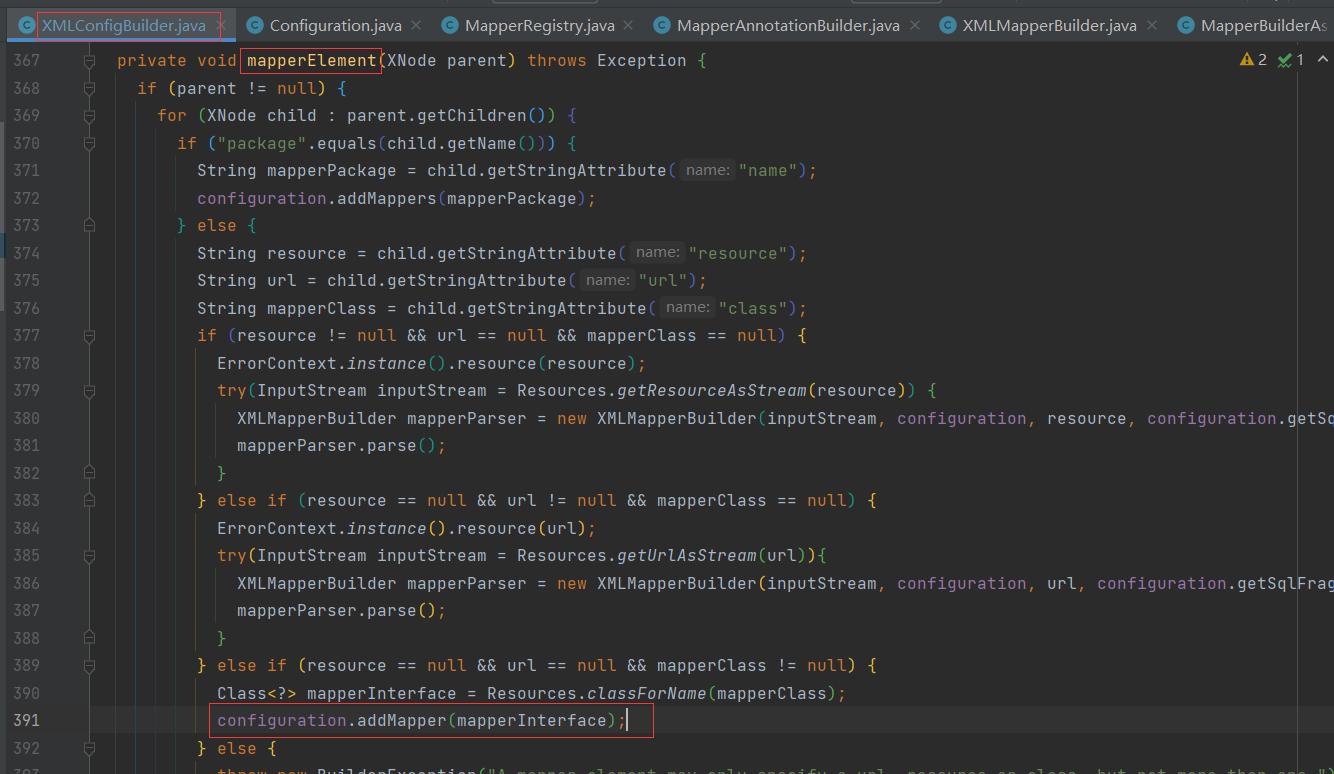
给mapperRegistry成员属性中添加值。
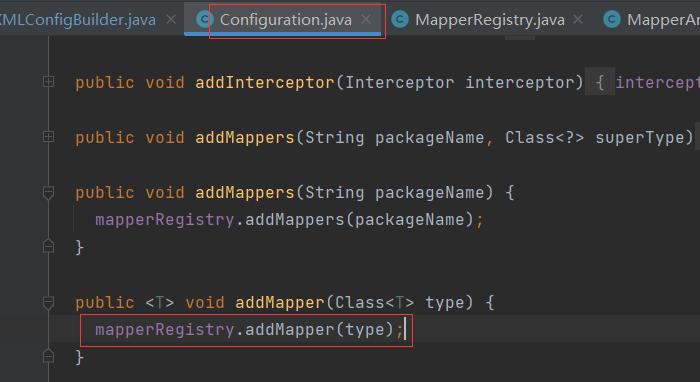
MapperRegister中使用addMapper方法,给成员属性knowMapppers添加一个数据,MapperProxyFactory的接口对象。
public <T> void addMapper(Class<T> type) {
  if (type.isInterface()) {
    if (hasMapper(type)) {
      throw new BindingException("Type " + type + " is already known to the MapperRegistry.");
    }
    boolean loadCompleted = false;
    try {
      knownMappers.put(type, new MapperProxyFactory<>(type));
      // It's important that the type is added before the parser is run
      // otherwise the binding may automatically be attempted by the
      // mapper parser. If the type is already known, it won't try.
      MapperAnnotationBuilder parser = new MapperAnnotationBuilder(config, type);
      parser.parse();
      loadCompleted = true;
    } finally {
      if (!loadCompleted) {
        knownMappers.remove(type);
      }
    }
  }
}
MapperAnnotationBuilder 调用 Parse方法,方法中有一个loadXmlResource()。
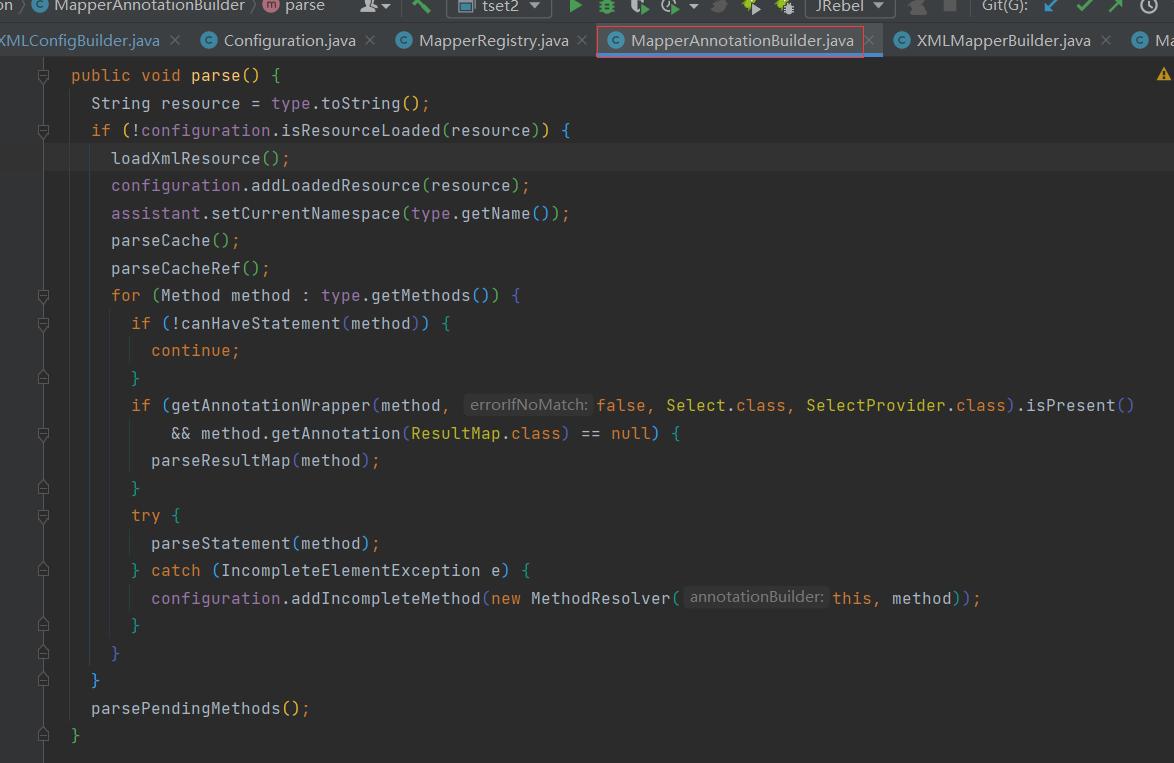
public void parse() {
    String resource = type.toString();
    if (!configuration.isResourceLoaded(resource)) {
      loadXmlResource();
      configuration.addLoadedResource(resource);
      assistant.setCurrentNamespace(type.getName());
      parseCache();
      parseCacheRef();
      for (Method method : type.getMethods()) {
        if (!canHaveStatement(method)) {
          continue;
        }
        if (getAnnotationWrapper(method, false, Select.class, SelectProvider.class).isPresent()
            && method.getAnnotation(ResultMap.class) == null) {
          //解析resultmap
          parseResultMap(method);
        }
        try {
          //解析一个方法生成对应的MapperedStatement对象
          parseStatement(method);
        } catch (IncompleteElementException e) {
          configuration.addIncompleteMethod(new MethodResolver(this, method));
        }
      }
    }
  //解析方法 (挂起的)
    parsePendingMethods();
  }
loadXmlResource方法中,把接口 全限定名 替换成文件路径,以及xml结尾。以此为路径查找mapper.xml文件资源。
private void loadXmlResource() {
    // Spring may not know the real resource name so we check a flag
    // to prevent loading again a resource twice
    // this flag is set at XMLMapperBuilder#bindMapperForNamespace
    if (!configuration.isResourceLoaded("namespace:" + type.getName())) {
      String xmlResource = type.getName().replace('.', '/') + ".xml";
      // #1347
      InputStream inputStream = type.getResourceAsStream("/" + xmlResource);
      if (inputStream == null) {
        // Search XML mapper that is not in the module but in the classpath.
        try {
          inputStream = Resources.getResourceAsStream(type.getClassLoader(), xmlResource);
        } catch (IOException e2) {
          // ignore, resource is not required
        }
      }
      if (inputStream != null) {
        XMLMapperBuilder xmlParser = new XMLMapperBuilder(inputStream, assistant.getConfiguration(), xmlResource, configuration.getSqlFragments(), type.getName());
        xmlParser.parse();
      }
    }
  }
小结:
以文件包或者接口的形式,首先给接口生成一个MapperProxyFactory对象,其次再根据接口的全限定名更改为路径再添加xml,以此来查找mapper.xml文件资源。
总之一句话,用接口全限定名找mapper配置文件。