
作者 | 渡渡鸟
分享 | 乔克
1. 告警方式
1.1. Prometheus 告警介绍
与Zabbix告警不同,Prometheus将告警分为两个部分:Prometheus 和 Alertmanager。其中Prometheus配置告警触发规则,对指标进行监控和计算,将再将告警信息发送到Alertmanager中。Alertmanager对告警进行管理,比如合并抑制等操作。

image.png
1.2. AlertManager介绍
Alertmanager处理由客户端应用程序(例如Prometheus服务器)发送的警报。它负责将重复数据删除,分组和路由到正确的接收者,通知方式有电子邮件、短信、微信等。它还负责沉默和禁止警报。Altermanager有以下几个功能点
- 分组
当机房网络故障时,或者机房断电时,会突然有大量相同的告警出现,此时就需要对告警进行分组聚合,整合成少量告警发出。每个告警信息中会列出受影响的服务或者机器。
- 抑制(Inhibition)
当集群故障时,会引发一系列告警,此时只需要通知集群故障,其它因为集群故障引起的告警应该被抑制,避免干扰判断。
- 静默(Silences)
当集群升级、服务更新的过程中,大概率导致告警。因此在升级期间,对这些告警进行静默,不再发送相关告警。
2. 告警相关配置
2.1. altermanager配置文件
2.1.1. 全局配置
#global指定了默认的接收者配置项
global:
#默认smtp配置项,如果recivers中没有配置则采用全局配置项
[smtp_from:<tmpl_string>]
[smtp_smarthost:<string>]
[smtp_hello:<string>|default="localhost"]
[smtp_auth_username:<string>]
[smtp_auth_password:<secret>]
[smtp_auth_identity:<string>]
[smtp_auth_secret:<secret>]
[smtp_require_tls:<bool>|default=true]

#企业微信告警配置
[wechat_api_url:<string>|default="https://qyapi.weixin.qq.com/cgi-bin/"]
[wechat_api_secret:<secret>]
[wechat_api_corp_id:<string>]

#默认http客户端配置,不推荐配置。参考官方文档:https://prometheus.io/docs/alerting/latest/clients/
[http_config:<http_config>]

#如果警报不包含EndsAt,则ResolveTimeout是Alertmanager使用的默认值,经过此时间后,如果尚未更新,则可以将警报声明为已解决。
#这对Prometheus的警报没有影响,因为它们始终包含EndsAt。
[resolve_timeout:<duration>|default=5m]

#定义通知模板,最好一个列表元素可以使用Linux通配符,如*.tmpl
templates:
[-<filepath>...]

#定义路由
route:<route>

#定义通知的接收者
receivers:
-<receiver>...

#告警抑制规则
inhibit_rules:
[-<inhibit_rule>...]
2.1.2. 路由配置
每个警报都会在已配置的顶级路由处进入路由树,该路由树必须与所有警报匹配(即没有任何已配置的匹配器)。然后遍历子节点。如果将continue设置为false,它将在第一个匹配的子项之后停止。如果在匹配的节点上true为true,则警报将继续与后续的同级进行匹配。如果警报与节点的任何子节点都不匹配(不匹配的子节点或不存在子节点),则根据当前节点的配置参数来处理警报。
#告警接收者
[receiver:<string>]
#告警根据标签进行分组,相同标签的作为一组进行聚合,发送单条告警信息。特殊值'...'表示告警不聚合
[group_by:'['<labelname>,...']']

#告警是否匹后续的同级节点,如果为true还会继续进行规则匹配,否则匹配成功就截止
[continue:<boolean>|default=false]

#报警必须匹配到labelname,否则无法匹配到该组路由,一般用于发送给不同联系人时使用
match:
[<labelname>:<labelvalue>,...]
match_re:
[<labelname>:<regex>,...]

#第一次发送当前group报警等待的时间,目的是实现同组告警的聚合
[group_wait:<duration>|default=30s]

#当上一次group告警发送成功后,改组又出现新的告警,那么等待多久再发送,一般设置为5分钟或者更久
[group_interval:<duration>|default=5m]

#已经发送成功的告警,但是一直没消除,那么等待多久再发送。一般推荐三个小时以上
[repeat_interval:<duration>|default=4h]

#子路由
routes:
[-<route>...]
2.1.3. 接收者配置
模板案例和模板数据类型可以参考官方文档
#接收者名称,唯一标识
name:<string>

#接收方式
email_configs:
[-<email_config>,...]
pagerduty_configs:
[-<pagerduty_config>,...]
pushover_configs:
[-<pushover_config>,...]
slack_configs:
[-<slack_config>,...]
opsgenie_configs:
[-<opsgenie_config>,...]
webhook_configs:
[-<webhook_config>,...]
victorops_configs:
[-<victorops_config>,...]
wechat_configs:
[-<wechat_config>,...]
- email_configs
#通过该机器发送邮件
[smarthost:<string>|default=global.smtp_smarthost]
#SMTPserver信息
[hello:<string>|default=global.smtp_hello]
#SMTP认证信息
[auth_username:<string>|default=global.smtp_auth_username]
[auth_password:<secret>|default=global.smtp_auth_password]
[auth_secret:<secret>|default=global.smtp_auth_secret]
[auth_identity:<string>|default=global.smtp_auth_identity]

#TLSconfiguration.
[require_tls:<bool>|default=global.smtp_require_tls]
tls_config:
[ca_file:<filepath>]
[cert_file:<filepath>]
[key_file:<filepath>]
[server_name:<string>]
[insecure_skip_verify:<boolean>|default=false]

#发件人
[from:<tmpl_string>|default=global.smtp_from]
#收件人
to:<tmpl_string>
#邮件标题
[headers:{<string>:<tmpl_string>,...}]
#邮件html正文信息
[html:<tmpl_string>|default='{{template"email.default.html".}}']
#邮件text正文信息
[text:<tmpl_string>]
#是否通知已恢复的告警
[send_resolved:<boolean>|default=false]
- wechat_configs
邮件告警有个两个很大的问题:容易被屏蔽或者当成垃圾邮件;延迟比较高。推荐使用微信或者钉钉告警,网上有相当丰富的博客案例。
#是否通知已恢复的告警
[send_resolved:<boolean>|default=false]

#TheAPIkeytousewhentalkingtotheWeChatAPI.
[api_secret:<secret>|default=global.wechat_api_secret]

#WechatAPI地址
[api_url:<string>|default=global.wechat_api_url]

#Thecorpidforauthentication.
[corp_id:<string>|default=global.wechat_api_corp_id]

#APIrequestdataasdefinedbytheWeChatAPI.
[message:<tmpl_string>|default='{{template"wechat.default.message".}}']
[agent_id:<string>|default='{{template"wechat.default.agent_id".}}']
[to_user:<string>|default='{{template"wechat.default.to_user".}}']
[to_party:<string>|default='{{template"wechat.default.to_party".}}']
[to_tag:<string>|default='{{template"wechat.default.to_tag".}}']
2.1.4. 告警抑制(inhibit_rules)配置
告警抑制是针对,系统已经发出A告警,对后续出现的由A告警引发的B告警进行抑制。流程就是:满足 source_match[_re] 的A 告警已触发,B告警满足 target_match[_re] ,且A和B在 equal 列表中的标签值全部相等,此时抑制告警B。需要注意的是,空值标签和缺少这个标签的值在语义上是相等的!
target_match:
[<labelname>:<labelvalue>,...]
target_match_re:
[<labelname>:<regex>,...]
source_match:
[<labelname>:<labelvalue>,...]
source_match_re:
[<labelname>:<regex>,...]
[equal:'['<labelname>,...']']
2.2. Prometheus Alerting Config
Prometheus 中alerting config 是用来定义 prometheus 和 alertmanager 通信方式的,在 prometheus.yml 文件中一级字段
#告警配置
alerting:
#告警标签重写,参考https://www.yuque.com/duduniao/linux/pkgsgv#ZoFlS
alert_relabel_configs:
[-<relabel_config>...]
#alertmanager配置,用于配置和发现alermanager实例
alertmanagers:
#向alertmanager发送告警的超时时间
-[timeout:<duration>|default=10s]
#使用alertmanager的API版本
[api_version:<string>|default=v1]
#HTTP报警路径前缀
[path_prefix:<path>|default=/]
#请求协议
[scheme:<scheme>|default=http]
#向请求添加Authorizationheader
basic_auth:
[username:<string>]
[password:<secret>]
[password_file:<string>]
[bearer_token:<string>]
[bearer_token_file:<filename>]
#Configuresthescraperequest'sTLSsettings.
tls_config:
[<tls_config>]
#OptionalproxyURL.
[proxy_url:<string>]

#自动发现alertmanager的方式,与target的自动发现一致
file_sd_configs:
[-<file_sd_config>...]
kubernetes_sd_configs:
[-<kubernetes_sd_config>...]
static_configs:
[-<static_config>...]
#对发现的alertmanager进行筛选和标签重写,比如API中PATH
relabel_configs:
[-<relabel_config>...]
2.3. Prometheus Alerting Rules
模板案例和模板常用函数可以参考官方文档
groups:
#组名,一个文件中唯一标识
-name:<string>
[interval:<duration>|default=global.evaluation_interval]
rules:
-alert:<string>#报警名称
expr:<string>#报警规则表达式
[for:<duration>|default=0s]#当触发条件持续指定时间再发送告警,发送前告警为pending
labels:#告警标签
[<labelname>:<tmpl_string>]#会覆盖已有的标签,用于后面alertmanager中筛选
annotations:#告警注释
[<labelname>:<tmpl_string>]#一般添加发送邮件的内容、标题等等。常用字段有:summary,description
2.4. 告警屏蔽
当前机器数量太少,演示不方便,后续再补充。
3. 案例
prometheus-72 10.4.7.72 CentOS Linux release 7.5 Prometheus,Alertmanager,Node_exporter grafana-79 10.4.7.79 CentOS Linux release 7.5 Node_exporter,Grafana
3.1. 安装和配置Alertmanager
3.1.1. 安装alertmanager
[root@prometheus-72~]#cd/opt/src/
[root@prometheus-72src]#wgethttps://github.com/prometheus/alertmanager/releases/download/v0.21.0/alertmanager-0.21.0.linux-amd64.tar.gz
[root@prometheus-72src]#tar-xfalertmanager-0.21.0.linux-amd64.tar.gz-C/opt/release/
[root@prometheus-72src]#ln-s/opt/release/alertmanager-0.21.0.linux-amd64/opt/apps/alertmanager
[root@prometheus-72src]#mkdir/data/alertmanager#数据目录
[root@prometheus-72src]#chown-Rmonitor.monitor/data/alertmanager/opt/release/alertmanager-0.21.0.linux-amd64
[root@prometheus-72src]#vim/usr/lib/systemd/system/alertmanager.service
[Unit]
Description=alertmanagerservice
After=network.targetprometheus.service

[Service]
User=monitor
Group=monitor
KillMode=control-group
Restart=on-failure
RestartSec=60
#参数指定的data目录不能加双引号
ExecStart=/opt/apps/alertmanager/alertmanager--config.file=/opt/apps/alertmanager/alertmanager.yml--storage.path=/data/alertmanager/--log.level=info

ExecReload=/bin/kill-HUP$MAINPID

[Install]
WantedBy=multi-user.target
[root@prometheus-72src]#systemctldaemon-reload
2.1.2. 配置邮件告警
#/opt/apps/alertmanager/alertmanager.yml
global:
smtp_from:linux_hy_1992@163.com
smtp_smarthost:smtp.163.com:25
smtp_auth_username:linux_hy_1992@163.com
smtp_auth_password:linux1992
smtp_require_tls:false

route:
group_by:["alertname"]
group_wait:60s
group_interval:10m
repeat_interval:6h
receiver:ops_email
routes:
-match_re:
level:info|warn|error|fatal
receiver:ops_email
continue:true
-match:
level:fatal
receiver:admin_email
continue:true

receivers:
-name:ops_email
email_configs:
-to:1659775014@qq.com
send_resolved:true

-name:admin_email
email_configs:
-to:hys_1992@outlook.com
send_resolved:true
[root@prometheus-72~]#/opt/apps/alertmanager/amtoolcheck-config/opt/apps/alertmanager/alertmanager.yml
Checking'/opt/apps/alertmanager/alertmanager.yml'SUCCESS
Found:
-globalconfig
-route
-0inhibitrules
-2receivers
-0templates
3.2. 配置Prometheus
3.2.1. 配置alerting config
global:
smtp_from:linux_hy_1992@163.com
smtp_smarthost:smtp.163.com:25
smtp_auth_username:linux_hy_1992@163.com
smtp_auth_password:linux1992
smtp_require_tls:false

route:
group_by:["alertname"]
group_wait:60s
group_interval:10m
repeat_interval:6h
receiver:ops_email
routes:
-match_re:
level:(info|warn|error)
receiver:ops_email
continue:true
-match:
level:error
receiver:admin_email
templates:
-/opt/apps/alertmanager/templates/*.tmpl

receivers:
-name:ops_email
email_configs:
-to:1659775014@qq.com
send_resolved:true
headers:{Subject:"[{{.Status|toUpper}}{{ifeq.Status\"firing\"}}:{{.Alerts.Firing|len}}{{end}}]{{.GroupLabels.SortedPairs.Values}}"}
html:'{{template"email.html".}}'

-name:admin_email
email_configs:
-to:linux_hy_1992@163.com
send_resolved:true
headers:{Subject:"[{{.Status|toUpper}}{{ifeq.Status\"firing\"}}:{{.Alerts.Firing|len}}{{end}}]{{.GroupLabels.SortedPairs.Values}}"}
html:'{{template"email.html".}}'
[root@prometheus-72~]#cat/opt/apps/alertmanager/templates/email.tmpl
{{define"email.html"}}

<styletype="text/css">
table.gridtable{
font-family:verdana,arial,sans-serif;
font-size:11px;
color:#333333;
border-width:1px;
border-color:#666666;
border-collapse:collapse;
}
table.gridtableth{
border-width:1px;
padding:8px;
border-style:solid;
border-color:#666666;
background-color:#dedede;
}
table.gridtabletd{
border-width:1px;
padding:8px;
border-style:solid;
border-color:#666666;
background-color:#ffffff;
}
</style>

<tableclass="gridtable">
<tr>
<th>报警项</th>
<th>实例</th>
<th>当前值</th>
<th>告警级别</th>
<th>开始时间</th>
<th>告警摘要</th>
</tr>
{{range$i,$alert:=.Alerts}}
<tr>
<td>{{index$alert.Labels"alertname"}}</td>
<td>{{index$alert.Labels"instance"}}</td>
<td>{{index$alert.Annotations"value"}}</td>
<td>{{index$alert.Labels"level"}}</td>
<td>{{$alert.StartsAt.Format"2006-01-0215:04:05MST"}}</td>
<td>{{index$alert.Annotations"summary"}}</td>
</tr>
{{end}}
</table>
{{end}}
[root@prometheus-72~]#/opt/apps/alertmanager/amtoolcheck-config/opt/apps/alertmanager/alertmanager.yml#检查配置文件
Checking'/opt/apps/alertmanager/alertmanager.yml'SUCCESS
Found:
-globalconfig
-route
-0inhibitrules
-2receivers
-1templates
SUCCESS
[root@prometheus-72~]#systemctlstartalertmanager;systemctlenablealertmanager
3.2.2. 配置alerting rules
#/opt/apps/prometheus/prometheus.yml默认的模板太丑了
global:
scrape_interval:60s
external_labels:
monitor:'codelab-monitor'

scrape_configs:
-job_name:'prometheus'
static_configs:
-targets:['localhost:9090']
-job_name:'node'
static_configs:
-targets:
-"10.4.7.72:9100"
-"10.4.7.79:9100"
relabel_configs:
-source_labels:[__address__]
regex:(.+):[0-9]+
target_label:host

alerting:
alertmanagers:
-timeout:10s
static_configs:
-targets:["10.4.7.72:9093"]

rule_files:
-/opt/apps/prometheus/rules.d/node_exporter_recording.yaml
-/opt/apps/prometheus/rules.d/node_exporter_alerting.yaml
#cat/opt/apps/prometheus/rules.d/node_exporter_alerting.yaml#下面的规则仅仅作为试验,生产环境需要详细配置
groups:
-name:node_resource
rules:
-alert:node_cpu_used_percent_alert_info
expr:1-avg(irate(node_cpu_seconds_total{mode="idle"}[2m]))by(host,instance,job)>=0.8
labels:
level:info
type:cpu
annotations:
summary:"cpuusedmorethan80%"
value:"{{$value}}"
for:3m
-alert:node_cpu_used_percent_alert_warn
expr:1-avg(irate(node_cpu_seconds_total{mode="idle"}[2m]))by(host,instance,job)>=0.8
labels:
level:warn
type:cpu
annotations:
summary:"cpuusedmorethan80%"
value:"{{$value}}"
for:20m
-name:node_base_info
rules:
-alert:node_unreachable#主机不可达
expr:up{job="node"}==0
labels:
level:error
type:node
annotations:
summary:"hostunreachable"
value:"{{$value}}"
for:10s
3.3. 测试
对 prometheus-72 进行CPU压测 stress -c 2
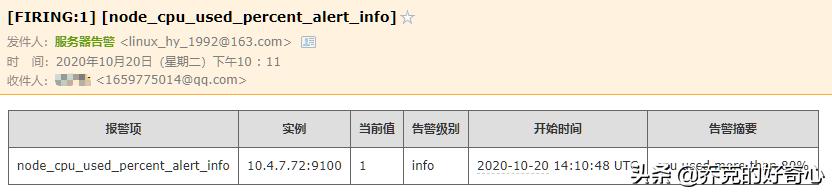
image.png

image.png
停止 grafana-79 上的node_exporter,演示宕机情况

image.png

image.png