步骤:
一. 创建地图数组,并略作处理。
二. 创建点击事件,确定点击数组,并进行地形交换
关键算法:
//偏移量x除以宽度100退一取整:Math.floor(1.36)=1.查找相同a.x
let cx = Math.floor(x / cw);
//偏移量y除以高度100并退一取整:Math.floor(1.36)=1.查找相同a.y
let cy = Math.floor(y / cw);
三. 点击地形修改,先改数组,再改画布。
Js代码:
<script type="text/javascript">
let canvas = document.getElementById("canvas"),//canvas
	bool = document.getElementById("bool"),//容器
	ul = document.getElementsByClassName("ul")[0],//修改导航
	gb = document.getElementsByClassName("gb")[0],//游标
	img_l = document.getElementsByClassName("none")[0],//道路图片
	img_z = document.getElementsByClassName("none")[1],//山图片
	ctx = canvas.getContext('2d'),//画布
	cw = 100,//方块宽度=高度
	cws_x = 10,//x数量
	cws_y = 10,//y数量
	w = canvas.width = cw * cws_x,//canvas宽度
	h = canvas.height = cw * cws_y,//canvas高度
	tArray = [];//初始数组
//生成初始数组
for (let i = 0; i < cws_x; i++) {
	for (let j = 0; j < cws_y; j++) {
		//t:1道路2:障碍物
		let t = To_img(i, j);
		let col = t!=1 ? img_z : img_l;
		tArray.push({x:i, y:j, t:t, color:col});
	}
}
//确保外围一圈地形为障碍物
function To_img(x, y) {
	let z;
	if (x == 0 || x >= cws_x - 1 || y == 0 || y >= cws_y - 1) {
		z = 2;
	}else{
		z = ~~(getRandom(1, 3));
	}
	return z;
}
//获取除外围以外的道路地形数量
function OTo_arr(arr) {
	let k = 0;
	for (let i = 0, l = arr.length; i < l; i++) {
		let b = arr[i];
		if (b.x == 0 || b.x >= cws_x - 1 || b.y == 0 || b.y >= cws_y - 1){
			continue;
		}else{
			if (b.t == 1) k++;
		}
	}
	return k;
}
//过滤,地形道路取最多值
function bdarr(a, arr) {
	let t = [];
	//获取全部除外围一圈以外的全部数组length的五分之四数量并进一取整
	let num = Math.ceil((cws_x * cws_y - (cws_x*2 + cws_y*2 - 4)) * .6);
	//判断是否少于这个数量
	if(a <  num){
		for (let i = 0, l = arr.length; i < l; i++) {
			let b = arr[i];
			//跳过外围一圈
			if (b.x == 0 || b.x >= cws_x - 1 || b.y == 0 || b.y >= cws_y - 1){
				continue;
			}else{
				//地形对调
				let h = b.t!=1?b.t-1:b.t+1, col = h!=1 ? img_z : img_l;
				t.push({x:b.x, y:b.y, t:h, color:col});
			}
		}
	}
	return t;
}
//合并数组并去重
function larr(a, b) {
	//合并数组
	a.push(...b);
	var r = [];
	//去重,前后比对
    for (var i = 0, l = a.length; i < l; i++) {
        for (var j = i + 1; j < l; j++)
            if (a[i].x == a[j].x && a[i].y == a[j].y) j = ++i;
        	r.push(a[i]);
    	}
    return r;
}
//绘制图片
function draw() {
	let iarrr = larr(tArray, bdarr(OTo_arr(tArray), tArray));
	for (let i = 0, l = iarrr.length; i < l; i++) {
		let s = iarrr[i];
		ctx.drawImage(s.color, s.x * cw, s.y * cw, cw, cw);
	}

}
window.onload = function() {
	//绘制画布
	draw();
	bool.style.width = w + 'px';
	bool.style.height = h + 'px';
	gb.style.width = cw + 'px';
	gb.style.height = cw + 'px';
	//canvas点击事件
	canvas.onclick = function(e) {
		//获取鼠标偏移量
		let x = e.pageX || e.clientX + document.body.scrollLeft,
			y = e.pageY || e.clientY + document.body.scrollTop;
		//canvas:margin-left,最小值
		let min_x = (window.innerWidth - w) / 2 + 5;
		//canvas:margin-top,最小值
		let min_y = 5;
		let d = arrIndex(x-min_x, y-min_y, tArray);
		let l = d.pop();//index
		let dom = tArray[l];//this.arr[l]
		//加载ul子元素<li></li>
		let m = d!=1 ? 'cd_2.png' : 'qcy.png';
		let tx = d!=1 ? '路' : '山';
		let thhrml = `<li onclick="xiuGai(this)" ipath="${l}" title="点击修改"><img src="./img/${m}" ipath="${d}"><span>${tx}</span></li>`;
		//加载ul内容并显示
		ul.innerHTML = thhrml,
		ul.style.display = 'block',
		gb.style.display = 'block',
		gb.style.top = (dom.y * cw - 5) + 'px',
		gb.style.left = (dom.x * cw - 5) + 'px';
		//判断是否超出下偏移量或者右偏移量,根据x,y>=行高数字量的最大值-1
		let dy = dom.y >= cws_y - 1 ? dom.y * cw : dom.y * cw + 20,
			dx = dom.x >= cws_x - 1 ? dom.x * cw - 20 : dom.x * cw + 50;
		ul.style.top = dy + 'px', ul.style.left = dx + 'px';
	}
	//设置新Div,覆盖body,防止点击事件冒泡,ul元素隐藏
	document.getElementById("move").onclick = function() {
		ul.style.display = 'none',
		gb.style.display = 'none';
	}
}
//判断点击区域所属数组并返回除该元素以外的所有内容
function arrIndex(x, y, arr) {
	let p = [];//存储内容
	let k, v;//记录被修改的原始地形以及index
	for (let i = 0, l = arr.length; i < l; i++) {
		let a = arr[i];
		//x/宽度100-4边框并退一取整:Math.floor(1.36)=1.查找相同a.x
		let cx = Math.floor(x / cw);
		//y/高度100-4边框并退一取整:Math.floor(1.36)=1.查找相同a.y
		let cy = Math.floor(y / cw);
		//拿走所有地形属性包括被点击的
		//p.push(a.t);
		if (a.x == cx && a.y == cy) {
			v = i;//获取index
			k = arr[v].t;
		}
	}
	/*需要遍历数组所有属性并生成全部按键的方法*/
	/*//删除被点击的数组
	//k = p.splice(v, 1);
	//带走被点击数组的index
	//p.push(v);*/
	//带走被点击数组的index
	p.push(k, v);
	return p;
}
//修改函数
function xiuGai(t) {
	let cipath = t.children[0].getAttribute('ipath');//获取类型1:路2:山
	let ipath  = t.getAttribute('ipath');//获取ipath属性
	//先改数组
	let a = garr(tArray, ipath);
	//再改画布
	gcanvas(tArray, ipath);
	//如果未修改前不等于修改后的地形属性,则修改成功
	if (cipath !== a) {
		dradiv('修改成功!');
		//修改自身地形,图片以及文本
		let c = cipath!=1?1:2;
		let b = cipath!=1?'./img/qcy.png':'./img/cd_2.png';
		t.children[0].setAttribute('ipath', c),
		t.children[0].setAttribute('src', b),
		t.children[1].innerHTML = cipath!=1?'山':'路';
	}

}
//修改数组,因为知道index因此可以直接修改
function garr(arr, ipath) {
	let l1 = arr[ipath];
	//直接修改整组数组
	let ta = {x:l1.x, y:l1.y, t:l1.t!=1?1:2, color:l1.t!=1?img_l:img_z};
	let a = arr.splice(ipath, 1, ta);
	//返回修改后的地形属性
	return a.t;
}
//局部重新画图函数,因为已经修改了数组,因此直接从数组读取
function gcanvas(arr, ipath) {
	let a = arr[ipath];
	//先清空局部画布
	ctx.clearRect(a.x * cw, a.y * cw, cw, cw);
	//再局部位置绘制地形图片
	ctx.drawImage(a.color, a.x * cw, a.y * cw, cw, cw);
}
//提示信息
function dradiv(text) {
	let div = document.createElement("div");
	div.style.cssText = 'height:38px; width:fit-content; padding-left:10px; padding-right:10px; background: rgb(22, 22, 22, .8); border-radius:5px; position:fixed; line-height:38px;color:#FFF;font-size:1.2em;font-weight:bold;font-family:KaiTi;top:45%;left:45%;z-index:10;';
	div.innerHTML = text;
	document.body.appendChild(div);
	//定时清除
	setTimeout(function() {
		div.parentNode.removeChild(div);
	},500);
}

//取x到y的随机数
function getRandom(x, y) {
	return Math.random() * (y - x) + x;
}
//随机颜色
function randomInt(from, to) {
	return parseInt(Math.random() * (to - from + 1) + from);
}
</script>
html代码:
<!DOCTYPE html>
<html lang="en">
<head>
<meta charset="UTF-8">
<link rel="stylesheet" href="./css/index.css" type="text/css" />
<title>菜单</title>
</head>
<body>
<div id="bool">
	<canvas id="canvas"></canvas>
	<ul class="ul">
		<!--<li onclick="xiuGai(this)" ipath="1" title="点击修改"><img src="./img/cd_2.png" ipath="1"><span>山</span></li>-->
	</ul>
	<div class="gb"></div>
</div>
<div id="move"></div>
<img src="./img/cd_2.png" class="none">
<img src="./img/qcy.png" class="none">
</body>
</html>
css代码:
*{ margin: 0; padding:0;font-family: "微软雅黑";box-sizing: border-box;list-style: none;scrollbar-width: thin;/*火狐浏览器调节滚动条宽度*/}
canvas {background:#272822;display: block;max-width: 100%;cursor: pointer;}
.none{display: none;}
#bool{
	margin:0 auto;
	border:5px solid red;
	position: relative;
	z-index: 3;
}

.ul{
	height: auto;
	position: absolute;
	z-index: 8;
	left:0px;
	top: 0px;
	transition: all .5s;
	display: none;
}

li{
	height: 50px;
	cursor: pointer;
	transition: all .2s;
	box-shadow: 1px 1px 1px #FFF inset;
	background: linear-gradient(to right, #575757, #8D8D8D, #FFF);
	border:1px solid #6B6B6B;
	border-radius: 5px;
}

li>img{
	width: 30px;
	border:1px solid #6B6B6B;
	margin:10px 10px 10px 5px;
	float: left;
	transition: all .5s;
}

li>span{
	display: block;
	width: fit-content;
	height: 50px;
	line-height: 50px;
	text-align: center;
	float: left;
	margin:0px 10px 0px 0px;
	padding-left: 2px;
	padding-right: 1px;
	font-family: KaiTi;
	color: #FFF;
	text-shadow: -1px 0 blue, 0 1px blue, 1px 0 blue, 0 -1px blue;
	font-weight: bold;
	font-size:1.2em;
}

li:hover{
	filter: brightness(120%);
}

li:hover > img{
	-webkit-transform: scale(1.1);
}


#move{
	width: 100%;
	min-height: 100vh;
	position: absolute;
	top: 0;
	left: 0;
	z-index: 1;
}

.gb{
	position: absolute;
	left: 0;
	top: 0;
	cursor: pointer;
	animation: bj 1.5s linear infinite;
	display: none;
	transition: all .5s;
}

@keyframes bj{
	0%{
		border:5px solid rgb(136, 0, 0, 1);
	}

	25%{
		border:5px solid rgb(136, 0, 0, .5);
	}

	50%{
		border:5px solid rgb(136, 0, 0, 0);
	}

	75%{
		border:5px solid rgb(136, 0, 0, .5);
	}

	100%{
		border:5px solid rgb(136, 0, 0, 1);
	}
}
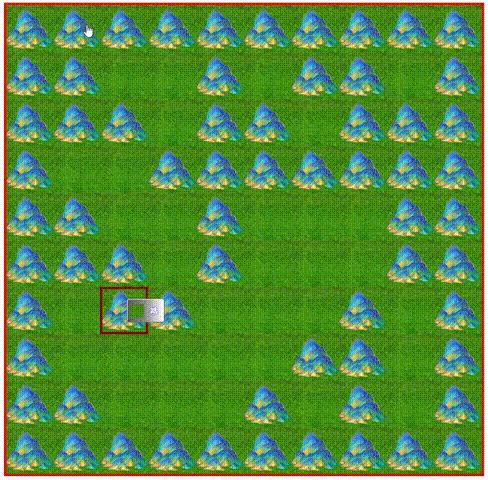
基本操作效果图
最后可以对修改后的数据进行保存:
四. 保存数据,可以是数据库或者js自带的session
js自带的session代码:
//窗口关闭自动删除
sessionStorage.setItem('username', username);
//获取
var session_name = sessionStorage.getItem("username");

//窗口关闭不删除,需要手动删除
localStorage.setItem('username', username);
//获取
var session_name = localStorage.getItem("username");
//手动删除
localStorage.removeItem("username");
感谢阅读!