
海王
前言
2018年12月7日,本年度最后一部压轴大片《海王》如期上映,目前猫眼评分达到9.5分,靠着1.5亿美金的制作成本,以小博大,目前票房接近9亿,本文爬取了猫眼3w+条评论,多方位带你解读是否值得一看!!其实(yin)我(wei)也(mei)没(qian)看!

数据爬取
现在猫眼电影网页似乎已经全部服务端渲染了,没有发现相应的评论接口,参考了之前其他文章中对于猫眼数据的爬取方法,找到了评论接口!
http://m.maoyan.com/mmdb/comments/movie/249342.json?v=yes&offset=15&startTime=2018-1208%2019%3A17%3A16%E3%80%82
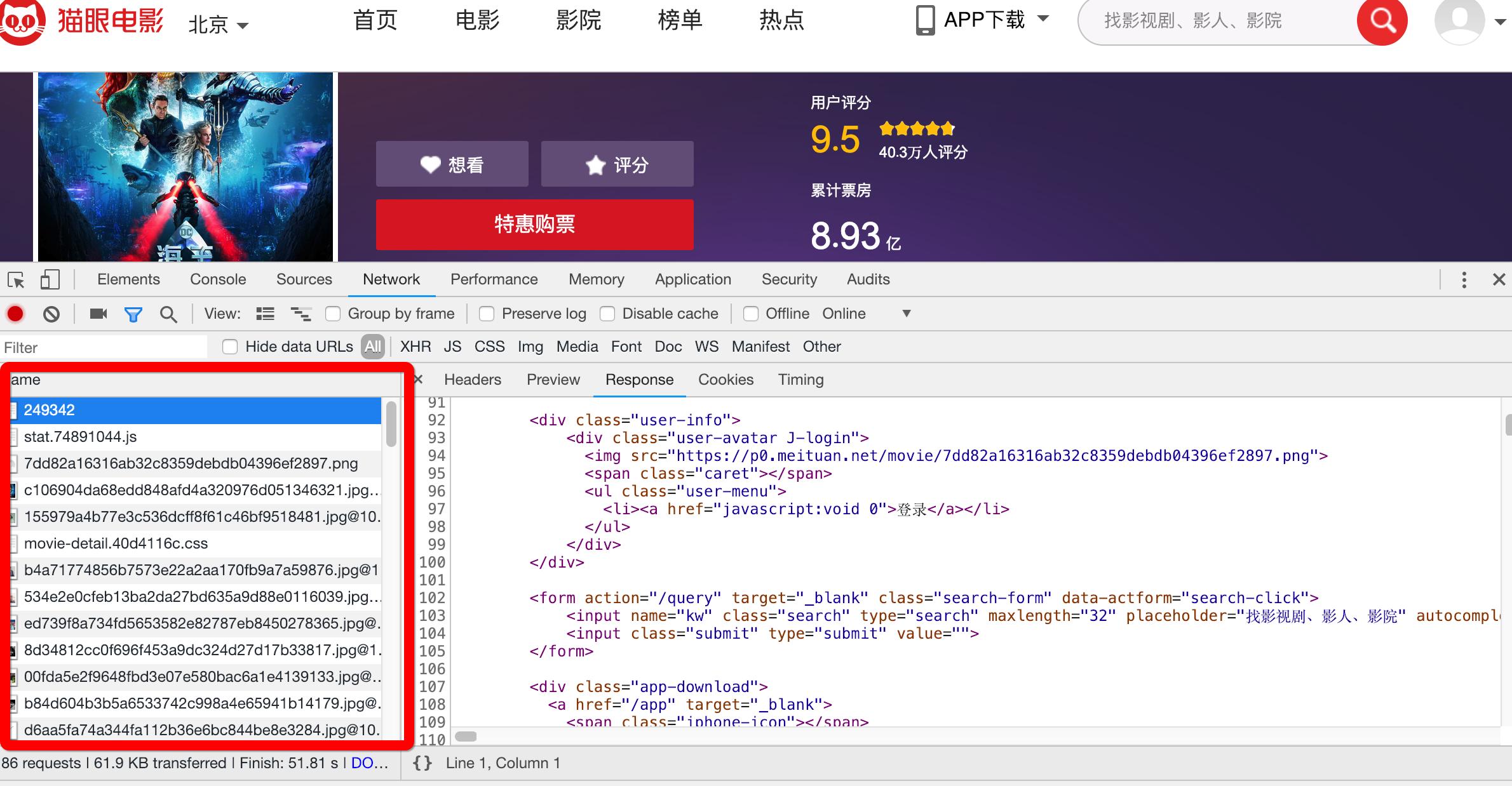
接口有了,但是没有对应的电影id,不过这难不倒我们,使用猫眼app+charles,我们成功找到海王对应的电影ID;
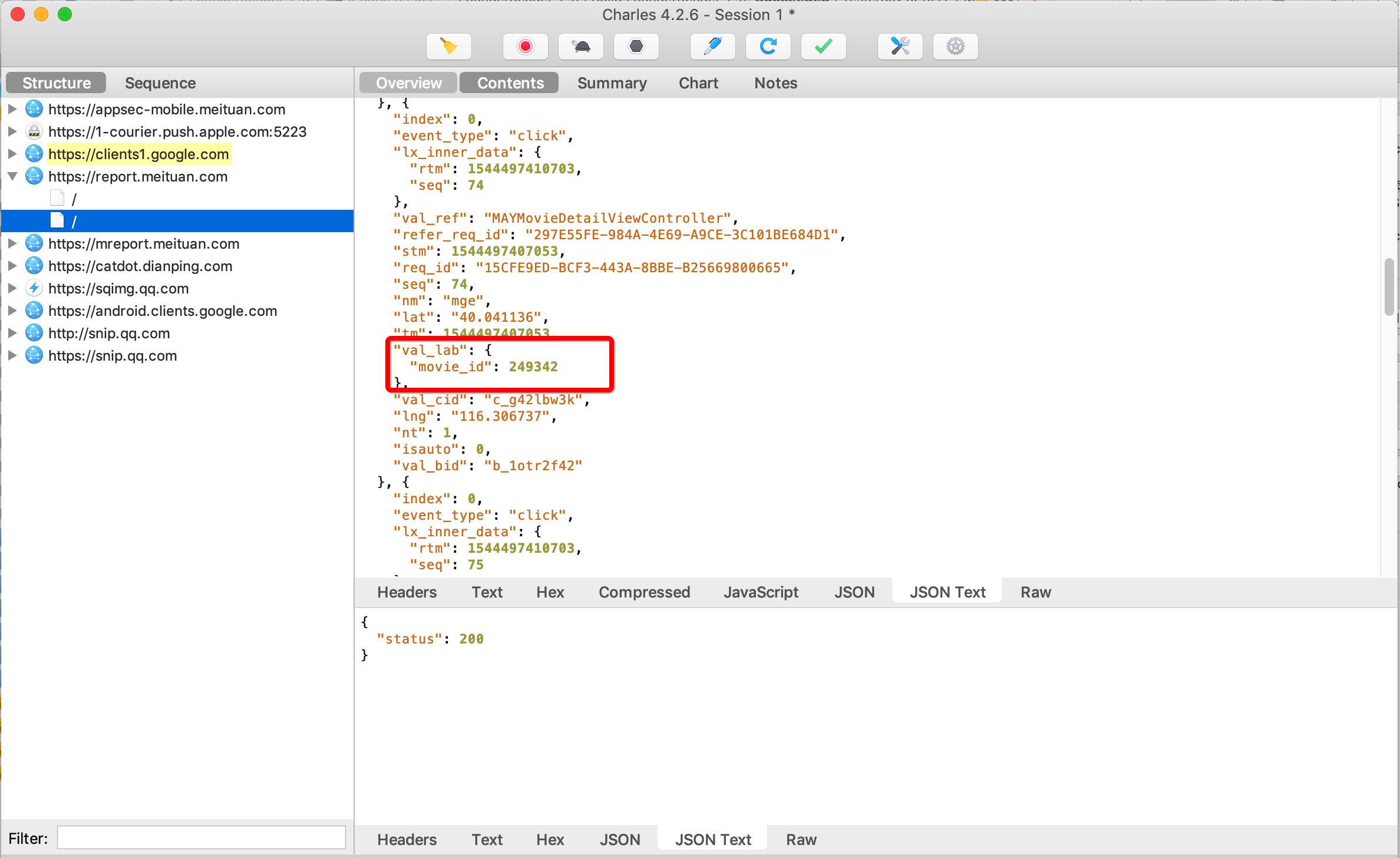
接下来爬取评论:
#获取数据
def get_data(url):
 headrs = {
 "User-Agent": "Mozilla/5.0 (Windows NT 10.0; WOW64) AppleWebKit/537.36 (KHTML, like Gecko) Chrome/51.0.2704.103 Safari/537.36"
 }
 html = request(method='GET',url=url,headers=headrs)
 if html.status_code == 200:
 return html.content
 else:
 return None
解析接口返回数据
#处理接口返回数据
def parse_data(html):
 json_data = json.loads(html,encoding='utf-8')['cmts']
 comments = []
 try:
 for item in json_data:
 comment = {
 'nickName':item['nickName'],
 'cityName':item['cityName'] if 'cityName' in item else '',
 'content':item['content'].strip().replace('\n',''),
 'score':item['score'],
 'startTime': item['startTime']
 }
 comments.append(comment)
 return comments
 except Exception as e:
 print(e)
处理链接及存储数据
def change_url_and_save():
 start_time = time.strftime('%Y-%m-%d %H:%M:%S',time.localtime(time.time())).replace(' ','%20')
 end_time = '2026-03-16T14:41:49+00:00'
 while start_time > end_time:
 url = "http://m.maoyan.com/mmdb/comments/movie/249342.json?v=yes&offset=15&startTime="+start_time
 html = None
 try:
 html = get_data(url)
 except Exception as e:
 time.sleep(0.5)
 html = get_data(url)
 else:
 time.sleep(0.1)
 comments = parse_data(html)
 start_time = comments[14]['startTime']
 print(start_time)
 t = datetime.datetime.now()
 start_time = time.strptime(start_time,'%Y-%m-%d %H:%M:%S')
 start_time = datetime.datetime.fromtimestamp(time.mktime(start_time))+datetime.timedelta(seconds=-1)
 start_time = time.mktime(start_time.timetuple())
 start_time = time.strftime('%Y-%m-%d %H:%M:%S',time.localtime(start_time)).replace(' ', '%20')
 for item in comments:
 print(item)
 with open('/Users/mac/Desktop/H5DOC/H5learn/REPTILE/comments.txt', 'a', encoding='utf-8')as f:
 f.write(item['nickName'] + ',' + item['cityName'] + ',' + item['content'] + ',' + str(item['score']) +','+ item[
 'startTime'] + '\n')
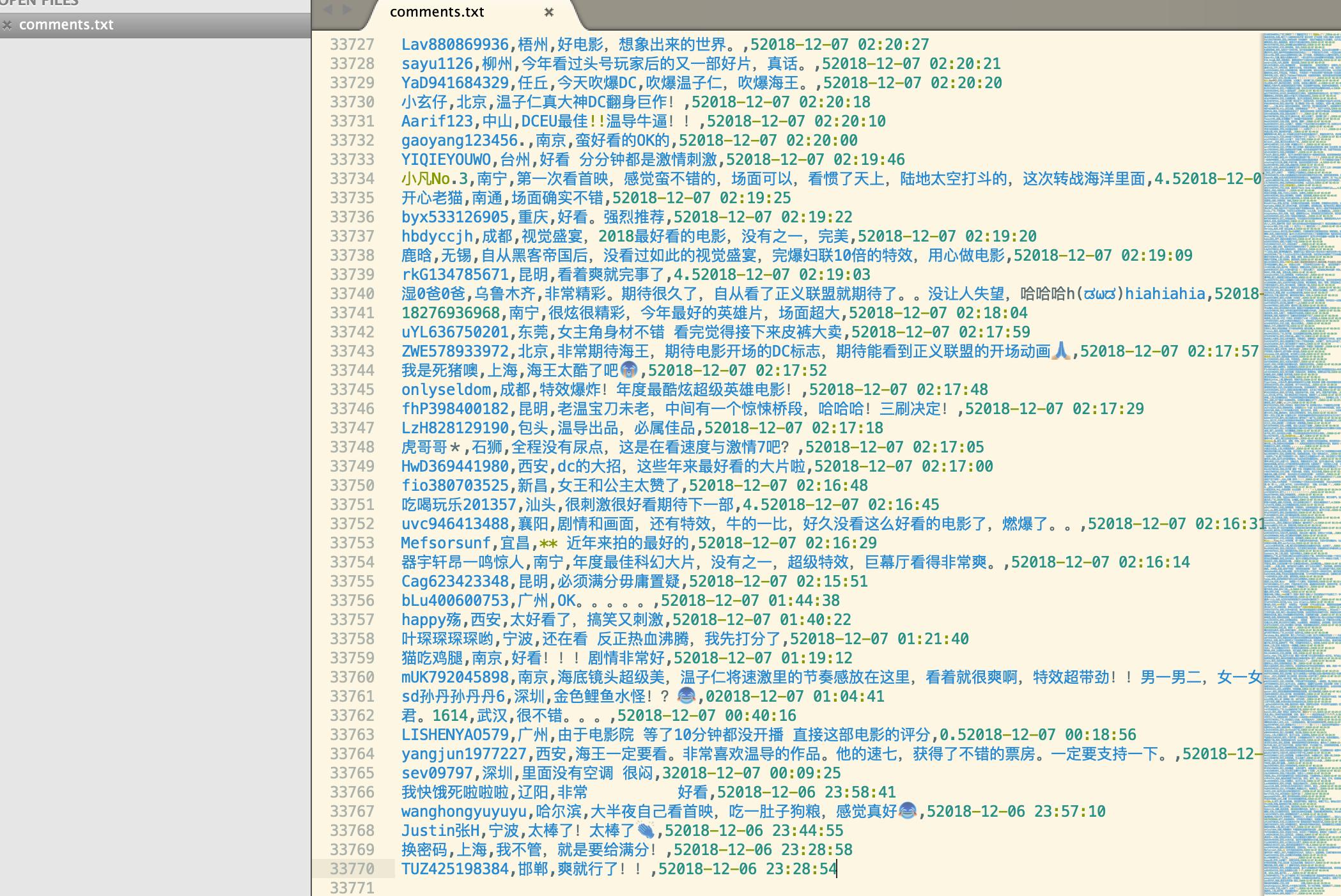
最终我们获取到了大约33000条数据
数据分析
数据分析我们使用了百度的pyecharts、excel以及使用wordcloud生成词云
首先看一下,评论分布热力图:

京津冀、长三角、珠三角等在各种榜单长期霸榜单的区域,在热力图中,依然占据着重要地位。而新一线的川渝、郑州武汉紧随其后!
下面是评论数前20的城市
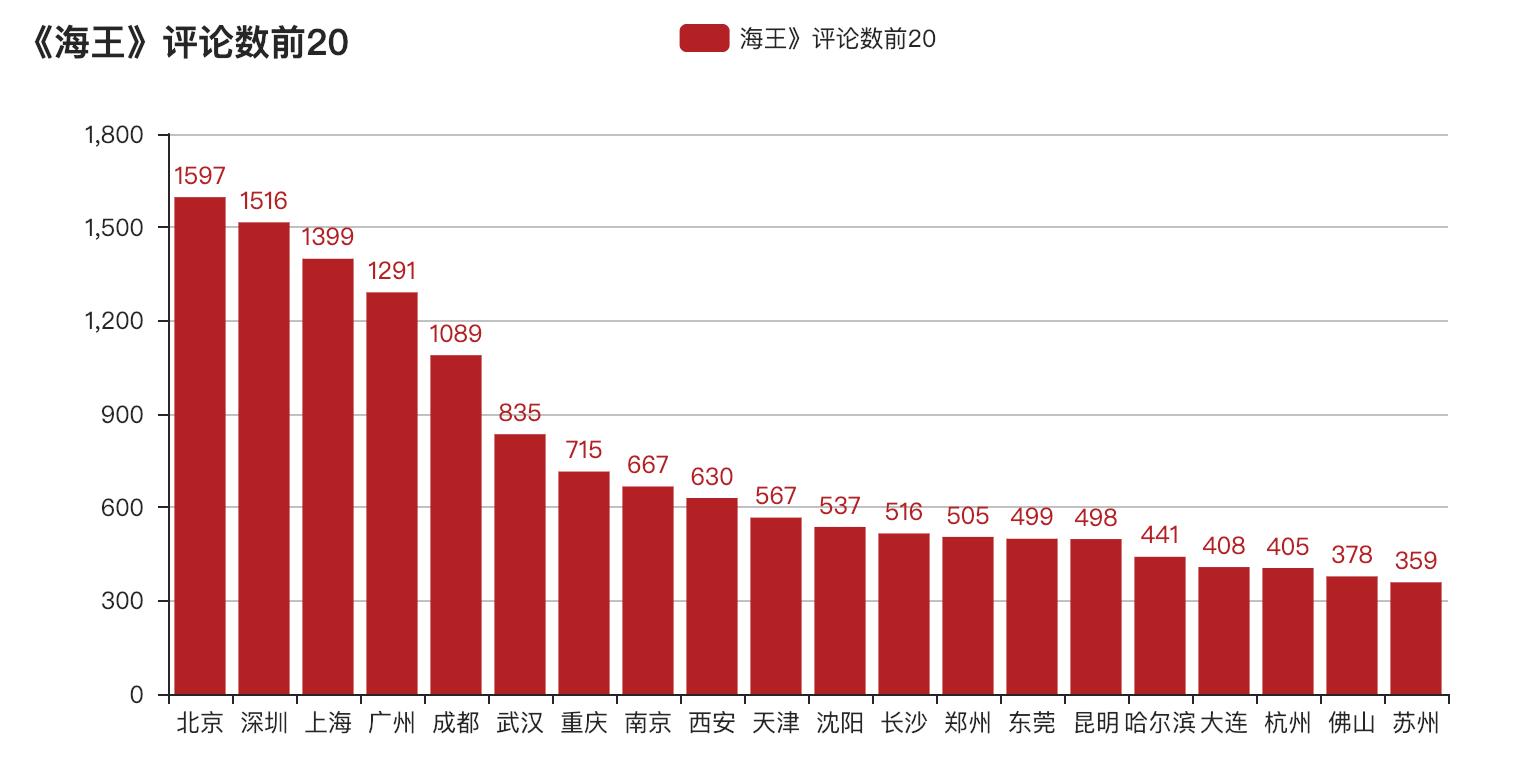
评论全国分布图:
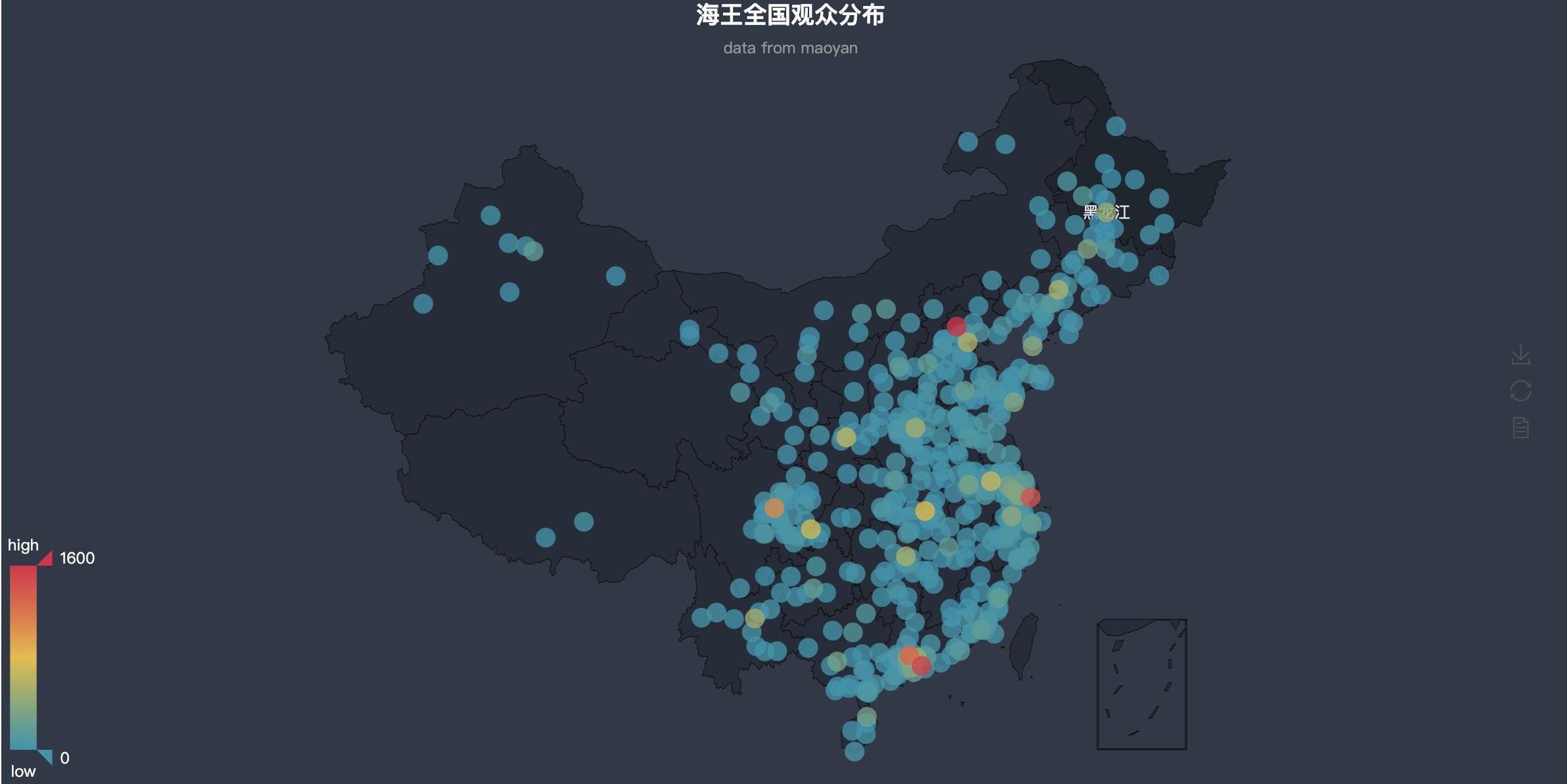
由图中可以看出基本与热力图相似,主要分布在各大一线、新一线城市,对于杭州为何会排在第17的位置,我觉得可能是阿里大本营,大家都用淘票票的缘故吧!
接下来是评分占比情况
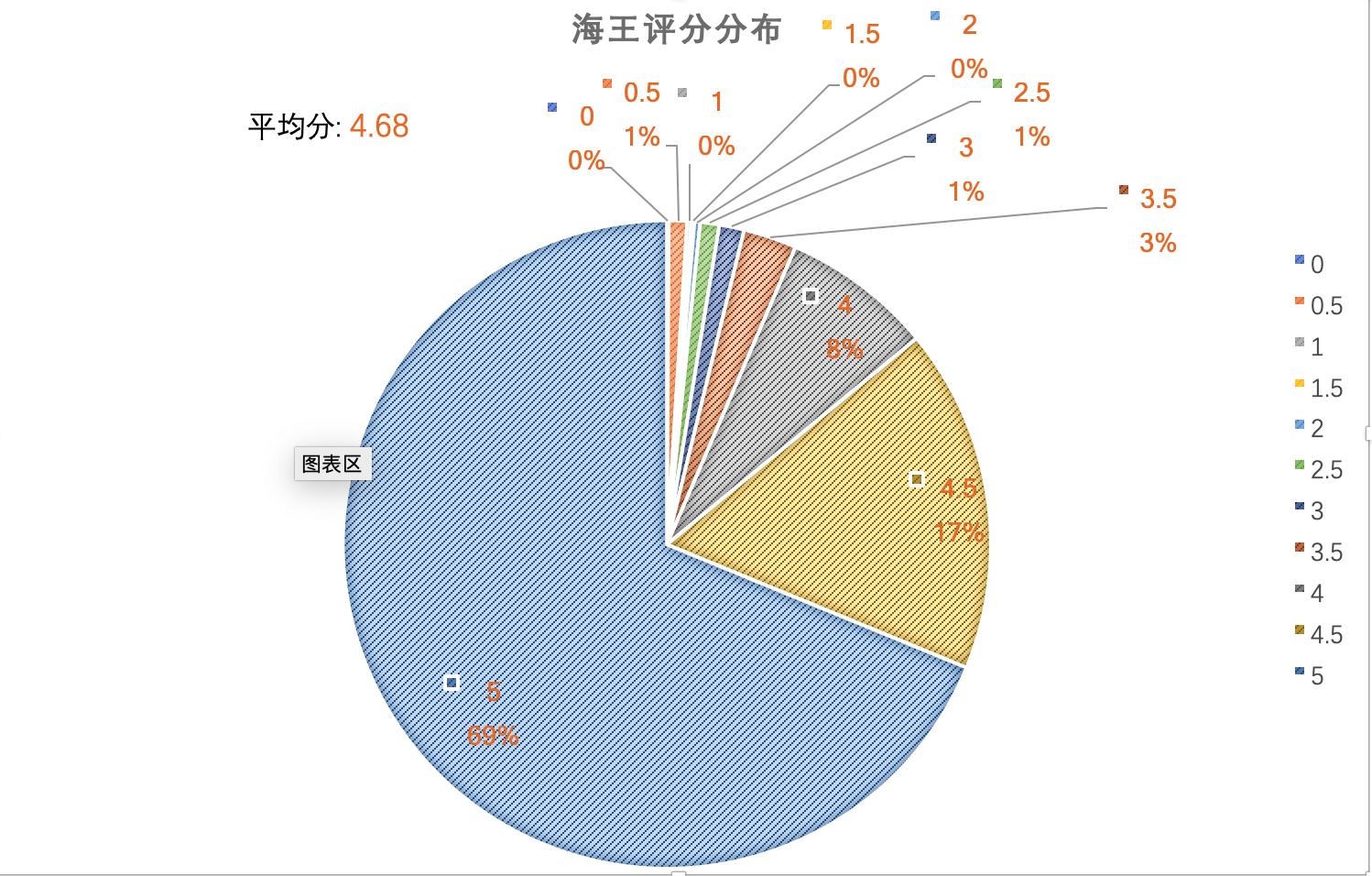
由图中可以看出,评分在4以上的占比达到了94%,而平均评分也达到4.68分!!!
再来看一下各城市评分情况:

看了评分再来看看评论的词云情况:



词云出现较多的是好看、特效、剧情、震撼等,可以看出大家对此电影对特效和剧情还是十分认同的,毕竟烂番茄新鲜度73%,1.5亿美元对制作能做到如此实属不易,我还是决定这周末去影院刷一下的!
词云代码
def data_wordclound():
 comments = ''
 with open('comments.txt','r') as f:
 rows = f.readlines()
 try:
 for row in rows:
 lit = row.split(',')
 if len(lit) >= 3:
 comment = lit[2]
 if comment != '':
 comments += ' '.join(jieba.cut(comment.strip()))
 # print(comments)
 except Exception as e:
 print(e)
 hai_coloring = imread('hai.jpeg')
 # 多虑没用的停止词
 stopwords = STOPWORDS.copy()
 stopwords.add('电影')
 stopwords.add('一部')
 stopwords.add('一个')
 stopwords.add('没有')
 stopwords.add('什么')
 stopwords.add('有点')
 stopwords.add('感觉')
 stopwords.add('海王')
 stopwords.add('就是')
 stopwords.add('觉得')
 stopwords.add('DC')
 bg_image = plt.imread('hai.jpeg')
 font_path = '/System/Library/Fonts/STHeiti Light.ttc'
 wc = WordCloud(width=1024, height=768, background_color='white', mask=bg_image, font_path=font_path,
 stopwords=stopwords, max_font_size=400, random_state=50)
 wc.generate(comments)
 images_colors = ImageColorGenerator(hai_coloring)
 plt.figure()
 plt.imshow(wc.recolor(color_func=images_colors))
 plt.axis('off')
 plt.show()
综上,我觉得没看的小伙伴可以跟我一样一起周末去贡献一下票房了!哈哈哈哈