我使用的SRS版本:SRS-CentOS6-x86_64-2.0.263
查看系统版本
[root@xxxxxx ~]# cat /etc/redhat-release
安装常用软件
[root@xxxxxx ~]# yum install -y redhat-lsb
[root@xxxxxx ~]# yum install -y wget lrzsz zip unzip vim
将下好的SRS解压
[root@xxxxxx ~]# unzip SRS-CentOS6-x86_64-2.0.263.zip
进入目录安装
[root@xxxxxx ~]# cd SRS-CentOS6-x86_64-2.0.263
[root@xxxxxx ~]# sudo ./INSTALL
下面安装ffmpeg,首先更新源
[root@xxxxxx ~]# yum install -y epel-release
[root@xxxxxx ~]# rpm --import http://li.nux.ro/download/nux/RPM-GPG-KEY-nux.ro
[root@xxxxxx ~]# rpm -Uvh http://li.nux.ro/download/nux/dextop/e17/x86_64/nux-dextop-release-0-1.e17.nux.noarch.rpm
安装ffmpeg
[root@xxxxxx ~]# yum install -y ffmpeg ffmpeg-devel
启动srs
[root@xxxxxx ~]# sudo /etc/init.d/srs start
启动后推流采用OBS,配置:
【设置】->【推流】:服务选择自定义,服务器填写rtmp://[服务器IP]:1935/live 串流密钥填写livestream
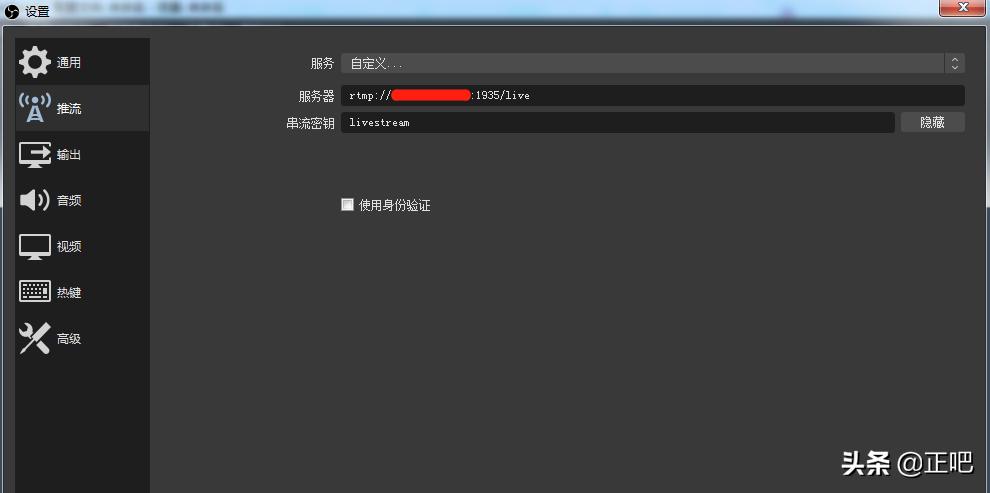
OBS配置
填写好后回主界面点击【开始推流】
拉流*放播**可以使用PotPlayer,【打开】->【打开链接】:打开地址为rtmp://[服务器IP]:1935/live/livestream
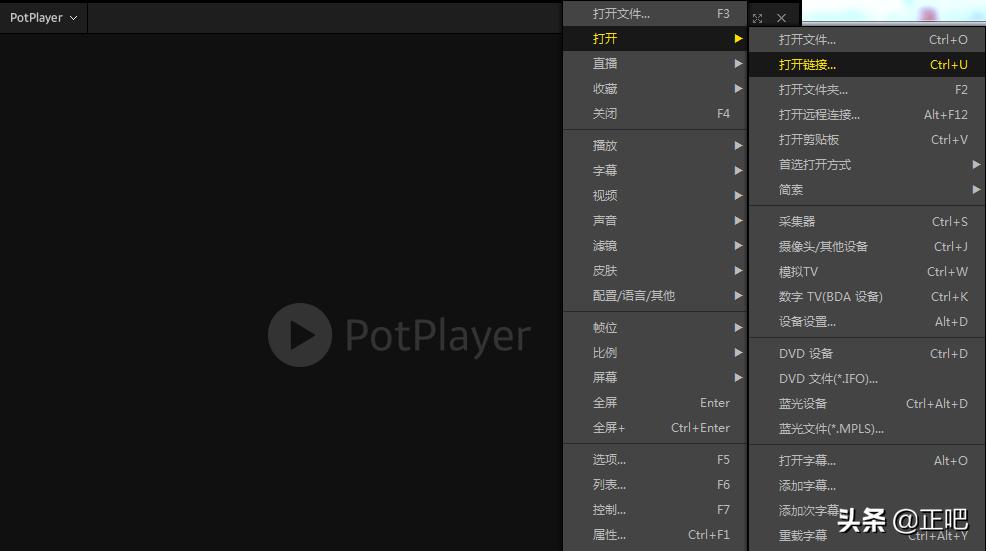
PotPlayer观看直播
点击【确定】即可看到直播推流内容。
SRS*载下**:https://www.zheng888.cn/data/file/software/srs.rar