我曾经遇到过一个问题,在IDE开发程序时运行时,程序运行效果没有任何问题,但是单独运行EXE文件就不行,仔细查了一下资料,发现是权限的问题,收集并整理了代码,实例如下
仍然是打开program.cs
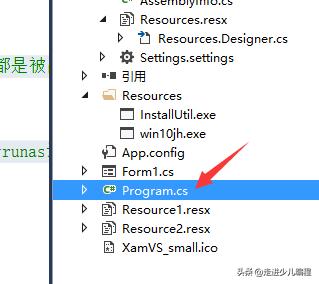
修改main函数如下:
using System;
using System.Windows.Forms;

namespace JH
{
    static class Program
    {
        /// <summary>
        /// 应用程序的主入口点。
        /// </summary>
        [STAThread]
        static void Main(string[] args)
        {
            Application.EnableVisualStyles();
            Application.SetCompatibleTextRenderingDefault(false);

            System.Security.Principal.WindowsIdentity identity = System.Security.Principal.WindowsIdentity.GetCurrent();
            System.Security.Principal.WindowsPrincipal gz = new System.Security.Principal.WindowsPrincipal(identity);
            //判断当前登录用户是否为管理员
            if (gz.IsInRole(System.Security.Principal.WindowsBuiltInRole.Administrator))
            {
                //如果是管理员,则直接运行
                //这里我理解是比如你已经把EXE文件属性加上了以管理员身份运行时,
                //就直接执行下面这句运行程序
                Application.Run(new Form1());
            }
            else
            {
                //创建启动对象
                System.Diagnostics.ProcessStartInfo si = new System.Diagnostics.ProcessStartInfo();
                si.UseShellExecute = true;
                si.WorkingDirectory = Environment.CurrentDirectory;
                si.FileName = Application.ExecutablePath;
                //设置启动动作,确保以管理员身份运行
                si.Verb = "runas";
                //这里就是如果不是管理员身份运行,用程序来加上管理员身份运行
                try
                {
                    System.Diagnostics.Process.Start(si);
                }
                catch(Exception ex)
                {
                    //如果出错了,这里可以显示一下错误原因,一般都是被占用什么的
                    MessageBox.Show(ex.ToString());
                    return;
                }
                //退出自己当前这个实例,因为上面已经重新开了一个runas进程
                Application.Exit();
            }
        }
    }
}
居然有一小点错误,我修改了一下