在MyBatis初始化过程中,大致会有以下几个步骤:拉勾IT课小编为大家分解
- 创建Configuration全局配置对象,会往TypeAliasRegistry别名注册中心添加Mybatis需要用到的相关类,并设置默认的语言驱动类为XMLLanguageDriver
- 加载mybatis-config.xml配置文件、Mapper接口中的注解信息和XML映射文件,解析后的配置信息会形成相应的对象并保存到Configuration全局配置对象中
- 构建DefaultSqlSessionFactory对象,通过它可以创建DefaultSqlSession对象,MyBatis中SqlSession的默认实现类
因为整个初始化过程涉及到的代码比较多,所以拆分成了四个模块依次对MyBatis的初始化进行分析:
- 《MyBatis初始化(一)之加载mybatis-config.xml》
- 《MyBatis初始化(二)之加载Mapper接口与XML映射文件》
- 《MyBatis初始化(三)之SQL初始化(上)》
- 《MyBatis初始化(四)之SQL初始化(下)》
由于在MyBatis的初始化过程中去解析Mapper接口与XML映射文件涉及到的篇幅比较多,XML映射文件的解析过程也比较复杂,所以才分成了后面三个模块,逐步分析,这样便于理解
初始化(二)之加载Mapper接口与映射文件
在上一个模块已经分析了是如何解析mybatis-config.xml配置文件的,在最后如何解析<mapper />标签的还没有进行分析,这个过程稍微复杂一点,因为需要解析Mapper接口以及它的XML映射文件,让我们一起来看看这个解析过程
解析XML映射文件生成的对象主要如下图所示:
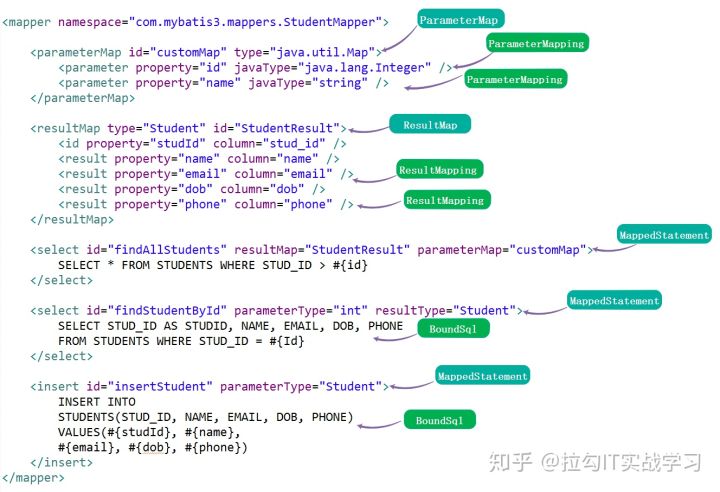
主要包路径:org.apache.ibatis.builder、org.apache.ibatis.mapping
主要涉及到的类:
- org.apache.ibatis.builder.xml.XMLConfigBuilder:根据配置文件进行解析,开始Mapper接口与XML映射文件的初始化,生成Configuration全局配置对象
- org.apache.ibatis.binding.MapperRegistry:Mapper接口注册中心,将Mapper接口与其动态代理对象工厂进行保存,这里我们解析到的Mapper接口需要往其进行注册
- org.apache.ibatis.builder.annotation.MapperAnnotationBuilder:解析Mapper接口,主要是解析接口上面注解,其中加载XML映射文件内部会调用XMLMapperBuilder类进行解析
- org.apache.ibatis.builder.xml.XMLMapperBuilder:解析XML映射文件
- org.apache.ibatis.builder.xml.XMLStatementBuilder:解析XML映射文件中的Statement配置(<select /> <update /> <delete /> <insert />标签)
- org.apache.ibatis.builder.MapperBuilderAssistant:Mapper构造器小助手,用于创建ResultMapping、ResultMap和MappedStatement对象
- org.apache.ibatis.mapping.ResultMapping:保存<resultMap />标签的子标签相关信息,也就是 Java Type 与 Jdbc Type 的映射信息
- org.apache.ibatis.mapping.ResultMap:保存了<resultMap />标签的配置信息以及子标签的所有信息
- org.apache.ibatis.mapping.MappedStatement:保存了解析<select /> <update /> <delete /> <insert />标签内的SQL语句所生成的所有信息
解析入口
我们回顾上一个模块,在org.apache.ibatis.builder.xml.XMLConfigBuilder中会解析mybatis-config.xml配置文件中的<mapper />标签,调用其parse()->parseConfiguration(XNode root)->mapperElement(XNode parent)方法,那么我们来看看这个方法,代码如下:
private void mapperElement(XNode parent) throws Exception {if (parent != null) {// <0> 遍历子节点for (XNode child : parent.getChildren()) {// <1> 如果是 package 标签,则扫描该包if ("package".equals(child.getName())) {// 获得包名String mapperPackage = child.getStringAttribute("name");// 添加到 configuration 中configuration.addMappers(mapperPackage);} else { // 如果是 mapper 标签// 获得 resource、url、class 属性String resource = child.getStringAttribute("resource");String url = child.getStringAttribute("url");String mapperClass = child.getStringAttribute("class");// <2> 使用相对于类路径的资源引用if (resource != null && url == null && mapperClass == null) {ErrorContext.instance().resource(resource);// 获得 resource 的 InputStream 对象InputStream inputStream = Resources.getResourceAsStream(resource);// 创建 XMLMapperBuilder 对象XMLMapperBuilder mapperParser = new XMLMapperBuilder(inputStream, configuration, resource, configuration.getSqlFragments());// 执行解析mapperParser.parse();// <3> 使用完全限定资源定位符(URL)} else if (resource == null && url != null && mapperClass == null) {ErrorContext.instance().resource(url);// 获得 url 的 InputStream 对象InputStream inputStream = Resources.getUrlAsStream(url);// 创建 XMLMapperBuilder 对象XMLMapperBuilder mapperParser = new XMLMapperBuilder(inputStream, configuration, url,configuration.getSqlFragments());// 执行解析mapperParser.parse();// <4> 使用映射器接口实现类的完全限定类名} else if (resource == null && url == null && mapperClass != null) {// 获得 Mapper 接口Class<?> mapperInterface = Resources.classForName(mapperClass);// 添加到 configuration 中configuration.addMapper(mapperInterface);} else {throw new BuilderException( "A mapper element may only specify a url, resource or class, but not more than one.");}}}}}
遍历<mapper />标签的子节点

- 如果是<package />子节点,则获取package属性,对该包路径下的Mapper接口进行解析
- 否的的话,通过子节点的resource属性或者url属性解析该映射文件,或者通过class属性解析该Mapper接口
通常我们是直接配置一个包路径,这里就查看上面第1种对Mapper接口进行解析的方式,第2种的解析方式其实在第1 种方式都会涉及到,它只是抽取出来了,那么我们就直接看第1种方式
首先将package包路径添加到Configuration全局配置对象中,也就是往其内部的MapperRegistry注册表进行注册,调用它的MapperRegistry的addMappers(String packageName)方法进行注册
我们来看看在MapperRegistry注册表中是如何解析的,在之前文档的Binding模块中有讲到过这个类,该方法如下:
public class MapperRegistry {public void addMappers(String packageName) {addMappers(packageName, Object.class);}/*** 用于扫描指定包中的Mapper接口,并与XML文件进行绑定* @since 3.2.2*/public void addMappers(String packageName, Class<?> superType) {// <1> 扫描指定包下的指定类ResolverUtil<Class<?>> resolverUtil = new ResolverUtil<>();resolverUtil.find(new ResolverUtil.IsA(superType), packageName);Set<Class<? extends Class<?>>> mapperSet = resolverUtil.getClasses();// <2> 遍历,添加到 knownMappers 中for (Class<?> mapperClass : mapperSet) {addMapper(mapperClass);}}public <T> void addMapper(Class<T> type) {// <1> 判断,必须是接口。if (type.isInterface()) {// <2> 已经添加过,则抛出 BindingException 异常if (hasMapper(type)) {throw new BindingException("Type " + type + " is already known to the MapperRegistry.");}boolean loadCompleted = false;try {// <3> 将Mapper接口对应的代理工厂添加到 knownMappers 中knownMappers.put(type, new MapperProxyFactory<>(type));// It's important that the type is added before the parser is run// otherwise the binding may automatically be attempted by the mapper parser.// If the type is already known, it won't try.// <4> 解析 Mapper 的注解配置MapperAnnotationBuilder parser = new MapperAnnotationBuilder(config, type);// 解析 Mapper 接口上面的注解和 Mapper 接口对应的 XML 文件parser.parse();// <5> 标记加载完成loadCompleted = true;} finally {// <6> 若加载未完成,从 knownMappers 中移除if (!loadCompleted) {knownMappers.remove(type);}}}}}
<1>首先必须是个接口
<2>已经在MapperRegistry注册中心存在,则会抛出异常
<3>创建一个Mapper接口对应的MapperProxyFactory动态代理工厂
<4>【重要!!!】通过MapperAnnotationBuilder解析该Mapper接口与对应XML映射文件
MapperAnnotationBuilder
org.apache.ibatis.builder.annotation.MapperAnnotationBuilder:解析Mapper接口,主要是解析接口上面注解,加载XML文件会调用XMLMapperBuilder类进行解析
我们先来看看他的构造函数和parse()解析方法:

public class MapperAnnotationBuilder {/*** 全局配置对象*/private final Configuration configuration;/*** Mapper 构造器小助手*/private final MapperBuilderAssistant assistant;/*** Mapper 接口的 Class 对象*/private final Class<?> type;public MapperAnnotationBuilder(Configuration configuration, Class<?> type) {String resource = type.getName().replace('.', '/') + ".java (best guess)";this.assistant = new MapperBuilderAssistant(configuration, resource);this.configuration = configuration;this.type = type;}public void parse() {String resource = type.toString();if (!configuration.isResourceLoaded(resource)) {// 加载该接口对应的 XML 文件loadXmlResource();configuration.addLoadedResource(resource);assistant.setCurrentNamespace(type.getName());// 解析 Mapper 接口的 @CacheNamespace 注解,创建缓存parseCache();// 解析 Mapper 接口的 @CacheNamespaceRef 注解,引用其他命名空间parseCacheRef();Method[] methods = type.getMethods();for (Method method : methods) {try {// issue #237if (!method.isBridge()) { // 如果不是桥接方法// 解析方法上面的注解parseStatement(method);}} catch (IncompleteElementException e) {configuration.addIncompleteMethod(new MethodResolver(this, method));}}}parsePendingMethods();}private void loadXmlResource() {// Spring may not know the real resource name so we check a flag// to prevent loading again a resource twice// this flag is set at XMLMapperBuilder#bindMapperForNamespaceif (!configuration.isResourceLoaded("namespace:" + type.getName())) {String xmlResource = type.getName().replace('.', '/') + ".xml";// #1347InputStream inputStream = type.getResourceAsStream("/" + xmlResource);if (inputStream == null) {// Search XML mapper that is not in the module but in the classpath.try {inputStream = Resources.getResourceAsStream(type.getClassLoader(), xmlResource);} catch (IOException e2) {// ignore, resource is not required}}if (inputStream != null) {// 创建 XMLMapperBuilder 对象XMLMapperBuilder xmlParser = new XMLMapperBuilder(inputStream, assistant.getConfiguration(),xmlResource, configuration.getSqlFragments(), type.getName());// 解析该 XML 文件xmlParser.parse();}}}}
在构造函数中,会创建一个MapperBuilderAssistant对象,Mapper 构造器小助手,用于创建XML映射文件中对应相关对象
parse()方法,用于解析Mapper接口:
- 获取Mapper接口的名称,例如interfacexxx.xxx.xxx,根据Configuration全局配置对象判断该Mapper接口是否被解析过

- 没有解析过则调用loadXmlResource()方法解析对应的XML映射文件
- 然后解析接口的@CacheNamespace和@CacheNamespaceRef注解,再依次解析方法上面的MyBatis相关注解
注解的相关解析这里就不讲述了,因为我们通常都是使用XML映射文件,逻辑没有特别复杂,都在MapperAnnotationBuilder中进行解析,感兴趣的小伙伴可以看看