基本属性
- text: 显示的文本
- modifier
- color: 字体颜色
- fontSize: 字体大小
- fontStyle: 字体样式 (比如斜体)
- fontWeight: 字体样式 (比如粗体)
- fontFamily: 处理字体 (比如设置宋体等)
- letterSpacing: 每个字符之间的间距
- textDecoration: 文本的装饰,比如TextDecoration.Underline
- 添加下划线,比如TextDecoration.LineThrough 中线划线
- textAlign: 设置文字对齐 对齐方式
- lineHeight: 设置行高
- maxLines: 最大行数
- overflow: 当文字溢出的时候,比如…设置显示在最后
- softWrap: 声明是否应在换行符处断开文本,默认是true
- onTextLayout: 在计算新的文本布局时执行的回调
- style: 文本样式
代码示例
@Composable
fun TextDemo() {
    //垂直布局
    Column() {
        //显示资源中的文字
        Text(stringResource(id = R.string.app_name))
        //最多显示行数 , 溢出处理
        Text(
            text = "你好呀陌生人,这是一个标题,不是很长,因为我想不出其他什么比较好的标题了",
            //宽度
            modifier = Modifier.width(200.dp),
            //设置 最多显示行数
            maxLines = 1,
            //溢出处理 省略
            overflow = TextOverflow.Ellipsis
        )
        //文字颜色
        Text(text = "Hello World", color = Color.Blue)
        //文字大小
        Text(text = "Hello World", fontSize = 30.sp)
        //斜体
        Text(text = "Hello World", fontStyle = FontStyle.Italic)
        //粗体
        Text(text = "Hello World", fontWeight = FontWeight.Bold)
        //文字对齐 (居中)
        Text(
            text = "Hello World Hello World\nHello World",
            //文本的对齐方式
            textAlign = TextAlign.Center
        )
        //设置宽度与高度
        Text(
            text = "Hello World",
            //居中对齐
            textAlign = TextAlign.Center,
            modifier = Modifier
                //宽度
                .width(100.dp)
                //高度
                .height(30.dp)
        )
        //字体设置
        Text(text = "Hello World", fontFamily = FontFamily.Serif)
        //字体设置
        Text(text = "Hello World", fontFamily = FontFamily.SansSerif)
        //自定义 fontFamily
        val firaSansFamily = FontFamily(
            Font(R.font.firasans_light, FontWeight.Light),
            Font(R.font.firasans_regular, FontWeight.Normal)
        )
        //字体设置
        Text(
            text = "Hello World",
            fontFamily = firaSansFamily,
            fontWeight = FontWeight.Light
        )
        //字体设置
        Text(
            text = "Hello World",
            fontFamily = firaSansFamily,
            fontWeight = FontWeight.Normal
        )
        //文本中间绘制线
        Text(
            text = "Hello World",
            style = TextStyle(textDecoration = TextDecoration.LineThrough)
        )
        //文本下方绘制线  下划线
        Text(
            text = "Hello World",
            style = TextStyle(textDecoration = TextDecoration.Underline)
        )
        //设置多个 textDecoration
        Text(
            text = "Hello World",
            style = TextStyle(
                textDecoration =
                TextDecoration.combine(
                    listOf(
                        TextDecoration.LineThrough,
                        TextDecoration.Underline
                    )
                )
            )
        )
        //设置样式
        Text(text = buildAnnotatedString {
            withStyle(
                style = SpanStyle(
                    //字体颜色
                    color = Color.Blue
                )
            ) {
                append("H")
            }
            append("ello ")
            withStyle(
                style = SpanStyle(
                    //粗体
                    fontWeight = FontWeight.Bold,
                    //字体颜色
                    color = Color.Green
                )
            ) {
                append("W")
            }
            append("orld")
        })
        //设置段落样式
        Text(text = buildAnnotatedString {
            withStyle(
                style = ParagraphStyle(
                    //行高间距
                    lineHeight = 40.sp
                )
            ) {
                withStyle(
                    style = SpanStyle(
                        //字体颜色
                        color = Color.Yellow
                    )
                ) {
                    append("Hello\n")
                }
                withStyle(
                    style = SpanStyle(
                        //粗体
                        fontWeight = FontWeight.Bold,
                        //字体颜色
                        color = Color.Red
                    )
                ) {
                    append("World\n")
                }
                append("Compose")
            }
        })
        //设置最大行数
        Text(
            //重复字符串
            text = "Hello World ".repeat(20),
            //设置行数
            maxLines = 3
        )
        //文字溢出处理
        Text(
            text = "Hello World".repeat(20),
            //设置最大行数
            maxLines = 3,
            //溢出处理:省略号
            overflow = TextOverflow.Ellipsis
        )
        // 将内部 Text 组件的 alpha 强调程度设置为高
        // 注意: MaterialTheme 已经默认将强调程度设置为 high
        CompositionLocalProvider(LocalContentAlpha provides ContentAlpha.high) {
            Text("这里是high强调效果")
        }
        // 将内部 Text 组件的 alpha 强调程度设置为中
        CompositionLocalProvider(LocalContentAlpha provides ContentAlpha.medium) {
            Text("这里是medium强调效果")
        }
        // 将内部 Text 组件的 alpha 强调程度设置为禁用
        CompositionLocalProvider(LocalContentAlpha provides ContentAlpha.disabled) {
            Text("这里是禁用后的效果")
        }
    }
}
图例
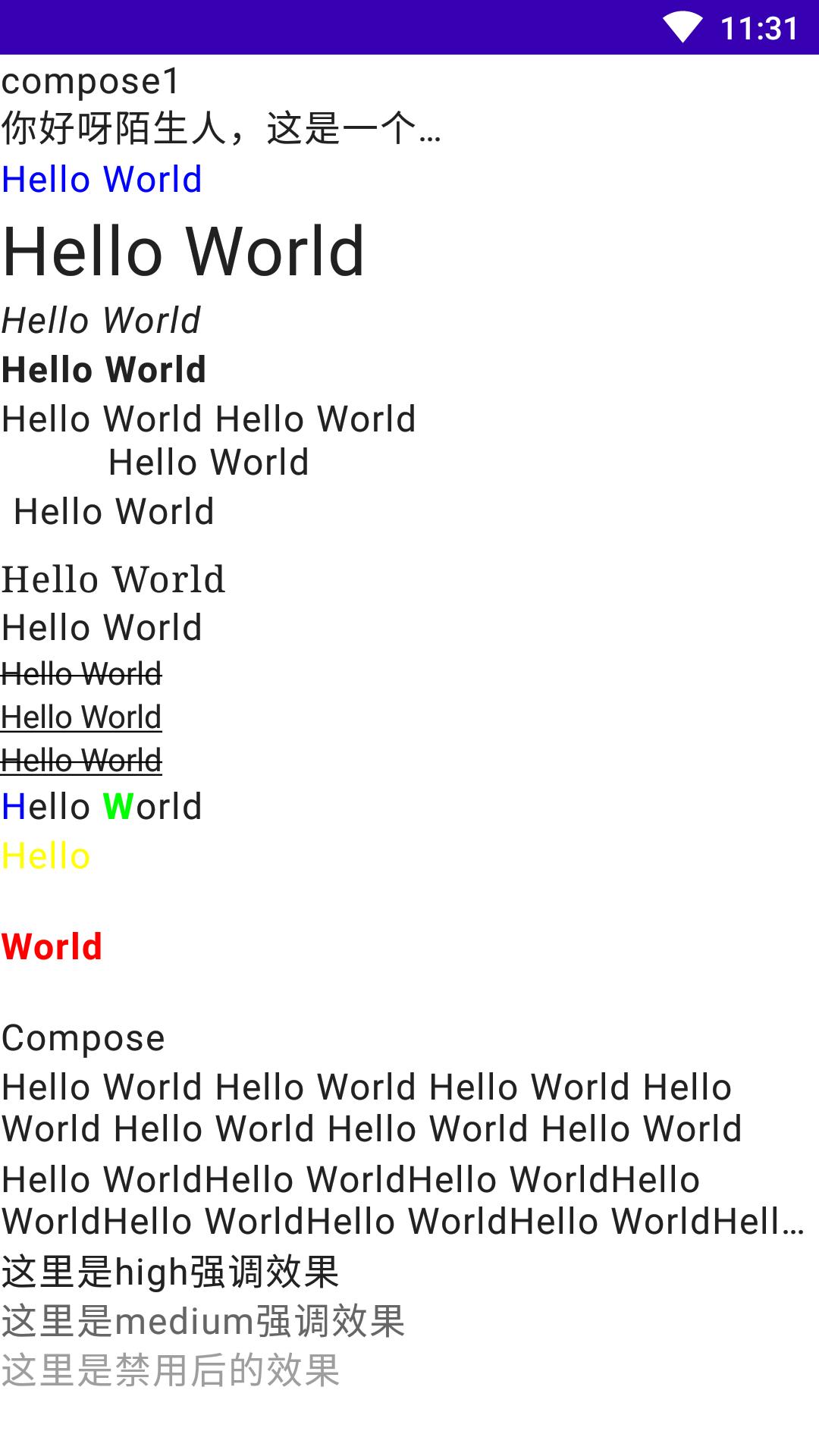
运行效果