
分享兴趣,传播快乐,
增长见闻,留下美好!
亲爱的您,这里是LearningYard新学苑。
今天小编为大家带来的是<谈ps系列(23)|ps布尔运算—合并形状。
Share interest, spread happiness,
Increase knowledge and leave good news!
Dear you, this is LearningYard Academy.
What Xiaobian brings to you today is<Talk about ps series (23) | ps Boolean Operation Merge Shapes
PART.1.
一、合并知识点
在我们学习布尔运算之前,让我们先回顾下往期关于合并的知识点。关于合并,我们讲过合并图层。首先ps合并是向上合并的,快捷点为ctrl+E,图层合并后只会产生两种情况,第一,任何类型的图层合并后都会变成位图,不管是位图和智能对象或者位图和位图,第二,矢量图层和矢量图层合并后会变成矢量图层。而在这里,只有矢量图层的合并可以使用布尔运算,而位图是无法使用的。
Before we learn Boolean operation, let's review the knowledge points about merging in the previous period. About merging, we talked about merging layers. First, ps merging is upward. The shortcut is ctrl+E. After merging layers, only two situations will occur. First, any type of layer will become a bitmap after merging, whether it is a bitmap or an intelligent object or a bitmap or a bitmap. Second, vector layers and vector layers will become vector layers after merging. In this case, only the merging of vector layers can use Boolean operations, while bitmaps cannot be used.
二、布尔运算—合并形状
什么是布尔运算:布尔运算是数字符号化的逻辑推演法,包括联合、相交、相减。在图形处理操作中引用了这种逻辑运算方法以使简单的基本图形组合产生新的形体,并由二维布尔运算发展到三维图形的布尔运算。在ps中运用主要是合并,减去顶层,相交和重叠。我们这节课首先接触布尔运算中的合并。
条件:必须是矢量图层。
下面让我们看一个合并的例子:
1、首先建立两个矢量图层,如下图所示;
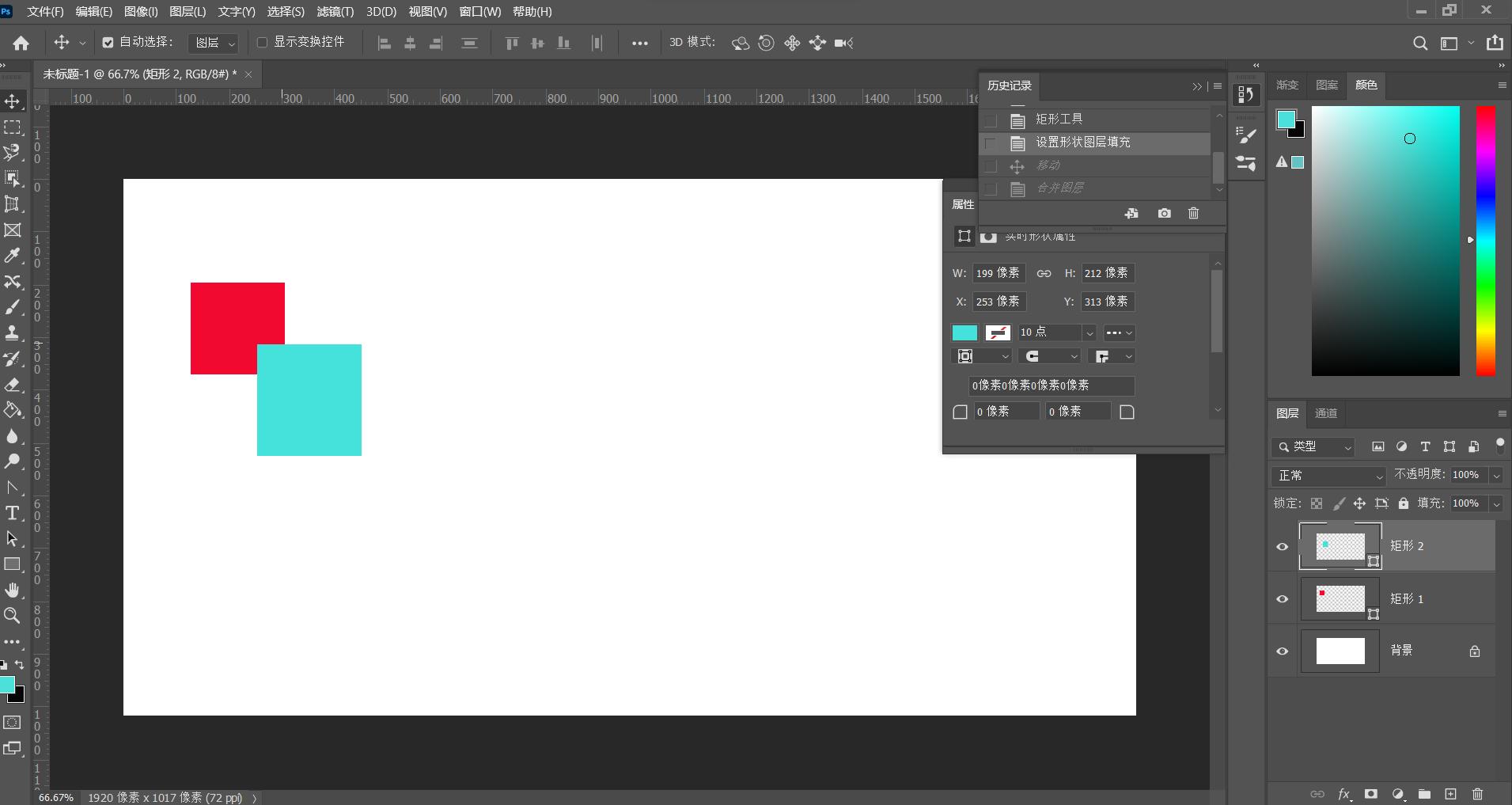
2、同时选中两个图层,ctrl+E合并图层,因为ps中合并为向上合并,在下方的图层颜色在合并后会自动和上方的图层颜色统一,所以合并后的颜色为蓝色,如下图所示:

合并不仅仅是简单的合并,也是为剩下的布尔运算打基础,接下来的减去顶层,相交等运算都需要合并做铺路。
2、 Boolean - Merge Shapes
What is Boolean operation: Boolean operation is the logical deduction of number symbolization, including union, intersection and subtraction. This logic operation method is used in the graphic processing operation to make the simple basic graphic combination generate new shapes, and the Boolean operation of 2D graphics is developed into the Boolean operation of 3D graphics. In ps, it is mainly used to merge, subtract the top layer, intersect and overlap. In this lesson, we will first touch on merging in Boolean operations.
Condition: Must be a vector layer.
Let's look at an example of consolidation:
- First, create two vector layers, as shown in the following figure;
- Select two layers at the same time, and ctrl+E merge the layers. Because ps is merged upward, the color of the lower layer will be automatically unified with the color of the upper layer after merging, so the merged color is blue, as shown in the following figure:
Merge is not only a simple merge, but also a foundation for the remaining Boolean operations. The next operations, such as subtracting the top layer and intersection, need to be merged to pave the way.
今天的分享就到这里,如果您对今天的文章有独特的想法,欢迎给我们留言,让我们相约明天,祝您今天过得开心快乐!
That's all for today's sharing. If you have a unique idea for today's article, please leave us a message and let us meet tomorrow. I wish you a happy and happy life today!
本文由learningyard学苑原创,如有侵权,请联系我们。
部分文字参考:百度百科
示例图片来源:百度
翻译:百度翻译