Help on class Window in module PySimpleGUI.PySimpleGUI:
眼花不看部分:
| __init__(self, title, layout=None, default_element_size=None, default_button_element_size=(None, None), auto_size_text=None, auto_size_buttons=None, location=(None, None), relative_location=(None, None), size=(None, None), element_padding=None, margins=(None, None), button_color=None, font=None, progress_bar_color=(None, None), background_color=None, border_depth=None, auto_close=False, auto_close_duration=3, icon=None, force_toplevel=False, alpha_channel=None, return_keyboard_events=False, use_default_focus=True, text_justification=None, no_titlebar=False, grab_anywhere=False, grab_anywhere_using_control=True, keep_on_top=None, resizable=False, disable_close=False, disable_minimize=False, right_click_menu=None, transparent_color=None, debugger_enabled=True, right_click_menu_background_color=None, right_click_menu_text_color=None, right_click_menu_disabled_text_color=None, right_click_menu_selected_colors=(None, None), right_click_menu_font=None, right_click_menu_tearoff=False, finalize=False, element_justification='left', ttk_theme=None, use_ttk_buttons=None, modal=False, enable_close_attempted_event=False, titlebar_background_color=None, titlebar_text_color=None, titlebar_font=None, titlebar_icon=None, use_custom_titlebar=None, scaling=None, sbar_trough_color=None, sbar_background_color=None, sbar_arrow_color=None, sbar_width=None, sbar_arrow_width=None, sbar_frame_color=None, sbar_relief=None, metadata=None)
一、标题: | :param title: The title that will be displayed in the Titlebar and on the Taskbar | :type title: (str) 标题,str类型,显示于标题栏和任务栏
import PySimpleGUI as sg
layout = [ [] ]
window = sg.Window('test',layout=layout)
while True:
event,values = window.read()
if event in (sg.WIN_CLOSED):
break
window.Close

这是运行后的效果图:
好难看,又小又窄的一个东东,还不能调节大小(默认由程序自动调节),其实sg.Window只是提供了一个“画板”,可以让我们将各种控件(Widget)放置到上面。标题test其实已经写在标题栏上了,由于没有缩放,我们看不到而已。而且,这个参数是必须要有的参数,如果没有指定,就会报错。还有,标题栏上还有最小化、最大化、关闭三个按钮。由于尺寸限制,只能看到半个关闭按钮。
二、布局: | :param layout: The layout for the window. Can also be specified in the Layout method | :type layout: List[List[Element]] | Tuple[Tuple[Element]] 布局,列表或元组,窗口的布局,也可以用Layout方法来指定。
第一种:
window = sg.Window('test',layout=layout)
第二种:
window = sg.Window('test')
window.layout(layout) 两种方法都可以,但都不能省略,因为要是省略,window的read()方法就不能使用。也就看不到窗口了。
三、默认元素尺寸:
| :param default_element_size: size in characters (wide) and rows (high) for all elements in this window | :type default_element_size: (int, int) - (width, height) 默认元素尺寸,元组,分别代表宽和高,用于所有元素
layout = [ [sg.T("第一行第一个元素:文本"),sg.I("第一行第二个元素:输入框")],
[sg.T("第二行第一个元素:文本"),sg.I("第二行第二个元素:输入框")] ]
window = sg.Window('Graph test',layout = layout,default_element_size=(90,1))
第一个width是像素,第二个是行数。需要auto_size_text=False
四、默认按钮尺寸: | :param default_button_element_size: (width, height) size in characters (wide) and rows (high) for all Button elements in this window | :type default_button_element_size: (int, int) 默认按钮元素尺寸,元组,用于所有按钮。
需要auto_size_buttons=False,第一个width是像素,第二个height是行数。
五、自动文字长度: | :param auto_size_text: True if Elements in Window should be sized to exactly fir the length of text | :type auto_size_text: (bool) 自动调整文字长度,布尔值。优先级高于default_element_size
- 自动按钮长度: | :param auto_size_buttons: True if Buttons in this Window should be sized to exactly fit the text on this. | :type auto_size_buttons: (bool) 自动调整按钮尺寸。优先级高于default_button_element_size
七、相对位置: | :param relative_location: (x,y) location relative to the default location of the window, in pixels. Normally the window centers. This location is relative to the location the window would be created. Note they can be negative. | :type relative_location: (int, int) 表示相对于窗口的默认位置(居中)的像素坐标。默认情况下,窗口居中。这个位置是相对于窗口创建的位置而言的。需要注意的是,它们可以为负值。
- 绝对位置 | :param location: (x,y) location, in pixels, to locate the upper left corner of the window on the screen. Default is to center on screen. | :type location: (int, int) 窗口左上角在屏幕上的像素坐标。
- 窗口尺寸 | :param size: (width, height) size in pixels for this window. Normally the window is autosized to fit contents, not set to an absolute size by the user. Try not to set this value. You risk, the contents being cut off, etc. Let the layout determine the window size instead | :type size: (int, int) 窗口的宽度和高度以像素为单位。通常情况下,窗口会自动调整大小以适应其内容,而不是由用户设置一个绝对大小。尽量不要设置这个值,因为这样可能会导致内容被裁剪等问题。让布局来决定窗口的大小吧。还有,这个尺寸不包含标题栏。如果设置了这个,最大化按钮就不可用了。
- 元素内边框 | :param element_padding: Default amount of padding to put around elements in window (left/right, top/bottom) or ((left, right), (top, bottom)), or an int. If an int, then it's converted into a tuple (int, int) | :type element_padding: (int, int) or ((int, int),(int,int)) or int 默认的元素周围填充量(左/右,上/下)或((左,右),(上,下)),或者是一个整数。如果是一个整数,则将其转换为一个元组(int,int)。
- 元素外边框 | :param margins: (left/right, top/bottom) Amount of pixels to leave inside the window's frame around the edges before your elements are shown. | :type margins: (int, int) 表示在窗口边框内留出多少像素空间,然后再显示元素。
- 按钮的颜色 | :param button_color: Default button colors for all buttons in the window | :type button_color: (str, str) or str 按钮颜色(字体颜色、背景颜色),用字符串表示,如(‘red’,’yellow’)
- 字体 | :param font: specifies the font family, size, etc. Tuple or Single string format 'name size styles'. Styles: italic * roman bold normal underline overstrike | :type font: (str or (str, int[, str]) or None) 指定字体族、大小等信息。格式为元组或单个字符串'name size styles'。样式包括斜体、罗马体、粗体、正常、下划线和删除线。(字体,(字号,样式)),如:font=('仿宋',12,’bold’ )
- 进度条颜色 | :param progress_bar_color: (bar color, background color) Sets the default colors for all progress bars in the window | :type progress_bar_color: (str, str) 设置窗口中所有进度条的默认颜色。(进度条,背景色)
- 背景颜色 | :param background_color: color of background | :type background_color: (str) 背景颜色
- 边框深度 | :param border_depth: Default border depth (width) for all elements in the window | :type border_depth: (int) 窗口中所有元素的默认边框深度(宽度)。
这是border_depth=0时的效果。
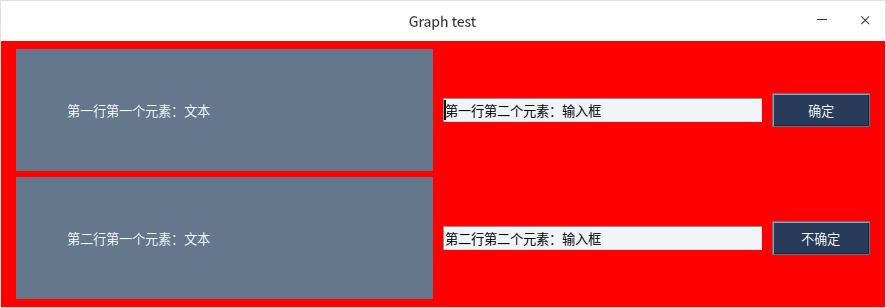
这是border_depth=50时的效果。
- 自动关闭 | :param auto_close: If True, the window will automatically close itself | :type auto_close: (bool) 窗口是否自动关闭。配合auto_close_duration一起使用。
- 自动关闭时间 | :param auto_close_duration: Number of seconds to wait before closing the window | :type auto_close_duration: (int) 窗口关闭前等待秒数。
- 图标 | :param icon: Can be either a filename or Base64 value. For Windows if filename, it MUST be ICO format. For Linux, must NOT be ICO. Most portable is to use a Base64 of a PNG file. This works universally across all OS's | :type icon: (str | bytes) 可以是文件名或Base64值。对于Windows,如果是文件名,则必须是ICO格式。对于Linux,不能是ICO。最通用的方法是使用PNG文件的Base64编码。这在所有操作系统上都通用。
- | :param force_toplevel: If True will cause this window to skip the normal use of a hidden master window | :type force_toplevel: (bool) 咦,多出来一个窗口,长这样:
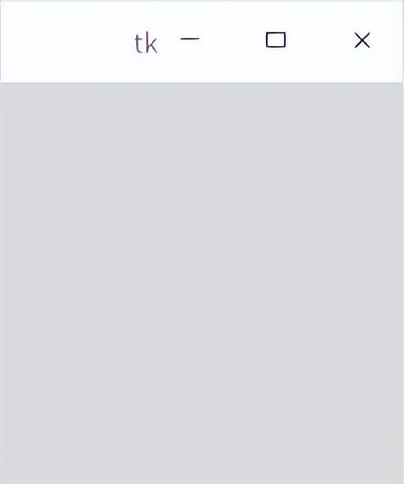
这个就是tk的主窗口。平时它隐藏了,这是强制让它显示出来。不过不知道有什么作用。
二十、透明度
| :param alpha_channel: Sets the opacity of the window. 0 = invisible 1 = completely visible. Values bewteen 0 & 1 will produce semi-transparent windows in SOME environments (The Raspberry Pi always has this value at 1 and cannot change. | :type alpha_channel: (float) 透明度,0-1之间一个值。有的系统可能不能用,比如说我的系统。
二十一、返回键盘事件 | :param return_keyboard_events: if True key presses on the keyboard will be returned as Events from Read calls | :type return_keyboard_events: (bool) 如果为True,则在调用Read时按下键盘上的键将作为事件返回。
import PySimpleGUI as sg
layout = [ [sg.T("第一行第一个元素:文本"),sg.I("第一行第二个元素:输入框"),sg.B("确定")],
[sg.T("第二行第一个元素:文本"),sg.I("第二行第二个元素:输入框"),sg.B("不确定")]]
window = sg.Window('Graph test',layout = layout,
return_keyboard_events=True
)
while True:
event,values = window.read()
if event == sg.WIN_CLOSED:
break
print(event) #这里加上这句话才能看出效果。
window.Close
二十二、使用默认焦点 | :param use_default_focus: If True will use the default focus algorithm to set the focus to the "Correct" element | :type use_default_focus: (bool) 如果True,将使用默认的焦点算法将焦点设置到正确的元素上。
二十三、文本对齐 | :param text_justification: Default text justification for all Text Elements in window | :type text_justification: 'left' | 'right' | 'center'默认情况下,所有文本元素在窗口中的对齐方式是居中。
二十四、无标题栏模式 | :param no_titlebar: If true, no titlebar nor frame will be shown on window. This means you cannot minimize the window and it will not show up on the taskbar | :type no_titlebar: (bool)如果为True,则窗口中不会显示标题栏和边框。这意味着您无法最小化窗口,并且它也不会显示在任务栏上。最小化、最大化、和关闭按钮需要你自己去定义。
二十五、随意拖动 | :param grab_anywhere: If True can use mouse to click and drag to move the window. Almost every location of the window will work except input fields on some systems | :type grab_anywhere: (bool)如果为True,可以使用鼠标单击和拖动窗口的任意位置来移动窗口。但在某些系统上,输入字段可能无法正常工作。
二十六、按Control拖动 | :param grab_anywhere_using_control: If True can use CONTROL key + left mouse mouse to click and drag to move the window. DEFAULT is TRUE. Unlike normal grab anywhere, it works on all elements. | :type grab_anywhere_using_control: (bool)如果为True,可以使用CONTROL键+鼠标左键单击和拖动来移动窗口。默认情况下为True。与普通的抓取任何位置不同,它适用于所有元素。
二十七、置顶 | :param keep_on_top: If True, window will be created on top of all other windows on screen. It can be bumped down if another window created with this parm | :type keep_on_top: (bool)如果为True,窗口将在屏幕上的所有其他窗口之上创建。如果另一个窗口使用此参数创建,则可以将其向下移动。
二十八、可调节窗口 | :param resizable: If True, allows the user to resize the window. Note the not all Elements will change size or location when resizing. | :type resizable: (bool)如果为True,允许用户调整窗口大小。请注意,并非所有元素在调整大小时都会改变大小或位置。
二十九、禁用X按钮 | :param disable_close: If True, the X button in the top right corner of the window will no work. Use with caution and always give a way out toyour users | :type disable_close: (bool)如果为True,窗口右上角的X按钮将无法使用。请谨慎使用,并始终为用户提供退出方式。
三十、禁用最小化按钮 | :param disable_minimize: if True the user won't be able to minimize window. Good for taking over entire screen and staying that way. | :type disable_minimize: (bool)如果为True,用户将无法最小化窗口。这对于占据整个屏幕并保持该状态很有用。
三十一、右击菜单 | :param right_click_menu: A list of lists of Menu items to show when this element is right clicked. See user docs for exact format. | :type right_click_menu: List[List[ List[str] | str ]]当右键单击此元素时,要显示的菜单项列表。请参阅用户文档以获取确切格式。暂时不知道怎么使用。
三十二、指定透明颜色 | :param transparent_color: Any portion of the window that has this color will be completely transparent. You can even click through these spots to the window under this window. | :type transparent_color: (str)窗口中具有此颜色的任何部分都将完全透明。您甚至可以点击这些点,以查看下面的窗口。有的系统也不能用。
三十三、内部调试器 | :param debugger_enabled: If True then the internal debugger will be enabled | :type debugger_enabled: (bool)如果为True,则会启用内部调试器。
三十四、右键背景色 | :param right_click_menu_background_color: Background color for right click menus | :type right_click_menu_background_color: (str)设置右键菜单的背景颜色。
三十五、右键菜单文本颜色 | :param right_click_menu_text_color: Text color for right click menus | :type right_click_menu_text_color: (str)设置右键菜单的文本颜色。
三十六、禁用的右键菜单项的文本颜色 | :param right_click_menu_disabled_text_color: Text color for disabled right click menu items | :type right_click_menu_disabled_text_color: (str)禁用的右键菜单项的文本颜色。
三十七、右键选中部分颜色 | :param right_click_menu_selected_colors: Text AND background colors for a selected item. Can be a Tuple OR a color string. simplified-button-color-string "foreground on background". Can be a single color if want to set only the background. Normally a tuple, but can be a simplified-dual-color-string "foreground on background". Can be a single color if want to set only the background. | :type right_click_menu_selected_colors: (str, str) | str | Tuple所选项目的文本和背景颜色。可以是元组或颜色字符串。简化按钮颜色字符串 "前景色 on 背景色"。如果只想设置背景色,也可以是一个单色。通常为元组,但也可以是简化的双色字符串 "前景色 on 背景色"。如果只想设置背景色,也可以是一个单色。
三十八、右键菜单的字体。 | :param right_click_menu_font: Font for right click menus | :type right_click_menu_font: (str or (str, int[, str]) or None)右键菜单的字体。
三十九、右键菜单拆分 | :param right_click_menu_tearoff: If True then all right click menus can be torn off | :type right_click_menu_tearoff: bool如果为True,则可以拆分所有右键菜单。
四十、定案 | :param finalize: If True then the Finalize method will be called. Use this rather than chaining .Finalize for cleaner code | :type finalize: (bool)如果为True,则会调用Finalize方法。使用此选项而不是链式调用.Finalize以获得更清晰的代码。
四十一、元素对齐 | :param element_justification: All elements in the Window itself will have this justification 'left', 'right', 'center' are valid values | :type element_justification: (str)窗口中的所有元素都将具有此对齐方式“左”、“右”和“居中”,这些都是有效的值。 | :param ttk_theme: Set the tkinter ttk "theme" of the window. Default = DEFAULT_TTK_THEME. Sets all ttk widgets to this theme as their default
四十二、ttk主题 | :type ttk_theme: (str)设置窗口的tkinter ttk "主题"。默认值为DEFAULT_TTK_THEME。将所有ttk小部件设置为此主题作为其默认值。
四十三、使用ttk按钮 | :param use_ttk_buttons: Affects all buttons in window. True = use ttk buttons. False = do not use ttk buttons. None = use ttk buttons only if on a Mac | :type use_ttk_buttons: (bool)影响窗口中的所有按钮。True = 使用ttk按钮。False = 不使用ttk按钮。None = 仅在Mac上使用ttk按钮。
四十四、模态 | :param modal: If True then this window will be the only window a user can interact with until it is closed | :type modal: (bool)如果为True,则此窗口将是用户可以与之交互的唯一窗口,直到它被关闭。
四十五、关闭事件 | :param enable_close_attempted_event: If True then the window will not close when "X" clicked. Instead an event WINDOW_CLOSE_ATTEMPTED_EVENT if returned from window.read | :type enable_close_attempted_event: (bool)如果为True,则当单击“X”时,窗口不会关闭。返回一个-WINDOW CLOSE ATTEMPTED-事件,相反,如果从window.read返回WINDOW_CLOSE_ATTEMPTED_EVENT事件,则会触发该事件。
四十六、标题栏背景色 | :param titlebar_background_color: If custom titlebar indicated by use_custom_titlebar, then use this as background color | :type titlebar_background_color: (str | None)
四十七、标题栏文本颜色
| :param titlebar_text_color: If custom titlebar indicated by use_custom_titlebar, then use this as text color | :type titlebar_text_color: (str | None)如果使用自定义标题栏,由use_custom_titlebar指示,则将其用作文本颜色。
四十八、标题栏字体 | :param titlebar_font: If custom titlebar indicated by use_custom_titlebar, then use this as title font | :type titlebar_font: (str or (str, int[, str]) or None)如果使用自定义标题栏,由use_custom_titlebar指示,则将其用作标题字体。
四十九、标题栏图标 | :param titlebar_icon: If custom titlebar indicated by use_custom_titlebar, then use this as the icon (file or base64 bytes) | :type titlebar_icon: (bytes | str)如果使用自定义标题栏,由use_custom_titlebar指示,则将其用作图标(文件或base64字节)。
五十、使用用户自定义标题栏 | :param use_custom_titlebar: If True, then a custom titlebar will be used instead of the normal titlebar | :type use_custom_titlebar: bool如果为True,则将使用自定义标题栏而不是常规标题栏。
五十一、缩放 | :param scaling: Apply scaling to the elements in the window. Can be set on a global basis using set_options | :type scaling: float对窗口中的元素应用缩放。可以使用set_options在全局基础上进行设置。
五十二、滚轮槽颜色 | :param sbar_trough_color: Scrollbar color of the trough | :type sbar_trough_color: (str)滚轮的槽的颜色。
五十三、滚轮槽背景色
| :param sbar_background_color: Scrollbar color of the background of the arrow buttons at the ends AND the color of the "thumb" (the thing you grab and slide). Switches to arrow color when mouse is over | :type sbar_background_color: (str)滚轮末端箭头按钮的背景颜色以及“滑块”(您可以抓住并滑动的东西)的颜色。当鼠标悬停时切换到箭头颜色。
五十四、滚轮箭头颜色 | :param sbar_arrow_color: Scrollbar color of the arrow at the ends of the scrollbar (it looks like a button). Switches to background color when mouse is over | :type sbar_arrow_color: (str)滚轮末端箭头(看起来像按钮)的颜色。当鼠标悬停时切换到背景颜色。
五十五、滚轮宽度 | :param sbar_width: Scrollbar width in pixels | :type sbar_width: (int)滚轮的像素宽度。
五十六、箭头宽度 | :param sbar_arrow_width: Scrollbar width of the arrow on the scrollbar. It will potentially impact the overall width of the scrollbar | :type sbar_arrow_width: (int)滚轮末端箭头的宽度。它可能会影响整个滚轮的宽度。
五十七、滚轮框架颜色 | :param sbar_frame_color: Scrollbar Color of frame around scrollbar (available only on some ttk themes) | :type sbar_frame_color: (str)滚轮周围的框架颜色(仅在某些ttk主题中可用)。
五十八、滚轮滑块样式 | :param sbar_relief: Scrollbar relief that will be used for the "thumb" of the scrollbar (the thing you grab that slides). Should be a constant that is defined at starting with "RELIEF_" - RELIEF_RAISED, RELIEF_SUNKEN, RELIEF_FLAT, RELIEF_RIDGE, RELIEF_GROOVE, RELIEF_SOLID | :type sbar_relief: (str)滚轮“滑块”(您可以抓住并滑动的东西)的 relief 样式。应该是以 "RELIEF_" 开头的常量,包括 RELIEF_RAISED、RELIEF_SUNKEN、RELIEF_FLAT、RELIEF_RIDGE、RELIEF_GROOVE 和 RELIEF_SOLID。 | :param metadata: User metadata that can be set to ANYTHING | :type metadata: (Any)可以设置为任何内容的用户元数据。
| | add_row(self, *args) | Adds a single row of elements to a window's self.Rows variables. | Generally speaking this is NOT how users should be building Window layouts. | Users, create a single layout (a list of lists) and pass as a parameter to Window object, or call Window.Layout(layout) 将一行元素添加到窗口的self.Rows变量中。通常来说,这并不是用户应该如何构建窗口布局的方式。用户应该创建一个单一的布局(列表的列表),并将其作为参数传递给Window对象,或者调用Window.Layout(layout)。 | :param *args: List[Elements] | :type *args: | | add_rows(self, rows) | Loops through a list of lists of elements and adds each row, list, to the layout. | This is NOT the best way to go about creating a window. Sending the entire layout at one time and passing | it as a parameter to the Window call is better. 遍历一个元素列表的列表,并将每一行、列表添加到布局中。这并不是创建窗口的最佳方式。一次性发送整个布局并将其作为参数传递给Window调用是更好的方法。 | :param rows: A list of a list of elements | :type rows: List[List[Elements]] | | bind(self, bind_string, key, propagate=True) | Used to add tkinter events to a Window. 用于向窗口添加tkinter事件。 | The tkinter specific data is in the Window's member variable user_bind_event tkinter特定的数据存储在窗口的成员变量user_bind_event中 | :param bind_string: The string tkinter expected in its bind function 在其bind函数中需要的字符串 | :type bind_string: (str) | :param key: The event that will be generated when the tkinter event occurs 当tkinter事件发生时将生成的事件 | :type key: str | int | tuple | object | :param propagate: If True then tkinter will be told to propagate the event 如果为True,则会告诉tkinter传播事件 | :type propagate: (bool) | | bring_to_front(self) | Brings this window to the top of all other windows (perhaps may not be brought before a window made to "stay | on top") | 将此窗口置于所有其他窗口的顶部(可能不会在“置顶”窗口之前)。 | close(self) | Closes window. Users can safely call even if window has been destroyed. Should always call when done with | a window so that resources are properly freed up within your thread. | 关闭窗口。用户可以安全地调用,即使窗口已被销毁。在完成窗口操作后别忘了调用此方法,以便在您的线程中正确释放资源。 | current_location(self, more_accurate=False) | Get the current location of the window's top left corner. | Sometimes, depending on the environment, the value returned does not include the titlebar,etc | A new option, more_accurate, can be used to get the theoretical upper leftmost corner of the window. | The titlebar and menubar are crated by the OS. It gets really confusing when running in a webpage (repl, trinket) | Thus, the values can appear top be "off" due to the sometimes unpredictable way the location is calculated. | 获取窗口左上角的当前位置。有时,根据环境的不同,返回的值可能不包括标题栏等。可以使用新的选项 more_accurate 来获取窗口的理论左上角位置。操作系统通过创建标题栏和菜单栏来实现这一点。在网页环境中运行时(如 repl、trinket),这可能会变得非常混乱。因此,由于计算位置的方式有时不可预测,所以这些值可能看起来像是“偏离”顶部。 | :param more_accurate: If True, will use the window's geometry to get the topmost location with titlebar, menubar taken into account | :type more_accurate: (bool) 如果为True,则将使用窗口的几何形状来获取带有标题栏和菜单栏的顶部位置。 | :return: The x and y location in tuple form (x,y) | :rtype: Tuple[(int | None), (int | None)] | | current_size_accurate(self) | Get the current location of the window based on tkinter's geometry setting | 根据tkinter的几何设置获取窗口的当前位置。 | :return: The x and y size in tuple form (x,y) | :rtype: Tuple[(int | None), (int | None)] | | ding(self, display_number=0) | Make a "bell" sound. A capability provided by tkinter. Your window needs to be finalized prior to calling. | Ring a display's bell is the tkinter description of the call. | 发出“铃声”。这是tkinter提供的功能。在调用之前,需要将窗口设置为最终状态。 | :param display_number: Passed to tkinter's bell method as parameter "displayof". | :type display_number: int | | disable(self) | Disables window from taking any input from the user | 禁止窗口从用户那里接收任何输入。 | disable_debugger(self) | Disable the internal debugger. By default the debugger is ENABLED | 禁用内部调试器。默认情况下,调试器是启用的。 | disappear(self) | Causes a window to "disappear" from the screen, but remain on the taskbar. It does this by turning the alpha | channel to 0. NOTE that on some platforms alpha is not supported. The window will remain showing on these | platforms. The Raspberry Pi for example does not have an alpha setting | 使窗口从屏幕上“消失”,但仍保留在任务栏上。它通过将alpha通道设置为0来实现这一点。请注意,在某些平台上不支持alpha。这些平台上的窗口将保持显示,例如树莓派就没有alpha设置。 | element_list(self) | Returns a list of all elements in the window | | :return: List of all elements in the window and container elements in the window | :rtype: List[Element] | 返回窗口中所有元素的列表以及窗口中的容器元素。 | enable(self) | Re-enables window to take user input after having it be Disabled previously | 在之前禁用窗口接收用户输入之后,重新启用窗口接收用户输入。 | enable_debugger(self) | Enables the internal debugger. By default, the debugger IS enabled | 启用内部调试器。默认情况下,调试器是启用的。 | extend_layout(self, container, rows) | Adds new rows to an existing container element inside of this window | If the container is a scrollable Column, you need to also call the contents_changed() method | 向窗口内的现有容器元素添加新行。如果容器是可滚动的列,则还需要调用contents_changed()方法。 | :param container: The container Element the layout will be placed inside of | :type container: Frame | Column | Tab | :param rows: The layout to be added | :type rows: (List[List[Element]]) | :return: (Window) self so could be chained | :rtype: (Window) | | fill(self, values_dict) | Fill in elements that are input fields with data based on a 'values dictionary' | 根据“值字典”填充输入字段中的元素。 | :param values_dict: pairs | :type values_dict: (Dict[Any, Any]) - {Element_key : value} | :return: returns self so can be chained with other methods | :rtype: (Window) | | finalize(self) | Use this method to cause your layout to built into a real tkinter window. In reality this method is like | Read(timeout=0). It doesn't block and uses your layout to create tkinter widgets to represent the elements. | Lots of action! | 使用此方法将布局构建为真正的tkinter窗口。实际上,这个方法类似于Read(timeout=0)。它不会阻塞,并使用您的布局创建tkinter小部件来表示元素。 | :return: Returns 'self' so that method "Chaining" can happen (read up about it as it's very cool!) | :rtype: (Window) | | find_element(self, key, silent_on_error=False) | Find element object associated with the provided key. | THIS METHOD IS NO LONGER NEEDED to be called by the user | 此方法不再需要由用户调用。 | You can perform the same operation by writing this statement: | element = window[key] | | You can drop the entire "find_element" function name and use [ ] instead. | 您可以省略“find_element”函数名称,并使用[ ]代替。 | However, if you wish to perform a lookup without error checking, and don't have error popups turned | off globally, you'll need to make this call so that you can disable error checks on this call. | 然而,如果您希望在不进行错误检查的情况下执行查找操作,并且没有全局关闭错误弹出窗口,您需要调用此方法以禁用此调用上的错误检查。 | find_element is yypically used in combination with a call to element's Update method (or any other element method!): | window[key].update(new_value) | find_element通常与调用元素的Update方法(或其他任何元素方法)结合使用: | Versus the "old way" | window.FindElement(key).Update(new_value) | | This call can be abbreviated to any of these: | find_element = FindElement == Element == Find | With find_element being the PEP8 compliant call that should be used. | | Rememeber that this call will return None if no match is found which may cause your code to crash if not | checked for. | 请记住,如果没有找到匹配项,此调用将返回None,这可能会导致代码崩溃(如果未检查)。 | :param key: Used with window.find_element and with return values to uniquely identify this element | :type key: str | int | tuple | object | :param silent_on_error: If True do not display popup nor print warning of key errors | :type silent_on_error: (bool) | :return: Return value can be: the Element that matches the supplied key if found; an Error Element if silent_on_error is False; None if silent_on_error True; | :rtype: Element | Error Element | None | | find_element_with_focus(self) | Returns the Element that currently has focus as reported by tkinter. If no element is found None is returned! | :return: An Element if one has been found with focus or None if no element found | :rtype: Element | None | 返回当前具有焦点的元素,该元素由tkinter报告。如果未找到元素,则返回None! | force_focus(self) | Forces this window to take focus | 强制使此窗口获得焦点。 | get_screen_dimensions(self) | Get the screen dimensions. NOTE - you must have a window already open for this to work (blame tkinter not me) | 获取屏幕尺寸。注意:您必须已经打开了一个窗口才能使用此方法 | :return: Tuple containing width and height of screen in pixels | :rtype: Tuple[None, None] | Tuple[width, height] | | grab_any_where_off(self) | Turns off Grab Anywhere functionality AFTER a window has been created. Don't try on a window that's not yet | been Finalized or Read. | 在创建窗口后关闭“任意位置抓取”功能。不要尝试在一个尚未完成或读取的窗口上使用此方法。 | grab_any_where_on(self) | Turns on Grab Anywhere functionality AFTER a window has been created. Don't try on a window that's not yet | been Finalized or Read. | 在创建窗口后打开“任意位置抓取”功能。不要尝试在一个尚未完成或读取的窗口上使用此方法。 | hide(self) | Hides the window from the screen and the task bar | 从屏幕和任务栏中隐藏窗口。 | is_closed(self) | Returns True is the window is maybe closed. Can be difficult to tell sometimes | 如果窗口可能已关闭,则返回True。有时这可能很难判断。 | :return: True if the window was closed or destroyed | :rtype: (bool) | | keep_on_top_clear(self) | Clears keep_on_top after a window has been created. Effect is the same | as if the window was created with this set. | 在创建窗口后清除“保持置顶”功能。效果与使用此设置创建窗口相同。 | keep_on_top_set(self) | Sets keep_on_top after a window has been created. Effect is the same | as if the window was created with this set. The Window is also brought | to the front | 在创建窗口后设置“保持置顶”功能。效果与使用此设置创建窗口相同。该窗口也会被带到最前面。 | layout(self, rows) | Second of two preferred ways of telling a Window what its layout is. The other way is to pass the layout as | a parameter to Window object. The parameter method is the currently preferred method. This call to Layout | has been removed from examples contained in documents and in the Demo Programs. Trying to remove this call | from history and replace with sending as a parameter to Window. | 两种告诉窗口其布局的方式中的第二种。另一种方式是通过将布局作为参数传递给Window对象来实现。将参数方法作为当前首选方法。此Layout调用已被从文档和演示程序中包含的示例中删除。尝试将其从历史记录中删除并通过将其作为参数发送给Window来替换。 | :param rows: Your entire layout | :type rows: List[List[Elements]] | :return: self so that you can chain method calls | :rtype: (Window) | | load_from_disk(self, filename) | Restore values from a previous call to SaveToDisk which saves the returned values dictionary in Pickle format | 从上一次调用SaveToDisk中恢复值,该方法将返回的值字典以Pickle格式保存。 | :param filename: Pickle Filename to load | :type filename: (str) | | make_modal(self) | Makes a window into a "Modal Window" | This means user will not be able to interact with other windows until this one is closed | 将窗口转换为“模态窗口”。这意味着用户在关闭此窗口之前无法与其他窗口进行交互。 | NOTE - Sorry Mac users - you can't have modal windows.... lobby your tkinter Mac devs | | maximize(self) | Maximize the window. This is done differently on a windows system versus a linux or mac one. For non-Windows | the root attribute '-fullscreen' is set to True. For Windows the "root" state is changed to "zoomed" | The reason for the difference is the title bar is removed in some cases when using fullscreen option | 最大化窗口。在Windows系统和Linux/Mac系统上实现方式不同。对于非Windows系统,将root属性'-fullscreen'设置为True。对于Windows系统,将“root”状态更改为“zoomed”。之所以存在差异,是因为在使用全屏选项时,某些情况下会删除标题栏。 | minimize(self) | Minimize this window to the task bar | 将此窗口最小化到任务栏。 | mouse_location(self) | Return the (x,y) location of the mouse relative to the entire screen. It's the same location that | you would use to create a window, popup, etc. | 返回鼠标相对于整个屏幕的(x,y)位置。它与您用于创建窗口、弹出窗口等的位置相同。 | :return: The location of the mouse pointer | :rtype: (int, int) | | move(self, x, y) | Move the upper left corner of this window to the x,y coordinates provided | :param x: x coordinate in pixels | :type x: (int) | :param y: y coordinate in pixels | :type y: (int) | 将此窗口的左上角移动到提供的位置(x,y)。 | move_to_center(self) | Recenter your window after it's been moved or the size changed. | 在窗口移动或大小改变后,将其居中。 | This is a conveinence method. There are no tkinter calls involved, only pure PySimpleGUI API calls. | | normal(self) | Restore a window to a non-maximized state. Does different things depending on platform. See Maximize for more. | 将窗口恢复到非最大化状态。根据平台的不同,会执行不同的操作。请参阅Maximize以了解更多信息。 | perform_long_operation(self, func, end_key) | Call your function that will take a long time to execute. When it's complete, send an event | specified by the end_key. | 调用需要长时间执行的函数。当它完成时,发送由end_key指定的事件。 | Starts a thread on your behalf. | 代表您启动一个线程。 | This is a way for you to "ease into" threading without learning the details of threading. | Your function will run, and when it returns 2 things will happen: | 1. The value you provide for end_key will be returned to you when you call window.read() | 2. If your function returns a value, then the value returned will also be included in your windows.read call in the values dictionary | 这是一种让您“逐渐了解”线程而不学习线程细节的方法。您的函数将运行,当它返回时,会发生两件事情: | 1.当您调用window.read()时,您提供的end_key值将被返回给您。 | 2.如果您的函数返回一个值,则该值也将包含在您的windows.read调用的values字典中。 | IMPORTANT - This method uses THREADS... this means you CANNOT make any PySimpleGUI calls from | the function you provide with the exception of one function, Window.write_event_value. | 重要提示 - 此方法使用线程...这意味着您不能从提供的函数中进行任何PySimpleGUI调用,函数Window.write_event_value除外。 | :param func: A lambda or a function name with no parms | :type func: Any | :param end_key: The key that will be generated when the function returns | :type end_key: (Any) | :return: The id of the thread | :rtype: threading.Thread | | read(self, timeout=None, timeout_key='__TIMEOUT__', close=False) | THE biggest deal method in the Window class! This is how you get all of your data from your Window. | Pass in a timeout (in milliseconds) to wait for a maximum of timeout milliseconds. Will return timeout_key | if no other GUI events happen first. | Window类中最大的方法!这是您从窗口获取所有数据的方法。传递一个超时(以毫秒为单位)来等待最多超时毫秒。如果在此期间没有其他GUI事件发生,则将返回timeout_key。 | :param timeout: Milliseconds to wait until the Read will return IF no other GUI events happen first | :type timeout: (int) | :param timeout_key: The value that will be returned from the call if the timer expired | :type timeout_key: (Any) | :param close: if True the window will be closed prior to returning | :type close: (bool) | :return: (event, values) | :rtype: Tuple[(Any), Dict[Any, Any], List[Any], None] | | reappear(self) | Causes a window previously made to "Disappear" (using that method). Does this by restoring the alpha channel | 使先前创建的窗口“消失”(使用该方法)。通过恢复alpha通道来实现。 | refresh(self) | Refreshes the window by calling tkroot.update(). Can sometimes get away with a refresh instead of a Read. | Use this call when you want something to appear in your Window immediately (as soon as this function is called). | If you change an element in a window, your change will not be visible until the next call to Window.read | or a call to Window.refresh() | 通过调用tkroot.update()刷新窗口。有时可以使用刷新而不是Read来避免问题。 | 当您希望立即在窗口中显示某些内容时,请使用此调用。如果您更改窗口中的元素,您的更改将不会立即可见,直到下一次调用Window.read或Window.refresh()。 | :return: `self` so that method calls can be easily "chained" | :rtype: (Window) | | save_to_disk(self, filename) | Saves the values contained in each of the input areas of the form. Basically saves what would be returned from a call to Read. It takes these results and saves them to disk using pickle. | Note that every element in your layout that is to be saved must have a key assigned to it. | 保存表单中每个输入区域的值。基本上,它会保存从Read调用返回的结果。它使用pickle将这些结果保存到磁盘中。 | 请注意,您的布局中的每个要保存的元素都必须分配一个键。 | :param filename: Filename to save the values to in pickled form | :type filename: str | | save_window_screenshot_to_disk(self, filename=None) | Saves an image of the PySimpleGUI window provided into the filename provided | 将提供的PySimpleGUI窗口保存为filename指定的图像。 | :param filename: Optional filename to save screenshot to. If not included, the User Settinds are used to get the filename | :return: A PIL ImageGrab object that can be saved or manipulated | :rtype: (PIL.ImageGrab | None) | | send_to_back(self) | Pushes this window to the bottom of the stack of windows. It is the opposite of BringToFront | 将此窗口推到窗口堆栈的底部。它是BringToFront的相反操作。 | set_alpha(self, alpha) | Sets the Alpha Channel for a window. Values are between 0 and 1 where 0 is completely transparent | 为窗口设置Alpha通道。值在0和1之间,其中0表示完全透明。 | :param alpha: 0 to 1. 0 is completely transparent. 1 is completely visible and solid (can't see through) | :type alpha: (float) | | set_cursor(self, cursor) | Sets the cursor for the window. | If you do not want any mouse pointer, then use the string "none" | 为窗口设置光标。如果您不想使用任何鼠标指针,则使用字符串“none”。 | :param cursor: The tkinter cursor name | :type cursor: (str) | | set_icon(self, icon=None, pngbase64=None) | Changes the icon that is shown on the title bar and on the task bar. | NOTE - The file type is IMPORTANT and depends on the OS! | Can pass in: | * filename which must be a .ICO icon file for windows, PNG file for Linux | * bytes object | * BASE64 encoded file held in a variable | 更改标题栏和任务栏上显示的图标。 | 注意 - 文件类型非常重要,取决于操作系统! | 可以传递以下内容: | filename(必须是Windows上的.ICO图标文件,Linux上的PNG文件) | bytes对象 | BASE64编码的文件变量 | :param icon: Filename or bytes object | :type icon: (str) | :param pngbase64: Base64 encoded image | :type pngbase64: (bytes) | | set_min_size(self, size) | Changes the minimum size of the window. Note Window must be read or finalized first. | 更改窗口的最小大小。注意,必须先读取或完成窗口才能进行此操作。 | :param size: (width, height) tuple (int, int) of the desired window size in pixels | :type size: (int, int) | | set_title(self, title) | Change the title of the window | 更改窗口的标题。 | :param title: The string to set the title to | :type title: (str) | | set_transparent_color(self, color) | Set the color that will be transparent in your window. Areas with this color will be SEE THROUGH. | 设置窗口中将要变为透明的颜色。具有此颜色的区域将是透明的。 | :param color: Color string that defines the transparent color | :type color: (str) | | start_thread = perform_long_operation(self, func, end_key) | | un_hide(self) | Used to bring back a window that was previously hidden using the Hide method | 用于将之前使用Hide方法隐藏的窗口带回显示。 | visibility_changed(self) | When making an element in a column or someplace that has a scrollbar, then you'll want to call this function | prior to the column's contents_changed() method. | 在创建一个带有滚动条的列或某个位置的元素时,您希望在此之前调用此函数。 | was_closed(self) | Returns True if the window was closed | 如果窗口已关闭,则返回True。 | :return: True if the window is closed | :rtype: bool | | widget_to_element(self, widget) | Returns the element that matches a supplied tkinter widget. | If no matching element is found, then None is returned. | 返回与提供的tkinter小部件匹配的元素。如果未找到匹配的元素,则返回None。 | | :return: Element that uses the specified widget | :rtype: Element | None | | write_event_value(self, key, value) | Adds a key & value tuple to the queue that is used by threads to communicate with the window | | :param key: The key that will be returned as the event when reading the window | :type key: Any | :param value: The value that will be in the values dictionary | :type value: Any | 将一个键值对元组添加到队列中,该队列由线程用于与窗口通信。 | ---------------------------------------------------------------------- | Class methods defined here: | | get_screen_size() from builtins.type | This is a "Class Method" meaning you call it by writing: width, height = Window.get_screen_size() | Returns the size of the "screen" as determined by tkinter. This can vary depending on your operating system and the number of monitors installed on your system. For Windows, the primary monitor's size is returns. On some multi-monitored Linux systems, the monitors are combined and the total size is reported as if one screen. | | :return: Size of the screen in pixels as determined by tkinter | :rtype: (int, int) | 这是一个“类方法”,意味着您可以通过编写:width, height = Window.get_screen_size()来调用它。 | 该方法返回由tkinter确定的“屏幕”大小。这取决于您的操作系统和安装在系统上的显示器数量。对于Windows,将返回主显示器的大小。在某些多显示器的Linux系统中,显示器被组合在一起,并报告为一个屏幕的总大小。 | ---------------------------------------------------------------------- | Data descriptors defined here: | | AlphaChannel | A property that changes the current alpha channel value (internal value) | :return: the current alpha channel setting according to self, not read directly from tkinter | :rtype: (float) | 一个属性,可以更改当前的alpha通道值(内部值)。 | Size | Return the current size of the window in pixels | 返回窗口当前的像素大小。 | :return: (width, height) of the window | :rtype: Tuple[(int), (int)] or Tuple[None, None] | | __dict__ | dictionary for instance variables (if defined) | | __weakref__ | list of weak references to the object (if defined) | | alpha_channel | A property that changes the current alpha channel value (internal value) | :return: the current alpha channel setting according to self, not read directly from tkinter | :rtype: (float) | | key_dict | Returns a dictionary with all keys and their corresponding elements | { key : Element } | :return: Dictionary of keys and elements | :rtype: Dict[Any, Element] | 返回一个包含所有键及其对应元素的字典。 | metadata | Metadata is available for all windows. You can set to any value. | :return: the current metadata value | :rtype: (Any) | 所有窗口都可用元数据。您可以将其设置为任何值。 | size | Return the current size of the window in pixels | | :return: (width, height) of the window | :rtype: Tuple[(int), (int)] or Tuple[None, None] | | ---------------------------------------------------------------------- | Data and other attributes defined here: | | NumOpenWindows = 0 | | hidden_master_root = None