项目需求
实现多个账号
项目实现
#include <stdio.h>
#include <string.h>

int main(void) {
	// 定义变量,用来表示用户名和密码
	char name[32];
	char password[16];
	FILE *file; //定义了一个档指针变量,变量名是file
	char line[128];
	char name_tmp[32];
	char password_tmp[16];
	char *ret;

	//打开档
	file = fopen("users.txt", "r");
	if (!file) { //等效于 file == NULL
		printf("档打开失败");
		return 1;
	}

	//输入用户名和密码
	while (1) {
		// 输入用户名和密码
		printf("请输入用户名:");
		scanf("%s", name);
		printf("请输入密码:");
		scanf("%s", password);

		/*
		if (strcmp(name, "admin") == 0 &&
			strcmp(password, "123456") == 0) {
			break;
		} else {
			printf("用户名或密码错误!\n");
			system("pause");
			system("cls");
		}
		*/

		//从档中读取账号,并进行判断!
		while (1) {
			//读一行
			ret = fgets(line, sizeof(line), file); //line: "admin 123456\n"
			if (!ret) {
				break;
			}
			sscanf(line, "%s %s", name_tmp, password_tmp);
			if (!strcmp(name, name_tmp) && !strcmp(password, password_tmp)) {
				break;
			}
		}

		if (ret) { //用户名和密码匹配成功
			break;
		} else {
			printf("用户名或密码错误!\n");
			system("pause");
			system("cls");

			fseek(file, 0, SEEK_SET); //把档内部的位置指针设置到档头
		}
	}

	system("cls");

	// 打印功能菜单
	printf("---交换机后台管理---\n");
	printf("1. 创建账号\n");
	printf("2. IP管理\n");
	printf("3. 退出\n");
	printf("请选择...");

	return 0;
}
项目精讲
1. fopen档的打开操作
函数原型
#include <stdio.h>
FILE *fopen( const char *fname, const char *mode );
参数1:fname 表示文件名(可以含有路径信息)
参数2:打开方式
返回值:FILE* 档指针,
如果打开失败,就返回NULL(就是0)
mode 打开方式
"r" 以"读"的方式打开一个文本档(只能读)
"r+" 与"r" 的区别在于,增加了"写"
"rb" 以"读"的方式打开一个二进制档(只能读)
"rb+" 与"rb"的区别在于,增加了"写"
"w" 以"写"的方式创建一个文本档,如果这个档已经存在,就会覆盖原来的档
"w+" 与"w"的区别在于,增加了"读"
"wb" 以"写"的方式创建一个二进制档
"wb+" 与"wb"的区别在于,增加了"读"
"a" 以"尾部追加"的方式打开一个文本档, (只能写)
"a+" 以"a"的区别在于,增加了"读"
"ab" 以"尾部追加"的方式打开一个二进制档, (只能写)
"ab+" 与"ab"的区别在于,增加了"读"
小结:
打开方式,共1到3个字符。
第一个字符是 r、w或a
r 表示"读",用于打开已经存在的档
w 表示"创建", 用于创建一个新档,并能够"写"
a 表示"尾部追加",并能够"写"
b, 只能写在第二位,表示打开的是二进制档
+,只能写在最后,表示增加一个读或写的功能
实例
#include <stdio.h>

int main(void) {
	FILE *file;

	//file = fopen("users.txt", "r");
	file = fopen("users1.txt", "r");
	if (file != NULL) { //NULL就是0
		printf("档users.txt打开成功!\n");
	} else {
		printf("档users.txt打开失败!\n");
	}

	return 0;
}
2. fclose档的关闭操作
清理缓冲区,并释放档指针。
Demo
#include <stdio.h>

int main(void) {
	FILE *file;

	file = fopen("users.txt", "a");
	fputs("\nxiaoxiao 123456", file);

	fclose(file);
	return 0;
}
特别注意:
对档执行写操作以后,并不会马上写入档,而只是写入到了这个档的输出缓冲区中!
只有当这个输出缓冲区满了,或者执行了fflush,或者执行了fclose函数以后,或者程序结束,
才会把输出缓冲区中的内容正真写入档!
3. fgetc档的读操作
函数原型:
#include <stdio.h>
int fgetc( FILE *stream );
返回值:成功时,返回读到的字符,返回的是int类型(实际值是字符)
失败或读到档尾,返回EOF (就是-1)
作用:
从档中读取一个字符
实例:
#include <stdio.h>

int main(void) {
	FILE *file;
	char c;

	file = fopen("users.txt", "r");

	while ((c = fgetc(file)) != EOF) { //EOF就是 -1
		printf("%c", c);
	}

	return 0;
}
4. fputc写一个字符到档fputc
函数原型:
#include <stdio.h>
int fputc( int ch, FILE *stream );
实例:
test.c
#include <stdio.h>

int main(void) {
	FILE *file1;
	FILE *file2;
	char c;

	file1 = fopen("test.c", "r");
	file2 = fopen("test2.c", "w");

	while ((c = fgetc(file1)) != EOF) { //EOF就是 -1
		fputc(c, file2);
	}

	fclose(file1);
	fclose(file2);

	return 0;
}
5. fgets 从档中读取一个字符串
复习:
在项目4的"字符串输入"中学习过。
函数原型:
#include <stdio.h>
char * fgets( char *str, int num, FILE *stream );
参数:
num: 最多读取num-1个字符,或者遇到档结束符EOF为止(即"档读完了")
返回值; 读取失败时, 返回NULL,
读取成功时,返回str
实例:
#include <stdio.h>

int main(void) {
	FILE *file1;
	char tmp[64];

	char c;

	file1 = fopen("test.c", "r");

	while (fgets(tmp, sizeof(tmp), file1) != NULL) {
		printf("%s", tmp);
	}

	fclose(file1);
	return 0;
}
6. fputs 写一个字符串到档中去
函数原型:
#include <stdio.h>
int fputs( const char *str, FILE *stream );
实例
#include <stdio.h>

int main(void) {
	FILE *file1;
	FILE *file2;
	char tmp[64];

	char c;

	file1 = fopen("test.c", "r");
	file2 = fopen("test2.c", "w");

	while (fgets(tmp, sizeof(tmp), file1) != NULL) {
		fputs(tmp, file2);
	}

	fclose(file1);
	fclose(file2);
	return 0;
}
7. fprintf 往档中写格式化数据
函数原型:
#include <stdio.h>
int fprintf( FILE *stream, const char *format, ... );
Demo:
#include <stdio.h>

int main(void) {
	FILE *file1;
	char name[32];
	int age;
	char c;

	file1 = fopen("info.txt", "w");

	while (1) {
		printf("请输入学员姓名:");
		scanf("%s", name);
		printf("请输入%s的成绩: ", name);
		scanf("%d", &age);

		fprintf(file1, "姓名:%s\t\t年龄:%d\n", name, age);

		printf("还需要继续输入吗? Y/N\n");

		//fflush(stdin);
		while((c=getchar()) != '\n'); //直到读到回车符为止!

		scanf("%c", &c);
		if (c == 'Y' || c == 'y') {
			continue;
		} else {
			break;
		}
	}

	fclose(file1);
	return 0;
}
8. fscanf 格式化读取档中数据
函数原型:
#include <stdio.h>
int fscanf( FILE *stream, const char *format, ... );
返回值:成功时,返回实际读取的数据个数
失败时,返回 EOF (-1)
匹配失败时,返回0
Demo
#include <stdio.h>

int main(void) {
	FILE *file1;
	char name[32];
	int age;
	int ret;

	file1 = fopen("info.txt", "r");

	while (1) {
		ret = fscanf(file1, "姓名:%s 年龄:%d\n", &name, &age);
		if (ret == EOF) {
			break;
		}

		printf("%s,%d\n", name, age);
	}

	fclose(file1);
	return 0;
}
9. fwrite 以二进制形式写数据到档中去
#include <stdio.h>
int fwrite( const void *buffer, //要写入的数据的其实地址,也就是变量的地址
size_t size, //每"块"数据的大小
size_t count, //写入几块数据
FILE *stream );
Demo
#include <stdio.h>
#include <string.h>

int main(void) {
	FILE *file1;
	char name[32];
	int age;
	int ret;

	file1 = fopen("info.txt", "wb");

	printf("请输入您的姓名: ");
	gets(name);
	printf("请输入您的年龄: ");
	scanf("%d", &age);

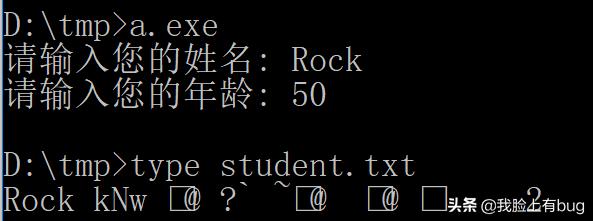
	fwrite(name, sizeof(name), sizeof(char), file1);
	fwrite(&age, 1, sizeof(int), file1);

	fclose(file1);
	return 0;
}
补充:
w和wb的区别
wb的demo
#include <stdio.h>
#include <string.h>

int main(void) {
	FILE *file1;
	char info[] = "Hello\nWorld";
	int age;
	int ret;

	file1 = fopen("test.txt", "wb");

	fwrite(info, sizeof(char), strlen(info), file1);

	fclose(file1);
	return 0;
}
w的demo
#include <stdio.h>
#include <string.h>

int main(void) {
	FILE *file1;
	char info[] = "Hello\nWorld"; // \n 保存位 \r\n
	int age;
	int ret;

	file1 = fopen("test.txt", "w");

	fwrite(info, strlen(info), sizeof(char), file1);

	fclose(file1);
	return 0;
}
小结:
在windows平台下,
当使用w方式打开档时,
如果使用fwrite写入数据时,会把'\n'写入为 '\r''\n'
即把10保存为 13 10
因为,在windows平台下,文本档中的回车符\n,会保存为 \r\n
( \n的ASCII码为10, \r的ASCII码为13)
当使用wb方式打开档时,
如果使用fwrite写入数据时,遇到'\n'仍只写入为 '\n'
fread 以二进制形式读取档中的数据
函数原型:
#include <stdio.h>
int fread( void *buffer, size_t size, size_t num, FILE *stream );
Demo
#include <stdio.h>
#include <string.h>

int main(void) {
	FILE *file1;
	char name[32];
	int age;
	int ret;

	file1 = fopen("student.txt", "rb");


	fread(name, sizeof(name), sizeof(char), file1);
	fread(&age, 1, sizeof(int), file1);

	printf("%s, %d\n", name, age);

	fclose(file1);
	return 0;
}
putw 以二进制形式存贮一个整数
demo
#include <stdio.h>
#include <string.h>

int main(void) {
	FILE *file1;
	int data[] = {1,2,3,4,5};
	int i;

	file1 = fopen("test.txt", "w");

	for (i=0; i<5; i++) {
		putw(data[i], file1);
	}

	fclose(file1);

	return 0;
}
getw 以二进制形式读取一个整数
函数原型:
int getw(FILE *fp)
返回值:成功时返回读取到的值
失败时返回-1。
Demo
#include <stdio.h>


int main(void) {
	FILE *file;
	int value;

	file = fopen("test.data", "rb");
	if (!file) {
		printf("档打开失败!\n");
		return 1;
	}

	while (1) {
		value = getw(file);
		if (value == -1 && feof(file)) {
			break;
		}

		printf("%d ", value);
	}

	fclose(file);

	return 0;
}
档状态检查函数
feof 档结束
函数原型:
#include <stdio.h>
int feof( FILE *stream );
返回值:如果指定的程序,已经到达档末尾位置,就返回非零值(真)。
#include <stdio.h>

int main(void) {
	FILE *file;
	char c;

	file = fopen("test.c", "r");

	//while ((c = fgetc(file)) != EOF) { //EOF就是 -1
	while (!feof(file)) {
		c = fgetc(file);
		printf("%c", c);
	}

	return 0;
}
ferror 档读/写出错
#include <stdio.h>

int main(void) {
	FILE *file;
	char c;
	int ret;

	file = fopen("test.c", "r");

	fputc('A', file);

	if (ferror(file)) {
		perror("档file发生错误");
	}


	return 0;
}
执行结果:

把 "r" 改为 "r+" 就不会发生错误了。
clearerr 清除档错误标志
函数原型:
#include <stdio.h>
void clearerr( FILE *stream );
Demo
#include <stdio.h>

int main(void) {
	FILE *file;
	char c;
	int ret;

	file = fopen("test.c", "r");

	fputc('A', file);
	if (ferror(file)) {
		perror("档file发生错误");
	}

	//如果不清除档错误,以后读写档时, 即使没有发生错误,ferror仍将返回非零值(认为还有错)
	clearerr(file);

	c = fgetc(file);
	printf("c=%c\n", c);
	if (ferror(file)) {
		perror("档file发生错误");
	}

	return 0;
}
ftell 获取档指针的当前位置
函数原型:
#include <stdio.h>
long ftell( FILE *stream );
Demo
#include <stdio.h>

int main(void) {
	FILE *file;
	char c;
	int ret;
	long offset;

	file = fopen("test.c", "r");

	offset = ftell(file);
	printf("当前位置是: %ld\n", offset);

	fgetc(file);
	offset = ftell(file);
	printf("当前位置是: %ld\n", offset);

	fclose(file);

	return 0;
}
档定位函数
注意:档始终只能从当前的位置向档尾方向读写!
fseek 随*定位机**
函数原型:
#include <stdio.h>
int fseek( FILE *stream, long offset, int origin );
参数2:
偏移量,可正可负。
<0 向档头方向偏移
>0 向档尾方向偏移
参数3:
SEEK_SET 从档的开始位置定位, 此时参数2必须大于0
SEEK_CUR 从档的当前位置定位
SEEK_END 从档的结束位置定位, 此时参数2必须小与0
Demo
#include <stdio.h>

int main(void) {
	FILE *file;
	char c;
	char buff[256];
	int i;

	file = fopen("test.c", "r");

	//读取档最后10个字符
	fseek(file, -10, SEEK_END);
	while (!feof(file)) {
		c = fgetc(file);
		printf("%c", c);
	}

	//读取档的第一行
	fseek(file, 0, SEEK_SET);
	fgets(buff, sizeof(buff), file);
	printf("\n第一行:%s\n", buff);

	//读取当前位置的前10个字符
	fseek(file, -10, SEEK_CUR);
	printf("\n这10个字符是:");
	for (i=0; i<10; i++) {
		c = fgetc(file);
		printf("%c", c);
	}

	close(file);
	return 0;
}
rewind 反绕
把档的位置指针定位到开始位置。
rewind(file)
等效于:
fseek(file, 0, SEEK_SET)
项目练习
1. 练习1
独立实现项目7.
2. 编写一个程序,统计该程序本身一共有多少个字符,有多少行,并列印输出。
#include <stdio.h>

// 统计这个程序本身,有多少个字符,有多少行代码

int main(void) {
	FILE *file ;
	char c;
	int count_char = 0; //字符总数
	int count_line = 0; //行数

	file = fopen("test.c", "r");
	if (!file ) {
		printf("档打开失败!\n");
		return 1;
	}

	while ((c=fgetc(file)) != EOF) {
		count_char++;
		if (c == '\n') {
			count_line++;
		}
	}

	count_line++;

	printf("一共有 %d 个字符\n", count_char);
	printf("一共有 %d 行代码\n", count_line);

	return 0;
}
3. 已有一个档,用来保存通讯录,假设已有内容如下:
note.txt
张三丰 Tel:13507318888 Addr:武当
刘备 Tel:13802289999 Addr:成都
马云 Tel:13904256666 Addr:杭州
马化腾 Tel:13107551111 Addr:深圳
编写一个程序,执行效果如下:
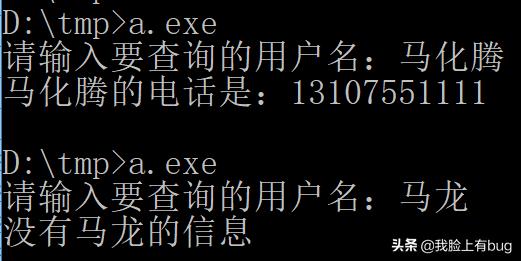
参考:
#include <stdio.h>
#include <string.h>

int main(void) {
	FILE *file;
	char name_search[64];
	char line[256];
	char name[64];
	char tel[32];
	char addr[32];
	int found = 0;

	file = fopen("note.txt", "r");
	if (!file) {
		printf("档打开失败\n");
		return 1;
	}

	printf("请输入要查询的用户名:");
	scanf("%s", name_search);

	while (!feof(file)) {
			fscanf(file, "%s Tel:%s Addr:%s\n", name, tel, addr);
			if (!strcmp(name, name_search)) {
				printf("%s的电话是:%s\n", name_search, tel);
				found = 1;
				break;
			}
	}

	if (found == 0) {
		printf("没有%s的信息\n", name_search);
	}

	return 0;
}
需要特别注意fscanf的格式字符串中最后的\n,否者只能匹配第一行!
补充说明:
对于如下文本:
张三丰 Tel:13507318888 Addr:武当
刘备 Tel:13802289999 Addr:成都
马云 Tel:13904256666 Addr:杭州
马化腾 Tel:13107551111 Addr:深圳

可以循环使用如下代码读取:
fscanf(file, "%s Tel:%s Addr:%s\n", name, tel, addr);

但是不加回车符,使用如下语句也能读取:
fscanf(file, "%s Tel:%s Addr:%s", name, tel, addr);

这是是因为:
使用fscanf(file,"%s Tel:%s Addr:%s",name_tmp,tel,addr),匹配到第一行的第2个%s时,刚好把第一个行中,除了最后的回车符以外,匹配完。此时第一行还剩下一个回车符。接着进入第2轮循环,又开始使用scanf匹配,但是注意,是从档的上一次匹配结束的位置继续匹配,也就是第一行行尾的回车符为止,在这个格式字符串中,第一个是%s,所以会跳过第一行行尾的回车符,从而匹配成功。

如果档的内容是这样的格式,就必须在格式字符串的最后加上\n了
姓名:张三丰 电话:13243879188
姓名:张四风 电话:13243879199

总结:需要特别注意fscanf的格式字符串中最后的\n的作用。