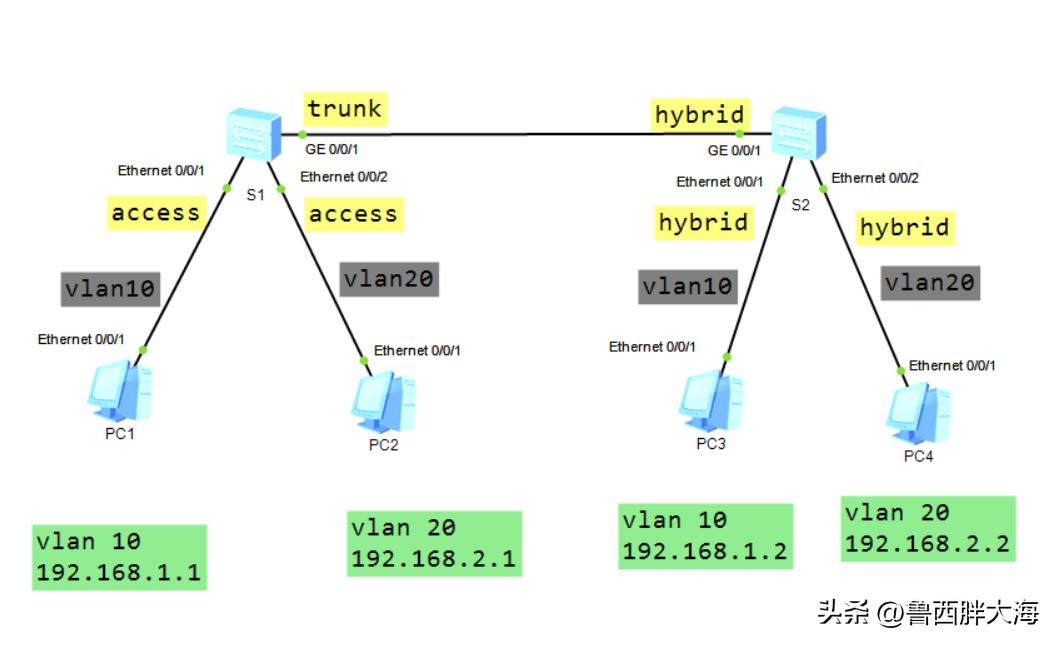
华为交换机接口类型
①access接口:用在交换机和终端/路由器相连的接口,只允许一个VLAN的流量通过
②trunk接口:用在交换机和交换机相连的接口,允许多个VLAN的流量通过
③hybrid接口:混合接口
设备规划
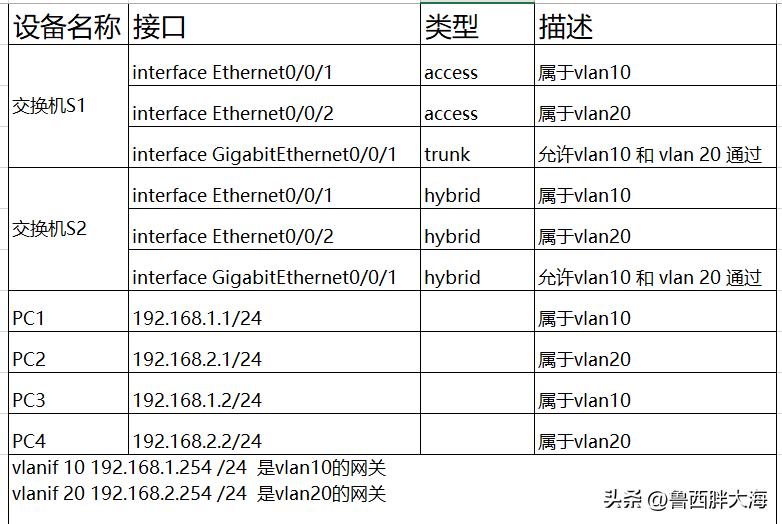
实验要求
这四台PC可以相互ping 通
配置步骤
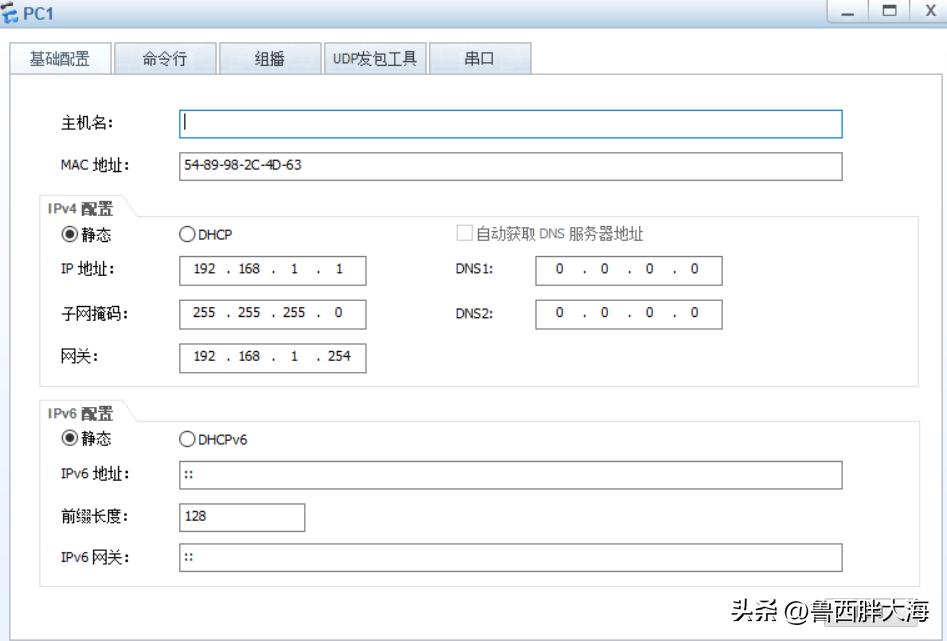
1、配置四台PC机的IP地址
PC1 192.168.1.1/24 网关192.168.1.254
PC2 192.168.2.1/24 网关192.168.2.254
PC3 192.168.1.2/24 网关192.168.1.254
PC4 192.168.2.2/24 网关192.168.2.254
- 配置交换机S1
配置access接口类型及所属vlan
<Huawei>undo terminal monitor
<Huawei>sys
[Huawei]sysname S1
[S1]vlan batch 10 20
[S1]interface Ethernet0/0/1
[S1-Ethernet0/0/1]port link-type access
[S1-Ethernet0/0/1]port default vlan 10
[S1-Ethernet0/0/1]dis this
interface Ethernet0/0/1
port link-type access
port default vlan 10
重复以上步骤配置interface Ethernet0/0/2 属于vlan20
interface Ethernet0/0/2
port link-type access
port default vlan 20
配置trunk接口并允许vlan10 vlan20通过
[S1]interface GigabitEthernet 0/0/1
[S1-GigabitEthernet0/0/1]port link-type trunk
[S1-GigabitEthernet0/0/1]port trunk allow-pass vlan 10 20
[S1-GigabitEthernet0/0/1]display this
interface GigabitEthernet0/0/1
port link-type trunk
port trunk allow-pass vlan 10 20
配置vlanif的IP地址
vlanif 10 192.168.1.254 /24 是vlan10的网关
vlanif 20 192.168.2.254 /24 是vlan20的网关
[S1]interface Vlanif 10
[S1-Vlanif10]ip address 192.168.1.254 24
[S1-Vlanif10]dis this
interface Vlanif10
ip address 192.168.1.254 255.255.255.0
[S1-Vlanif10]q
[S1]interface vlanif 20
[S1-Vlanif20]ip address 192.168.2.254 24
[S1-Vlanif20]q
<S1>save
The current configuration will be written to the device.
Are you sure to continue?[Y/N]y
至此交换机S1上配置完毕
3、配置交换机S2
<Huawei>u t m
<Huawei>sys
[Huawei]sysname S2
[S2]vlan batch 10 20
[S2]interface e0/0/1
[S2-Ethernet0/0/1]port link-type hybrid
[S2-Ethernet0/0/1]port hybrid pvid vlan 10
[S2-Ethernet0/0/1]port hybrid untagged vlan 10
[S2-Ethernet0/0/1]dis this
interface Ethernet0/0/1 #类access接口作用
port hybrid pvid vlan 10
port hybrid untagged vlan 10
同理配置Ethernet0/0/2为hybrid接口并配置pvid为vlan20 然后untagged
[S2-Ethernet0/0/2]dis this
interface Ethernet0/0/2 #类access接口作用
port hybrid pvid vlan 20
port hybrid untagged vlan 20
接下来配置 hybrid接口interface GigabitEthernet0/0/1类似trunk作用并允许vlan10和vlan20的流量通过
[S2]interface GigabitEthernet 0/0/1
[S2-GigabitEthernet0/0/1]port link-type hybrid
[S2-GigabitEthernet0/0/1]port hybrid tagged vlan 10 20
[S2-GigabitEthernet0/0/1]display this
interface GigabitEthernet0/0/1
port hybrid tagged vlan 10 20
然后退出保存,至此两交换机就配置了,接下来就做连接测试吧
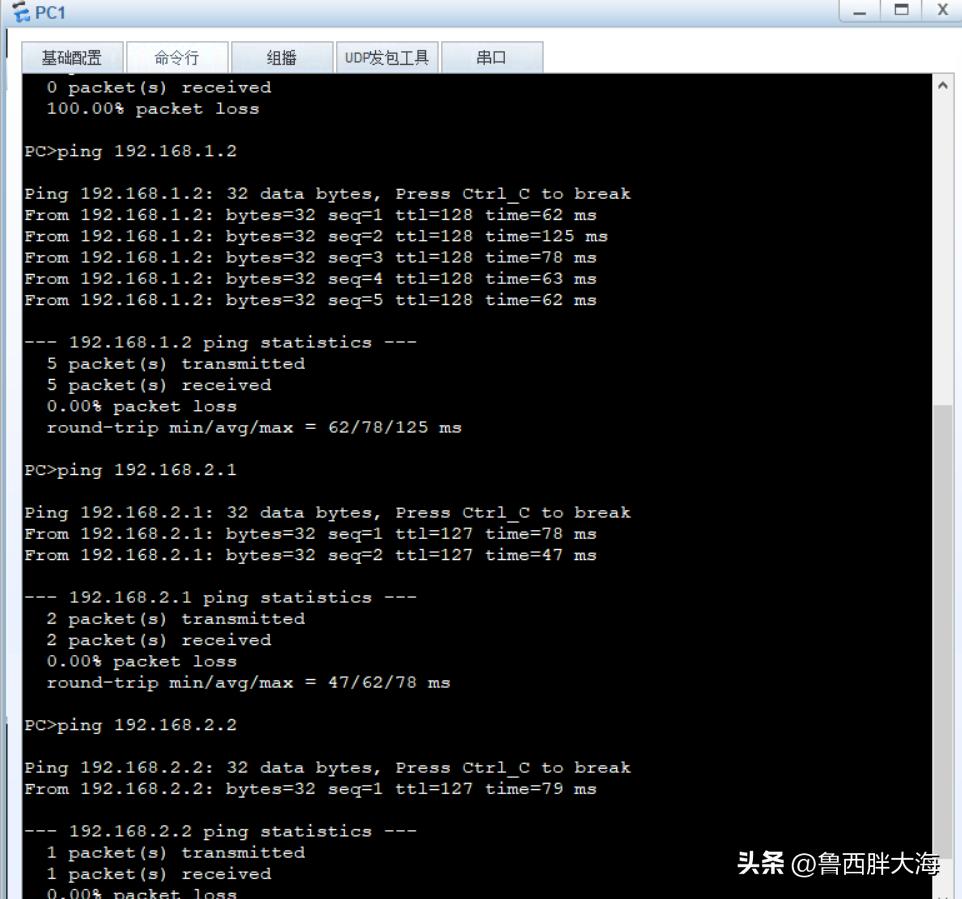
已经可以相互访问了