环境:Springboot2.4.11
环境配置
接下来的演示都是基于如下接口进行。
@RestController
@RequestMapping("/exceptions")
public class ExceptionsController {

  @GetMapping("/index")
  public Object index(int a) {
    if (a == 0) {
      throw new BusinessException() ;
    }
    return "exception" ;
  }

}
默认错误展示
默认情况下,当请求一个接口发生异常时会有如下两种情况的错误信息提示
- 基于HTML
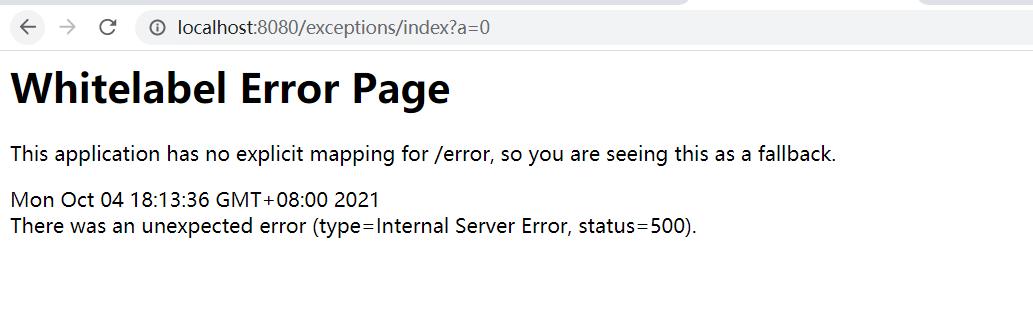
- 基于JSON

上面两个示例通过请求的Accept请求头设置希望接受的数据类型,得到不同的响应数据类型。
错误响应原理
默认情况下SpringMVC在发生错误了后会跳转到/error 的错误输出页面。页面上的内容又是如何控制的?
- Servlet捕获异常
public class DispatcherServlet extends FrameworkServlet {

  protected void doDispatch(...) {
    try {
      // 处理结果,在该方法中会判断是否有异常发生
      processDispatchResult(processedRequest, response, mappedHandler, mv, dispatchException);
    }
  }
  private void processDispatchResult(...) {
    if (exception != null) {
      if (exception instanceof ModelAndViewDefiningException) {
        // ...
      } else {
        Object handler = (mappedHandler != null ? mappedHandler.getHandler() : null);
        // 当有异常发生,exception不为空,所以进入下面方法进行处理
        mv = processHandlerException(request, response, handler, exception);
        errorView = (mv != null);
			}
		}
  }
  protected ModelAndView processHandlerException(...) {
    ModelAndView exMv = null;
    if (this.handlerExceptionResolvers != null) {
      // 默认请求我们的Rest API接口在抛出异常后是没有通用的HandlerExceptionResolver异常解析器可以处理的
      // 所以在这里的for不会获取ModelAndView对象
      for (HandlerExceptionResolver resolver : this.handlerExceptionResolvers) {
        exMv = resolver.resolveException(request, response, handler, ex);
        if (exMv != null) {
          break;
        }
      }
    }
  }
  if (exMv != null) {
    // ...
  }
  // 将异常继续向上抛出
  throw ex;
}
在上面的代码中会一步一步地抛出异常最后一直到tomcat容器所在的上下文中(当前web实例的上下文),查找当前的web应用是否配置有错误页。Springboot中默认错误页是 /error 的一个Controller(BasicErrorController)。
@Controller
@RequestMapping("${server.error.path:${error.path:/error}}")
public class BasicErrorController extends AbstractErrorController {
  @RequestMapping(produces = MediaType.TEXT_HTML_VALUE)
  public ModelAndView errorHtml(HttpServletRequest request, HttpServletResponse response) {
    HttpStatus status = getStatus(request);
    Map<String, Object> model = Collections.unmodifiableMap(getErrorAttributes(request, getErrorAttributeOptions(request, MediaType.TEXT_HTML)));
    response.setStatus(status.value());
    ModelAndView modelAndView = resolveErrorView(request, response, status, model);
    return (modelAndView != null) ? modelAndView : new ModelAndView("error", model);
  }

  @RequestMapping
  public ResponseEntity<Map<String, Object>> error(HttpServletRequest request) {
    HttpStatus status = getStatus(request);
    if (status == HttpStatus.NO_CONTENT) {
      return new ResponseEntity<>(status);
    }
    Map<String, Object> body = getErrorAttributes(request, getErrorAttributeOptions(request, MediaType.ALL));
    return new ResponseEntity<>(body, status);
  }
}
在这个Controller中定义了2个处理错误的方法,分别用来处理不同的Accept请求header信息。
当发生错误以后会跳转到上面的Controller中,默认当Accept为text/html时会调用errorHtml方法,该方法返回的是一个ModelAndView对象。接下来查看这个错误的ModelAndView是如何被处理的。
- 处理错误ModelAndView
默认的Tomcat最终会定位调整到/error的错误页面,执行如下逻辑:
public class DispatcherServlet extends FrameworkServlet {

  protected void doDispatch(...) {
    try {
      // 处理结果,在该方法中会判断是否有异常发生
      processDispatchResult(processedRequest, response, mappedHandler, mv, dispatchException);
    }
  }
  private void processDispatchResult(...) {
    // ...
    // Did the handler return a view to render?
    // 通过上面的源码,知道了这个/error返回的是一个ModelAndView对象,所以会进入到这里if语句
    if (mv != null && !mv.wasCleared()) {
      // 渲染视图
      render(mv, request, response);
    }
    // ...
  }
  protected void render(ModelAndView mv, HttpServletRequest request, HttpServletResponse response) throws Exception {
    View view;
    String viewName = mv.getViewName();
    if (viewName != null) {
      // 解析视图名
      view = resolveViewName(viewName, mv.getModelInternal(), locale, request);
      if (view == null) {
        throw new ServletException(...);
      }
    } else {
      // ...
    }
    try {
      if (mv.getStatus() != null) {
        response.setStatus(mv.getStatus().value());
      }
      view.render(mv.getModelInternal(), request, response);
    } catch (Exception ex) {
      throw ex;
    }
  }
  protected View resolveViewName(String viewName, ...) throws Exception {
    if (this.viewResolvers != null) {
      // 遍历所有的视图解析器;这里会匹配ContentNegotiatingViewResolver视图解析器
      // ContentNegotiatingViewResolver解析器是在WebMvcAutoConfigurationAdapter中被创建的
      // 通过继承层次在父类中会吧容器中其它的ViewResolver都添加到自身的List集合中
			for (ViewResolver viewResolver : this.viewResolvers) {
        // 由ContentNegotiatingViewResolver解析器成功返回View对象
				View view = viewResolver.resolveViewName(viewName, locale);
				if (view != null) {
					return view;
				}
			}
		}
		return null;
	}

}
ContentNegotiatingViewResolver解析器解析视图
public class ContentNegotiatingViewResolver extends WebApplicationObjectSupport implements ViewResolver, Ordered, InitializingBean {
  public View resolveViewName(String viewName, Locale locale) throws Exception {
		RequestAttributes attrs = RequestContextHolder.getRequestAttributes();
    // 获取当前请求的Accept 头信息
		List<MediaType> requestedMediaTypes = getMediaTypes(((ServletRequestAttributes) attrs).getRequest());
		if (requestedMediaTypes != null) {
      // 获取
			List<View> candidateViews = getCandidateViews(viewName, locale, requestedMediaTypes);
			View bestView = getBestView(candidateViews, requestedMediaTypes, attrs);
			if (bestView != null) {
				return bestView;
			}
		}
    // ...
  }
  private List<View> getCandidateViews(String viewName, Locale locale, List<MediaType> requestedMediaTypes) throws Exception {
    List<View> candidateViews = new ArrayList<>();
    if (this.viewResolvers != null) {
      // 这里的解析器默认有如下图中的3个
      for (ViewResolver viewResolver : this.viewResolvers) {
        View view = viewResolver.resolveViewName(viewName, locale);
        if (view != null) {
          candidateViews.add(view);
        }
        // ...
      }
    }
    return candidateViews;
  }
}
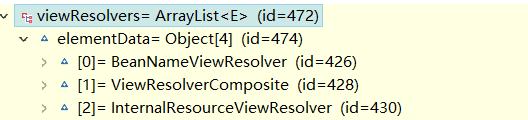
上面的this.viewResolvers
这里遍历后最终会返回一个 ErrorMvcAutoConfiguration$StaticView的视图对象,该视图是由BeanNameViewResolver视图解析器通过BeanName进行解析出来的,在ErrorMvcAutoConfiguration自动配置中会配置这个视图对象
@AutoConfigureBefore(WebMvcAutoConfiguration.class)
@EnableConfigurationProperties({ ServerProperties.class, WebMvcProperties.class })
public class ErrorMvcAutoConfiguration {

  @Configuration(proxyBeanMethods = false)
  // 可以通过下面这个属性进行配置是否开启
	@ConditionalOnProperty(prefix = "server.error.whitelabel", name = "enabled", matchIfMissing = true)
	@Conditional(ErrorTemplateMissingCondition.class)
	protected static class WhitelabelErrorViewConfiguration {
    private final StaticView defaultErrorView = new StaticView();

    // 注册一个名称为error的视图View对象;@ConditionalOnMissingBean我们可以在自己的系统中自定义一个视图对象
    @Bean(name = "error")
    @ConditionalOnMissingBean(name = "error")
    public View defaultErrorView() {
      return this.defaultErrorView;
    }
  }
}
在上面解析有哪些视图对象时,还有一个InternalResourceView视图对象
List<View> candidateViews = getCandidateViews(viewName, locale, requestedMediaTypes);
这里的候选的View对象有两个:
ErrorMvcAutoConfiguration$StaticViewInternalResourceView
紧接着在上面的如下代码中会从这两个视图对象中找出一个更加合适的View对象
View bestView = getBestView(candidateViews, requestedMediaTypes, attrs);
最终在该方法中会通过请求的Accept的请求header信息确定视图对象为StaticView
如果你将日志信息设置为trace,你将会在日志中发现如下信息:

logging.level.web: trace
找到了View对象会,返回到DispatcherServlet#render继续执行
public class DispatcherServlet extends FrameworkServlet {
  protected void render(ModelAndView mv, HttpServletRequest request, HttpServletResponse response) throws Exception {
    // 解析视图
    View view = resolveViewName(viewName, mv.getModelInternal(), locale, request);
    try {
      // 调用视图对象的render方法;当前的View = ErrorMvcAutoConfiguration$StaticView
      view.render(mv.getModelInternal(), request, response);
    } catch (Exception ex) {
      throw ex;
    }
  }
}
StaticView视图对象
private static class StaticView implements View {
  @Override
  public void render(Map<String, ?> model, HttpServletRequest request, HttpServletResponse response) throws Exception {
    response.setContentType(TEXT_HTML_UTF8.toString());
    StringBuilder builder = new StringBuilder();
    Object timestamp = model.get("timestamp");
    Object message = model.get("message");
    Object trace = model.get("trace");
    if (response.getContentType() == null) {
      response.setContentType(getContentType());
    }
    builder.append("<html><body><h1>Whitelabel Error Page</h1>").append(
      "<p>This application has no explicit mapping for /error, so you are seeing this as a fallback.</p>")
      .append("<div id='created'>").append(timestamp).append("</div>")
      .append("<div>There was an unexpected error (type=").append(htmlEscape(model.get("error")))
      .append(", status=").append(htmlEscape(model.get("status"))).append(").</div>");
    if (message != null) {
      builder.append("<div>").append(htmlEscape(message)).append("</div>");
    }
    if (trace != null) {
      builder.append("<div style='white-space:pre-wrap;'>").append(htmlEscape(trace)).append("</div>");
    }
    builder.append("</body></html>");
    response.getWriter().append(builder.toString());
  }
}
看到这里你是不是知道了默认的错误页输出内容是如何被输出的,是如何工作的呢?
完毕!!!
求个 关注+转发
公众:Springboot实战案例锦集
Spring 自定义Advisor以编程的方式实现AOP
Springboot整合RabbitMQ死信队列详解
SpringBoot AOP 9种切入点详细使用说明
Spring依赖注入@Autowried的这些功能你都知道吗?
SpringBoot2 整合OAuth2实现统一认证
SpringBoot分布式事务之最大努力通知
Springboot编程式事务使用方式详解
SpringBoot整合MyBatis完全使用注解方式定义Mapper
Springboot自定义消息转换器
SpringBoot项目中接口限流实现方案
Springboot基础使用@Conditional多条件注册Bean