在实际项目中有很多场景遇到需要操作EXCEL文件,而常用到的库就有NPOI;NPOI是开源的POI 项目的.NET版,POI是一个开源的Java读写Excel、WORD等微软OLE2组件文档的项目, 使用 NPOI 你就可以在没有安装 Office 或者相应环境的机器上对 WORD/EXCEL 文档进行读写。在处理Excel文件上,NPOI 可以同时兼容 xls 和 xlsx。
程序集构成

一、引用
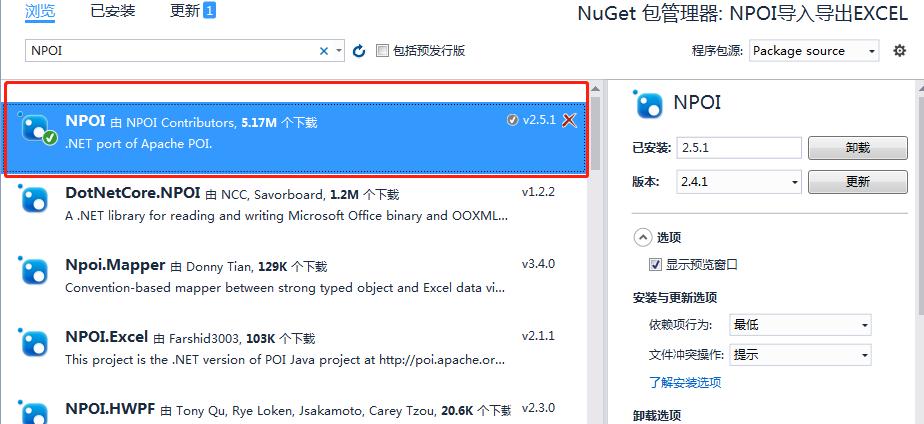
在NuGet里搜索NPOI,选择下图的项目安装即可;
二、程序示例:

部分代码如下:
(1)导出EXCEL代码
publicvoidExport_Excel(stringpath)
  {
     string extension= Path.GetExtension(path).ToLower();
     IWorkbook workbook;
     if (extension==".xlsx")
     {
         workbook = new XSSFWorkbook();
      }
      else
       {
          workbook = new HSSFWorkbook();
       }
      ISheet sheet = workbook.CreateSheet("表1");
      using(FileStream fs=new FileStream(path,FileMode.Create,FileAccess.ReadWrite))
      {
         IRow row_Head = sheet.CreateRow(0);
         for (int i = 0; i < dataGridView1.Columns.Count; i++)
          {
             ICell cell = row_Head.CreateCell(i);
             cell.SetCellValue(dataGridView1.Columns[i].HeaderText);
         }
         for (int i = 0; i < dataGridView1.Rows.Count; i++)
          {
             IRow row1 = sheet.CreateRow(i + 1);
             for (int j = 0; j < dataGridView1.Columns.Count; j++)
             {
                ICell cell = row1.CreateCell(j);
                if(dataGridView1.Rows[i].Cells[j].Value==null)
                      cell.SetCellValue("");
                else
                      cell.SetCellValue(dataGridView1.Rows[i].Cells[j].Value.ToString());
                    }
                }
      workbook.Write(fs);
       workbook.Close();
     }
 }
(2)读取EXCEL文件代码
publicvoidImport_Excel(stringpath)
{
DataTabledt = newDataTable();
using(FileStreamfsRead = newFileStream(path, FileMode.Open, FileAccess.Read))
{
stringextension = Path.GetExtension(path).ToLower();
IWorkbookworkbook;
if(extension == ".xlsx")
{
workbook = newXSSFWorkbook(fsRead);
}
else
{
workbook = newHSSFWorkbook(fsRead);
}
ISheetsheet = workbook.GetSheetAt(0);
IRowcurrentRow = sheet.GetRow(0);
//最后一个方格的编号 即总的列数
intcellCount = currentRow.LastCellNum;
dataGridView1.DataSource = null;
for(inti = 0; i < cellCount; i++)
{
//DataColumn dc = new DataColumn();
dt.Columns.Add( currentRow.GetCell(i).ToString());//增加列
}
for(intj = 0; j <= sheet.LastRowNum - 1; j++)
{

dt.Rows.Add();//增加行
IRowcurrentRow1 = sheet.GetRow(j + 1);
if(currentRow1 != null)
{
for(intc = 0; c < currentRow1.LastCellNum; c++)
{
ICellcell = currentRow1.GetCell(c);
if(cell == null|| cell.CellType == CellType.Blank)
{
dt.Rows[j][c] = DBNull.Value;
}
else
{
//如果当前单元格不为空,则根据单元格的类型获取数据
switch(cell.CellType)
{
//只有当单元格的数据类型是数字类型的时候使用cell.NumericCellValue来获取值。其余类型都使用字符串来获取.日期类型数据插入单元格后也是CellType.NUMERIC
caseCellType.Numeric:
//cell.NumericCellValue;
dt.Rows[j][c] = cell.NumericCellValue;
break;
default:
//cell.ToString();
dt.Rows[j][c] = cell.ToString();
break;
}
}
}
}
}
dataGridView1.DataSource = dt;
workbook.Close();
}
}
三、感谢您的阅读,完整代码已上传,关注点赞后发送私信“NPOI”即可获取。