同事配置交换机发现总报错,重启后无法启动,发现如下问题:
System is starting...
Press Ctrl+D to access BASIC-BOOTWARE MENU
Booting Normal Extend BootWare
The Extend BootWare is self-decompressing..................Done!

****************************************************************************
*                                                                         		                           		       *
*                H3C S3110-10TP-SI BootWare, Version 1.07                           *
*                                                                                                                  *
****************************************************************************
Copyright (c) 2004-2013 Hangzhou H3C Technologies Co., Ltd.

Compiled Date       : Sep 25 2013 14:52:32
CPU Type            : MIPS4kec
CPU L1 Cache        : 16KB
CPU Clock Speed     : 500MHz
Memory Type         : DDR3 SDRAM
Memory Size         : 128MB
Memory Speed        : 300MHz
BootWare Size       : 3MB
Flash Size          : 32MB

BootWare Validating...
Application program does not exist.
BootWare password: Not required. Please press Enter to continue.

Password recovery capability is enabled.
Note: The current operating device is flash
Enter < Storage Device Operation > to select device.

===========================<EXTEND-BOOTWARE MENU>=================
|<1> Boot System
|<2> Enter Serial SubMenu
|<3> Enter Ethernet SubMenu
|<4> File Control
|<5> Restore to Factory Default Configuration
|<6> Skip Current System Configuration
|<7> BootWare Operation Menu
|<8> Clear Super Password
|<9> Storage Device Operation
|<0> Reboot
================================================================
Ctrl+Z: Access EXTEND-ASSISTANT MENU
Ctrl+F: Format File System
Enter your choice(0-9):
出现一个拓展菜单,让选择数字,可是不管选哪个,基本都会回到这个页面上。
查看配置文件:
===========================<EXTEND-BOOTWARE MENU>=================
|<1> Boot System
|<2> Enter Serial SubMenu
|<3> Enter Ethernet SubMenu
|<4> File Control
|<5> Restore to Factory Default Configuration
|<6> Skip Current System Configuration
|<7> BootWare Operation Menu
|<8> Clear Super Password
|<9> Storage Device Operation
|<0> Reboot
================================================================
Ctrl+Z: Access EXTEND-ASSISTANT MENU
Ctrl+F: Format File System
Enter your choice(0-9): 4         //文件控制

===============================<File CONTROL>======================
|Note:the operating device is flash
|<1> Display All File(s)
|<2> Set Application File type
|<3> Set Configuration File type
|<4> Delete File
|<0> Exit To Main Menu
================================================================
Enter your choice(0-4): 1       //显示所有文件

Display all file(s) in flash:
 'M' = MAIN      'B' = BACKUP      'S' = SECURE      'N/A' = NOT ASSIGNED
================================================================
|NO. Size(B)   Time                 Type   Name
================================================================

===============================<File CONTROL>======================
|Note:the operating device is flash
|<1> Display All File(s)
|<2> Set Application File type
|<3> Set Configuration File type
|<4> Delete File
|<0> Exit To Main Menu
================================================================
Enter your choice(0-4): 4       //删除文件

Deleting the file in flash:
 'M' = MAIN      'B' = BACKUP      'S' = SECURE      'N/A' = NOT ASSIGNED
================================================================
|NO. Size(B)   Time                 Type   Name
|No file in the current device!
================================================================
发现,根本就没有配置文件可删除,没有任何配置文件,交换机根本无从启动。
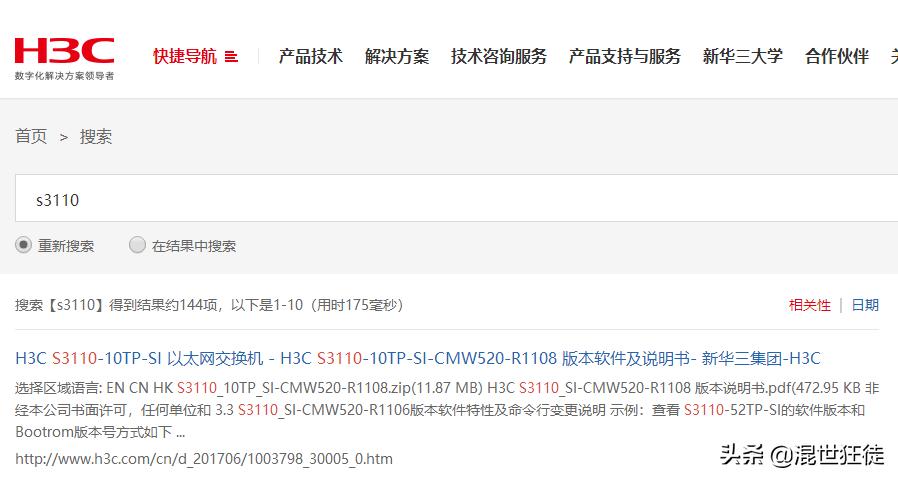
只好刷机,从华三官网找对应的配置文件刷进交换机中,http://search.h3c.com/
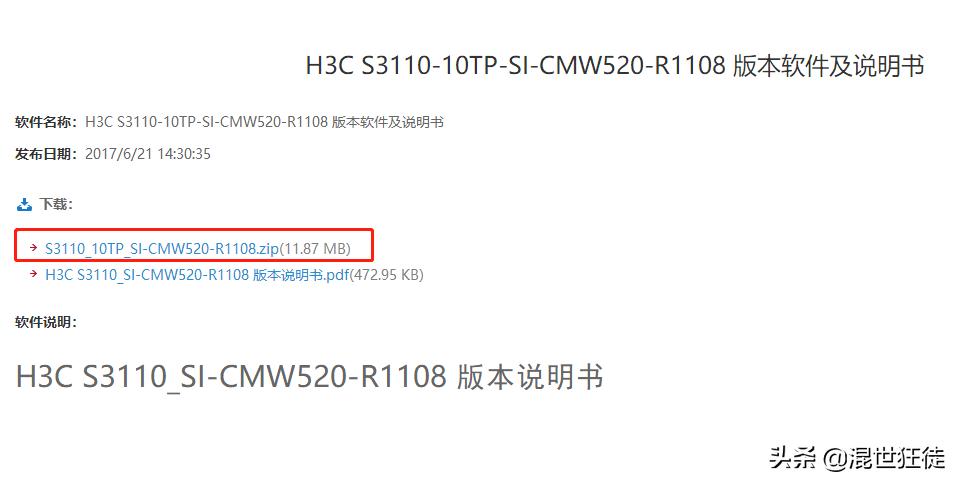
*载下**配置文件:
先配置网络参数:
===============================<File CONTROL>======================
|Note:the operating device is flash
|<1> Display All File(s)
|<2> Set Application File type
|<3> Set Configuration File type
|<4> Delete File
|<0> Exit To Main Menu
================================================================
Enter your choice(0-4): 0           //回到主菜单

===========================<EXTEND-BOOTWARE MENU>=================
|<1> Boot System
|<2> Enter Serial SubMenu
|<3> Enter Ethernet SubMenu
|<4> File Control
|<5> Restore to Factory Default Configuration
|<6> Skip Current System Configuration
|<7> BootWare Operation Menu
|<8> Clear Super Password
|<9> Storage Device Operation
|<0> Reboot
================================================================
Ctrl+Z: Access EXTEND-ASSISTANT MENU
Ctrl+F: Format File System
Enter your choice(0-9): 3          //进入网路子菜单

==========================<Enter Ethernet SubMenu>====================
|Note:the operating device is flash
|<1> Download Application Program To SDRAM And Run
|<2> Update Main Application File
|<3> Update Backup Application File
|<4> Update Secure Application File
|<5> Modify Ethernet Parameter
|<0> Exit To Main Menu
|<Ensure The Parameter Be Modified Before Downloading!>
================================================================
Enter your choice(0-5): 5          //修改网络参数

==========================<ETHERNET PARAMETER SET>==================
|Note:       '.' = Clear field.
|            '-' = Go to previous field.
|          Ctrl+D = Quit.
================================================================
Protocol (FTP or TFTP) :tftp              //使用tftp协议
Load File Name         :host
                       :S3110_10TP_SI-CMW520-R1108.bin              //粘贴从官网*载下**的.bin配置文件名称
Target File Name       :target
                       :S3110_10TP_SI-CMW520-R1108.bin               //同上
Server IP Address      :192.168.1.1                //设置tftp服务器地址
Local IP Address       :192.168.1.253              //交换机地址
Gateway IP Address     :0.0.0.0
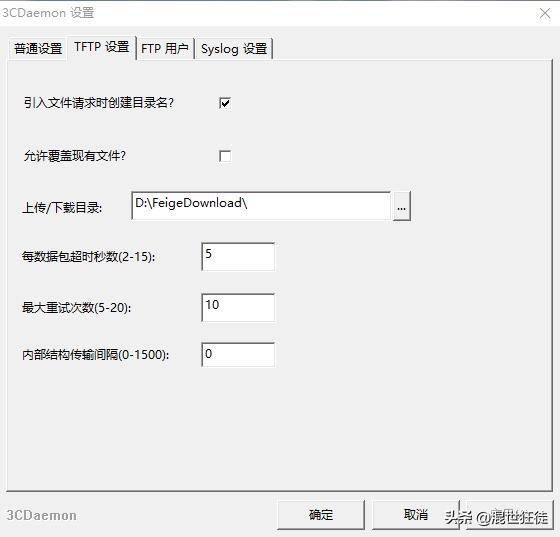
*载下**3CDaemon软件:

自行设置配置文件路径,将解压后的配置文件S3110_10TP_SI-CMW520-R1108.bin放到指定目录下:
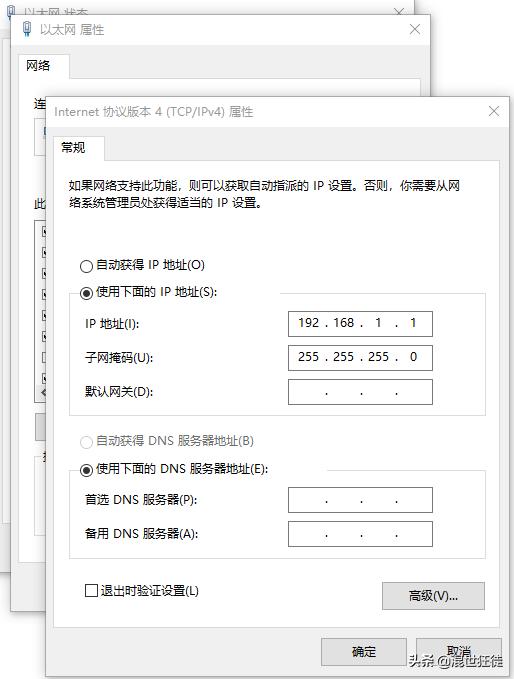
电脑作为tftp服务器需要配置IP为192.168.1.1:
电脑网线直接连接交换机任意一个口,下面继续进行刷机操作:
==========================<Enter Ethernet SubMenu>===================
|Note:the operating device is flash
|<1> Download Application Program To SDRAM And Run
|<2> Update Main Application File
|<3> Update Backup Application File
|<4> Update Secure Application File
|<5> Modify Ethernet Parameter
|<0> Exit To Main Menu
|<Ensure The Parameter Be Modified Before Downloading!>
===============================================================
Enter your choice(0-5): 2           //更新主配置文件
Loading.................................................................................................................................................
.......................................................................................................Done!
12544000 bytes downloaded!
Updating File flash:/S3110_10TP_SI-CMW520-R1108.bin........................Done!

==========================<Enter Ethernet SubMenu>===================
|Note:the operating device is flash
|<1> Download Application Program To SDRAM And Run
|<2> Update Main Application File
|<3> Update Backup Application File
|<4> Update Secure Application File
|<5> Modify Ethernet Parameter
|<0> Exit To Main Menu
|<Ensure The Parameter Be Modified Before Downloading!>
================================================================
Enter your choice(0-5): 0             //返回主菜单

===========================<EXTEND-BOOTWARE MENU>=================
|<1> Boot System
|<2> Enter Serial SubMenu
|<3> Enter Ethernet SubMenu
|<4> File Control
|<5> Restore to Factory Default Configuration
|<6> Skip Current System Configuration
|<7> BootWare Operation Menu
|<8> Clear Super Password
|<9> Storage Device Operation
|<0> Reboot
================================================================
Ctrl+Z: Access EXTEND-ASSISTANT MENU
Ctrl+F: Format File System
Enter your choice(0-9): 1              //启动交换机
Starting to get the main application
file--flash:/S3110_10TP_SI-CMW520-R1108.bin!.......................
The main application file is self-decompressing........................................................................................................
..........................................................................................................................................................Done!
Extend BootWare Version is not equal,updating? [Y/N]
Updating Extend BootWare..........Done!
Basic BootWare Version is not equal,updating? [Y/N]
Updating Basic BootWare..........Done!
BootWare updated,System is rebooting now.
System is starting...
Press Ctrl+D to access BASIC-BOOTWARE MENU
Booting Normal Extend BootWare
The Extend BootWare is self-decompressing..........................Done!

****************************************************************************
*                                                                                                                  *
*                H3C S3110-10TP-SI BootWare, Version 1.22                           *     //发现版本已经升级成1.22
*                                                                                                                  *
****************************************************************************
Copyright (c) 2004-2017 New H3C Technologies Co., Ltd.

Compiled Date       : Apr 14 2017 15:05:19
CPU Type            : MIPS4kec
CPU L1 Cache        : 16KB
CPU Clock Speed     : 500MHz
Memory Type         : DDR3 SDRAM
Memory Size         : 128MB
Memory Speed        : 300MHz
BootWare Size       : 3MB
Flash Size          : 32MB

BootWare Validating...
Normal Basic BootWare Version is newer than Backup Basic BootWare!
Begin to Update the Backup Basic BootWare............Done!
Normal Extend BootWare Version is newer than Backup Extend BootWare!
Begin to Update the Backup Extend BootWare..........Done!
Press Ctrl+B to enter extended boot menu...
Starting to get the main application
file--flash:/S3110_10TP_SI-CMW520-R1108.bin!................................
...............................................................
The main application file is self-decompressing.............................
............................................................................
............................................................................
............................................................................
....................................................Done!
System application is starting...
Configuration file is skipped.
User interface aux0 is available.

Press ENTER to get started.                   //至此,大功告成!
<H3C>
#Apr 26 12:00:38:837 2000 H3C SHELL/4/LOGIN:
 Trap 1.3.6.1.4.1.25506.2.2.1.1.3.0.1<hh3cLogIn>: login from Console
%Apr 26 12:00:38:977 2000 H3C SHELL/5/SHELL_LOGIN: Console logged in from aux0.
<H3C>
<H3C>
交换机刷机完毕,可以正常使用了!如果还不行,再返厂维修也不迟。
回复关键词:“3CD” 获取3CDaemon刷机软件*载下**链接。