写一个程序,需要关闭防火墙,系统是win10,现在把过程分享一下,有需要的朋友可以看一下。
首先引用 NetFwTypeLib 和 System.ServiceProcess
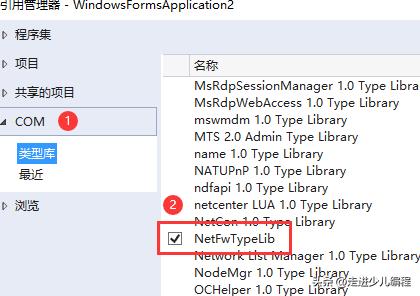
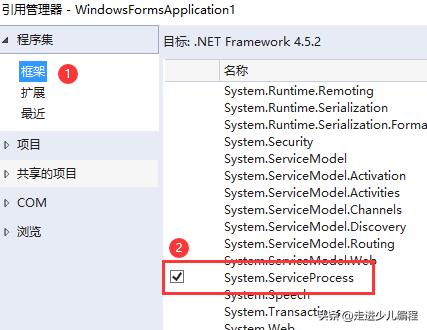
操作防火墙的函数和使用方法代码如下:
using Microsoft.Win32;
using NetFwTypeLib;
using System;
using System.Diagnostics;
using System.IO;
using System.ServiceProcess;
using System.Windows.Forms;

namespace WindowsFormsApplication1
{
    public partial class Form1 : Form
    {
        public Form1()
        {
            InitializeComponent();
        }

        FIREWALL fw = new FIREWALL();
        private void button1_Click(object sender, EventArgs e)
        {
            fw.打开防火墙();
        }
        private void button2_Click(object sender, EventArgs e)
        {
            fw.关闭防火墙();
        }

        //操作防火墙的类,还是一样,懒的话照抄就行
        public class FIREWALL
        {
            public void 打开防火墙()
            {
                //看看系统是不是WIN10
                RegistryKey rk = Registry.LocalMachine.OpenSubKey(@"Software\\Microsoft\\Windows NT\\CurrentVersion");
                var SystemTip = rk.GetValue("ProductName").ToString();
                rk.Close();
                if (!SystemTip.StartsWith("Windows 10"))
                {
                    MessageBox.Show("不是win10系统!");
                    return;
                }

                //防火墙服务名称
                string ServicerName = "MpsSvc";
                RegistryKey key = Registry.LocalMachine.OpenSubKey(@"SYSTEM\\CurrentControlSet\\Services\\" + ServicerName, true);

                //如果防火墙启动类型是禁止,更改其为自动
                var StartIndex = key.GetValue("Start").ToString();
                Log("StartIndex:" + StartIndex.ToString());
                if (StartIndex == "4")
                {
                    try
                    {
                        ProcessStartInfo objProInfo = new ProcessStartInfo();
                        objProInfo.FileName = "cmd*ex.e**";
                        objProInfo.CreateNoWindow = false;
                        objProInfo.WindowStyle = ProcessWindowStyle.Hidden;
                        objProInfo.Arguments = "/c sc config " + ServicerName + " start= " + "auto";
                        Process.Start(objProInfo);
                        //等待操作执行完毕
                        System.Threading.Thread.Sleep(1000);
                    }
                    catch (Exception ex)
                    {
                        Log("防火墙启动类型设置失败,原因:\r\n" + ex.ToString());
                        return;
                    }
                }

                key.Close();

                // 确保防火墙服务是启动状态
                ServiceController sc = new ServiceController(ServicerName);
                if ((sc.Status.Equals(ServiceControllerStatus.Stopped)) || (sc.Status.Equals(ServiceControllerStatus.StopPending)))
                {
                    sc.Start();
                    Log("防火墙服务已经开启。");
                    //等待操作执行完毕
                    System.Threading.Thread.Sleep(1000);
                }

                //开始打开防火墙
                try
                {
                    INetFwPolicy2 FP = (INetFwPolicy2)Activator.CreateInstance(Type.GetTypeFromProgID("HNetCfg.FwPolicy2"));
                    // 启用公用防火墙
                    FP.set_FirewallEnabled(NET_FW_PROFILE_TYPE2_.NET_FW_PROFILE2_PUBLIC, true);
                    // 启用专用防火墙
                    FP.set_FirewallEnabled(NET_FW_PROFILE_TYPE2_.NET_FW_PROFILE2_PRIVATE, true);

                    Log("防火墙已相打开");
                }
                catch(Exception ex)
                {
                    Log("开启防火墙失败,原因:\r\n" + ex.ToString());
                    return;
                }
            }
            public void 关闭防火墙()
            {
                //看看系统是不是WIN10
                RegistryKey rk = Registry.LocalMachine.OpenSubKey(@"Software\\Microsoft\\Windows NT\\CurrentVersion");
                var SystemTip = rk.GetValue("ProductName").ToString();
                rk.Close();
                if (!SystemTip.StartsWith("Windows 10"))
                {
                    MessageBox.Show("不是win10系统!");
                    return;
                }

                //关闭防火墙
                try
                {
                    INetFwPolicy2 FP = (INetFwPolicy2)Activator.CreateInstance(Type.GetTypeFromProgID("HNetCfg.FwPolicy2"));
                    // 禁用公用防火墙
                    FP.set_FirewallEnabled(NET_FW_PROFILE_TYPE2_.NET_FW_PROFILE2_PUBLIC, false);
                    // 禁用专用防火墙
                    FP.set_FirewallEnabled(NET_FW_PROFILE_TYPE2_.NET_FW_PROFILE2_PRIVATE, false);

                    Log("防火墙已经关闭");
                }
                catch (Exception ex)
                {
                    Log("关闭防火墙失败,原因:\r\n" + ex.ToString());
                    return;
                }
            }
            void Log(string logcontent)   //记录日志
            {
                using (FileStream st = new FileStream(Application.StartupPath + "\\log.txt", FileMode.Append))
                {
                    using (StreamWriter wr = new StreamWriter(st))
                    {
                        wr.WriteLine(#34;{DateTime.Now.ToLongTimeString()},{logcontent}");
                    }
                }
            }
        }
    }
}
运行效果如下: