关键词:美团 Python Excel
0.程序是针对美团中的美食部分数据按好评排序采集。
要抓取保存的数据为:
商家名 类型 地理位置 评论人数 均价 最低价格
1.首先编写网页数据采集函数,使用request采集网页源码,具体实现如下
-
def getHtml(url):
-
headers = (’User-Agent’,
-
’Mozilla/5.0 (Windows NT 6.1) AppleWebKit/537.11 (KHTML, like Gecko) Chrome/23.0.1271.64 Safari/537.11’)
-
opener = urllib.request.build_opener
-
opener.addheaders = [headers]
-
htmldata = opener.open(url).read
-
htmldata=htmldata.decode(’utf-8’)
-
return htmldata
2.根据网页源码解析获取已上线城市的url
-
part = (’gaevent’,’changecity/build’)
-
urldic = {}
-
def handle_starttag(self, tag, attrs):
-
if tag==’a’ and (self.part in attrs):
-
for att,value in attrs:
-
if att==’href’:
-
self.urldic.__setitem__(value, value+’/category/meishi/all/rating’)
-
def getUrl(self):
-
return self.urldic
3.获取分页url
-
pagelist = list
-
temphref = str
-
flg = 0
-
initurl = str
-
def setInitUrl(self,url):
-
self.initurl = url
-
def handle_starttag(self, tag, attrs):
-
if tag==’a’:
-
for attr,value in attrs:
-
if attr==’href’ and (’page’ in value):
-
self.temphref = self.initurl + value
-
if self.temphref not in self.pagelist:
-
self.pagelist.append(self.temphref)
-
def getList(self):
-
return self.pagelist
4.解析网页源码 获取有效信息
-
tempstr = str
-
divsum = int
-
def handle_starttag(self, tag, attrs):
-
if tag==’div’:
-
for attr,value in attrs:
-
if attr==’class’ and value.find(’poi-tile-nodeal’)!=-1:
-
self.tempstr=’’
-
self.divsum = 0
-
def handle_data(self, data):
-
if(data.isspace==False):
-
data = data.replace(’·’, ’·’)
-
if data==’¥’:
-
if ’¥’ not in self.tempstr:
-
self.tempstr+=’无’ +’\t’
-
self.tempstr+=data
-
elif data==’¥’:
-
if ’¥’ not in self.tempstr:
-
self.tempstr+=’无’ +’\t’
-
self.tempstr+=’¥’
-
elif data==’人评价’:
-
self.tempstr=self.tempstr[0:-1]+data+’\t’
-
elif data==’人均 ’:
-
self.tempstr+=’人均’
-
elif data[0]==’起’:
-
self.tempstr=self.tempstr[0:-1]+’起’
-
else:
-
self.tempstr+=data+’\t’
-
def handle_endtag(self, tag):
-
if tag==’div’:
-
self.divsum+=1
-
if self.divsum==6:
-
if (self.tempstr.find(’¥’))!=-1:
-
if (re.split(r’\t’, self.tempstr).__len__)==5:
-
teststr = str
-
flg = 0
-
for stmp in re.split(r’\t’,self.tempstr):
-
if flg==2:
-
teststr+=’无位置信息’+’\t’
-
teststr+=stmp+’\t’
-
flg+=1
-
self.tempstr=teststr
-
if (re.split(r’\t’, self.tempstr).__len__)==6:
-
arraystr.append(self.tempstr)
-
self.divsum=0
-
self.tempstr=’’
5.将信息存放于Excel中
-
def SaveExcel(listdata):
-
head=[’商家名’,’类型’,’地理位置’,’评论人数’,’均价’,’最低价格’]
-
wbk=xlwt.Workbook
-
sheet1=wbk.add_sheet("sheet1")
-
ii=0
-
for testhand in head:
-
sheet1.write(0,ii,testhand)
-
ii+=1
-
i=1
-
j=0
-
for stt in listdata:
-
j=0
-
lis = re.split(r’\t’,stt)
-
for ls in lis:
-
sheet1.write(i,j,ls)
-
j=j+1
-
i+=1
-
wbk.save(’test.xls’)
以下是Excel中的数据:
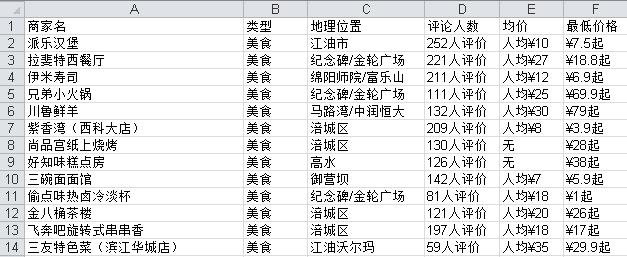
来自:数据挖掘入门与实战
↓↓↓ 【精彩推荐】
1、 大咖看过来,数据分析网专栏作家招募!!
2、 加入大数据交流QQ群,开启数据江湖!!
3、 有缘人看过来,数据分析网志愿者招募!!
↓↓↓【点击阅读原文访问数据分析网】