说到对比两个文件的差异,对于我们程序员来说,可以说是天天碰到。我们经常需要对比两份代码是否不同。但今天给大家推荐的是,一个对比两份Html代码最终效果差异的项目。
项目简介
一个基于.Net 4.5开发的对比Html文件、片段效果差异的项目。两份Html效果不一样的地方会通过颜色、删除线、背景色分别标记出来。
该项目使用场景一般是针对一些文章排版、错别字显示等情况,项目比较简单,感兴趣的可以了解下。
技术架构
1、平台:基于.Net Framework 4.5、netstandard2.0开发
2、开发工具: Visual Studio 2017
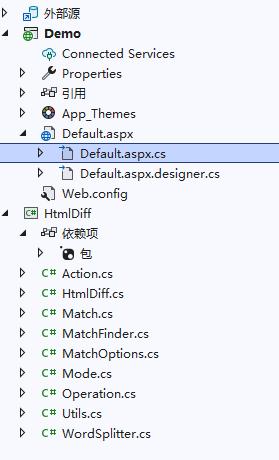
项目结构
使用方法
对比Html片段
var oldText = @"<p><i>This is</i> some sample text to <strong>demonstrate</strong> the capability of the <strong>HTML diff tool</strong>.</p>
<p>It is based on the <b>Ruby</b> implementation found <a href='http://github.com/myobie/htmldiff'>here</a>. Note how the link has no tooltip</p>
<p>What about a number change: 123456?</p>
<table cellpadding='0' cellspacing='0'>
<tr><td>Some sample text</td><td>Some sample value</td></tr>
<tr><td>Data 1 (this row will be removed)</td><td>Data 2</td></tr>
</table>
                    Here is a number 2 32
<br><br>
                    This date: 1 Jan 2016 is about to change (note how it is treated as a block change!)";


var newText = @"<p>This is some sample <strong>text to</strong> demonstrate the awesome capabilities of the <strong>HTML <u>diff</u> tool</strong>.</p><br/><br/>Extra spacing here that was not here before.
<p>It is <i>based</i> on the Ruby implementation found <a title='Cool tooltip' href='http://github.com/myobie/htmldiff'>here</a>. Note how the link has a tooltip now and the HTML diff algorithm has preserved formatting.</p>
<p>What about a number change: 123356?</p>
<table cellpadding='0' cellspacing='0'>
<tr><td>Some sample <strong>bold text</strong></td><td>Some sample value</td></tr>
</table>
                    Here is a number 2 <sup>32</sup>
<br><br>
                    This date: 22 Feb 2017 is about to change (note how it is treated as a block change!)";


var diffHelper = new HtmlDiff.HtmlDiff(oldText, newText);
litOldText.Text = oldText;
litNewText.Text = newText;


// Lets add a block expression to group blocks we care about (such as dates)
diffHelper.AddBlockExpression(new Regex(@"[\d]{1,2}[\s]*(Jan|Feb)[\s]*[\d]{4}", RegexOptions.IgnoreCase));


litDiffText.Text = diffHelper.Build();
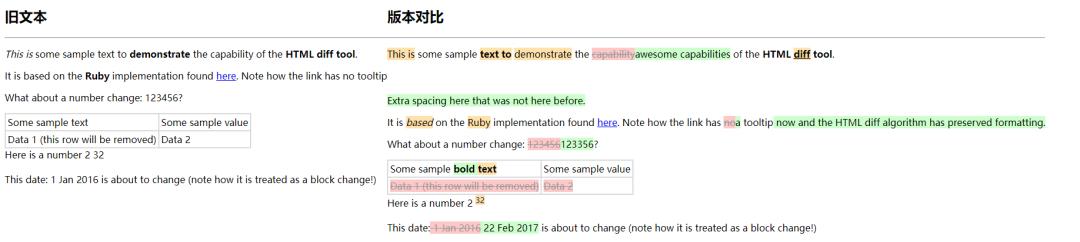
效果
通过效果图,我们可以看出:
1、不一样的地方,通过橙色背景色标记;
2、增加的地方,通过绿色背景色标记;
3、删除的地方,通过粉色背景色+删除线标记。
自定义对比效果
标记效果,也可以自定义,只需在Css文件修改样式
/* ***************************************
** Diff related styles
*****************************************/


ins {
background-color: #cfc;
text-decoration:inherit;


}


del {
color: #999;
background-color:#FEC8C8;
}


ins.mod {
background-color: #FFE1AC;
}
源码获取
私信回复:1069
- End -
推荐阅读
- 盘点10个.Net比较流行的开源的ORM框架
- 推荐一个.Net Core开源轻量级插件架构
- 一个基于.NetCore开发的可视化大屏幕报表系统
- 推荐基于.Net6+Furion +iView开发的一套极简的进销存管理系统
- 一个基于.NetCore开发、模块化、跨平台、多语言商城系统
- 推荐一个微软反向代理组件+NetCore开发的API网关