1 gzip的压缩效果是立竿见影的:

2 网站是否开启gzip的查看方式
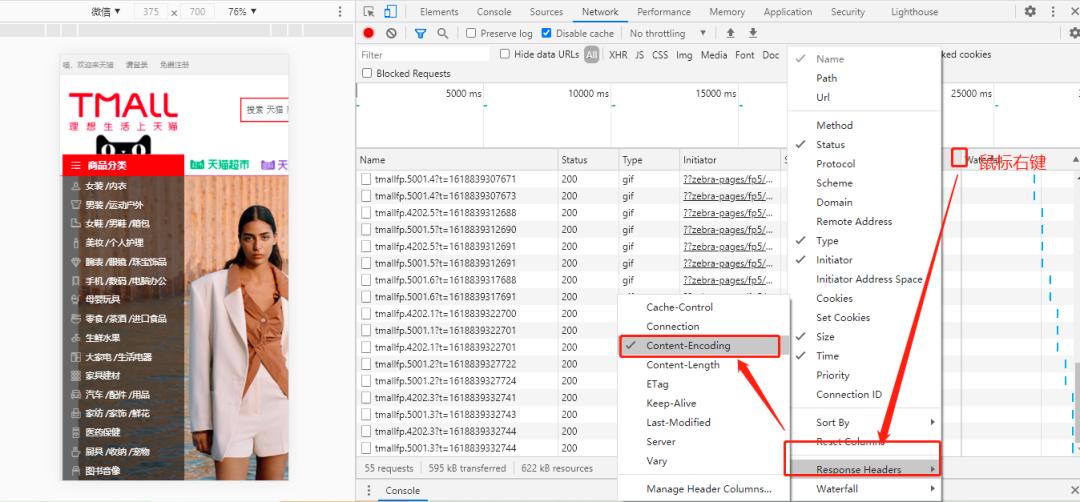
2.1 打开Chrome浏览器,按 F12打开调试面板
2.2 切换到network页签,在网络请求列表的表头,鼠标右键==>Response Headers==>Content Encoding
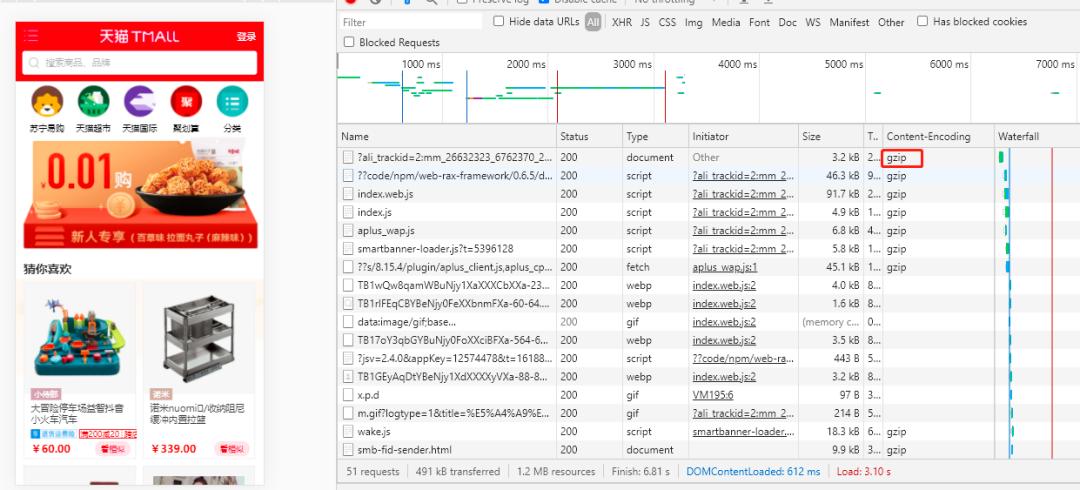
这一栏如果显示gzip,证明启用了gzip压缩。
3. gzip压缩方案
3.1 方案一 前端打包构建时进行gzip压缩
3.1.1 安装插件compression-webpack-plugin
yarn add -D compression-webpack-plugin@5.0.1
3.1.2 在webpack中配置compression-webpack-plugin
const CompressionPlugin = require( 'compression-webpack-plugin' );module.exports = {plugins: [new CompressionPlugin({algorithm: 'gzip' , // 使用gzip压缩 test : /\.js$|\.html$|\.css$/, // 匹配文件名filename: '[path].gz[query]' , // 压缩后的文件名(保持原文件名,后缀加.gz)minRatio: 0.8, // 压缩率小于0.8才会压缩threshold: 10240, // 对超过10k的数据压缩deleteOriginalAssets: false , // 是否删除未压缩的源文件}),],},};
3.1.3 在Nginx中配置加载静态的本地gz文件
nginx 静态压缩需要使用 ngx_http_gzip_static_module 模块,nginx_http_gzip_static_module 模块允许发送扩展名为 .gz 的预压缩文件,而不是常规文件。默认情况下未构建此模块,应使用 --with-http_gzip_static_module 配置参数启用它 。重新编译nginx,添加参数--with-http_gzip_static_module
./configure --with-http_gzip_static_module
然后修改 nginx.conf 配置文件:
http {include mime.types;default_type application/octet-stream; #提高服务器读写文件性能 sendfile on; #tcp_nopush on; keepalive_timeout 65; # 开启gzip gzip_static on; server {listen 8462;server_name localhost;location / {root dist;index index.html index.htm;}error_page 500 502 503 504 /50x.html;location = /50x.html {root html;}}}
3.2 方案二 服务器在线gzip压缩
http {include mime.types;default_type application/octet-stream; #提高服务器读写文件性能 sendfile on; #tcp_nopush on; #keepalive_timeout 0; keepalive_timeout 65; # 开启gzip gzip on; #压缩级别官网建议是6 数字越大压缩的越好,也越占用CPU时间 #1.随着压缩级别的升高,压缩比有所提高,但到了级别6后,很难再提高; #2.随着压缩级别的升高,处理时间明显变慢; #3.gzip很消耗cpu的性能,高并发情况下cpu达到100% gzip_comp_level 6; # 压缩的类型 html,css,xml,js,php # 二进制资源:例如图片/mp3这样的二进制文件,不必压缩;因为压缩率比较小, 比如100->80字节,而且压缩也是耗费CPU资源的. # text/javascript是IE6,7,8才能识别的js标签 gzip_types text/plain text/css application/xml application/javascript text/javascript application/x-httpd-php; #nginx用作反向代理时启用 #off – 关闭所有的代理结果数据压缩 #expired – 如果header中包含”Expires”头信息,启用压缩 #no-cache – 如果header中包含”Cache-Control:no-cache”头信息,启用压缩 #no-store – 如果header中包含”Cache-Control:no-store”头信息,启用压缩 #private – 如果header中包含”Cache-Control:private”头信息,启用压缩 #no_last_modified – 启用压缩,如果header中包含”Last_Modified”头信息,启用压缩 #no_etag – 启用压缩,如果header中包含“ETag”头信息,启用压缩 #auth – 启用压缩,如果header中包含“Authorization”头信息,启用压缩 #any – 无条件压缩所有结果数据 gzip_proxied off # 是否在http header中添加Vary: Accept-Encoding,建议开启 gzip_vary on # 设置用于处理请求压缩的缓冲区数量和大小 gzip_buffers 4 16k; # 大于多少字节进行压缩,以K为单位,当值为0时,所有页面都进行压缩 gzip_min_length 10 # 开始压缩的http协议版本(可以不设置,目前几乎全是1.1协议) gzip_http_version 1.1; # 配置禁用gzip条件,可以不设置,目前几乎没有IE6,支持正则。此处表示ie6及以下不启用gzip(因为ie低版本不支持) gzip_disable "MSIE [1-6]\." ; server {listen 8462;server_name localhost;location / {root dist;index index.html index.htm;}error_page 500 502 503 504 /50x.html;location = /50x.html {root html;}}}
4.两种方案的优缺点:
1.在前端进行gzip压缩,不耗服务器性能,但需要重新编译nginx,添加gzip_static模块。2.使用nginx实时进行gzip压缩,缺点就是耗性能,对于前端而言的优点是什么都不用管,因为有时候前端不一定有nginx的配置修改权限。