在本教程中,我们将学习如何从命令行和桌面获取Ubuntu Linux上的CPU温度。文内含长段代码可复制可往左滑,希望对大家有帮助!

♥
使用Lm_Sensors检测cpu温度
Lm_sensors是一个命令行工具,用于显示所有芯片传感器数据的当前读数,包括CPU温度。默认情况下,Ubuntu LInux没有安装Lm_Sensors,因此,我们必须自己安装它们。
root@linuxprobe-PC:~nbsp;sudoaptinstalllm-sensors
<以上代码可复制粘贴,可往左滑>
检测硬件
接下来,我们需要检测安装在电脑上的硬件监控芯片。现在我们可以开始检测电脑的硬件传感器了:
root@linuxprobe-PC:~nbsp;sudosensors-detect
#sensors-detectrevision6284(2015-05-3114:00:33+0200)
#System:VMware,Inc.VMwareVirtualPlatform[None]
#Board:IntelCorporation440BXDesktopReferencePlatform
#Kernel:4.15.0-30Ubuntu-genericx86_64
#Processor:Intel(R)Core(TM)i7-8700CPU@3.20GHz(6/158/10)

Thisprogramwillhelpyoudeterminewhichkernelmodulesyouneed
toloadtouselm_sensorsmosteffectively.Itisgenerallysafe
andrecommendedtoacceptthedefaultanswerstoallquestions,
unlessyouknowwhatyou'redoing.

Somesouthbridges,CPUsormemorycontrollerscontainembeddedsensors.
Doyouwanttoscanforthem?Thisistotallysafe.(YES/no):yes
SiliconIntegratedSystemsSIS5595...No
VIAVT82C686IntegratedSensors...No
VIAVT8231IntegratedSensors...No
AMDK8thermalsensors...No
AMDFamily10hthermalsensors...No
AMDFamily11hthermalsensors...No
AMDFamily12hand14hthermalsensors...No
AMDFamily15hthermalsensors...No
AMDFamily16hthermalsensors...No
AMDFamily17hthermalsensors...No
AMDFamily15hpowersensors...No
AMDFamily16hpowersensors...No
Inteldigitalthermalsensor...Success!
(driver`coretemp')
IntelAMBFB-DIMMthermalsensor...No
Intel5500/5520/X58thermalsensor...No
VIAC7thermalsensor...No
VIANanothermalsensor...No

SomeSuperI/Ochipscontainembeddedsensors.Wehavetowriteto
standardI/Oportstoprobethem.Thisisusuallysafe.
DoyouwanttoscanforSuperI/Osensors?(YES/no):yes

..................
<以上代码可复制粘贴,可往左滑>
显示CPU温度
可以通过以下命令查看温度数据了:
root@linuxprobe-PC:~nbsp;sensors
iwlwifi_1-virtual-0
Adapter:Virtualdevice
temp1:+33.0°C

pch_skylake-virtual-0
Adapter:Virtualdevice
temp1:+38.5°C

BAT0-acpi-0
Adapter:ACPIinterface
in0:+12.45V

coretemp-isa-0000
Adapter:ISAadapter
Packageid0:+39.0°C(high=+100.0°C,crit=+100.0°C)
Core0:+39.0°C(high=+100.0°C,crit=+100.0°C)
Core1:+38.0°C(high=+100.0°C,crit=+100.0°C)

thinkpad-isa-0000
Adapter:ISAadapter
fan1:0RPM
temp1:+38.0°C
temp2:N/A
temp3:+0.0°C
temp4:+0.0°C
temp5:+0.0°C
temp6:+0.0°C
temp7:+0.0°C
temp8:+0.0°C

BAT1-acpi-0
Adapter:ACPIinterface
in0:+12.49V

acpitz-acpi-0
Adapter:ACPIinterface
temp1:+38.0°C(crit=+128.0°C)
<以上代码可复制粘贴,可往左滑>
还可以使用watch命令实时关注:
root@linuxprobe-PC:~nbsp;watchsensors
<以上代码可复制粘贴,可往左滑>
♥
使用图形化工具psensor显示cpu温度
使用Psensor,您可以检查以下各项:
- 主板、CPU传感器和NVidia GPU的温度
- 硬盘驱动器的温度
- 风扇的转速
- 监视CPU使用情况
最新版本的Psensor还为Ubuntu提供了一个applet指示器,因此在Ubuntu上更容易监控硬件温度。您可以选择在顶部面板中显示温度。它甚至可以在温度超过极限时发送桌面通知。
我们可以使用下面的命令安装Psensor:
root@linuxprobe-PC:~/Desktopnbsp;sudoaptinstall-ypsensor
<以上代码可复制粘贴,可往左滑>
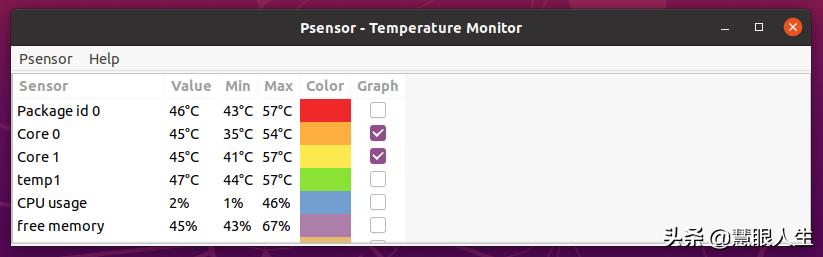
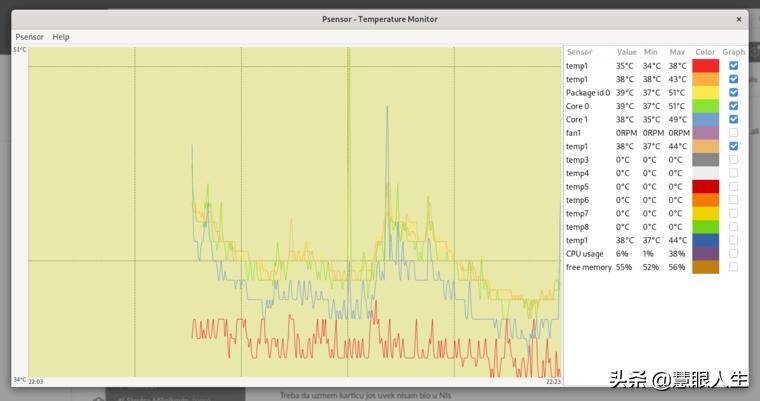
打开ubuntu的launchpad,在里面找到psensor,打开该应用就可以看到多个传感器:
♥
使用图形化工具hardinfo
Hardinfo是Linux中用于在图形化界面中显示硬件信息的工具。可以使用它检测cpu的温度。以下命令安装hardinfo:
root@linuxprobe-PC:~/Desktopnbsp;sudoaptinstallhardinfo
#运行一下命令打开hardinfo
root@linuxprobe-PC:~/Desktopnbsp;sudohardinfo
<以上代码可复制粘贴,可往左滑>

♥
总结
在本教程中,我们将学习如何从命令行和桌面获取Ubuntu Linux上的CPU温度。