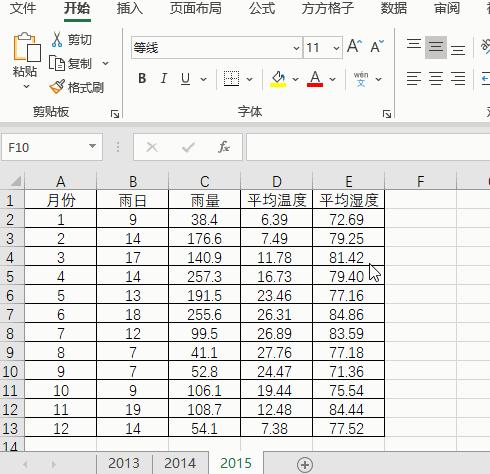
1.如下图是某地区三年的气象资料表,现在我们想要将这三个表格合并为一个方便查看。

2.点击下图选项(Excel工具箱,百度即可了解详细*载下**安装信息,本文这里就不做详细解说。)

3.点击【汇总拆分】

4.选择【合并多表】

5.勾选【合并后,标注源工作表】,并选择【全部行标注】

6.最后点击【确定】即可完成。

7.完成效果如下图

1.如下图是某地区三年的气象资料表,现在我们想要将这三个表格合并为一个方便查看。
2.点击下图选项(Excel工具箱,百度即可了解详细*载下**安装信息,本文这里就不做详细解说。)
3.点击【汇总拆分】
4.选择【合并多表】
5.勾选【合并后,标注源工作表】,并选择【全部行标注】
6.最后点击【确定】即可完成。
7.完成效果如下图