如果可以远程设备登录,可以通过远程登录到设备后修改Console口密码,然后保存配置。
使用Telnet/SSH账号登录设备,并确认当前账号有3级或更高的权限。使用display users命令查看当前设备所有登录用户。其中带“+”标记行为当前用户,记录对应的编号VTY 1。
<HUAWEI>dis users
User-Intf Delay Type Network Address AuthenStatus AuthorcmdFlag
+ 35 VTY 1 00:00:00 SSH 119.136.152.36 pass no Username : telnet001
使用display user-interface命令显示所有用户的权限,确定VTY1对应的等级为15,有权限修改Console密码。
<HUAWEI>dis user-interface
Idx Type Tx/Rx Modem Privi ActualPrivi Auth Int
0 CON 0 9600 - 15 - A -
34 VTY 0 - 0 - A -
+ 35 VTY 1 - 0 15 A -
36 VTY 2 - 0 - A -
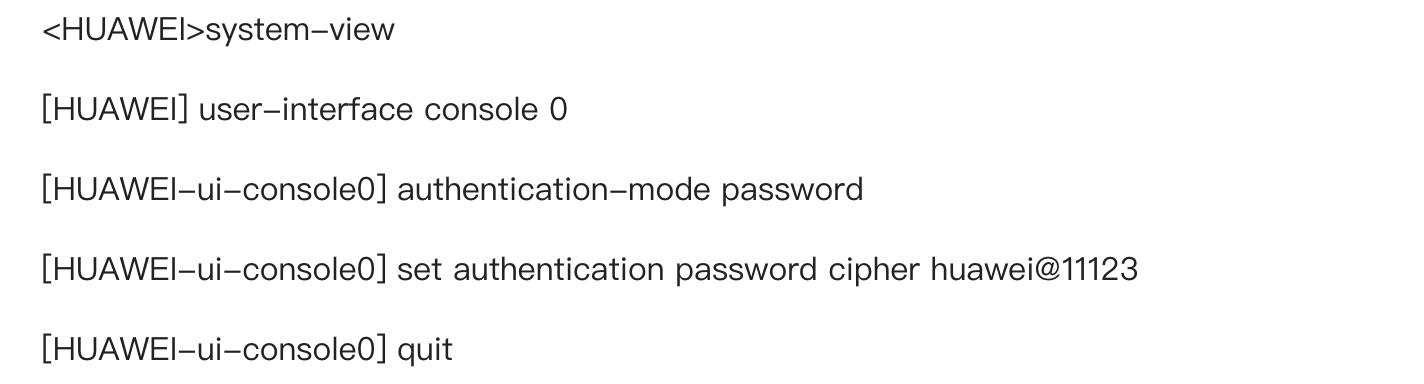
修改Console用户的密码,以修改为密码认证,密码为“huawei@11123”为例。
为了防止重启后配置丢失,保存配置。
<HUAWEI>save
The current configuration will be written to the device.
Are you sure to continue?[Y/N]y
Now saving the current configuration to the slot 0.
Save the configuration successfully.