在市场交易中,有各种消息,各种新闻,真真假假难舍难分。但是,那些用钱堆出来的数据,用资金交易堆出来的价格K线不会说谎。
不能看市场怎么说,要看市场资金怎么压。真实的资金会用脚投票。
说到这,如何及时获取数据?哪些数据又是有用的?数据背后要说明了什么?这是三个关键问题。
可以先从最简单的获取数据入手,并选取CNN恐慌指数这个综合情绪指标。从过往历史看,该指标与标普指数的正相关性,具有一定参考价值。
完整代码如下:
将cmd写入bat文件,作为爬取工具的启动入口。
PAUSE
PowerShell*ex.e** -Command "python .\scrape_fear_idex.py"
PAUSE
采用selenium库作为爬取工具,SQLite3作为数据库系统,两者都是免费开源。代码含义见注释。
from selenium import webdriver
from selenium.webdriver import Keys
from selenium.webdriver.common.by import By
import sqlite3
import requests
from bs4 import BeautifulSoup
import time
import datetime
import os


DRIVER_PATH = "chromedriver*ex.e**"
TARGET_URL = "https://www.cnn.com/markets/fear-and-greed"


def save_data(time_index_list, table_name):
    # time_index_list: list of tuple, (timestamp:int, date_time:str, idx:int)


    # connect to the table
    conn = sqlite3.connect("FearAndGreedyIndex.db")
    c = conn.cursor()


    # get all tables in the FearAndGreedyIndex.db
    c*ex.e**cute("""SELECT name FROM sqlite_master WHERE type='table';""")
    table_list = c.fetchall()


    # if table doesn't exist, create the table
    if table_name not in [i[0] for i in table_list]:
        c*ex.e**cute(f"CREATE TABLE {table_name} (time_stamp INTEGER, date_time TEXT, idx_data INTEGER);")
        # c*ex.e**cute("CREATE TABLE index_data (time_stamp INTEGER, date_time TEXT, idx_data INTEGER);")
        # c*ex.e**cute("CREATE TABLE friends (first_name TEXT, last_name TEXT, closeness INTEGER);")
        conn.commit()
        # conn.close()
        print('database and table created...')
    else:
        print('database and table already created...')


    c*ex.e**cutemany(f"INSERT INTO {table_name} VALUES (?,?,?);", time_index_list)
    conn.commit()
    conn.close()
    print('data saved...')
    print('--------->')


# def close_db():
#     conn = sqlite3.connect("FearAndGreedyIndex.db")
#     conn.close()


def get_time_index_list(hours, table_name):
    # hours (int): input the hours duration to run
    # table_name (str): input the database table to save to


    driver = webdriver.Chrome(executable_path=DRIVER_PATH)
    driver.maximize_window()
    driver.get(TARGET_URL)
    time.sleep(5)  # wait webpage loading
    print('web drive launched...')
    time.sleep(1)
    print('--------->')


    minutes = hours * 60
    time_index_list_tmp = []
    time_index_list = []


    time.sleep(5)


    for i in range(minutes):


        try:
            # get the timestamp from the webpage
            time_em = driver.find_element(By.CLASS_NAME, 'market-fng-gauge__timestamp')
            timestamp = time_em.get_attribute("data-timestamp")
            if len(timestamp) == 0:
                timestamp = 0


            # get the index value from the webpage
            index = driver.find_element(By.CLASS_NAME, 'market-fng-gauge__dial-number-value')
            if len(index.text) == 0:
                index.text = 0
        except:
            print("An exception occurred, skip to next run in 60s.")
            driver.refresh()
            time.sleep(60)
            continue


        # get the current datetime from system
        current_date_time = datetime.datetime.now().strftime("%d-%m-%Y %H:%M:%S")


        # combine the data as tuple and append to list
        time_index = (int(timestamp), current_date_time, int(index.text))
        time_index_list_tmp.append(time_index)


        # save the index data every 10 minutes
        if (i % 10 == 0) and (i > 0):
            table_name_tmp = table_name + '_' + datetime.datetime.now().strftime("%d_%m_%Y")
            save_data(time_index_list_tmp, table_name_tmp)
            save_data(time_index_list_tmp, table_name)
            time_index_list_tmp = []  # empty the list to avoid duplicate data


        print(time_index)  # print current index for log
        time_index_list.append(time_index)


        time.sleep(60)  # wait every 60 sec


    # for loop end and scrape completed
    print('Scrape Completed')
    # print(time_index_list)
    # save_data(time_index_list, table_name)


    # quit the scrape and web drive
    time.sleep(2)
    driver.close()
    time.sleep(5)
    driver.quit()
    print('web drive terminated')


# start, run only once to creat the database:
# creat_db("FearAndGreedyIndex.db")


# Call the scrape function to runn
# Input: hours, table name to save
get_time_index_list(8, "index_data")
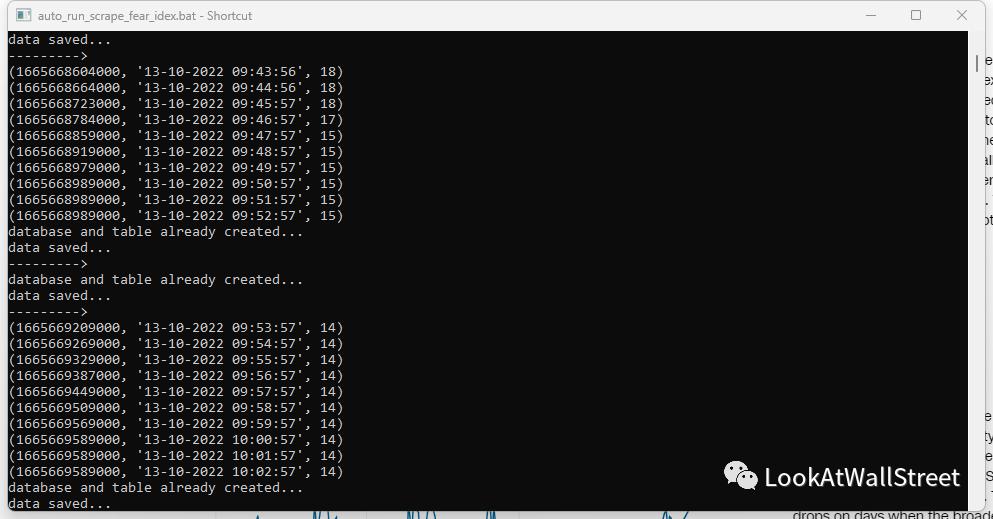
运行:
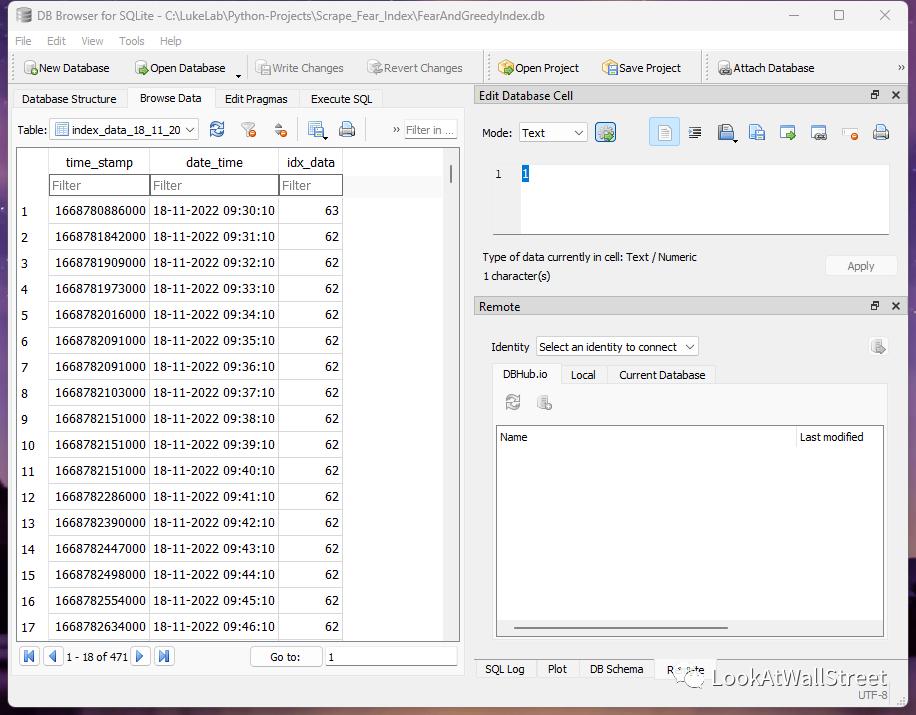
SQLite3支持可视化操作,比MySQL简易轻便。
另外,想要UI界面,还可以用TKinter做UI。对于其他数据也可以套用这个代码,只要是公开无需授权的数据,并注意好法律风险,就可以。
最后,哪些数据又是有用的?数据背后要说明了什么?这两个问题才是关键。